

[ Eval( { | oSay, nWidth, nHeight | If( ! Empty( oSay ) .and. ! Empty( nWidth ), oSay:SetSize( nWidth, nHeight ),) }, <oSay>, <nWidth>, <nHeight> ) ]
Working! :-)
Working! :-)
function Main()

    local oWnd, oTest1, oTest2

    DEFINE WINDOW oWnd

    @ 057,376 SAY oTest1 PROMPT 'Test1' PIXEL
    ? oTest1:nWidth,oTest1:nHeight // 28,16

    @ 087,376 SAY oTest2 PROMPT 'Test2' PIXEL SIZE 015,007
    ? oTest2:nWidth,oTest2:nHeight // 15,07

    oTest1:SetText('** Test1 **')
    ? oTest1:nWidth,oTest1:nHeight // 28,16

    oTest2:SetText('** Test2 **')
    ? oTest2:nWidth,oTest2:nHeight // 15,07

    oTest1:refresh()
    ? oTest1:nWidth,oTest1:nHeight // 28,16

    oTest2:refresh()
    ? oTest2:nWidth,oTest2:nHeight //15,07

    ACTIVATE WINDOW oWnd

return nilfunction Test()
local oWnd, oTest1, oTest2
DEFINE DIALOG oWnd
@ 057,376 SAY oTest1 PROMPT 'Test1' PIXEL
? oTest1:nWidth,oTest1:nHeight // 37,16
@ 087,376 SAY oTest2 PROMPT 'Test2' PIXEL SIZE 015,007
? oTest2:nWidth,oTest2:nHeight // 1,1
oTest1:SetText('** Test1 **')
? oTest1:nWidth,oTest1:nHeight // 27,16
oTest2:SetText('** Test2 **')
? oTest2:nWidth,oTest2:nHeight // 1,1
oTest1:refresh()
? oTest1:nWidth,oTest1:nHeight // 37,16
oTest2:refresh()
? oTest2:nWidth,oTest2:nHeight //1,1
ACTIVATE DIALOG oWnd
return nilYou are right as controls in dialogboxes don't exist until the dialog is activated
Could you please explain us what do you need this for ?
Maybe there is another way of doing it
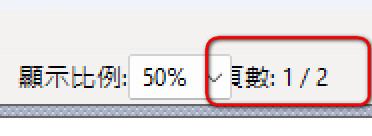
if nStyle < 2007
         @ nRow, nCol + 1400 SAY ::oPage PROMPT FWString( "Page number:" ) + ;
           LTrim( Str( ::nPage, 4, 0 ) ) + " / " + ;
           LTrim( Str( Len( ::oDevice:aMeta ) ) ) ;
           SIZE 180, 15 PIXEL OF ::oBar FONT ::oFont
         ::oPage:lTransparent = .T.
endif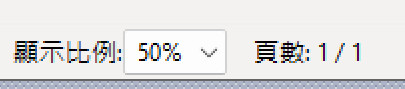
if nStyle < 2007
         @ nRow, nCol + 120 SAY ::oPage PROMPT FWString( "Page number:" ) + ;
           LTrim( Str( ::nPage, 4, 0 ) ) + " / " + ;
           LTrim( Str( Len( ::oDevice:aMeta ) ) ) ;
           SIZE 180, 15 PIXEL OF ::oBar FONT ::oFont
         ::oPage:lTransparent = .T.
endifvinhesoft wrote:good morningWorking correctly for me.
via command does not assume nHeight
@ 057,376 SAY oTest PROMPT 'Test' PIXEL
? oTest:nHeight --> 22
@ 057,376 SAY oTest PROMPT 'Test' PIXEL SIZE 015,007
? oTest:nHeight --> 22
------------------------------------
via property yes
oTest:nHeight := 7
? oTest:nHeight --> 7
#include "fivewin.ch"

function Main()

   local oWnd, oSay1, oSay2, oBtn, aInfo

   DEFINE WINDOW oWnd FROM 0,0 TO 500,500 PIXEL TITLE FWVERSION

   @  20,20 SAY oSay1 PROMPT "30 PIXEL HEIGHT" SIZE 200,30 PIXEL OF oWnd
   ? oSay1:nHeight // --> 31

   @  60,20 SAY oSay2 PROMPT "50 PIXEL HEIGHT" SIZE 200,50 PIXEL OF oWnd
   ? oSay2:nHeight // --> 51

   @ 350,20 BTNBMP oBtn PROMPT "CHECK SIZES" + CRLF + "60 PIX HEIGHT" ;
      SIZE 200,60 PIXEL OF oWnd FLAT ACTION ( ;
      aInfo := {}, ;
      AEval( oWnd:aControls, ;
         { |o| AAdd( aInfo, { o:ClassName(), o:nHeight } ) } ), ;
      XBrowse( aInfo ) )

   ACTIVATE WINDOW oWnd CENTERED

return nil
not Working! with DEFINE DIALOGThis is working for me here:
#include "fivewin.ch"

function Main()

   local oDlg, oSay1, oSay2, oBtn, aInfo

   DEFINE DIALOG oDlg SIZE 500,500 PIXEL TRUEPIXEL TITLE FWVERSION

   @  20,20 SAY oSay1 PROMPT "30 PIXEL HEIGHT" SIZE 200,30 PIXEL OF oDlg
   ? oSay1:nHeight // --> 31

   @  60,20 SAY oSay2 PROMPT "50 PIXEL HEIGHT" SIZE 200,50 PIXEL OF oDlg
   ? oSay2:nHeight // --> 51

   @ 350,20 BTNBMP oBtn PROMPT "CHECK SIZES" + CRLF + "60 PIX HEIGHT" ;
      SIZE 200,60 PIXEL OF oDlg FLAT ACTION ( ;
      aInfo := {}, ;
      AEval( oDlg:aControls, ;
         { |o| AAdd( aInfo, { o:ClassName(), o:nHeight } ) } ), ;
      XBrowse( aInfo ) )

   ACTIVATE DIALOG oDlg CENTERED

return nilI want to move Say object position. I add 1400 not work. FWH2404 version only add 120 work fine.Adding 1400 pixels may move it outside the size of the Bar
nageswaragunupudi wrote:Adding 1400 and 120 always stay here not move.I want to move Say object position. I add 1400 not work. FWH2404 version only add 120 work fine.Adding 1400 pixels may move it outside the size of the Bar
Does it work if you add 120 pixels?
How can you help us to test this at our end?
Many thanks for your feedback
We are working to fix it
Please provide one small sample program which we can test here with different versions with Window and dialog
nageswaragunupudi wrote:How can you help us to test this at our end?Mr.RAO
richard-service wrote:I have tried changing this here on my PC.How can you help us to test this at our end?Mr.RAO
Thinking about FWH2404 working and FWH2407 not work. I just modify same code and Chinese word within rpreview.prg
@ nRow, nCol + 100 SAY ::oPage PROMPT FWString( "Page number:" ) + ;
@ nRow, nCol + 300 SAY ::oPage PROMPT FWString( "Page number:" ) + ;
@ nRow, nCol + 600 SAY ::oPage PROMPT FWString( "Page number:" ) + ;
   ::nBottom   = ::nTop + nHeight
::nRight = ::nLeft + nWidth ::nBottom = ::nTop + nHeight - 1
::nRight = ::nLeft + nWidth - 1 ::CalcSize( ::nTop, ::nLeft, @nWidth, @nHeight, lRelPix )// ::CalcSize( ::nTop, ::nLeft, @nWidth, @nHeight, lRelPix )
