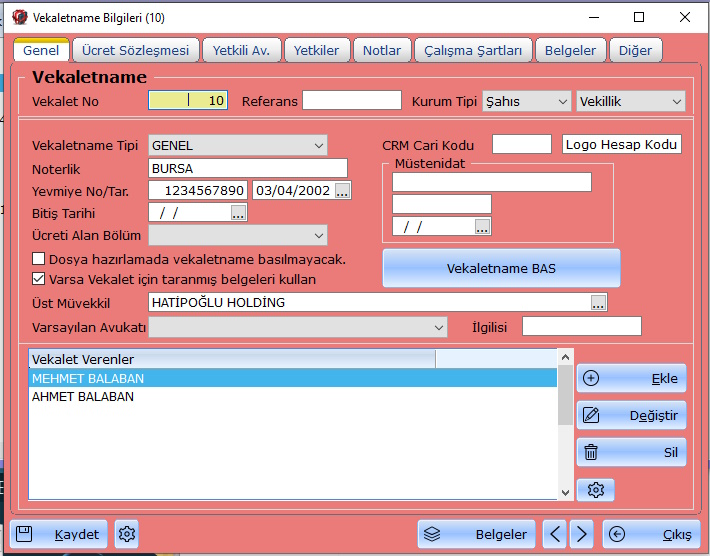
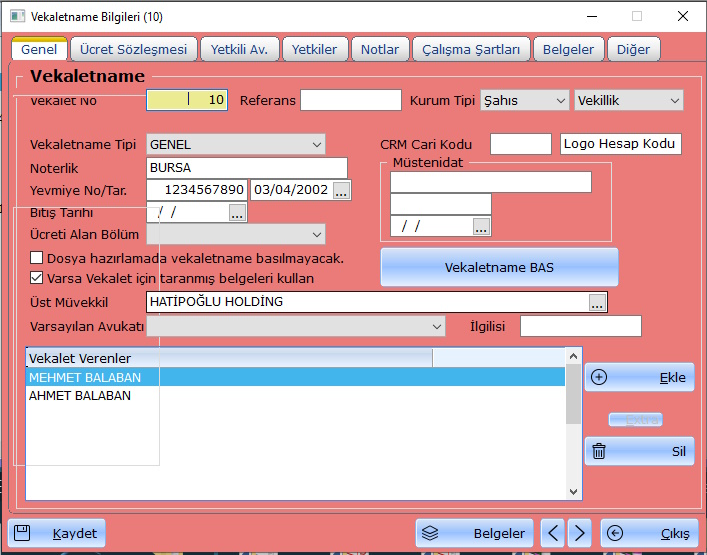
Hi Mr. Rao,
I know I should prepare small, working example but I could not.
I also know this is not a solution but.
Fwh 24.09 Group class
METHOD New( nTop, nLeft, nBottom, nRight, cLabel, oWnd, nClrText, nClrPane,;
            lPixel, lDesign, oFont, lTransparent, nWidth, nHeight, lRelPix ) CLASS TGroup

   DEFAULT nTop     := 0, nLeft := 0, nBottom := 3, nRight := 3,;
           oWnd     := GetWndDefault(),;
           nClrText := oWnd:nClrText, nClrPane := oWnd:nClrPane,;
           lPixel   := .f., lDesign := .f.,;
           lTransparent := .f., oFont := oWnd:oFont

   ::lUnicode = FW_SetUnicode()

   if !lPixel
      if nTop    >= 1.0; nTop    *= GRP_CHARPIX_H; endif
      if nLeft   >= 1.0; nLeft   *= GRP_CHARPIX_W; endif
      if nBottom >= 1.0; nBottom *= GRP_CHARPIX_H; endif
      if nRight  >= 1.0; nRight  *= GRP_CHARPIX_W; endif
   endif
   ::CalcSize( @nTop, @nLeft, @nWidth, @nHeight, lRelPix, oWnd, @nBottom, @nRight )

/*
   ::nTop  = nTop  * If( lPixel, 1, GRP_CHARPIX_H ) // 14
   ::nLeft = nLeft * If( lPixel, 1, GRP_CHARPIX_W ) //  7

   if nWidth != nil
      ::nRight = ::nLeft + nWidth
   else
      ::nRight   = nRight  * If( lPixel, 1, GRP_CHARPIX_W ) //  7
   endif
*/

   if nHeight != nil
      ::nBottom = ::nTop + nHeight
   else
      ::nBottom  = nBottom * If( lPixel, 1, GRP_CHARPIX_H ) // 14
   endif
Changed to.
METHOD New( nTop, nLeft, nBottom, nRight, cLabel, oWnd, nClrText, nClrPane,;
            lPixel, lDesign, oFont, lTransparent, nWidth, nHeight, lRelPix ) CLASS TGroup

   DEFAULT nTop     := 0, nLeft := 0, nBottom := 3, nRight := 3,;
           oWnd     := GetWndDefault(),;
           nClrText := oWnd:nClrText, nClrPane := oWnd:nClrPane,;
           lPixel   := .f., lDesign := .f.,;
           lTransparent := .f., oFont := oWnd:oFont

   ::lUnicode = FW_SetUnicode()

   if !lPixel
      if nTop    >= 1.0; nTop    *= GRP_CHARPIX_H; endif
      if nLeft   >= 1.0; nLeft   *= GRP_CHARPIX_W; endif
      if nBottom >= 1.0; nBottom *= GRP_CHARPIX_H; endif
      if nRight  >= 1.0; nRight  *= GRP_CHARPIX_W; endif
   endif
   //::CalcSize( @nTop, @nLeft, @nWidth, @nHeight, lRelPix, oWnd, @nBottom, @nRight )


   ::nTop  = nTop  * If( lPixel, 1, GRP_CHARPIX_H ) // 14
   ::nLeft = nLeft * If( lPixel, 1, GRP_CHARPIX_W ) //  7

   if nWidth != nil
      ::nRight = ::nLeft + nWidth
   else
      ::nRight   = nRight  * If( lPixel, 1, GRP_CHARPIX_W ) //  7
   endif


   if nHeight != nil
      ::nBottom = ::nTop + nHeight
   else
      ::nBottom  = nBottom * If( lPixel, 1, GRP_CHARPIX_H ) // 14
   endif
And my group problem is solved. Maybe this can give you an idea.