FiveTech Support Forums

FiveWin / Harbour / xBase community
Board index FiveWin for Harbour/xHarbour xbrowse cell on two sections
Posts: 7317
Joined: Thu Oct 18, 2012 07:17 PM
xbrowse cell on two sections
Posted: Thu Oct 31, 2024 10:51 AM
I have this xbrowse


these two columns are related to the number and late extractions (red color)

I would like to change the layout in this way: above the number and below in the same cell the late extractions


will it be possible with xbrowse?
Since from 1991/1992 ( fw for clipper Rel. 14.4 - Momos)

I use : FiveWin for Harbour March-April 2024 - Harbour 3.2.0dev (harbour_bcc770_32_20240309) - Bcc7.70 - xMate ver. 1.15.3 - PellesC - mail: silvio[dot]falconi[at]gmail[dot]com
Posts: 10733
Joined: Sun Nov 19, 2006 05:22 AM
Re: xbrowse cell on two sections
Posted: Thu Oct 31, 2024 01:37 PM
Code (fw): Select all Collapse
#include "fivewin.ch"

function Main()

   local aData := { ;
      { "Bari", 43, 103, 11, 69 }, ;
      { "Roma", 53, 117, 21, 57 }, ;
      { "Toino", 70, 60, 55, 34 }, ;
      { "", 0, 0, 0, 0 } }

   XBROWSER aData SETUP TITLE "SetColsAsRows" xSetUp( oBrw )

return nil

function xSetUp( oBrw )

   local n

   oBrw:cHeaders := { "Name", "Num/Rit", "Rit", "Num/Rit", "Rit" }
   AEval( oBrw:aCols, { |oCol,i| If( i % 2 = 0, ;
      oCol:bClrStd := oCol:bClrSelFocus := { || { CLR_WHITE, CLR_HRED } }, nil ) } )
   oBrw:aCols[ 2 ]:SetColsAsRows( 2, 3 )
   oBrw:aCols[ 4 ]:SetColsAsRows( 4, 5 )

return nil
Regards


G. N. Rao.

Hyderabad, India
Posts: 7317
Joined: Thu Oct 18, 2012 07:17 PM
Re: xbrowse cell on two sections
Posted: Thu Oct 31, 2024 05:25 PM
nageswaragunupudi wrote:
Code (fw): Select all Collapse
#include "fivewin.ch"

function Main()

   local aData := { ;
      { "Bari", 43, 103, 11, 69 }, ;
      { "Roma", 53, 117, 21, 57 }, ;
      { "Toino", 70, 60, 55, 34 }, ;
      { "", 0, 0, 0, 0 } }

   XBROWSER aData SETUP TITLE "SetColsAsRows" xSetUp( oBrw )

return nil

function xSetUp( oBrw )

   local n

   oBrw:cHeaders := { "Name", "Num/Rit", "Rit", "Num/Rit", "Rit" }
   AEval( oBrw:aCols, { |oCol,i| If( i % 2 = 0, ;
      oCol:bClrStd := oCol:bClrSelFocus := { || { CLR_WHITE, CLR_HRED } }, nil ) } )
   oBrw:aCols[ 2 ]:SetColsAsRows( 2, 3 )
   oBrw:aCols[ 4 ]:SetColsAsRows( 4, 5 )

return nil

Nice job , i go to test it
Since from 1991/1992 ( fw for clipper Rel. 14.4 - Momos)

I use : FiveWin for Harbour March-April 2024 - Harbour 3.2.0dev (harbour_bcc770_32_20240309) - Bcc7.70 - xMate ver. 1.15.3 - PellesC - mail: silvio[dot]falconi[at]gmail[dot]com
Posts: 7317
Joined: Thu Oct 18, 2012 07:17 PM
Re: xbrowse cell on two sections
Posted: Thu Oct 31, 2024 07:56 PM
nageswaragunupudi wrote:
Code (fw): Select all Collapse
#include "fivewin.ch"

function Main()

   local aData := { ;
      { "Bari", 43, 103, 11, 69 }, ;
      { "Roma", 53, 117, 21, 57 }, ;
      { "Toino", 70, 60, 55, 34 }, ;
      { "", 0, 0, 0, 0 } }

   XBROWSER aData SETUP TITLE "SetColsAsRows" xSetUp( oBrw )

return nil

function xSetUp( oBrw )

   local n

   oBrw:cHeaders := { "Name", "Num/Rit", "Rit", "Num/Rit", "Rit" }
   AEval( oBrw:aCols, { |oCol,i| If( i % 2 = 0, ;
      oCol:bClrStd := oCol:bClrSelFocus := { || { CLR_WHITE, CLR_HRED } }, nil ) } )
   oBrw:aCols[ 2 ]:SetColsAsRows( 2, 3 )
   oBrw:aCols[ 4 ]:SetColsAsRows( 4, 5 )

return nil

Nages ,
I have adata array differently and I was not able to set it as you wrote to me
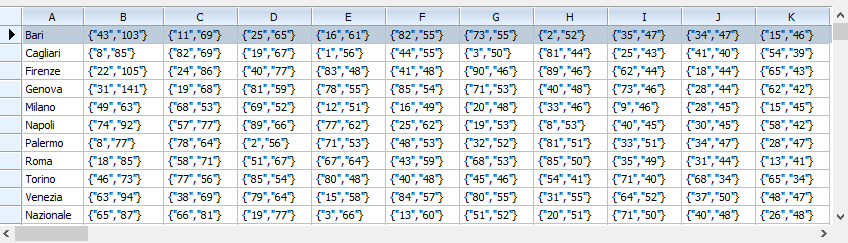


the first number is the number and the second number is the delay

on old procedure I set


ADD COLUMN TO oBrw HEADER "Ruota" DATA {|v,oCol| oCol:oBrw:aArrayData[oCol:oBrw:nArrayAt,1] } CENTER
ADD COLUMN TO oBrw HEADER "Num" DATA {|v,oCol| oCol:oBrw:aArrayData[oCol:oBrw:nArrayAt,2,1] } CENTER
ADD COLUMN TO oBrw HEADER "Rit" DATA {|v,oCol| oCol:oBrw:aArrayData[oCol:oBrw:nArrayAt,2,2] } CENTER

until

ADD COLUMN TO oBrw HEADER "Num" DATA {|v,oCol| oCol:oBrw:aArrayData[oCol:oBrw:nArrayAt,11,1] } CENTER
ADD COLUMN TO oBrw HEADER "Rit" DATA {|v,oCol| oCol:oBrw:aArrayData[oCol:oBrw:nArrayAt,11,2] } CENTER

then I make set SetGroupHeader
Code (fw): Select all Collapse
:SetGroupHeader( "1",        2,  3 )
      :SetGroupHeader( "2",        4,  5 )
      :SetGroupHeader( "3",        6,  7 )
      :SetGroupHeader( "4",        8,  9 )
      :SetGroupHeader( "5",        10,  11 )
      :SetGroupHeader( "6",        12,  13 )
      :SetGroupHeader( "7",        14,  15 )
      :SetGroupHeader( "8",        16,  17 )
      :SetGroupHeader( "9",        18,  19 )
      :SetGroupHeader( "10",        20,  21 )
Since from 1991/1992 ( fw for clipper Rel. 14.4 - Momos)

I use : FiveWin for Harbour March-April 2024 - Harbour 3.2.0dev (harbour_bcc770_32_20240309) - Bcc7.70 - xMate ver. 1.15.3 - PellesC - mail: silvio[dot]falconi[at]gmail[dot]com
Posts: 7317
Joined: Thu Oct 18, 2012 07:17 PM
Re: xbrowse cell on two sections
Posted: Thu Oct 31, 2024 08:22 PM
there is an error


the last 5 headers are bad

I made
Code (fw): Select all Collapse
AEval( oBrw:aCols, { |oCol,i| If( i % 2 = 0, ;
      oCol:bClrStd := oCol:bClrSelFocus := { || {CLR_WHITE,CLR_HRED } }, nil ) } )


      :cHeaders := { "Name", "Num/Rit", "Num/Rit", "Num/Rit",;
                             "Num/Rit","Num/Rit", "Num/Rit",;
                             "Num/Rit", "Num/Rit","Num/Rit", "Num/Rit" }

      :aCols[ 1 ]:nWidth   := 130
      :aCols[ 1 ]:nDataStrAlign   := AL_LEFT
      :aCols[ 2 ]:SetColsAsRows( 2, 3 )
      :aCols[ 4 ]:SetColsAsRows( 4, 5 )
      :aCols[ 6 ]:SetColsAsRows( 6, 7 )
      :aCols[ 8 ]:SetColsAsRows( 8, 9 )
      :aCols[ 10 ]:SetColsAsRows( 10, 11 )
      :aCols[ 12 ]:SetColsAsRows( 12, 13 )
      :aCols[ 14 ]:SetColsAsRows( 14, 15 )
      :aCols[ 16 ]:SetColsAsRows( 16, 17 )
      :aCols[ 18 ]:SetColsAsRows( 18, 19 )
      :aCols[ 20 ]:SetColsAsRows( 20, 21 )
Since from 1991/1992 ( fw for clipper Rel. 14.4 - Momos)

I use : FiveWin for Harbour March-April 2024 - Harbour 3.2.0dev (harbour_bcc770_32_20240309) - Bcc7.70 - xMate ver. 1.15.3 - PellesC - mail: silvio[dot]falconi[at]gmail[dot]com
Posts: 7317
Joined: Thu Oct 18, 2012 07:17 PM
Re: xbrowse cell on two sections
Posted: Thu Oct 31, 2024 08:39 PM
Perhaps...


why the line (red) is more big than line of numbers ?

I made
Code (fw): Select all Collapse
FOR i := 1 TO LEN(:aCols)
        oCol := :aCols[ i ]
        if i >1  .and. hb_bitand(i,1)>0
         oCol:bClrStd := {|| { CLR_WHITE, RGB(255,0,0) } }
         oCol:bClrSelFocus := {|| { CLR_BLACK, { { 1, RGB( 252, 235, 220  ), RGB( 255, 0,0  ) } }}}
        endif
      NEXT

:cHeaders := { "Ruote", "Num/Rit", "Num/Rit", "Num/Rit",;
                             "Num/Rit", "Num/Rit", "Num/Rit",;
                             "Num/Rit", "Num/Rit", "Num/Rit",;
                             "Num/Rit", "Num/Rit", "Num/Rit",;
                             "Num/Rit", "Num/Rit", "Num/Rit","Num/Rit",;
                             "Num/Rit", "Num/Rit", "Num/Rit","Num/Rit"  }


      :aCols[ 1 ]:nWidth   := 130
      :aCols[ 1 ]:nDataStrAlign   := AL_LEFT
      :aCols[ 2 ]:SetColsAsRows( 2, 3 )
      :aCols[ 4 ]:SetColsAsRows( 4, 5 )
      :aCols[ 6 ]:SetColsAsRows( 6, 7 )
      :aCols[ 8 ]:SetColsAsRows( 8, 9 )
      :aCols[ 10 ]:SetColsAsRows( 10, 11 )
      :aCols[ 12 ]:SetColsAsRows( 12, 13 )
      :aCols[ 14 ]:SetColsAsRows( 14, 15 )
      :aCols[ 16 ]:SetColsAsRows( 16, 17 )
      :aCols[ 18 ]:SetColsAsRows( 18, 19 )
      :aCols[ 20 ]:SetColsAsRows( 20, 21 )
Since from 1991/1992 ( fw for clipper Rel. 14.4 - Momos)

I use : FiveWin for Harbour March-April 2024 - Harbour 3.2.0dev (harbour_bcc770_32_20240309) - Bcc7.70 - xMate ver. 1.15.3 - PellesC - mail: silvio[dot]falconi[at]gmail[dot]com
Posts: 7317
Joined: Thu Oct 18, 2012 07:17 PM
Re: xbrowse cell on two sections
Posted: Thu Nov 14, 2024 09:37 AM
nageswaragunupudi wrote:
Code (fw): Select all Collapse
#include "fivewin.ch"

function Main()

   local aData := { ;
      { "Bari", 43, 103, 11, 69 }, ;
      { "Roma", 53, 117, 21, 57 }, ;
      { "Toino", 70, 60, 55, 34 }, ;
      { "", 0, 0, 0, 0 } }

   XBROWSER aData SETUP TITLE "SetColsAsRows" xSetUp( oBrw )

return nil

function xSetUp( oBrw )

   local n

   oBrw:cHeaders := { "Name", "Num/Rit", "Rit", "Num/Rit", "Rit" }
   AEval( oBrw:aCols, { |oCol,i| If( i % 2 = 0, ;
      oCol:bClrStd := oCol:bClrSelFocus := { || { CLR_WHITE, CLR_HRED } }, nil ) } )
   oBrw:aCols[ 2 ]:SetColsAsRows( 2, 3 )
   oBrw:aCols[ 4 ]:SetColsAsRows( 4, 5 )

return nil

Nages,
I made this


But I need a feature

when the number below goes over 100 I would like it like this


when instead the number below does not exceed 100 I would like it this way


I made oCol:bClrStd := {|i| { RGB( 255, 0,0 ),IF (oBrw:aCols[ i ]:Value >100, CLR_BLUE,CLR_WHITE) } }
but make error
Since from 1991/1992 ( fw for clipper Rel. 14.4 - Momos)

I use : FiveWin for Harbour March-April 2024 - Harbour 3.2.0dev (harbour_bcc770_32_20240309) - Bcc7.70 - xMate ver. 1.15.3 - PellesC - mail: silvio[dot]falconi[at]gmail[dot]com
Posts: 7317
Joined: Thu Oct 18, 2012 07:17 PM
Re: xbrowse cell on two sections
Posted: Fri Nov 15, 2024 09:41 AM
corrected

oCol:bClrStd := {|oCol,i| { RGB( 255, 0,0 ),IF (val(i:Value) >=100, CLR_BLUE,CLR_WHITE) } }


How can I outline each square, that is, put a space on the side and below each square?
Since from 1991/1992 ( fw for clipper Rel. 14.4 - Momos)

I use : FiveWin for Harbour March-April 2024 - Harbour 3.2.0dev (harbour_bcc770_32_20240309) - Bcc7.70 - xMate ver. 1.15.3 - PellesC - mail: silvio[dot]falconi[at]gmail[dot]com

Continue the discussion