FiveTech Support Forums

FiveWin / Harbour / xBase community
Board index FiveWin for Harbour/xHarbour Open XLS without Excel
Posts: 708
Joined: Fri Oct 28, 2005 09:53 AM
Open XLS without Excel
Posted: Tue Dec 10, 2024 05:40 AM

Hello Everyone!

Does someone have an example of how to open XLS file and read row and a certain column data? I need to run a computer (server) that does not have MS office and upload data SQL server.

Thank You!

*~*~*~*~*~*~*~*~*~*
Darrell Ortiz
CDM Software Solutions, Inc.
https://www.cdmsoft.com
Posts: 1487
Joined: Tue Jun 14, 2016 07:51 AM
Re: Open XLS without Excel
Posted: Tue Dec 10, 2024 11:50 AM
From WhatsNew.txt

CREATING XLSX FILES WITHOUT USING EXCEL APPLICATION.

Recently two great libraries to create xlsx files without
using Excel have been released for free use by Harbour
community.

1. DrXlsx library by Dr Charles Kwon.
see: https://forums.fivetechsupport.com/viewtopic.php?f=3&t=43643
Library download link: http://www.charleskwon.com/?page_id=956
2. xlxlib by Mr. John McNamara and Mr. Arturo Tamayo Daza
see: https://forums.fivetechsupport.com/viewtopic.php?f=3&t=43767
Library download link: https://github.com/FiveTechSoft/FWH_tools/blob/master/Xlsxlibhb_ver2.zip

- Any one or both these libraries can be downloaded and linked with
FWH application. FWH further provides wrapper classes for these libraries
to make it more convenient to use these libraries.
Please see: \fwh\source\function\drxl.prg and \fwh\source\function\fwxlsxlb.prg
To force these classes, use
REQUEST DRXLSX
REQUEST XLXLIB
as the case may be.
- Interested users can download these libs to \fwh\libs folder,
BUILD??.BAT files provide the link scripts,
To use these libs, remove "rem " before the relevant link script
Marc Venken

Using: FWH 23.08 with Harbour
Posts: 10733
Joined: Sun Nov 19, 2006 05:22 AM
Re: Open XLS without Excel
Posted: Tue Dec 10, 2024 01:59 PM
CREATING XLSX FILES WITHOUT USING EXCEL APPLICATION.
They are for creating only. Not for reading
Regards


G. N. Rao.

Hyderabad, India
Posts: 1487
Joined: Tue Jun 14, 2016 07:51 AM
Re: Open XLS without Excel
Posted: Tue Dec 10, 2024 02:07 PM

Oeps .... Sorry

Marc Venken

Using: FWH 23.08 with Harbour
Posts: 10733
Joined: Sun Nov 19, 2006 05:22 AM
Re: Open XLS without Excel
Posted: Tue Dec 10, 2024 02:45 PM
Try opening an xlsx file with
Code (fw): Select all Collapse
oRs := FW_OpenADOExcelSheet( cXlsxFile, [cSheet], [cRange], [lHeaders] )
XBROWSER oRs
Regards


G. N. Rao.

Hyderabad, India
Posts: 708
Joined: Fri Oct 28, 2005 09:53 AM
Re: Open XLS without Excel
Posted: Tue Dec 10, 2024 07:01 PM

Hi Rao,

Thank you. However, this XLS has 494 columns and about 23,000 rows. I am looking to start reading row 2 and only retrieve about 80 columns of data so I can upload to SQL. Is there a way to read data row by row like below?

cValue01 := oSheet:Cells( nCurrentXlsRow, 2 ):Value

cValue02 := oSheet:Cells( nCurrentXlsRow, 8 ):Value

cValue03 := oSheet:Cells( nCurrentXlsRow, 18 ):Value

cValue04 := oSheet:Cells( nCurrentXlsRow, 28 ):Value

cValue05 := oSheet:Cells( nCurrentXlsRow, 88 ):Value

Thanks Again for your support!

*~*~*~*~*~*~*~*~*~*
Darrell Ortiz
CDM Software Solutions, Inc.
https://www.cdmsoft.com
Posts: 1816
Joined: Wed Oct 26, 2005 02:49 PM
Re: Open XLS without Excel
Posted: Tue Dec 10, 2024 08:38 PM
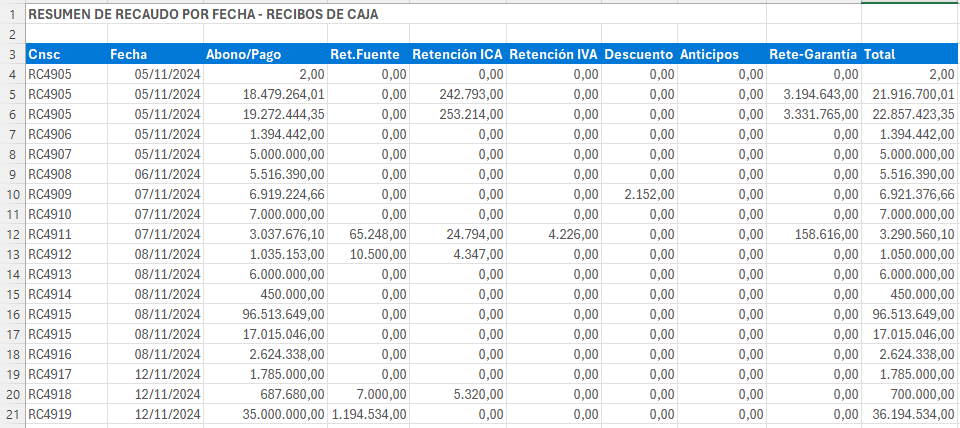
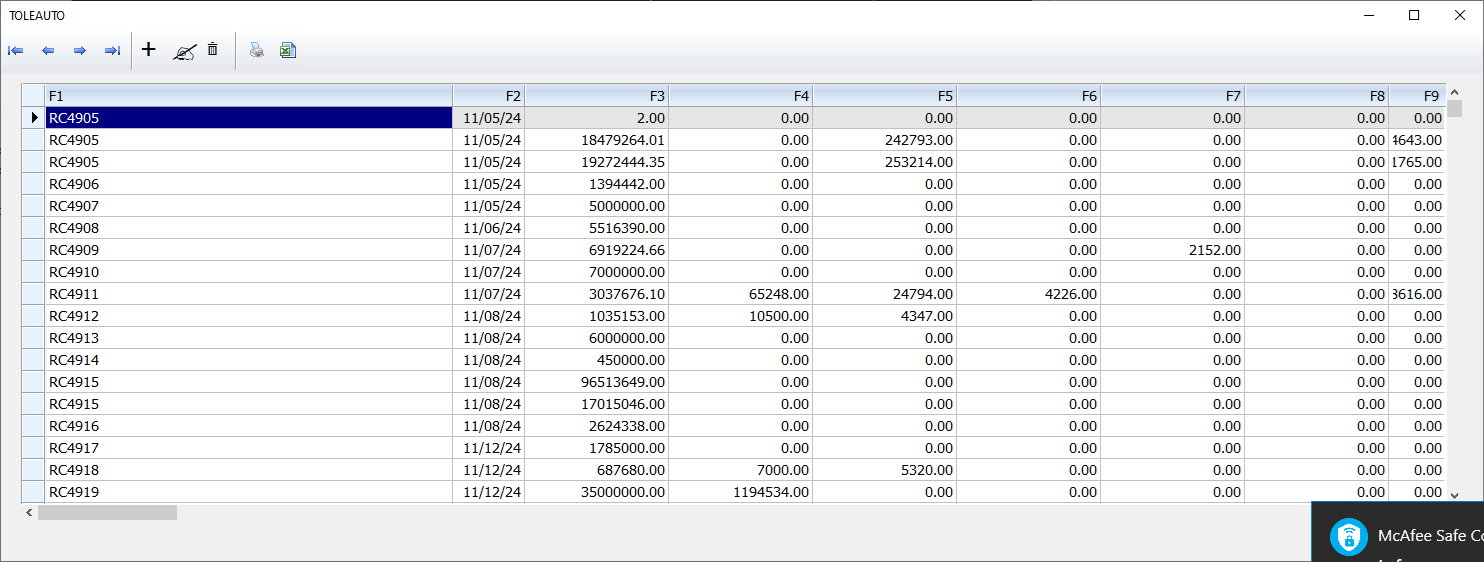
Una idea :D
Code (fw): Select all Collapse
#include "FiveWin.ch"

FUNCTION Main()

Local cXlsxFile := "para_leer_xls.xlsx"
Local oRs,cValue01,cValue02

oRs := FW_OpenADOExcelSheet( cXlsxFile, "Hoja1", "A4:J62", .F. )

//XBROWSER oRs

oRs:MoveFirst()
Do While !oRs:Eof()

    cValue01 := oRs:Fields("F1"):Value  
    cValue02 := oRs:Fields("F2"):Value  

    oRs:MoveNext()
EndDo
oRs:close()

return nil
Saludos
LEANDRO AREVALO
Bogotá (Colombia)
https://hymlyma.com
https://hymplus.com/
leandroalfonso111@gmail.com
leandroalfonso111@hotmail.com

[ Turbo Incremental Link64 6.98 Embarcadero 7.70 ] [ FiveWin 25.01 ] [ xHarbour 64 bits) ]
Posts: 708
Joined: Fri Oct 28, 2005 09:53 AM
Re: Open XLS without Excel
Posted: Wed Dec 11, 2024 01:13 AM

Hola Leandro, Gracias!

*~*~*~*~*~*~*~*~*~*
Darrell Ortiz
CDM Software Solutions, Inc.
https://www.cdmsoft.com
Posts: 708
Joined: Fri Oct 28, 2005 09:53 AM
Re: Open XLS without Excel
Posted: Wed Dec 11, 2024 01:58 AM

I tried

oRs := FW_OpenADOExcelSheet( cSource, "Sheet1", "A1:SB65000", .T. )

And got the following errors

  1. ADO ERROR UNKNOWN

  2. Fail to open "XLS path + filename.XLSX"

*~*~*~*~*~*~*~*~*~*
Darrell Ortiz
CDM Software Solutions, Inc.
https://www.cdmsoft.com
Posts: 10733
Joined: Sun Nov 19, 2006 05:22 AM
Re: Open XLS without Excel
Posted: Wed Dec 11, 2024 07:05 AM
cdmmaui wrote:I tried
oRs := FW_OpenADOExcelSheet( cSource, "Sheet1", "A1:SB65000", .T. )

And got the following errors
1. ADO ERROR UNKNOWN
2. Fail to open "XLS path + filename.XLSX"
By default, Microsoft Jet OLEDB is installed on every PC.
This default Jet OLEDB can open only "xls" files but not "xlsx" files using ADO.

You can right now try xls (not xlsx) files and you can open them.

To open xlsx files using ADO, you need to download and install Microsoft ACE.OLEDB version 16 and try.
One headache with these products is the confusion between 32/64 bit. Please try to install 32 bit version and try.

Lastly, if we want our application to run on any PC without intalling additional drivers, the best thing is to write our own fwh program to "raw" read directly from xlsx file.
I did this work earlier and left it without completely finishing it.
Let me try again
Regards


G. N. Rao.

Hyderabad, India
Posts: 10733
Joined: Sun Nov 19, 2006 05:22 AM
Re: Open XLS without Excel
Posted: Wed Dec 11, 2024 02:25 PM
We are working on a new function
Code (fw): Select all Collapse
FW_ShowXLSX( cFileXlsx )
This is still needs to be finalized.

No libraries, drivers or OleDB providers are required.
This function directly reads from the xlsx file and extracts the data.
So this is guaranteed to work on an computer.

Example out put:


If you like send any large xlslx file, I can try to test this function and fine tune it.

Note: This can read only xlsx files but not the older xls files
Regards


G. N. Rao.

Hyderabad, India
Posts: 10733
Joined: Sun Nov 19, 2006 05:22 AM
Re: Open XLS without Excel
Posted: Tue Dec 24, 2024 08:02 AM
cdmmaui wrote:Hi Rao,

Thank you. However, this XLS has 494 columns and about 23,000 rows. I am looking to start reading row 2 and only retrieve about 80 columns of data so I can upload to SQL. Is there a way to read data row by row like below?

cValue01 := oSheet:Cells( nCurrentXlsRow, 2 ):Value
cValue02 := oSheet:Cells( nCurrentXlsRow, 8 ):Value
cValue03 := oSheet:Cells( nCurrentXlsRow, 18 ):Value
cValue04 := oSheet:Cells( nCurrentXlsRow, 28 ):Value
cValue05 := oSheet:Cells( nCurrentXlsRow, 88 ):Value

Thanks Again for your support!
Is your Excel file XLS or XLSX ?
If this is XLSX we can use our new class:
Usage:
Code (fw): Select all Collapse
oSheet := FW_OpenXlsx( cFileNameXlsx)

nCurrentXlsRow := 19000 // or any
cValue01 := oSheet:Cells( nCurrentXlsRow, 2 )
cValue02 := oSheet:Cells( nCurrentXlsRow, 8 )
cValue03 := oSheet:Cells( nCurrentXlsRow, 18 )
cValue04 := oSheet:Cells( nCurrentXlsRow, 28 )
cValue05 := oSheet:Cells( nCurrentXlsRow, 88 )

// OR
aVals := oSheet:Cells( nCurrentXlsRow, { 2, 8, 18, 28, 88 } )
cValue01 := aVals[ 1 ]
....
cValue05 := aVals[ 5 ]
Regards


G. N. Rao.

Hyderabad, India

Continue the discussion