

I made a tree with checkboxes
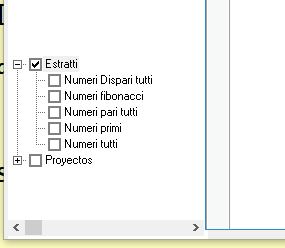
when I click on first main option "Estratti" I wish the procedure select each submenu are on menu 1, so how make it ?
then To check wich option are checked I made
where I save on atipic all items but when I go to save on first colums save the logic (.t. or .f.) and on second column save the name of Main option
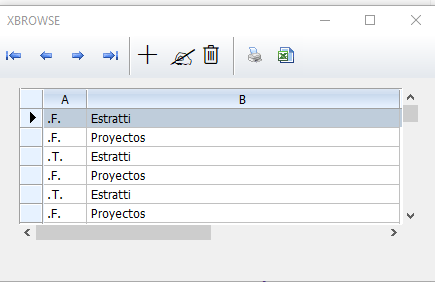
So how I can save the name of each submenu ?
How I can assign on each submenu a number ? I must load a data info for each submenu checked and I not Know How make
when I click on first main option "Estratti" I wish the procedure select each submenu are on menu 1, so how make it ?
then To check wich option are checked I made
oTree:OnClick = { || CheckStatus( oTree, oTree:aItems, @atipic ) }function CheckStatus( oTree, aItems,aTipic )
local n
for n = 1 to Len( aItems )
aadd(aTipic, {oTree:GetCheck( aItems[ n ] ),aItems[n]:cPrompt})
next
return nilSo how I can save the name of each submenu ?
How I can assign on each submenu a number ? I must load a data info for each submenu checked and I not Know How make
Since from 1991/1992 ( fw for clipper Rel. 14.4 - Momos)
I use : FiveWin for Harbour March-April 2024 - Harbour 3.2.0dev (harbour_bcc770_32_20240309) - Bcc7.70 - xMate ver. 1.15.3 - PellesC - mail: silvio[dot]falconi[at]gmail[dot]com
I use : FiveWin for Harbour March-April 2024 - Harbour 3.2.0dev (harbour_bcc770_32_20240309) - Bcc7.70 - xMate ver. 1.15.3 - PellesC - mail: silvio[dot]falconi[at]gmail[dot]com