
Hi,
How the best way to use multisel in xbrowse? I would not like to use a logical field in the dbf to select or unmark the record as there may be other users using the same record.
Thanks in advance!
Hi,
How the best way to use multisel in xbrowse? I would not like to use a logical field in the dbf to select or unmark the record as there may be other users using the same record.
Thanks in advance!
::nMarqueeStyle := MARQSTYLE_HIGHLROWMS
::select(1)
::seleect(2)
...
::aseleted stores Eval( ::bBookMark) //nrow
::select(0) clear selected rows ,::aselected:={}
Shuming Wang
wartiaga wrote: Hi,You must not also use a field on your archive
How the best way to use multisel in xbrowse? I would not like to use a logical field in the dbf to select or unmark the record as there may be other users using the same record.
Thanks in advance!
WITH OBJECT oBrw
                    :SetMultiSelectCol()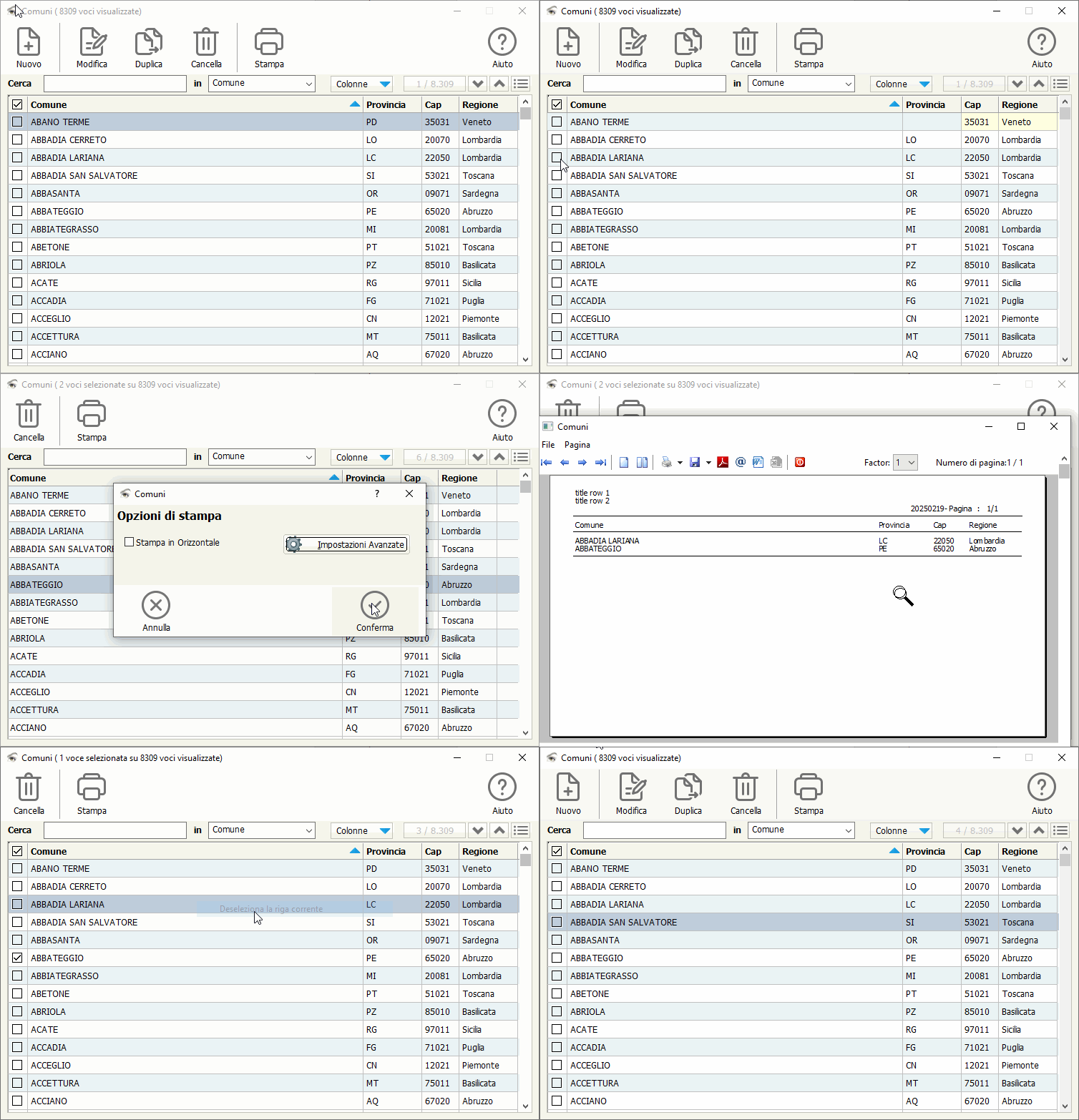
Respect and congratulations – I like the design.
Otto wrote: Respect and congratulations – I like the design.Thanks
// C:\FWH\SAMPLES\MULTSEL.PRG by mister Rao.

#include "FiveWin.Ch"
#include "ord.ch"
#include "xbrowse.ch"
#include "hbcompat.ch"

REQUEST DBFCDX

FUNCTION Main()

   LOCAL oDlg, oBrw, oFont

   XbrNumFormat( 'A', .T. )

   USE CUSTOMER NEW ALIAS "CUST" SHARED VIA "DBFCDX"

   DEFINE FONT oFont NAME "TAHOMA" SIZE 0, - 14 BOLD

   DEFINE DIALOG oDlg SIZE 700, 400 PIXEL FONT oFont

   oDlg:lHelpIcon := .F.

   @ 10, 10 XBROWSE oBrw SIZE - 10, - 10 PIXEL OF oDlg ;
      DATASOURCE "CUST"                                ;
      COLUMNS "FIRST", "CITY", "AGE", "SALARY"         ;
      CELL LINES NOBORDER

   WITH OBJECT oBrw:InsCol( 1 )

      :bEditValue    := {|| AScan( oBrw:aSelected, oBrw:BookMark ) > 0 }
      :SetCheck()
      :nHeadBmpNo    := {|| If( Len( oBrw:aSelected ) == oBrw:nLen, 1, 2 ) }

   END

   WITH OBJECT oBrw

      :nMarqueeStyle := MARQSTYLE_HIGHLROWMS // multisel does the job
      // :nMarqueeStyle := MARQSTYLE_HIGHLROW
      :lMultiSelect  := .F.
      :bClrSelFocus  := {|| { CLR_BLACK, CLR_HGRAY } }
      :nStretchCol   := 3

      :aCols[ 1 ]:bClrSelFocus := {|| {  CLR_BLACK, CLR_WHITE } }

      :bLClicked     := {| r, c, f, oBrw | If( oBrw:MouseColPos( c ) == 1, ;
         If( ( f := AScan( oBrw:aSelected, oBrw:BookMark ) ) == 0,         ;
         AAdd( oBrw:aSelected, oBrw:BookMark ),                            ;
         ADel( oBrw:aSelected, f, .T. ) ), NIL ),                          ;
         oBrw:RefreshCurrent() }

   :CreateFromCode()

   END

   ACTIVATE DIALOG oDlg CENTERED

   RELEASE FONT oFont

RETURN NIL

// FIN / ENDShumingWang wrote: ::nMarqueeStyle := MARQSTYLE_HIGHLROWMS
::select(1)
::seleect(2)
...
::aseleted stores Eval( ::bBookMark) //nrow
::select(0) clear selected rows ,::aselected:={}
Shuming Wang
Silvio.Falconi wrote:Thank You for the tip Silvio!Hi,You must not also use a field on your archive
How the best way to use multisel in xbrowse? I would not like to use a logical field in the dbf to select or unmark the record as there may be other users using the same record.
Thanks in advance!
WITH OBJECT oBrw
                    :SetMultiSelectCol()
karinha wrote: wartiaga, see if it helps:Thank You Karinha, works great!
Regards, saludos.// C:\FWH\SAMPLES\MULTSEL.PRG by mister Rao. #include "FiveWin.Ch" #include "ord.ch" #include "xbrowse.ch" #include "hbcompat.ch" REQUEST DBFCDX FUNCTION Main() LOCAL oDlg, oBrw, oFont XbrNumFormat( 'A', .T. ) USE CUSTOMER NEW ALIAS "CUST" SHARED VIA "DBFCDX" DEFINE FONT oFont NAME "TAHOMA" SIZE 0, - 14 BOLD DEFINE DIALOG oDlg SIZE 700, 400 PIXEL FONT oFont oDlg:lHelpIcon := .F. @ 10, 10 XBROWSE oBrw SIZE - 10, - 10 PIXEL OF oDlg ; DATASOURCE "CUST" ; COLUMNS "FIRST", "CITY", "AGE", "SALARY" ; CELL LINES NOBORDER WITH OBJECT oBrw:InsCol( 1 ) :bEditValue := {|| AScan( oBrw:aSelected, oBrw:BookMark ) > 0 } :SetCheck() :nHeadBmpNo := {|| If( Len( oBrw:aSelected ) == oBrw:nLen, 1, 2 ) } END WITH OBJECT oBrw :nMarqueeStyle := MARQSTYLE_HIGHLROWMS // multisel does the job // :nMarqueeStyle := MARQSTYLE_HIGHLROW :lMultiSelect := .F. :bClrSelFocus := {|| { CLR_BLACK, CLR_HGRAY } } :nStretchCol := 3 :aCols[ 1 ]:bClrSelFocus := {|| { CLR_BLACK, CLR_WHITE } } :bLClicked := {| r, c, f, oBrw | If( oBrw:MouseColPos( c ) == 1, ; If( ( f := AScan( oBrw:aSelected, oBrw:BookMark ) ) == 0, ; AAdd( oBrw:aSelected, oBrw:BookMark ), ; ADel( oBrw:aSelected, f, .T. ) ), NIL ), ; oBrw:RefreshCurrent() } :CreateFromCode() END ACTIVATE DIALOG oDlg CENTERED RELEASE FONT oFont RETURN NIL // FIN / END


