FiveTech Support Forums

FiveWin / Harbour / xBase community
Board index FiveWin for Harbour/xHarbour adjust zoom in xBrowse
Posts: 56
Joined: Tue Mar 23, 2010 12:53 PM
adjust zoom in xBrowse
Posted: Fri Feb 21, 2025 06:20 PM
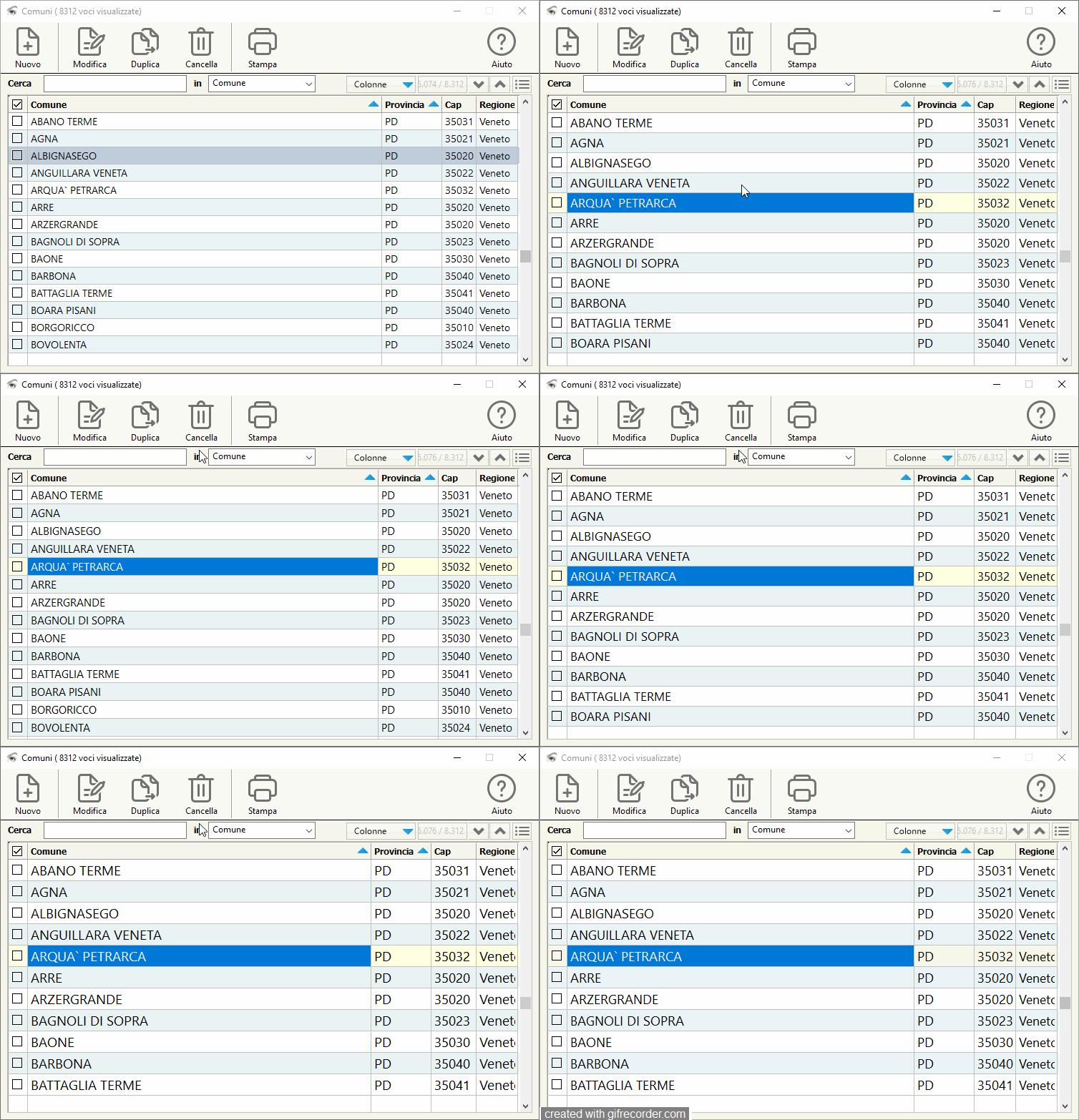
Adjust the zoom in xBrowse Hello friends, is it possible to have this control to adjust the Zoom of Xbrowse

Friends, would you have an Example

https://i.ibb.co/bRz7621x/zzzzzzzzzzzzzzzzzzzzzzzzzzzzzzzzz.jpg

Posts: 6983
Joined: Fri Oct 07, 2005 07:07 PM
Re: adjust zoom in xBrowse
Posted: Sat Feb 22, 2025 08:42 AM

What exactly do you want to do with Zoom?

Posts: 10733
Joined: Sun Nov 19, 2006 05:22 AM
Re: adjust zoom in xBrowse
Posted: Sat Feb 22, 2025 09:57 AM

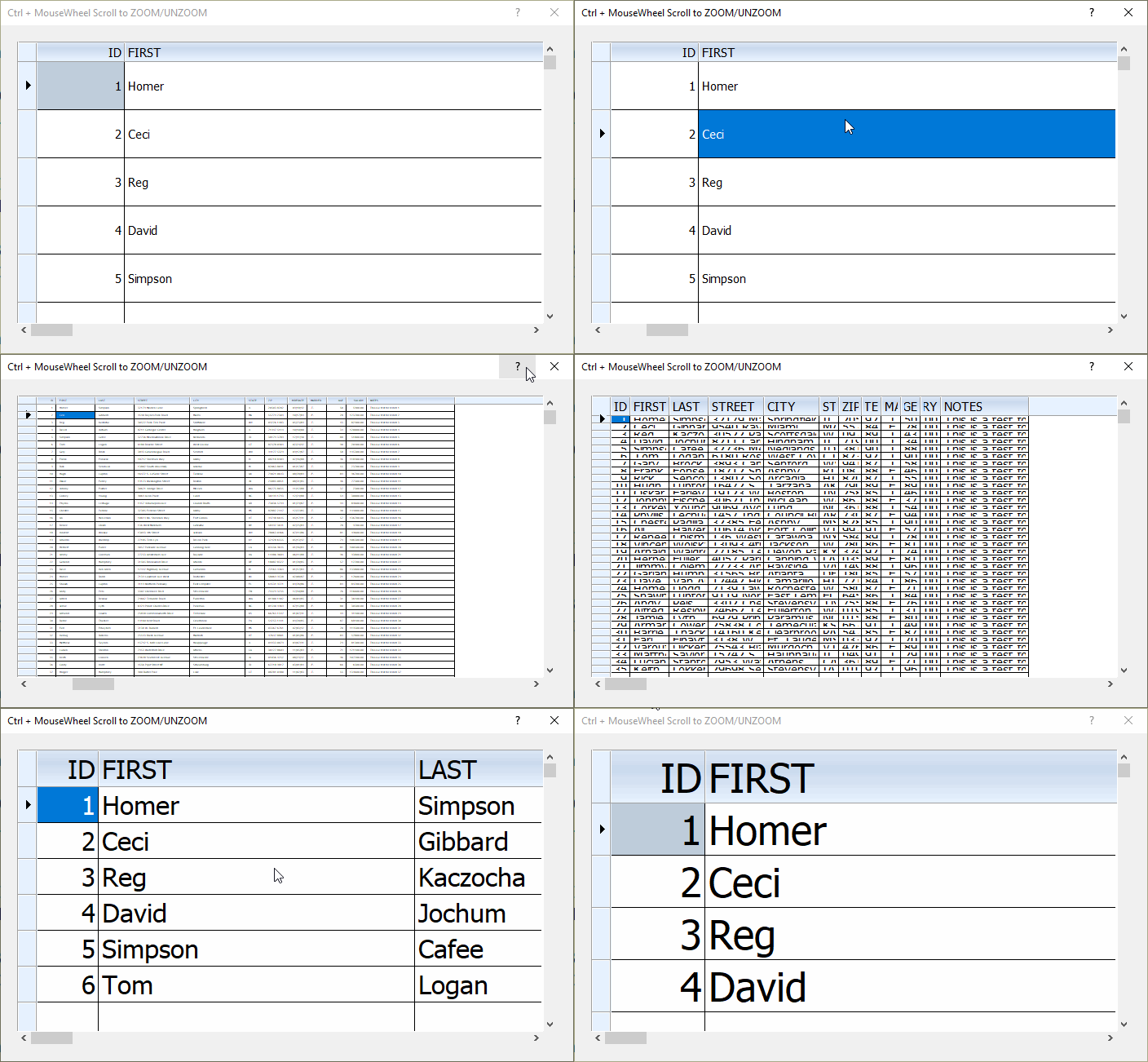
First, please try pressing Ctrl+ and Ctrl- keys and see the changes. Are you looking for effect similar to this? or something else?

Press Controll key and + of - on the numeric keypad

Regards


G. N. Rao.

Hyderabad, India
Posts: 56
Joined: Tue Mar 23, 2010 12:53 PM
Re: adjust zoom in xBrowse
Posted: Sat Feb 22, 2025 12:14 PM
Hello friends, thanks for replying


I need exactly what "Ctrl+ and Ctrl- and" do, but I want to Save this Status, so that the user can choose the Zoom size, preferably allowing it to be Saved together with "SaveState() and :RestoreState(cState)"


:D
Posts: 56
Joined: Tue Mar 23, 2010 12:53 PM
Re: adjust zoom in xBrowse
Posted: Tue Feb 25, 2025 10:29 PM

I don't know if I applied it correctly, but I need to save the Zoom Status for when I open the Dialog again with Xbrowse, in the last ZOOM

Posts: 56
Joined: Tue Mar 23, 2010 12:53 PM
Re: adjust zoom in xBrowse
Posted: Thu Feb 27, 2025 11:46 AM
This company did, I downloaded the demo version where I can see that it does what I need


Link https://www.donorquest.com/
Posts: 7317
Joined: Thu Oct 18, 2012 07:17 PM
Re: adjust zoom in xBrowse
Posted: Thu Feb 27, 2025 01:52 PM
INFORMAISVRB wrote: This company did, I downloaded the demo version where I can see that it does what I need


Link https://www.donorquest.com/
this sample test make the zoom and save it on state


#include "fivewin.ch"

function Main()   
   local oDlg, oFont, oBrw
   local cSection :="Cust"
local cIniUser :=  cFilePath( GetModuleFileName( GetInstance() ) ) + "test.ini"

local cState := GetPvProfString(cSection, "State","", cIniuser)  // load state from disk

   USE CUSTOMER

DEFINE FONT oFont NAME "TAHOMA" SIZE 0,-15   

DEFINE DIALOG oDlg SIZE 700,400 PIXEL TRUEPIXEL FONT oFont ; 
     TITLE "Ctrl + MouseWheel Scroll to ZOOM/UNZOOM"   

@ 20,20 XBROWSE oBrw SIZE -20,-20 PIXEL OF oDlg ;    
  DATASOURCE ALIAS() AUTOCOLS ;  
    CELL LINES NOBORDER 

  WITH OBJECT oBrw  
    :CreateFromCode()  
 END   

 oBrw:RestoreState( cState )  // set the old state saved 

 ACTIVATE DIALOG oDlg CENTERED ;
 VALID (oBrw:nLen := 0 ,;
     WritePProString(cSection,"State",oBrw:SaveState(),cIniUser))  // save the state into disk

                   
 RELEASE FONT oFont
return nil


Nages,
If I Use this configuration on xbrowse
@ 103 , 10 XBROWSE oBrw ;
                  OF oDlg ;
                SIZE -10 , 390 ;
               PIXEL ;
          DATASOURCE oDbf ;
             COLUMNS aCols ;
            AUTOSORT ;
                FONT oFontNormal ;
            NOBORDER ;
                CELL ;
               LINES ;
              UPDATE
              
MyStyleBrowse(oBrw)

   WITH OBJECT oBrw
  
      :CreateFromCode()
   END
   
   
   Function MyStyleBrowse(oBrw)
   local nColorHeader  := DLG_nColorDlg
   local nColorFooter  := DLG_nColorDlg
   local nColorPigiama := RGB(235,243,245)
         WITH OBJECT oBrw
            :nRowHeight          := 25
            :l2007               := .F.
            :l2015               := .T.
            :lRecordSelector     := .F.
            :nColDividerStyle    := LINESTYLE_LIGHTGRAY
            :nRowDividerStyle    := LINESTYLE_LIGHTGRAY
            :nStretchCol         := STRETCHCOL_WIDEST
            :nMarqueeStyle        := MARQSTYLE_HIGHLROW
            :lDisplayZeros        := .f.
            :lAllowRowSizing     := .F.
            :lAllowColSwapping   := .F.
            :lAllowColHiding     := .F.
            :lAllowSizings       := .F.
             :lDrawBorder := .t.
             :nClrBorder := Rgb(195,195,185)
             :lDrawBorderIn   := .F.
            :bRecSelHeader    := ""
       *     :bClrSelFocus := { || {,rgb(255,255,224)}}
            :bClrRowFocus := { || {, rgb(255,255,224)}}
           * :nRecSelColor     :=   nRgb( 245,244,234)
            :bClrHeader       := {|| { ,nColorHeader } }
            :bClrFooter       := {|| { ,nColorFooter } }
            :bClrStd := { || { CLR_BLACK, If( oBrw:KeyNo % 2 == 0, CLR_WHITE,nColorPigiama ) } }
         END
 return nil

the zoom not run also if I use mousewhhel or keys ctrl + and -

probably there is something that is bothering you and the zoom does not work using the mouse wheel or using the + and - keys with ctrl
Since from 1991/1992 ( fw for clipper Rel. 14.4 - Momos)

I use : FiveWin for Harbour March-April 2024 - Harbour 3.2.0dev (harbour_bcc770_32_20240309) - Bcc7.70 - xMate ver. 1.15.3 - PellesC - mail: silvio[dot]falconi[at]gmail[dot]com
Posts: 6983
Joined: Fri Oct 07, 2005 07:07 PM
Re: adjust zoom in xBrowse
Posted: Thu Feb 27, 2025 02:48 PM
Hello,
I think it should work approximately like this. In my code, there is still an issue with the correct size of the restored font.
But I’m sure you can solve that.

The principle is: remember the font size, row height, and column widths from XBrowse.
When restarting, the saved values are loaded.
Best regards,
Otto
// Using Windows 7 row selection colors in xbrowse

#include 'fivewin.ch'
#include 'xbrowse.ch'


STATIC nLastFontSize := 0
STATIC aLastColWidths := {}
STATIC nLastRowHeight := 0
STATIC c_path

function Main()

   local oDlg, oBrw, oFont

	c_path := cFilePath(GetModuleFileName( GetInstance() ) )
   SET DATE ITALIAN
   SET CENTURY ON

   FwNumFormat( 'E', .t. )

   USE CUSTOMER ALIAS CUST

   DEFINE FONT oFont NAME 'Tahoma' SIZE 0, -16

   DEFINE DIALOG oDlg SIZE 640,440 PIXEL ;
      FONT oFont TITLE 'XBrowse Windows 7 Bars' ;
      COLOR CLR_BLACK,RGB(250,250,250)
          @ 0,20 ;
      BUTTON "SaveZoomSetting" ;
      ACTION SaveZoomSetting( oBrw ) ;
          OF oDlg ;
       PIXEL

      @ 0,120 ;
      BUTTON "LoadZoomSettings" ;
      ACTION LoadZoomSettings( oBrw ) ;
          OF oDlg ;
       PIXEL

   @ 20,20 XBROWSE oBrw OF oDlg SIZE -10,-20 PIXEL ;
      COLUMNS "First", "State", "Age", "HireDate", "Salary" ;
      ALIAS 'CUST' NOBORDER

   oBrw:lRecordSelector := .f.
   oBrw:nMarqueeStyle   := MARQSTYLE_HIGHLWIN7

   WITH OBJECT oBrw:InsCol( 1 )

      :cHeader       := " "
      :bEditValue    := { || If( AScan( oBrw:aSelected, oBrw:BookMark ) > 0, .t., nil ) }
      :SetCheck()
      :nHeadBmpNo    := { || If( Len( oBrw:aSelected ) == oBrw:nLen, 1, 2 ) }
      :bLClickHeader := { |r,c,f,oCol| If( Len( oBrw:aSelected ) == oBrw:nLen, ;
                                           oBrw:SelectNone(), oBrw:SelectAll() ) }

   END

   oBrw:CreateFromCode()

   ACTIVATE DIALOG oDlg CENTERED

   RELEASE FONT oFont

return nil


FUNCTION SaveZoomSetting( oBrw )
	LOCAL cIniFile := c_Path + "PROJECT.INI"


   LOCAL nZoom, i
	local cFontText


	FontToText( oBrw:oFont )

  MEMOWRIT( 'fontsave.txt', cFontText )


   // Schriftgröße speichern
   WritePProString(  "Settings","FontSize", Str( Abs( oBrw:oFont:nHeight ) ), cIniFile )

   // Zeilenhöhe speichern
   WritePProString ( "Settings", "RowHeight", Str( oBrw:nRowHeight ) , cIniFile )

   // Spaltenbreiten speichern
   FOR i := 1 TO Len( oBrw:aCols )
      WritePProString(  "Columns", "Col" + Str(i), Str( oBrw:aCols[i]:nWidth ) , cIniFile )
   NEXT
RETURN NIL


FUNCTION LoadZoomSettings( oBrw )
   LOCAL cIniFile := c_Path + "PROJECT.INI"
   LOCAL i, nWidth

   // Schriftgröße setzen
   LOCAL nFontSize := Val( GetPvProfString( "Settings", "FontSize", "12"  , cIniFile ) )

     oBrw:oFont   :=   FontFromText( MemoRead( 'FONTSAVE.TXT' ) )


   // Zeilenhöhe setzen
   oBrw:nRowHeight := Val( GetPvProfString( "Settings", "RowHeight", "20"  , cIniFile ))

   // Spaltenbreiten wiederherstellen
   FOR i := 1 TO Len( oBrw:aCols )
      nWidth := Val( GetPvProfString( "Columns", "Col" + Str(i), Str(oBrw:aCols[i]:nWidth)  , cIniFile ))
      oBrw:aCols[i]:nWidth := nWidth
   NEXT

   oBrw:Refresh()

RETURN NIL

function FontToText( oFont )
return FW_ValToExp(  { ;
   oFont:cFaceName, 0, oFont:nInpHeight, .f., oFont:lBold, oFont:nEscapement, ;
   oFont:nOrientation, nil, oFont:lItalic, oFont:lUnderline, oFont:lStrikeOut, ;
   oFont:nCharSet, oFont:nOutPrecision, oFont:nClipPrecision, oFont:nQuality, ;
   nil, oFont:nPitchFamily }  )
//----------------------------------------------------------------------------//
function FontFromText( cText )
return HB_ExecFromArray( TFont(), "NEW", &cText )
//----------------------------------------------------------------------------//
Posts: 56
Joined: Tue Mar 23, 2010 12:53 PM
Re: adjust zoom in xBrowse
Posted: Thu Feb 27, 2025 05:44 PM

Hi, thanks,

I'll try it

Posts: 7317
Joined: Thu Oct 18, 2012 07:17 PM
Re: adjust zoom in xBrowse
Posted: Thu Feb 27, 2025 08:48 PM
Otto wrote: Hello,
I think it should work approximately like this. In my code, there is still an issue with the correct size of the restored font.
But I’m sure you can solve that.

The principle is: remember the font size, row height, and column widths from XBrowse.
When restarting, the saved values are loaded.
Best regards,
Otto
// Using Windows 7 row selection colors in xbrowse

#include 'fivewin.ch'
#include 'xbrowse.ch'


STATIC nLastFontSize := 0
STATIC aLastColWidths := {}
STATIC nLastRowHeight := 0
STATIC c_path

function Main()

   local oDlg, oBrw, oFont

	c_path := cFilePath(GetModuleFileName( GetInstance() ) )
   SET DATE ITALIAN
   SET CENTURY ON

   FwNumFormat( 'E', .t. )

   USE CUSTOMER ALIAS CUST

   DEFINE FONT oFont NAME 'Tahoma' SIZE 0, -16

   DEFINE DIALOG oDlg SIZE 640,440 PIXEL ;
      FONT oFont TITLE 'XBrowse Windows 7 Bars' ;
      COLOR CLR_BLACK,RGB(250,250,250)
          @ 0,20 ;
      BUTTON "SaveZoomSetting" ;
      ACTION SaveZoomSetting( oBrw ) ;
          OF oDlg ;
       PIXEL

      @ 0,120 ;
      BUTTON "LoadZoomSettings" ;
      ACTION LoadZoomSettings( oBrw ) ;
          OF oDlg ;
       PIXEL

   @ 20,20 XBROWSE oBrw OF oDlg SIZE -10,-20 PIXEL ;
      COLUMNS "First", "State", "Age", "HireDate", "Salary" ;
      ALIAS 'CUST' NOBORDER

   oBrw:lRecordSelector := .f.
   oBrw:nMarqueeStyle   := MARQSTYLE_HIGHLWIN7

   WITH OBJECT oBrw:InsCol( 1 )

      :cHeader       := " "
      :bEditValue    := { || If( AScan( oBrw:aSelected, oBrw:BookMark ) > 0, .t., nil ) }
      :SetCheck()
      :nHeadBmpNo    := { || If( Len( oBrw:aSelected ) == oBrw:nLen, 1, 2 ) }
      :bLClickHeader := { |r,c,f,oCol| If( Len( oBrw:aSelected ) == oBrw:nLen, ;
                                           oBrw:SelectNone(), oBrw:SelectAll() ) }

   END

   oBrw:CreateFromCode()

   ACTIVATE DIALOG oDlg CENTERED

   RELEASE FONT oFont

return nil


FUNCTION SaveZoomSetting( oBrw )
	LOCAL cIniFile := c_Path + "PROJECT.INI"


   LOCAL nZoom, i
	local cFontText


	FontToText( oBrw:oFont )

  MEMOWRIT( 'fontsave.txt', cFontText )


   // Schriftgröße speichern
   WritePProString(  "Settings","FontSize", Str( Abs( oBrw:oFont:nHeight ) ), cIniFile )

   // Zeilenhöhe speichern
   WritePProString ( "Settings", "RowHeight", Str( oBrw:nRowHeight ) , cIniFile )

   // Spaltenbreiten speichern
   FOR i := 1 TO Len( oBrw:aCols )
      WritePProString(  "Columns", "Col" + Str(i), Str( oBrw:aCols[i]:nWidth ) , cIniFile )
   NEXT
RETURN NIL


FUNCTION LoadZoomSettings( oBrw )
   LOCAL cIniFile := c_Path + "PROJECT.INI"
   LOCAL i, nWidth

   // Schriftgröße setzen
   LOCAL nFontSize := Val( GetPvProfString( "Settings", "FontSize", "12"  , cIniFile ) )

     oBrw:oFont   :=   FontFromText( MemoRead( 'FONTSAVE.TXT' ) )


   // Zeilenhöhe setzen
   oBrw:nRowHeight := Val( GetPvProfString( "Settings", "RowHeight", "20"  , cIniFile ))

   // Spaltenbreiten wiederherstellen
   FOR i := 1 TO Len( oBrw:aCols )
      nWidth := Val( GetPvProfString( "Columns", "Col" + Str(i), Str(oBrw:aCols[i]:nWidth)  , cIniFile ))
      oBrw:aCols[i]:nWidth := nWidth
   NEXT

   oBrw:Refresh()

RETURN NIL

function FontToText( oFont )
return FW_ValToExp(  { ;
   oFont:cFaceName, 0, oFont:nInpHeight, .f., oFont:lBold, oFont:nEscapement, ;
   oFont:nOrientation, nil, oFont:lItalic, oFont:lUnderline, oFont:lStrikeOut, ;
   oFont:nCharSet, oFont:nOutPrecision, oFont:nClipPrecision, oFont:nQuality, ;
   nil, oFont:nPitchFamily }  )
//----------------------------------------------------------------------------//
function FontFromText( cText )
return HB_ExecFromArray( TFont(), "NEW", &cText )
//----------------------------------------------------------------------------//
Otto,
the font problem is an old request of mine from many years ago (long before the meeting in Sillian), but someone preferred not to create a method to save the fonts (header, footer and data) because it was of no use to anyone.
Now in 2015 someone else needs the same thing ....
In my opinion, a method should be made to save the fonts and inserted into the Restorestate() /savestate() methods
Since from 1991/1992 ( fw for clipper Rel. 14.4 - Momos)

I use : FiveWin for Harbour March-April 2024 - Harbour 3.2.0dev (harbour_bcc770_32_20240309) - Bcc7.70 - xMate ver. 1.15.3 - PellesC - mail: silvio[dot]falconi[at]gmail[dot]com
Posts: 7317
Joined: Thu Oct 18, 2012 07:17 PM
Re: adjust zoom in xBrowse
Posted: Mon Mar 03, 2025 11:16 AM
here there is a strange situation


If I put the font on dialog the xbrowse zoom not run

If I rem the font from dialog then xbrowse run ok
DEFINE DIALOG oDlg SIZE nWd, nHt PIXEL TRUEPIXEL;   //FONT oFont
         COLOR CLR_BLACK, DLG_nColorDlg  ;
       STYLE nOR( DS_MODALFRAME, WS_POPUP, WS_CAPTION, WS_SYSMENU, ;
                  WS_MINIMIZEBOX)   ICON oIcon


I'm working on saving the font, maybe you need to make a change in xbrowse
Since from 1991/1992 ( fw for clipper Rel. 14.4 - Momos)

I use : FiveWin for Harbour March-April 2024 - Harbour 3.2.0dev (harbour_bcc770_32_20240309) - Bcc7.70 - xMate ver. 1.15.3 - PellesC - mail: silvio[dot]falconi[at]gmail[dot]com

Continue the discussion