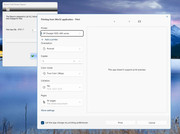
Preview" ... anyone have a work around not to show this screen and send the output directly to view or print .. you have to hit the "PRINT" button to continue .....
Thanks
Rick Lipkin

Hi Rick,
Can you provide a little PRG sample showing the problem?
Or you are not referring to a FWH application?
Enrico
This is a FW application .. I sent it a small application to Antonio and he got the same result ... I do have a self contained app I can send you via HighTail.ocm ... What e-mail address would you like me to sent it to ?
RIck Lipkin
Rick Lipkin wrote: EnricoOnly if it is a very small PRG sample. My email address is below.
This is a FW application .. I sent it a small application to Antonio and he got the same result ... I do have a self contained app I can send you via HighTail.ocm ... What e-mail address would you like me to sent it to ?
RIck Lipkin
Ok, I received it but it is NOT a small PRG sample. I can't help you, sorry.
Enrico
Roster.exe is the executable and Roster.prg .. compile the Roster.prg and the Dcarew32.res file .. to create Roster.exe to see the behavior and you can review the roster.prg file .. main.prg is not used .. just the Roster.prg and the Dcarew32.res are the two files you need to compile ..
Please, try to reduce the sample to the minimum. Remove all about ADODB and the database, leave only a PRINT command with a constant string. If you still get the problem, show that sample.
Enrico .. all the ado stuff is common to all desktops .. just compile roster.prg and DCareW32.res ... the .res file has all the .rc screen files already compiled .. the file ROster.EXE is the application showing the issue with the Windows 11 intermediate screen.
Dear Rick,
Do you mean that you don't want that window to appear ?
The one from Windows itself ?
Hello,
The "This app doesn't support print preview" error on Windows 11 can be resolved by updating printer drivers or fixing connection issues.
El error "Esta aplicación no admite la vista previa de impresión" en Windows 11 se puede resolver actualizando los controladores de la impresora o solucionando problemas de conexión.
Regards, saludos.
Antonio .. I do not want that extra Windows coming up when a user choses print or view from my applications .. imagine a State Agency that has 5000 users and they go to print their time and reporting sheet on windows 11 for the first time and they have pop up an addition screen that says "PRINT" and when you click the button .. the regular fivewin window come up to view or print and the program runs as it always has ... but you have that windows 11 print window come up "This app doesn't support print preview" .. in a 5 thousand user group .... that will be a tech support night mare.
karinha ... can you elaborate .. this looks like a Windows 11 issue and not a print driver issue "
If you like I can send you my small self contained sample and see if you get that additional windows 11 screen to go away. just send me your e-mail and I will send you the sample code ..
Rick Lipkin
See if this helps:
Printer Troubleshooter
Go to Settings
Select Update
Select Security Troubleshooter
Select Other Troubleshooters
Locate your printer in the Find and fix other problems section
Click on your printer and select Run the troubleshooter
Follow the on-screen instructions
Update your printer drivers
Check for a newer version of your printer driver
If not, go to the manufacturer's website and download and install the latest driver
Restart your computer and printer
Restart your computer
Turn off the printer, unplug all connected cables, and wait 20 seconds
Reconnect the cables and turn on the printer
Other procedures Restart the Print Spooler service, Reinstall the printer driver, Disable security software, Troubleshoot in a clean boot state, Roll back Windows Update.