FiveTech Support Forums

FiveWin / Harbour / xBase community
Board index FiveWin for Harbour/xHarbour TPanel Left click mouse is possbible?
Posts: 1286
Joined: Mon Feb 25, 2008 02:54 PM
TPanel Left click mouse is possbible?
Posted: Thu Mar 20, 2025 08:35 PM
TPanel Left click mouse is possbible?
DEFINE WINDOW oWnd TITLE "Dashboard " 
   *** Paneles
      
   oPanelWeb := TPanel():New( 0, 281, oWnd:nHeight, oWnd:nWidth, oWnd ) 
  
   oPanelWeb:blclicked := {|| msginfo("test")}  <---------
   
   oWebView := TWebView2():New(oPanelWeb)      
   oWebView:SetUserAgent( "Mozilla/5.0 (Linux; Android 6.0; Nexus 5 Build/MRA58N) AppleWebKit/537.36 (KHTML, like Gecko) Chrome/103.0.5060.53 Mobile Safari/537.36" )   
   oWebView:SetHtml( MiHtml(1) ) 
   oWebView:Run()   

ACTIVATE WINDOW oWnd MAXIMIZED ON RESIZE
ubiratanmga@gmail.com

FWH24.04
BCC7.3
HARBOUR3.2
xMate
Pelles´C
TDolphin
Posts: 8515
Joined: Tue Dec 20, 2005 07:36 PM
Re: TPanel Left click mouse is possbible?
Posted: Fri Mar 21, 2025 04:53 PM
Bira, mira se ayuda:
// C:\FWH\SAMPLES\BIRAPAN.PRG

#include "FiveWin.ch"

STATIC oWnd, OPANELWEB, OWEBVIEW

FUNCTION Main()

   DEFINE WINDOW oWnd TITLE "Dashboard " // ** Paneles

   oPanelWeb := TPanel():New( 0, 281, oWnd:nHeight, oWnd:nWidth, oWnd )

   WITH OBJECT oPanelWeb

      oWnd:bRClicked := { || ( FUNDOBIRA() ) } // Mouse Direito

      oWnd:bLClicked := { || ( FUNDOBIRA() ) } // Mouse Esquerdo

   END

   oWebView := TWebView2():New( oPanelWeb )
   oWebView:SetUserAgent( "Mozilla/5.0 (Linux; Android 6.0; Nexus 5 Build/MRA58N) AppleWebKit/537.36 (KHTML, like Gecko) Chrome/103.0.5060.53 Mobile Safari/537.36" )
   oWebView:SetHtml( MiHtml( 1 ) ) // ?? Mostre isso Bira, fiquei curioso.
   oWebView:Run()

   ACTIVATE WINDOW oWnd MAXIMIZED // ON RESIZE ??

RETURN NIL

FUNCTION FUNDOBIRA()

   ? [AQUI ESTOU BIRA]

RETURN NIL

// FIN / END - kapiabafwh@gmail.com
Regards, saludos.
João Santos - São Paulo - Brasil - Phone: +55(11)95150-7341
Posts: 1286
Joined: Mon Feb 25, 2008 02:54 PM
Re: TPanel Left click mouse is possbible?
Posted: Fri Mar 21, 2025 09:04 PM

Joao,

não funciona.

ubiratanmga@gmail.com

FWH24.04
BCC7.3
HARBOUR3.2
xMate
Pelles´C
TDolphin
Posts: 44158
Joined: Thu Oct 06, 2005 05:47 PM
Re: TPanel Left click mouse is possbible?
Posted: Fri Mar 21, 2025 10:44 PM

The WebView control covers all the window parent area so you can not use bRClicked

Use a javascript event called function that jumps to FWH using javascript SendToFWH()

If you provide function MiHtml() source code then we can help you to implement it

regards, saludos

Antonio Linares
www.fivetechsoft.com
Posts: 7317
Joined: Thu Oct 18, 2012 07:17 PM
Re: TPanel Left click mouse is possbible?
Posted: Mon Mar 24, 2025 09:44 AM
Antonio Linares wrote: The WebView control covers all the window parent area so you can not use bRClicked

Use a javascript event called function that jumps to FWH using javascript SendToFWH()

If you provide function MiHtml() source code then we can help you to implement it
Antonio ,
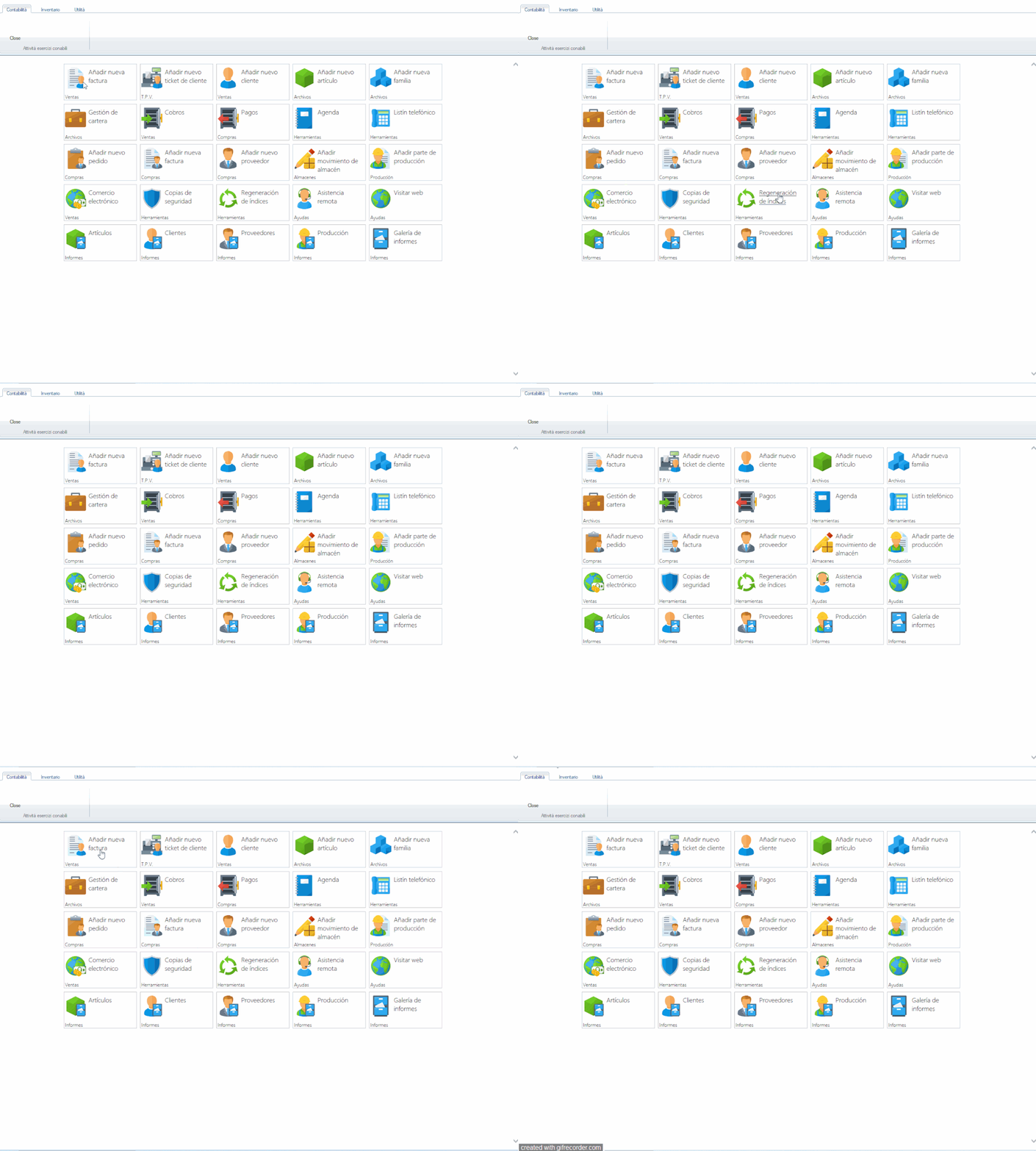
a long time ago I used a simple html without the Twebview class, I connected to an html page that I had on a server, the page was formed as a dashboard with all the icons, if I pressed a button or the writings I could open the procedures that were in the program without using javascript, I have to find the example again and I'll show it to you

run also on local

look the video


I use a simply activex

oActiveX := TActiveX():New( oWndBrowser, "Shell.Explorer" )
oActiveX:bOnEvent := { | event, aParams, pParams | EventInfo( event, aParams, pParams, oActiveX ) }

on Eventinfo I insert
 
  if ( "index.html" $ cParam .and. "#" $ cParam )

            cCommand := SubStr( cParam, At( "#", cParam ) + 1 )

            if !Empty( cCommand )
                            &cCommand
                        end if
sample on html
<ul class="post-content-button">
                            			<li class="post-contenido-button"><img src="img/gc_document_text_user.png" class="imagen"></li>
                                		<li class="post-contenido-button"><font class="tituloboton"><a href="index.html#AppFacCli()">A&ntilde;adir nueva factura</a></font></li>
                            		</ul>
when I click on "A&ntilde;adir nueva factura" I open the procedure index.html#AppFacCli()


I not Know TwebView or TwebView2 because I never use these object classes, exist a codeblock to insert as bonEvent ?
Since from 1991/1992 ( fw for clipper Rel. 14.4 - Momos)

I use : FiveWin for Harbour March-April 2024 - Harbour 3.2.0dev (harbour_bcc770_32_20240309) - Bcc7.70 - xMate ver. 1.15.3 - PellesC - mail: silvio[dot]falconi[at]gmail[dot]com
Posts: 7317
Joined: Thu Oct 18, 2012 07:17 PM
Re: TPanel Left click mouse is possbible?
Posted: Mon Mar 24, 2025 12:44 PM
an sample test with webview

mihtml.html
<!DOCTYPE html>
<html lang="it">
<head>
    <meta charset="UTF-8">
    <title>Test TWebView</title>
    <style>
        body {
            font-family: Arial, sans-serif;
            display: flex;
            justify-content: center;
            align-items: center;
            height: 100vh;
            margin: 0;
            background-color: #f0f0f0;
        }
        .post-content-button {
            list-style: none;
            padding: 0;
            display: flex;
            align-items: center;
            background-color: #ffffff;
            border: 1px solid #ccc;
            border-radius: 5px;
            box-shadow: 2px 2px 5px rgba(0,0,0,0.1);
        }
        .post-contenido-button {
            margin: 10px;
        }
        .imagen {
            width: 24px;
            height: 24px;
            vertical-align: middle;
        }
        .tituloboton {
            font-size: 16px;
            color: #333;
        }
        a {
            text-decoration: none;
            color: #0078d7;
        }
        a:hover {
            text-decoration: underline;
            color: #005bb5;
        }
    </style>
</head>
<body>
    <ul class="post-content-button">
        <li class="post-contenido-button">
            <img src="img/test.png" class="imagen" alt="Image">
        </li>
        <li class="post-contenido-button">
            <font class="tituloboton">
                <a href="#" onclick="callHarbourFunction('AppFacCli'); return false;">Añadir nueva factura</a>
            </font>
        </li>
    </ul>

    <script>
        function callHarbourFunction(funcName) {
            if (window.chrome && window.chrome.webview) {
                window.chrome.webview.postMessage(funcName); 
                alert("Messaggio inviato a Harbour: " + funcName); 
            } else {
                alert("WebView2 non è disponibile!");
            }
        }
    </script>
</body>
</html>


test.prg

#include "FiveWin.ch"

FUNCTION Main()
   LOCAL oWebView := TWebView():New( 0, 0, 800, 600 ) // Create the WebView control
   LOCAL cHtml := MemoRead("mihtml.html")   // Upload your HTML

   // Set up binding to receive messages from the web
   oWebView:bOnBind := {|cMessage| ExecuteFunction(cMessage) }

   // Load the HTML
   oWebView:SetHtml(cHtml)
   oWebView:Run()

RETURN NIL

FUNCTION ExecuteFunction(cFuncName)
   IF cFuncName == "AppFacCli"
      AppFacCli() // Call your Harbour function
   ENDIF
RETURN NIL

FUNCTION AppFacCli()
   MsgInfo("here your harbour/fwh  codes!")
RETURN NIL
Since from 1991/1992 ( fw for clipper Rel. 14.4 - Momos)

I use : FiveWin for Harbour March-April 2024 - Harbour 3.2.0dev (harbour_bcc770_32_20240309) - Bcc7.70 - xMate ver. 1.15.3 - PellesC - mail: silvio[dot]falconi[at]gmail[dot]com
Posts: 7317
Joined: Thu Oct 18, 2012 07:17 PM
Re: TPanel Left click mouse is possbible?
Posted: Mon Mar 24, 2025 01:16 PM
Antonio,
Please why it make error ?
#include "FiveWin.ch"

FUNCTION Main()
   LOCAL oWebView := TWebView():New()

   oWebView:SetHtml( Html() )
   oWebView:SetTitle( "Test AppFacCli" )
   oWebView:SetSize( 800, 600 )
   oWebView:Bind( "SendToFWH" )
   oWebView:bOnBind := {|cJson, cCalls| ExecuteFunction(cJson, cCalls, oWebView) }
   oWebView:Run()
   oWebView:Destroy()

RETURN NIL

FUNCTION ExecuteFunction(cJson, cCalls, oWebView)
   LOCAL hData

   // Decodifica il JSON ricevuto dal JavaScript
   hb_jsonDecode(cJson, @hData)

   // Controlla il contenuto del JSON
   IF hb_HHasKey(hData, "function") .AND. hData["function"] == "AppFacCli"
      AppFacCli()
      oWebView:Return(cCalls, 0, "{ 'result': 'AppFacCli eseguita con successo!' }")
   ELSE
      oWebView:Return(cCalls, 0, "{ 'result': 'Funzione non riconosciuta' }")
   ENDIF

RETURN NIL

FUNCTION AppFacCli()
   MsgInfo("my codes!")
RETURN NIL

FUNCTION Html()
   LOCAL cHtml

   TEXT INTO cHtml
   <!DOCTYPE html>
   <html lang="it">
   <head>
       <meta charset="UTF-8">
       <title>Test TWebView</title>
       <style>
           body { font-family: Arial, sans-serif; display: flex; justify-content: center; align-items: center; height: 100vh; margin: 0; background-color: #f0f0f0; }
           .post-content-button { list-style: none; padding: 0; display: flex; align-items: center; background-color: #ffffff; border: 1px solid #ccc; border-radius: 5px; box-shadow: 2px 2px 5px rgba(0,0,0,0.1); }
           .post-contenido-button { margin: 10px; }
           .imagen { width: 24px; height: 24px; vertical-align: middle; }
           .tituloboton { font-size: 16px; color: #333; }
           a { text-decoration: none; color: #0078d7; }
           a:hover { text-decoration: underline; color: #005bb5; }
       </style>
   </head>
   <body>
       <ul class="post-content-button">
           <li class="post-contenido-button"><img src="img/test.png" class="imagen" alt="Icona"></li>
           <li class="post-contenido-button">
               <font class="tituloboton">
                   <a href="#" onclick="callHarbourFunction('AppFacCli'); return false;">Añadir nueva factura</a>
               </font>
           </li>
       </ul>

       <script>
           function callHarbourFunction(funcName) {
               var data = { function: funcName };
               var s = SendToFWH(data).then(s => { 
                   alert(s.result);
               }).catch(err => {
                   alert("Errore: " + err); 
               });
           }
       </script>
   </body>
   </html>
   ENDTEXT

RETURN cHtm
Since from 1991/1992 ( fw for clipper Rel. 14.4 - Momos)

I use : FiveWin for Harbour March-April 2024 - Harbour 3.2.0dev (harbour_bcc770_32_20240309) - Bcc7.70 - xMate ver. 1.15.3 - PellesC - mail: silvio[dot]falconi[at]gmail[dot]com
Posts: 7317
Joined: Thu Oct 18, 2012 07:17 PM
Re: TPanel Left click mouse is possbible?
Posted: Mon Mar 24, 2025 01:33 PM
Antonio,
Now run ok

the procedure call RightClickEvent() , this is opened when I click on right click of the mouse into webview
#include "FiveWin.ch"

FUNCTION Main()
   LOCAL oWebView := TWebView():New()

   oWebView:SetHtml( Html() )
   oWebView:SetTitle( "Test AppFacCli" )
   oWebView:SetSize( 800, 600 )
   oWebView:Bind( "SendToFWH" )
   oWebView:bOnBind := {|cJson, cCalls| ExecuteFunction(cJson, cCalls, oWebView) }
   oWebView:Run()
   oWebView:Destroy()

RETURN NIL

FUNCTION ExecuteFunction(cJson, cCalls, oWebView)
   LOCAL hData, cFuncName

   // Debug: mostra il JSON ricevuto
   MsgInfo("JSON ricevuto: " + cJson)

   // Decodifica il JSON
   hb_jsonDecode(cJson, @hData)

   // Se hData è un array, prendi il primo elemento
   IF ValType(hData) == "A" .AND. Len(hData) > 0
      hData := hData[1]
   ENDIF

   // Estrai il nome della funzione
   cFuncName := hb_HGetDef(hData, "function", "Nessuna funzione")
   MsgInfo("Funzione estratta: " + cFuncName)

   // Esegui la funzione corrispondente
   IF Upper(cFuncName) == "APPFACCLI"
      AppFacCli()
      oWebView:Return(cCalls, 0, "{ 'result': 'AppFacCli eseguita con successo!' }")
   ELSE
      oWebView:Return(cCalls, 0, "{ 'result': 'Funzione non riconosciuta: " + cFuncName + "' }")
   ENDIF

   RETURN NIL

FUNCTION AppFacCli()
   MsgInfo("my codes!")
   RETURN NIL

Function RightClickEvent()     // this is opened when  I click on right click of the mouse into webview
         MsgInfo("right click!")
   return nil


   FUNCTION Html()
   LOCAL cHtml

   TEXT INTO cHtml
   <!DOCTYPE html>
   <html lang="it">
   <head>
       <meta charset="UTF-8">
       <title>Test TWebView</title>
       <style>
           body { font-family: Arial, sans-serif; display: flex; justify-content: center; align-items: center; height: 100vh; margin: 0; background-color: #f0f0f0; }
           .post-content-button { list-style: none; padding: 0; display: flex; align-items: center; background-color: #ffffff; border: 1px solid #ccc; border-radius: 5px; box-shadow: 2px 2px 5px rgba(0,0,0,0.1); }
           .post-contenido-button { margin: 10px; }
           .imagen { width: 24px; height: 24px; vertical-align: middle; }
           .tituloboton { font-size: 16px; color: #333; }
           a { text-decoration: none; color: #0078d7; }
           a:hover { text-decoration: underline; color: #005bb5; }
       </style>
   </head>
   <body>
       <ul class="post-content-button">
           <li class="post-contenido-button"><img src="img/test.png" class="imagen" alt="Icona"></li>
           <li class="post-contenido-button">
               <font class="tituloboton">
                   <a href="#" onclick="callHarbourFunction('AppFacCli'); return false;">Aggiungi nuova fattura</a>
               </font>
           </li>
       </ul>

       <script>
           // Funzione per chiamare Harbour
           function callHarbourFunction(funcName) {
               var data = { function: funcName };
               SendToFWH(data).then(s => { 
                   alert(s.result);
               }).catch(err => {
                   alert("Errore: " + err); 
               });
           }

           // Intercetta il clic destro e invia l'evento a Harbour
           document.addEventListener("contextmenu", function(event) {
               event.preventDefault(); // Evita il menu di default del browser
               var data = { function: "RightClickEvent" };
               SendToFWH(data);
           });
       </script>
   </body>
   </html>
   ENDTEXT

RETURN cHtml
Since from 1991/1992 ( fw for clipper Rel. 14.4 - Momos)

I use : FiveWin for Harbour March-April 2024 - Harbour 3.2.0dev (harbour_bcc770_32_20240309) - Bcc7.70 - xMate ver. 1.15.3 - PellesC - mail: silvio[dot]falconi[at]gmail[dot]com
Posts: 44158
Joined: Thu Oct 06, 2005 05:47 PM
Re: TPanel Left click mouse is possbible?
Posted: Mon Mar 24, 2025 07:54 PM

Dear Silvio,

Better use FWH Class TWebView2 instead of Class TWebView as it is much more advanced and it does not require an external DLL

thanks!

regards, saludos

Antonio Linares
www.fivetechsoft.com
Posts: 1286
Joined: Mon Feb 25, 2008 02:54 PM
Re: TPanel Left click mouse is possbible?
Posted: Tue May 20, 2025 02:26 PM
Mr Antonio,

Using WEBVIEW2, in a WINDOW as I showed, when opening for the first time, the ESC key 'bkeydown', works perfectly, so I can close the window with ESC. When clicking on the GRAPHIC mounted by webview, ESC stops working.

So, I would like to capture the mouse click on the graph and return the focus to the window.

DEFINE WINDOW oWnd TITLE "Dashboard "
*** Paneles

oPanelWeb := TPanel():New( 0, 281, oWnd:nHeight, oWnd:nWidth, oWnd )

oWebView := TWebView2():New(oPanelWeb)
....
oWnd:bKeyDown := {|nKey| IIF(nKey==VK_ESCAPE,oWnd:end(),)}

ACTIVATE WINDOW oWnd MAXIMIZED ON RESIZE


/************************************************************************************/
CLASS TDashboard
/*
*/
DATA cHtml
DATA aGraph INIT {}

METHOD New() CONSTRUCTOR
METHOD AddPanel (cTexto, cValor, cFaFaIcon, cColor )
METHOD AddGraph (cNombre, cTitulo, cTipo, aColumnsData, aData, cColor, cSubTitulo, cHorTitle, cVerTitle, lPrefixohAxis, lPrefixovAxis )
METHOD AddGraph2 (cNombre, cTitulo, cTipo, aColumnsData, aData, cColor, cSubTitulo, cHorTitle, cVerTitle, lPrefixohAxis, lPrefixovAxis )

ENDCLASS

/************************************************************************************/
METHOD New() CLASS TDashboard
/*
*/
TEXT INTO ::cHtml
<!DOCTYPE html>
<html lang="es">
<head>
<meta charset="UTF-8">
<meta name="viewport" content="width=device-width, initial-scale=1.0">
<title>Dashboard</title>
<script src="https://cdn.tailwindcss.com"></script>
<script type="text/javascript" src="https://www.gstatic.com/charts/loader.js"></script>
<link rel="stylesheet" href="https://use.fontawesome.com/releases/v5.12.1/css/all.css" crossorigin="anonymous">


<script type="text/javascript">
// Cargar Google Charts
google.charts.load('current', {'packages':['corechart'], 'language': 'pt-BR'});
google.charts.setOnLoadCallback(drawCharts);

// Función para dibujar los gráficos
function drawCharts() {
//AgregarChar
}

//FuncionGrafico

window.onresize = function () {
drawCharts(); // Redibujar gráficos cuando la ventana cambia de tamaño
};

</script>

</head>

<body class="bg-gray-100">

<div class="flex flex-col lg:flex-row min-h-screen">

<!-- Main Content -->
<div class="flex-1 overflow-y-auto">
<div id="values" class="section">
<div class="grid grid-cols-1 md:grid-cols-2 lg:grid-cols-4 gap-6">
<!-- AddPanel -->
</div>
</div>
<div class="section p-2">
<hr>
</div>
<!-- Gráficos Section -->
<div id="charts" class="section">
<div class="grid grid-cols-1 md:grid-cols-2 lg:grid-cols-2 gap-6">
<!-- idgrafico -->
</div>
</div>
<br><br><br><br><br><br>
</div>
</div>

</body>

</html>
ENDTEXT

return Self

/************************************************************************************/
METHOD AddPanel(cTexto, cValor, cFaFaIcon, cColor ) CLASS TDashboard
/*
*/
Local cPanel := '<div class="bg-white shadow-md p-6 h-50 rounded-lg text-center border-t-4 border-'+cColor+'-500">'+;
' <h3 class="text-lg font-bold text-'+cColor+'-500"><i class="fas fa-'+cFaFaIcon+' fa-3x"></i></h3>'+;
' <p class="text-xl mt-4 text-'+cColor+'-700">'+cTexto+'</p>'+;
' <p class="text-3xl mt-2 text-'+cColor+'-500 font-bold">'+cValor+'</p>'+;
'</div>'+;
'<!-- AddPanel -->'
::cHtml := strtran(::cHtml,"<!-- AddPanel -->",cPanel)
return Self

/************************************************************************************/
METHOD AddGraph2 (cNombre, cTitulo, cTipo, aColumnsData, aData, cColor, cSubTitulo, cHorTitle, cVerTitle, lPrefixohAxis, lPrefixovAxis )
/*
cTipo := ColumnChart, LineChart, PieChart, BarChart, ScatterChart
*/
Local cGraph, cFuncion, cId, i

Default cHorTitle := ''
Default cVerTitle := ''
Default lPrefixohAxis := .f.
Default lPrefixovAxis := .f.

cGraph := cNombre+'();//AgregarChar'
::cHtml := strtran(::cHtml,"//AgregarChar",cGraph)
cFuncion := "function "+cNombre+"() { "+;
"var data = google.visualization.arrayToDataTable(["+;
" ['"+aColumnsData[1]+"', '"+aColumnsData[2] + "', '"+aColumnsData[3] +"'], "

for i := 1 to len(aData)
cFuncion := cFuncion + "['"+aData[i,1]+"', "+STR(aData[i,2]) +", "+STR(aData[i,3]) +"],"
next i

cFuncion := cFuncion + " ]);"+;
"var options = { "+;
IIf(!Empty(cSubTitulo), " title: '" + cSubTitulo + "',", "")+;
" hAxis: {" + IIf(lPrefixohAxis, "format: 'R$ #,##0.00', ","")+"title: '" + Alltrim(cHorTitle) + "'},"+;
" vAxis: {" + IIf(lPrefixovAxis, "format: 'R$ #,##0.00', ","")+"title: '" + Alltrim(cVerTitle) + "'},"+;
" width: '100%',"+;
" height: 300, "+;
" isStacked: false, "+;
" is3D: " + IIf(s_hParametros['lGrafico3D'] ,"true ","false ")+;
"};"+;
" var chart = new google.visualization."+cTipo+"(document.getElementById('"+cNombre+"'));"+;
" var formatter = new google.visualization.NumberFormat({ decimalSymbol: ',', groupingSymbol: '.', fractionDigits: 2 });"+;
" formatter.format(data, 1);" +;
"chart.draw(data, options);"+;
"}"+;
"//FuncionGrafico"

::cHtml := StrTran(::cHtml,"//FuncionGrafico",cFuncion)
cId := '<div class="bg-white shadow-md p-2 rounded-lg border-t-4 border-'+cColor+'-500">'+;
'<h2 class="text-xl font-bold mb-4 text-'+cColor+'-500">'+cTitulo+'</h2>'+;
'<div id="'+cNombre+'"></div>'+;
'</div>'+;
'<!-- idgrafico -->'
::cHtml := StrTran(::cHtml,"<!-- idgrafico -->",cId)

return Self

/************************************************************************************/
METHOD AddGraph (cNombre, cTitulo, cTipo, aColumnsData, aData, cColor, cSubTitulo, cHorTitle, cVerTitle, lPrefixohAxis, lPrefixovAxis )
/*
cTipo := ColumnChart, LineChart, PieChart, BarChart, ScatterChart
*/
Local cGraph, cFuncion, cId, i

Default cHorTitle := ''
Default cVerTitle := ''
Default lPrefixohAxis := .f.
Default lPrefixovAxis := .f.

cGraph := cNombre+'();//AgregarChar'
::cHtml := strtran(::cHtml,"//AgregarChar",cGraph)
cFuncion := "function "+cNombre+"() { "+;
"var data = google.visualization.arrayToDataTable(["+;
" ['"+aColumnsData[1]+"', '"+aColumnsData[2]+"'], "

for i := 1 to len(aData)
cFuncion := cFuncion + "['"+aData[i,1]+"', "+STR(aData[i,2])+"],"
next i

cFuncion := cFuncion + " ]);"+;
"var options = { "+;
IIf(!Empty(cSubTitulo), " title: '" + cSubTitulo + "',", "")+;
" hAxis: {" + IIf(lPrefixohAxis, "format: 'R$ #,##0.00', ","")+"title: '" + Alltrim(cHorTitle) + "'},"+;
" vAxis: {" + IIf(lPrefixovAxis, "format: 'R$ #,##0.00', ","")+"title: '" + Alltrim(cVerTitle) + "'},"+;
" width: '100%',"+;
" height: 300, "+;
" isStacked: false, "+;
" is3D: " + IIf(s_hParametros['lGrafico3D'] ,"true ","false ")+;
"};"+;
" var chart = new google.visualization."+cTipo+"(document.getElementById('"+cNombre+"'));"+;
" var formatter = new google.visualization.NumberFormat({ decimalSymbol: ',', groupingSymbol: '.', fractionDigits: 2 });"+;
" formatter.format(data, 1);" +;
"chart.draw(data, options);"+;
"}"+;
"//FuncionGrafico"

::cHtml := StrTran(::cHtml,"//FuncionGrafico",cFuncion)
cId := '<div class="bg-white shadow-md p-2 rounded-lg border-t-4 border-'+cColor+'-500">'+;
'<h2 class="text-xl font-bold mb-4 text-'+cColor+'-500">'+cTitulo+'</h2>'+;
'<div id="'+cNombre+'"></div>'+;
'</div>'+;
'<!-- idgrafico -->'
::cHtml := StrTran(::cHtml,"<!-- idgrafico -->",cId)

return Self
ubiratanmga@gmail.com

FWH24.04
BCC7.3
HARBOUR3.2
xMate
Pelles´C
TDolphin
Posts: 44158
Joined: Thu Oct 06, 2005 05:47 PM
Re: TPanel Left click mouse is possbible?
Posted: Wed May 21, 2025 03:50 AM
Here you have Grok 3 advise about it:

https://x.com/i/grok/share/EQgvM8q2oP93r2MsPDdq7SLq5

We may need to modify Class TWebView2 to process those messages
regards, saludos

Antonio Linares
www.fivetechsoft.com

Continue the discussion