FiveTech Support Forums

FiveWin / Harbour / xBase community
Board index FiveWin for Harbour/xHarbour Using a webview from an existing window
Posts: 7317
Joined: Thu Oct 18, 2012 07:17 PM
Using a webview from an existing window
Posted: Wed Mar 26, 2025 12:11 PM

I wish insert a Webview2 html on an existing window

How I can make ?

Webview2 createa window ok but I need to insert a menupulldown and a ribbonbar how I can make ?

function Main()

local oWnd,oWebView,cHtml := Html()

DEFINE WINDOW oWnd TITLE "Test" MDI ;

MENU BuildMenu()

ACTIVATE WINDOW oWnd CENTER

return nil

Since from 1991/1992 ( fw for clipper Rel. 14.4 - Momos)

I use : FiveWin for Harbour March-April 2024 - Harbour 3.2.0dev (harbour_bcc770_32_20240309) - Bcc7.70 - xMate ver. 1.15.3 - PellesC - mail: silvio[dot]falconi[at]gmail[dot]com
Posts: 6755
Joined: Wed Feb 15, 2012 08:25 PM
Re: Using a webview from an existing window
Posted: Wed Mar 26, 2025 01:43 PM
Cristobal Navarro

Hay dos tipos de personas: las que te hacen perder el tiempo y las que te hacen perder la noción del tiempo

El secreto de la felicidad no está en hacer lo que te gusta, sino en que te guste lo que haces
Posts: 7317
Joined: Thu Oct 18, 2012 07:17 PM
Re: Using a webview from an existing window
Posted: Wed Mar 26, 2025 01:52 PM
cnavarro wrote: Look
https://forums.fivetechsupport.com/viewtopic.php?p=278426#p278426
tested but I see a white window blank
function Main()

   local oWnd, oWebView 
   local cHtml := Html()
   
   DEFINE WINDOW oWnd TITLE "Dashboard"

   oWebView = TWebView2():New( oWnd )

   oWebView:SetHtml( memoRead(cHtml ) )

   ACTIVATE WINDOW oWnd MAXIMIZED ;
      ON RESIZE oWebView:SetSize( nWidth, nHeight )

   return nil
perhaps run only with a html saved on disk not on memory
Since from 1991/1992 ( fw for clipper Rel. 14.4 - Momos)

I use : FiveWin for Harbour March-April 2024 - Harbour 3.2.0dev (harbour_bcc770_32_20240309) - Bcc7.70 - xMate ver. 1.15.3 - PellesC - mail: silvio[dot]falconi[at]gmail[dot]com
Posts: 137
Joined: Mon Oct 22, 2012 04:43 PM
Re: Using a webview from an existing window
Posted: Wed Mar 26, 2025 02:56 PM
#include "FiveWin.ch"

function Main()

   local oWnd, oWebView 

   DEFINE WINDOW oWnd TITLE "Dashboard"

   oWebView = TWebView2():New( oWnd )

   oWebView:SetHtml( dash() )

   ACTIVATE WINDOW oWnd MAXIMIZED ;
      ON RESIZE oWebView:SetSize( nWidth, nHeight )

return nil      

function dash()

local cHtml

TEXT INTO cHtml
<!DOCTYPE html>
<html lang="en">
<head>
    <meta charset="UTF-8">
    <meta name="viewport" content="width=device-width, initial-scale=1.0">
    <title>Professional Dashboard with Charts</title>
    <script src="https://cdn.jsdelivr.net/npm/chart.js"></script>
    <style>
        * {
            margin: 0;
            padding: 0;
            box-sizing: border-box;
            font-family: Arial, sans-serif;
        }

        body {
            background: #f0f2f5;
            color: #333;
            line-height: 1.6;
        }

        .container {
            display: flex;
            min-height: 100vh;
        }

        .sidebar {
            width: 250px;
            background: #2c3e50;
            color: white;
            position: fixed;
            height: 100%;
            padding: 20px;
        }

        .sidebar h2 {
            font-size: 24px;
            margin-bottom: 30px;
            text-align: center;
        }

        .sidebar ul {
            list-style: none;
        }

        .sidebar ul li {
            margin: 20px 0;
        }

        .sidebar ul li a {
            color: white;
            text-decoration: none;
            display: flex;
            align-items: center;
            padding: 10px;
            border-radius: 5px;
            transition: background 0.3s;
        }

        .sidebar ul li a:hover {
            background: #34495e;
        }

        .sidebar ul li a i {
            margin-right: 10px;
            font-size: 18px;
        }

        .main-content {
            flex: 1;
            margin-left: 250px;
            padding: 20px;
        }

        .dashboard-container {
            max-width: 1400px;
            margin: 0 auto;
        }

        .header {
            background: #2c3e50;
            color: white;
            padding: 20px;
            border-radius: 10px;
            margin-bottom: 20px;
        }

        .header h1 {
            font-size: 24px;
        }

        .grid-container {
            display: grid;
            grid-template-columns: repeat(auto-fit, minmax(300px, 1fr));
            gap: 20px;
        }

        .card {
            background: white;
            border-radius: 10px;
            padding: 20px;
            box-shadow: 0 4px 6px rgba(0,0,0,0.1);
            transition: transform 0.3s;
        }

        .card:hover {
            transform: translateY(-5px);
        }

        .card h3 {
            margin-bottom: 15px;
            color: #2c3e50;
        }

        .stats-card {
            display: flex;
            align-items: center;
            gap: 15px;
        }

        .stats-icon {
            width: 50px;
            height: 50px;
            background: #3498db;
            border-radius: 50%;
            display: flex;
            align-items: center;
            justify-content: center;
            color: white;
            font-size: 24px;
        }

        .chart-container {
            height: 200px;
            position: relative;
        }

        .progress-bar {
            width: 100%;
            height: 20px;
            background: #eee;
            border-radius: 10px;
            overflow: hidden;
            margin-top: 10px;
        }

        .progress {
            height: 100%;
            background: #2ecc71;
            width: 0;
        }

        .progress-75 { width: 75%; }
        .progress-50 { width: 50%; }
        .progress-25 { width: 25%; }

        @media (max-width: 768px) {
            .sidebar {
                width: 200px;
            }

            .main-content {
                margin-left: 200px;
            }

            .grid-container {
                grid-template-columns: 1fr;
            }
        }

        @media (max-width: 480px) {
            .sidebar {
                width: 70px;
            }

            .sidebar h2,
            .sidebar ul li a span {
                display: none;
            }

            .main-content {
                margin-left: 70px;
            }
        }
    </style>
</head>
<body>
    <div class="container">
        <div class="sidebar">
            <h2>Menu</h2>
            <ul>
                <li><a href="#"><i>🏠</i><span>Dashboard</span></a></li>
                <li><a href="#"><i>📊</i><span>Analytics</span></a></li>
                <li><a href="#"><i>👥</i><span>Users</span></a></li>
                <li><a href="#"><i>⚙️</i><span>Settings</span></a></li>
                <li><a href="#"><i>🚪</i><span>Logout</span></a></li>
            </ul>
        </div>

        <div class="main-content">
            <div class="dashboard-container">
                <div class="header">
                    <h1>Dashboard Overview</h1>
                </div>

                <div class="grid-container">
                    <div class="card stats-card">
                        <div class="stats-icon">📊</div>
                        <div>
                            <h3>Revenue</h3>
                            <p>$24,500</p>
                        </div>
                    </div>

                    <div class="card stats-card">
                        <div class="stats-icon">👥</div>
                        <div>
                            <h3>Users</h3>
                            <p>1,234</p>
                        </div>
                    </div>

                    <div class="card stats-card">
                        <div class="stats-icon">⭐</div>
                        <div>
                            <h3>Rating</h3>
                            <p>4.8/5</p>
                        </div>
                    </div>

                    <div class="card">
                        <h3>Sales Trend (Monthly)</h3>
                        <div class="chart-container">
                            <canvas id="salesChart"></canvas>
                        </div>
                    </div>

                    <div class="card">
                        <h3>Project Progress</h3>
                        <p>Development</p>
                        <div class="progress-bar"><div class="progress progress-75"></div></div>
                        <p>Design</p>
                        <div class="progress-bar"><div class="progress progress-50"></div></div>
                        <p>Testing</p>
                        <div class="progress-bar"><div class="progress progress-25"></div></div>
                    </div>

                    <div class="card">
                        <h3>User Distribution</h3>
                        <div class="chart-container">
                            <canvas id="userChart"></canvas>
                        </div>
                    </div>
                </div>
            </div>
        </div>
    </div>

    <script>
        // Sales Trend Line Chart
        const salesCtx = document.getElementById('salesChart').getContext('2d');
        new Chart(salesCtx, {
            type: 'line',
            data: {
                labels: ['Jan', 'Feb', 'Mar', 'Apr', 'May', 'Jun'],
                datasets: [{
                    label: 'Sales ($)',
                    data: [12000, 19000, 15000, 25000, 22000, 30000],
                    borderColor: '#3498db',
                    backgroundColor: 'rgba(52, 152, 219, 0.2)',
                    fill: true,
                    tension: 0.4
                }]
            },
            options: {
                responsive: true,
                maintainAspectRatio: false,
                scales: {
                    y: {
                        beginAtZero: true
                    }
                }
            }
        });

        // User Distribution Bar Chart
        const userCtx = document.getElementById('userChart').getContext('2d');
        new Chart(userCtx, {
            type: 'bar',
            data: {
                labels: ['New', 'Returning', 'Inactive'],
                datasets: [{
                    label: 'Users',
                    data: [500, 600, 134],
                    backgroundColor: [
                        '#2ecc71',
                        '#3498db',
                        '#e74c3c'
                    ]
                }]
            },
            options: {
                responsive: true,
                maintainAspectRatio: false,
                scales: {
                    y: {
                        beginAtZero: true
                    }
                }
            }
        });
    </script>
</body>
</html>
ENDTEXT
   
  
RETURN cHtml
Regards


Ing. Anton Lerchster
Posts: 7317
Joined: Thu Oct 18, 2012 07:17 PM
Re: Using a webview from an existing window
Posted: Wed Mar 26, 2025 04:44 PM
alerchster wrote:
#include "FiveWin.ch"

function Main()

   local oWnd, oWebView 

   DEFINE WINDOW oWnd TITLE "Dashboard"

   oWebView = TWebView2():New( oWnd )

   oWebView:SetHtml( dash() )

   ACTIVATE WINDOW oWnd MAXIMIZED ;
      ON RESIZE oWebView:SetSize( nWidth, nHeight )

return nil      

function dash()

local cHtml

TEXT INTO cHtml
<!DOCTYPE html>
<html lang="en">
<head>
    <meta charset="UTF-8">
    <meta name="viewport" content="width=device-width, initial-scale=1.0">
    <title>Professional Dashboard with Charts</title>
    <script src="https://cdn.jsdelivr.net/npm/chart.js"></script>
    <style>
        * {
            margin: 0;
            padding: 0;
            box-sizing: border-box;
            font-family: Arial, sans-serif;
        }

        body {
            background: #f0f2f5;
            color: #333;
            line-height: 1.6;
        }

        .container {
            display: flex;
            min-height: 100vh;
        }

        .sidebar {
            width: 250px;
            background: #2c3e50;
            color: white;
            position: fixed;
            height: 100%;
            padding: 20px;
        }

        .sidebar h2 {
            font-size: 24px;
            margin-bottom: 30px;
            text-align: center;
        }

        .sidebar ul {
            list-style: none;
        }

        .sidebar ul li {
            margin: 20px 0;
        }

        .sidebar ul li a {
            color: white;
            text-decoration: none;
            display: flex;
            align-items: center;
            padding: 10px;
            border-radius: 5px;
            transition: background 0.3s;
        }

        .sidebar ul li a:hover {
            background: #34495e;
        }

        .sidebar ul li a i {
            margin-right: 10px;
            font-size: 18px;
        }

        .main-content {
            flex: 1;
            margin-left: 250px;
            padding: 20px;
        }

        .dashboard-container {
            max-width: 1400px;
            margin: 0 auto;
        }

        .header {
            background: #2c3e50;
            color: white;
            padding: 20px;
            border-radius: 10px;
            margin-bottom: 20px;
        }

        .header h1 {
            font-size: 24px;
        }

        .grid-container {
            display: grid;
            grid-template-columns: repeat(auto-fit, minmax(300px, 1fr));
            gap: 20px;
        }

        .card {
            background: white;
            border-radius: 10px;
            padding: 20px;
            box-shadow: 0 4px 6px rgba(0,0,0,0.1);
            transition: transform 0.3s;
        }

        .card:hover {
            transform: translateY(-5px);
        }

        .card h3 {
            margin-bottom: 15px;
            color: #2c3e50;
        }

        .stats-card {
            display: flex;
            align-items: center;
            gap: 15px;
        }

        .stats-icon {
            width: 50px;
            height: 50px;
            background: #3498db;
            border-radius: 50%;
            display: flex;
            align-items: center;
            justify-content: center;
            color: white;
            font-size: 24px;
        }

        .chart-container {
            height: 200px;
            position: relative;
        }

        .progress-bar {
            width: 100%;
            height: 20px;
            background: #eee;
            border-radius: 10px;
            overflow: hidden;
            margin-top: 10px;
        }

        .progress {
            height: 100%;
            background: #2ecc71;
            width: 0;
        }

        .progress-75 { width: 75%; }
        .progress-50 { width: 50%; }
        .progress-25 { width: 25%; }

        @media (max-width: 768px) {
            .sidebar {
                width: 200px;
            }

            .main-content {
                margin-left: 200px;
            }

            .grid-container {
                grid-template-columns: 1fr;
            }
        }

        @media (max-width: 480px) {
            .sidebar {
                width: 70px;
            }

            .sidebar h2,
            .sidebar ul li a span {
                display: none;
            }

            .main-content {
                margin-left: 70px;
            }
        }
    </style>
</head>
<body>
    <div class="container">
        <div class="sidebar">
            <h2>Menu</h2>
            <ul>
                <li><a href="#"><i>🏠</i><span>Dashboard</span></a></li>
                <li><a href="#"><i>📊</i><span>Analytics</span></a></li>
                <li><a href="#"><i>👥</i><span>Users</span></a></li>
                <li><a href="#"><i>⚙️</i><span>Settings</span></a></li>
                <li><a href="#"><i>🚪</i><span>Logout</span></a></li>
            </ul>
        </div>

        <div class="main-content">
            <div class="dashboard-container">
                <div class="header">
                    <h1>Dashboard Overview</h1>
                </div>

                <div class="grid-container">
                    <div class="card stats-card">
                        <div class="stats-icon">📊</div>
                        <div>
                            <h3>Revenue</h3>
                            <p>$24,500</p>
                        </div>
                    </div>

                    <div class="card stats-card">
                        <div class="stats-icon">👥</div>
                        <div>
                            <h3>Users</h3>
                            <p>1,234</p>
                        </div>
                    </div>

                    <div class="card stats-card">
                        <div class="stats-icon">⭐</div>
                        <div>
                            <h3>Rating</h3>
                            <p>4.8/5</p>
                        </div>
                    </div>

                    <div class="card">
                        <h3>Sales Trend (Monthly)</h3>
                        <div class="chart-container">
                            <canvas id="salesChart"></canvas>
                        </div>
                    </div>

                    <div class="card">
                        <h3>Project Progress</h3>
                        <p>Development</p>
                        <div class="progress-bar"><div class="progress progress-75"></div></div>
                        <p>Design</p>
                        <div class="progress-bar"><div class="progress progress-50"></div></div>
                        <p>Testing</p>
                        <div class="progress-bar"><div class="progress progress-25"></div></div>
                    </div>

                    <div class="card">
                        <h3>User Distribution</h3>
                        <div class="chart-container">
                            <canvas id="userChart"></canvas>
                        </div>
                    </div>
                </div>
            </div>
        </div>
    </div>

    <script>
        // Sales Trend Line Chart
        const salesCtx = document.getElementById('salesChart').getContext('2d');
        new Chart(salesCtx, {
            type: 'line',
            data: {
                labels: ['Jan', 'Feb', 'Mar', 'Apr', 'May', 'Jun'],
                datasets: [{
                    label: 'Sales ($)',
                    data: [12000, 19000, 15000, 25000, 22000, 30000],
                    borderColor: '#3498db',
                    backgroundColor: 'rgba(52, 152, 219, 0.2)',
                    fill: true,
                    tension: 0.4
                }]
            },
            options: {
                responsive: true,
                maintainAspectRatio: false,
                scales: {
                    y: {
                        beginAtZero: true
                    }
                }
            }
        });

        // User Distribution Bar Chart
        const userCtx = document.getElementById('userChart').getContext('2d');
        new Chart(userCtx, {
            type: 'bar',
            data: {
                labels: ['New', 'Returning', 'Inactive'],
                datasets: [{
                    label: 'Users',
                    data: [500, 600, 134],
                    backgroundColor: [
                        '#2ecc71',
                        '#3498db',
                        '#e74c3c'
                    ]
                }]
            },
            options: {
                responsive: true,
                maintainAspectRatio: false,
                scales: {
                    y: {
                        beginAtZero: true
                    }
                }
            }
        });
    </script>
</body>
</html>
ENDTEXT
   
  
RETURN cHtml

If you add a buttonbar
DEFINE BUTTONBAR oBar _3D SIZE 80, 70 OF oWnd  2015
then the oWebview erase the buttonbar

I Tried also this ON RESIZE oWebView:SetSize( nWidth, nHeight-oBar:nHeight )
Since from 1991/1992 ( fw for clipper Rel. 14.4 - Momos)

I use : FiveWin for Harbour March-April 2024 - Harbour 3.2.0dev (harbour_bcc770_32_20240309) - Bcc7.70 - xMate ver. 1.15.3 - PellesC - mail: silvio[dot]falconi[at]gmail[dot]com
Posts: 6755
Joined: Wed Feb 15, 2012 08:25 PM
Re: Using a webview from an existing window
Posted: Wed Mar 26, 2025 04:49 PM

Webview not is a control windows

Please create TPanel into windows for webview

Cristobal Navarro

Hay dos tipos de personas: las que te hacen perder el tiempo y las que te hacen perder la noción del tiempo

El secreto de la felicidad no está en hacer lo que te gusta, sino en que te guste lo que haces
Posts: 7317
Joined: Thu Oct 18, 2012 07:17 PM
Re: Using a webview from an existing window
Posted: Wed Mar 26, 2025 06:50 PM
cnavarro wrote: Webview not is a control windows
Please create TPanel into windows for webview
but this
oWebView:oWnd:SetMenu( BuildMenu(oWebView) )

run
it could run also with buttonbar ?
Since from 1991/1992 ( fw for clipper Rel. 14.4 - Momos)

I use : FiveWin for Harbour March-April 2024 - Harbour 3.2.0dev (harbour_bcc770_32_20240309) - Bcc7.70 - xMate ver. 1.15.3 - PellesC - mail: silvio[dot]falconi[at]gmail[dot]com
Posts: 6755
Joined: Wed Feb 15, 2012 08:25 PM
Re: Using a webview from an existing window
Posted: Wed Mar 26, 2025 07:10 PM

Webview must be installed on oWnd:oClient ( area client )

Cristobal Navarro

Hay dos tipos de personas: las que te hacen perder el tiempo y las que te hacen perder la noción del tiempo

El secreto de la felicidad no está en hacer lo que te gusta, sino en que te guste lo que haces
Posts: 7317
Joined: Thu Oct 18, 2012 07:17 PM
Re: Using a webview from an existing window
Posted: Wed Mar 26, 2025 09:34 PM
cnavarro wrote: Webview must be installed on oWnd:oClient ( area client )
I tried But Not Knw How make it
Since from 1991/1992 ( fw for clipper Rel. 14.4 - Momos)

I use : FiveWin for Harbour March-April 2024 - Harbour 3.2.0dev (harbour_bcc770_32_20240309) - Bcc7.70 - xMate ver. 1.15.3 - PellesC - mail: silvio[dot]falconi[at]gmail[dot]com
Posts: 231
Joined: Fri Jul 20, 2012 01:49 AM
Re: Using a webview from an existing window
Posted: Thu Mar 27, 2025 12:15 AM
Maybe?
oWnd:oClient := oWebView
then you dont need setSize
Regards,

Lailton Fernando Mariano
Posts: 7317
Joined: Thu Oct 18, 2012 07:17 PM
Re: Using a webview from an existing window
Posted: Thu Mar 27, 2025 08:05 AM
Lailton wrote: Maybe?
oWnd:oClient := oWebView
then you dont need setSize
I allready tested and make error twebview:adjclient not found
rror occurred at: 03/27/25, 09:06:38
   Error description: Error BASE/1004  Message not found: TWEBVIEW2:ADJCLIENT
   Args:
     [   1] = O   TWEBVIEW2

Stack Calls
===========
   Called from: ../../../tobject.prg => __ERRRT_SBASE( 0 )
   Called from: ../../../tobject.prg => TWEBVIEW2:ERROR( 0 )
   Called from: ../../../tobject.prg => (b)HBOBJECT( 0 )
   Called from: ../../../tobject.prg => TWEBVIEW2:MSGNOTFOUND( 0 )
   Called from: ../../../tobject.prg => TWEBVIEW2:ADJCLIENT( 0 )
   Called from: .\source\classes\window.prg => TWINDOW:RESIZE( 2432 )
   Called from: .\source\classes\window.prg => TWINDOW:HANDLEEVENT( 0 )
   Called from: .\source\classes\window.prg => _FWH( 3719 )
please try
function Main()
   local oWnd, oWebView
   local oBar

 DEFINE WINDOW oWnd TITLE "Dashboard"
   oWebView := TWebView2():New( oWnd )
   //oWebView:SetHtml( Html() )
  // oWebView:bOnBind := {|hData| ExecuteFunction(hData, oWebView) }

  // oWebView:oWnd:SetMenu( BuildMenu(oWebView) )


   oWebView:oWnd:SetColor( CLR_BLACK, nRGB( 231, 242, 255 ) )
   oWebView:oWnd:l2007 := .T.
   oWebView:SetSize( WndWidth( oWebView:oWnd:hWnd ) - 15, WndHeight( oWebView:oWnd:hWnd ) - 58 )


    oWnd:oclient:= oWebView
    
   ACTIVATE WINDOW oWnd MAXIMIZED ;
      ON RESIZE ( oWebView:SetSize( nWidth, nHeight ))

   return nil
Since from 1991/1992 ( fw for clipper Rel. 14.4 - Momos)

I use : FiveWin for Harbour March-April 2024 - Harbour 3.2.0dev (harbour_bcc770_32_20240309) - Bcc7.70 - xMate ver. 1.15.3 - PellesC - mail: silvio[dot]falconi[at]gmail[dot]com
Posts: 44158
Joined: Thu Oct 06, 2005 05:47 PM
Re: Using a webview from an existing window
Posted: Thu Mar 27, 2025 08:19 AM

Better try with:

TWebView2():New( oWnd:oClient )

regards, saludos

Antonio Linares
www.fivetechsoft.com
Posts: 7317
Joined: Thu Oct 18, 2012 07:17 PM
Re: Using a webview from an existing window
Posted: Thu Mar 27, 2025 11:23 AM
Antonio Linares wrote: Better try with:

TWebView2():New( oWnd:oClient )
Not make error but I see a White window blank not load the html


the sample test
function Main()
   local oWnd, oWebView
   local oBar

 DEFINE WINDOW oWnd TITLE "Invoicing"
 BuildMainBar(oWnd)

 oWebView := TWebView2():New( oWnd:oClient )
 oWebView:SetHtml( Html() )
 oWebView:bOnBind := {|hData| ExecuteFunction(hData, oWebView) }
 oWebView:oWnd:SetMenu( BuildMenu(oWebView) )

 oWebView:oWnd:SetColor( CLR_BLACK, nRGB( 231, 242, 255 ) )
 oWebView:SetSize( WndWidth( oWebView:oWnd:hWnd ) - 15, WndHeight( oWebView:oWnd:hWnd ) - 58 )

   DEFINE MSGBAR PROMPT "Invoicing app" ;
      OF oWnd 2015 KEYBOARD DATE


   ACTIVATE WINDOW oWnd MAXIMIZED ;
      ON RESIZE ( oWebView:SetSize( nWidth, nHeight ))

   return nil


static function BuildMainBar(oWnd)

   local oBar

   DEFINE BUTTONBAR oBar OF oWnd 2015 SIZE 70, 60 //70

   DEFINE BUTTON OF oBar PROMPT "Invoices" RESOURCE "code" ;
      ACTION NIL

   DEFINE BUTTON OF oBar PROMPT "Clients" RESOURCE "clients" ;
      ACTION NIL

   DEFINE BUTTON OF oBar PROMPT "Items" RESOURCE "relation" ;
      ACTION NIL

   DEFINE BUTTON OF oBar PROMPT "Exit" RESOURCE "exit" ;
      ACTION oWnd:End()

return nil

Function BuildMenu(oWebView)
   local oMenu

   MENU oMenu
      MENUITEM "Uscita" ACTION oWebView:oWnd:End()
   ENDMENU

   return oMenu
I tried also with oWebView:setparent(oWnd:oClient) or oWebView:setparent(oWnd)
Since from 1991/1992 ( fw for clipper Rel. 14.4 - Momos)

I use : FiveWin for Harbour March-April 2024 - Harbour 3.2.0dev (harbour_bcc770_32_20240309) - Bcc7.70 - xMate ver. 1.15.3 - PellesC - mail: silvio[dot]falconi[at]gmail[dot]com
Posts: 7317
Joined: Thu Oct 18, 2012 07:17 PM
Re: Using a webview from an existing window
Posted: Thu Mar 27, 2025 11:40 AM
RUN OK with

function Main()
   local oWnd, oWebView
   local oBar

 DEFINE WINDOW oWnd TITLE "Invoicing"
                      BuildMainBar(oWnd)

 oWebView := TWebView2():New( oWnd )
 oWebView:SetHtml( Html() )
 oWebView:bOnBind := {|hData| ExecuteFunction(hData, oWebView) }
 oWebView:oWnd:SetMenu( BuildMenu(oWebView) )

 oWebView:oWnd:SetColor( CLR_BLACK, nRGB( 231, 242, 255 ) )

   DEFINE MSGBAR PROMPT "Invoicing app" ;
      OF oWnd 2015 KEYBOARD DATE

   ACTIVATE WINDOW oWnd MAXIMIZED ;
      ON RESIZE ( oWebView:SetSize( WndWidth( oWebView:oWnd:hWnd ) - 15,;
                     WndHeight( oWebView:oWnd:hWnd ) - 58 ) )
   return nil
only I not see the msgbar !!!
Since from 1991/1992 ( fw for clipper Rel. 14.4 - Momos)

I use : FiveWin for Harbour March-April 2024 - Harbour 3.2.0dev (harbour_bcc770_32_20240309) - Bcc7.70 - xMate ver. 1.15.3 - PellesC - mail: silvio[dot]falconi[at]gmail[dot]com
Posts: 7317
Joined: Thu Oct 18, 2012 07:17 PM
Re: Using a webview from an existing window
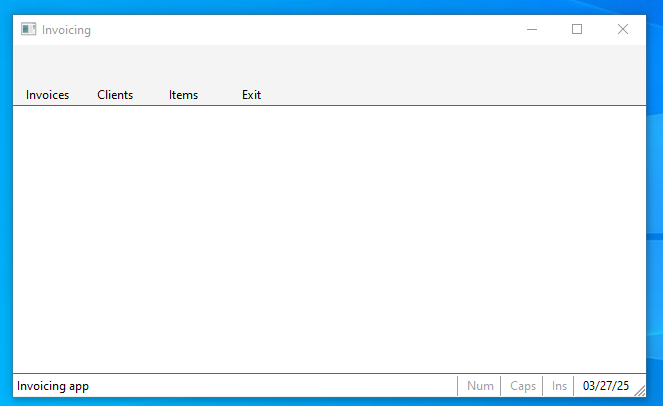
Posted: Thu Mar 27, 2025 11:48 AM
now I see msgbar


https://i.postimg.cc/MpCwxL2r/msgbar.png
 ACTIVATE WINDOW oWnd MAXIMIZED ;
      ON RESIZE ( oWebView:SetSize( WndWidth( oWebView:oWnd:hWnd ) - 15,;
                     WndHeight( oWebView:oWnd:hWnd ) - 80 ) )

the problem is on top because the html is too near the buttonbar

and I solved it with a trick
<body>
<p>
<p>

<div class="container">
Since from 1991/1992 ( fw for clipper Rel. 14.4 - Momos)

I use : FiveWin for Harbour March-April 2024 - Harbour 3.2.0dev (harbour_bcc770_32_20240309) - Bcc7.70 - xMate ver. 1.15.3 - PellesC - mail: silvio[dot]falconi[at]gmail[dot]com

Continue the discussion