
To view an RTF document, I use the RichEdit component (riched20.dll or msftedit.dll ) On some computers, RichEdit shows all the colors of the document, on others only some. What could be the reason for this?
Board index FiveWin for Harbour/xHarbour RichEdit and colors

Could it be the version of Richedit DLL?
I don't know which version of riched20 I have. :(
I tried everything. They work fine, but the colors don't show everything.
There is an assumption that the output of the full color gamut depends on the monitor.
https://cloud.mail.ru/public/cEGm/dRTeTxmUu
I tried everything. They work fine, but the colors don't show everything.
riched20.dll, 1 103 280
msftedit.dll, 2 680 320
riched32.dll, 32 768https://cloud.mail.ru/public/cEGm/dRTeTxmUu
Can I see the date of your DLLs?
riched20.dll, v 3.1
msftedit.dll, 2 680 320, v 10.0.10586.494
riched32.dll, 32 768,v 10.0.26100.1
C:\Windows\System32

riched20.dll
riched32.dllJoão Santos - São Paulo - Brasil - Phone: +55(11)95150-7341

Grok 3 response:
The inconsistent display of colors in an RTF document when using the RichEdit component (riched20.dll or msftedit.dll) could stem from several factors related to differences in system configurations, RichEdit versions, or rendering behavior. Here are the likely reasons and steps to diagnose or resolve the issue:
RichEdit Version Differences:
Different versions of the RichEdit control (e.g., RichEdit 2.0, 3.0, 4.1, or later) are installed on different computers, depending on the operating system or installed software (e.g., Microsoft Office). Older versions, like riched20.dll, may not fully support advanced RTF features, including certain color table implementations.
Solution: Check which DLL is loaded (riched20.dll or msftedit.dll) using a tool like Process Explorer or Dependency Walker. Ensure the application explicitly loads msftedit.dll (RichEdit 4.1 or later) for better RTF support by linking to it or using LoadLibrary. You can also verify the RichEdit version programmatically via the EM_GETEDITSTYLE message or by checking the DLL's version info.
Color Table Limitations:
The RTF color table (\colortbl) defines colors used in the document. Some RichEdit implementations may have limits on the number of colors they can render (e.g., older versions might cap at 16 or 256 colors). If the RTF document uses more colors than supported, some may be ignored or mapped incorrectly.
Solution: Inspect the RTF document’s color table using a text editor. Simplify the color table to use fewer colors (e.g., under 16) and test if the issue persists. Alternatively, ensure all systems use a newer RichEdit version (msftedit.dll) that supports larger color tables.
System Color Depth and Display Settings:
The display color depth (e.g., 16-bit vs. 32-bit) on some computers may affect color rendering. In lower color depth modes (e.g., 256 colors or 16-bit), the RichEdit control may approximate or skip colors that don’t map well to the system’s color palette.
Solution: Check the display settings on affected computers (Control Panel > Display > Advanced Settings). Ensure they are set to 32-bit True Color. Update graphics drivers if colors are still limited.
RTF Document Compatibility:
The RTF document may contain formatting or color definitions that are not fully compatible with all RichEdit versions. For example, complex color specifications or non-standard RTF tags might be ignored by older RichEdit controls.
Solution: Open the RTF in a text editor to check for unusual color definitions or proprietary tags. Test the document in a newer application (e.g., WordPad or Microsoft Word) to confirm the issue is with RichEdit and not the document. If needed, re-save the RTF in a simpler format using WordPad to ensure compatibility.
Font and Character Set Issues:
Colors in RTF documents are often tied to font or text properties. If the specified font or character set is missing on some systems, RichEdit may fall back to a default font that doesn’t render colors correctly.
Solution: Ensure the fonts referenced in the RTF document (check \fonttbl) are installed on all systems. Use common fonts like Arial or Times New Roman to minimize issues. Also, verify that the character set (\fcharset) is supported.
Graphics and GDI Limitations:
The RichEdit control relies on the Windows Graphics Device Interface (GDI) for rendering. Differences in GDI implementations or graphics hardware acceleration on some systems may cause color rendering issues, especially if the system uses outdated or incompatible graphics drivers.
Solution: Update graphics drivers on affected systems. Test disabling hardware acceleration (via Display Settings or application configuration) to see if it resolves the issue.
Application-Specific Configuration:
Your application may override RichEdit’s default behavior, such as setting a custom color palette or limiting color rendering via messages like EM_SETCHARFORMAT or EM_SETBKGND. These settings might behave differently across systems.
Solution: Review your code for any custom RichEdit configurations. Ensure consistent use of SCF_ALL or SCF_SELECTION when applying character formats and avoid hardcoding color indices that may not exist in the RTF color table.
Diagnostic Steps
Identify the RichEdit DLL: Use a debugger or Process Explorer to confirm whether riched20.dll or msftedit.dll is loaded. Check the file version (e.g., msftedit.dll version 8.5 or higher is preferable).
Test with a Minimal RTF: Create a simple RTF document with a small color table (e.g., 3–5 colors) and test it on affected systems to isolate the issue.
Compare System Configurations: Note the OS version (e.g., Windows 10 vs. Windows 11), display settings, and installed software (e.g., Microsoft Office) on computers where colors display correctly vs. incorrectly.
Log RichEdit Messages: Use EM_GETCHARFORMAT to log the color attributes applied to text and verify if the expected colors from the RTF color table are being used.
Recommended Fix
To maximize compatibility:
Explicitly load msftedit.dll in your application to ensure a modern RichEdit version (RichEdit 4.1 or later).
Simplify the RTF document’s color table to use fewer, standard colors.
Ensure all systems use 32-bit color depth and have updated graphics drivers.
Test the RTF document in WordPad to confirm expected color rendering and re-save if necessary.
If the issue persists, provide details about the OS versions, RichEdit DLL versions, and a sample RTF document to narrow down the cause further.

Natter wrote: To view an RTF document, I use the RichEdit component (riched20.dll or msftedit.dll ) On some computers, RichEdit shows all the colors of the document, on others only some. What could be the reason for this?What class do you use? TRichEdt or TRichEdt5
Cristobal Navarro
Hay dos tipos de personas: las que te hacen perder el tiempo y las que te hacen perder la noción del tiempo
El secreto de la felicidad no está en hacer lo que te gusta, sino en que te guste lo que haces
Hay dos tipos de personas: las que te hacen perder el tiempo y las que te hacen perder la noción del tiempo
El secreto de la felicidad no está en hacer lo que te gusta, sino en que te guste lo que haces
Natter wrote:Are these the problematic ones or the working fine ones?That's what it says in the properties of these files.riched20.dll, v 3.1 msftedit.dll, 2 680 320, v 10.0.10586.494 riched32.dll, 32 768,v 10.0.26100.1
I use TRichEdt5
All of these libraries are working fine except for color rendering.
This is an RTF file that is the source for RichEdit
https://cloud.mail.ru/public/cEGm/dRTeTxmUu
All of these libraries are working fine except for color rendering.
This is an RTF file that is the source for RichEdit
https://cloud.mail.ru/public/cEGm/dRTeTxmUu
You wrote: "On some computers, RichEdit shows all the colors of the document, on others only some.". So we have to check the not-working-fine DLLs.
The number of colors of the colored cells in the table is very limited
This explains the lack of color in some of the cells.
I installed Riched20 version 5. But it did not help to solve this problem.
Is it possible to fill a cell (combined cells) of a table with color in RichEdit5 ?
Yes, it's possible
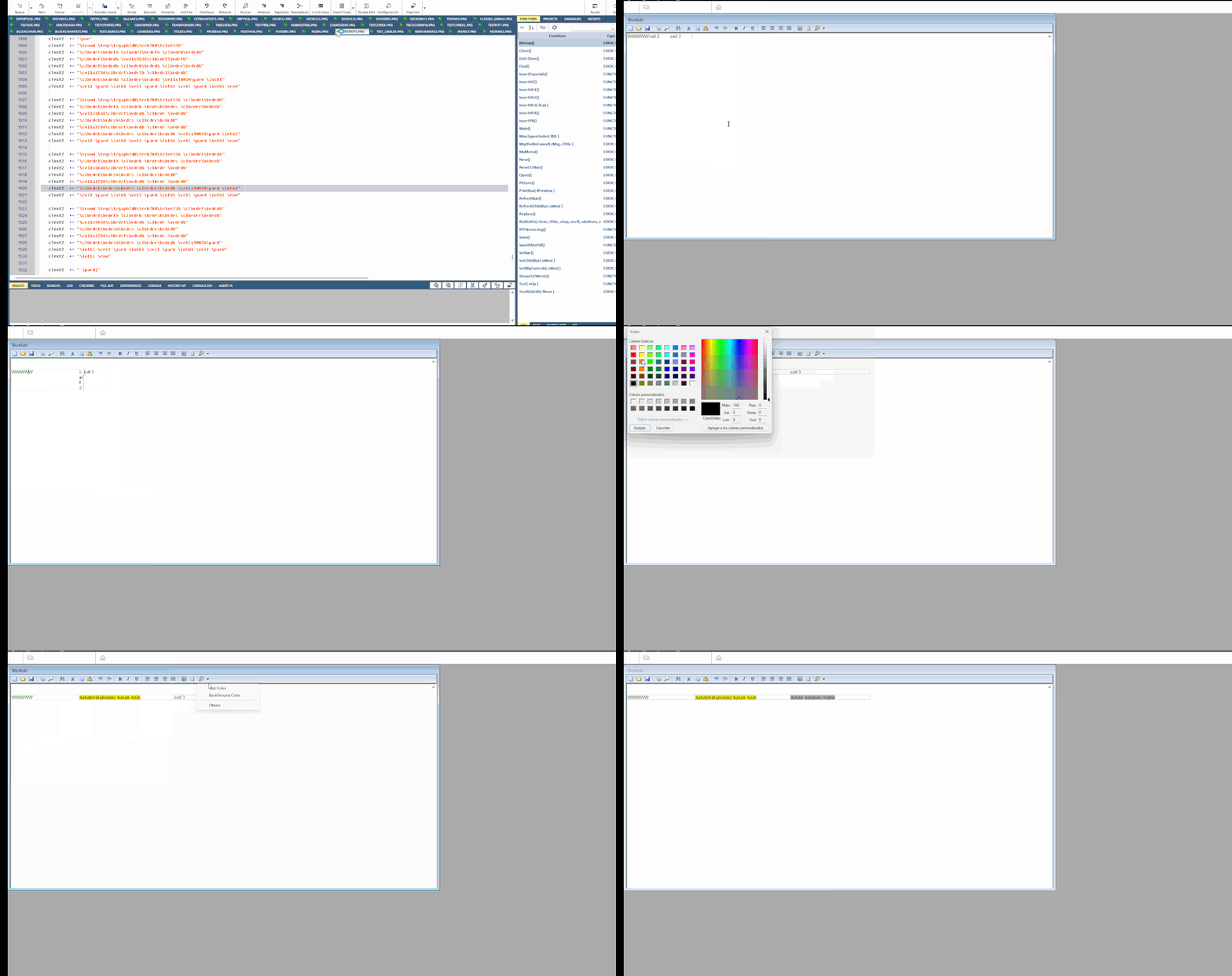
Create an RTF document and analyze the text to see the instructions to add to each cell in the table.
Create an RTF document and analyze the text to see the instructions to add to each cell in the table.
Cristobal Navarro
Hay dos tipos de personas: las que te hacen perder el tiempo y las que te hacen perder la noción del tiempo
El secreto de la felicidad no está en hacer lo que te gusta, sino en que te guste lo que haces
Hay dos tipos de personas: las que te hacen perder el tiempo y las que te hacen perder la noción del tiempo
El secreto de la felicidad no está en hacer lo que te gusta, sino en que te guste lo que haces
What you are suggesting only allows you to change the background color of the text.
Set the background color (fill) of a cell when creating a table (option Insert Table)
But I can no longer change the background color (fill) of the cell in the future.
Set the background color (fill) of a cell when creating a table (option Insert Table)
But I can no longer change the background color (fill) of the cell in the future.