FiveTech Support Forums

FiveWin / Harbour / xBase community
Board index FiveWin for Harbour/xHarbour How to Disable CRLF in xBrowse Column
Posts: 244
Joined: Mon Jun 05, 2006 09:39 PM
How to Disable CRLF in xBrowse Column
Posted: Tue May 20, 2025 11:54 PM
In the column I have 2 lines where I define CRLF.
If the column width is smaller than the text it automatically wraps the text.
Is there a way to prevent the text from wrapping automatically? It only wraps when I define CRLF?


Posts: 44158
Joined: Thu Oct 06, 2005 05:47 PM
Re: How to Disable CRLF in xBrowse Column
Posted: Wed May 21, 2025 03:37 AM

Do you want it to wrap only if CRLF is used ?

regards, saludos

Antonio Linares
www.fivetechsoft.com
Posts: 244
Joined: Mon Jun 05, 2006 09:39 PM
Re: How to Disable CRLF in xBrowse Column
Posted: Wed May 21, 2025 06:30 PM
Antonio Linares wrote: Do you want it to wrap only if CRLF is used ?
Yes. There should be a property in the xBrowse/TXBrwColumn class like: lColWrapTextAutomatic := .F.
In this case the desired column would only wrap the text if CRLF was included CRLF.
Posts: 44158
Joined: Thu Oct 06, 2005 05:47 PM
Re: How to Disable CRLF in xBrowse Column
Posted: Thu May 22, 2025 06:31 AM

It seems as the wrapping comes automatically for using Windows API DrawText() with DT_WORDBREAK

We should remove DT_WORDBREAK and just apply it if lColWrapTextAutomatic == .T.

regards, saludos

Antonio Linares
www.fivetechsoft.com
Posts: 6755
Joined: Wed Feb 15, 2012 08:25 PM
Re: How to Disable CRLF in xBrowse Column
Posted: Thu May 22, 2025 07:06 AM
Giovany Vecchi wrote:
Do you want it to wrap only if CRLF is used ?
Yes. There should be a property in the xBrowse/TXBrwColumn class like: lColWrapTextAutomatic := .F.
In this case the desired column would only wrap the text if CRLF was included CRLF.
Sorry,
Do you have defined
<ocol>:nDataLines := 1 or <oBrw>:nDatalines := 1 ?
Cristobal Navarro

Hay dos tipos de personas: las que te hacen perder el tiempo y las que te hacen perder la noci贸n del tiempo

El secreto de la felicidad no est谩 en hacer lo que te gusta, sino en que te guste lo que haces
Posts: 244
Joined: Mon Jun 05, 2006 09:39 PM
Re: How to Disable CRLF in xBrowse Column
Posted: Thu May 22, 2025 01:06 PM
cnavarro wrote: Sorry,
Do you have defined
<ocol>:nDataLines := 1 or <oBrw>:nDatalines := 1 ?
Hi Navarro.
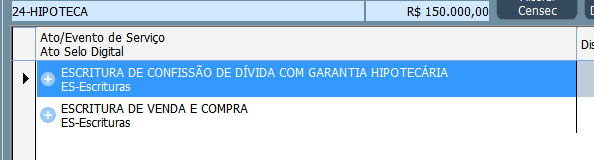
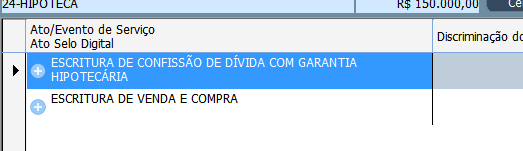
I have a CRLF to display on 2 lines. If one of the lines is longer than the cell length, it automatically wraps and displays on 3 lines.
I want it to be displayed on 2 lines without cutting off the second line because of the automatic wrap.
Posts: 6755
Joined: Wed Feb 15, 2012 08:25 PM
Re: How to Disable CRLF in xBrowse Column
Posted: Thu May 22, 2025 02:04 PM
Giovany Vecchi wrote:
Sorry,
Do you have defined
<ocol>:nDataLines := 1 or <oBrw>:nDatalines := 1 ?
Hi Navarro.
I have a CRLF to display on 2 lines. If one of the lines is longer than the cell length, it automatically wraps and displays on 3 lines.
I want it to be displayed on 2 lines without cutting off the second line because of the automatic wrap.
For now, use the data <oCol>:bPaintText
These are the parameters you'll receive from the class.
Eval( ::bPaintText, Self, hDC, cStrData, oRect:aRect, aColors, lHighLite, lSelected )
or change <ocol>nDataStyle
https://forums.fivetechsupport.com/viewtopic.php?p=279043#p279043

If you need more information on how to paint in the cell, look in xbrowse.prg for the PaintCellText method and the use of <oBrw>:SayText

I'll study the best way to implement more complete functionality than what you suggest.
Cristobal Navarro

Hay dos tipos de personas: las que te hacen perder el tiempo y las que te hacen perder la noci贸n del tiempo

El secreto de la felicidad no est谩 en hacer lo que te gusta, sino en que te guste lo que haces
Posts: 244
Joined: Mon Jun 05, 2006 09:39 PM
Re: How to Disable CRLF in xBrowse Column
Posted: Thu May 22, 2025 06:16 PM
I have already made changes to the codes.

In the txBrwColumn class
Method New():
   Data lColWrapTextAutomatic AS LOGICAL INIT .T. // Giovany
Method PaintCellText
   
   if Empty( ::aDataFont ) .and. Empty( ::aClrText )
      If ::lColWrapTextAutomatic //Giovany
         ::oBrw:SayText( cData, aRect, cAlign, oFont, aColors[ 1 ], nil, nil, nOr( DT_MODIFYSTRING, DT_EDITCONTROL, DT_NOPREFIX ) )
      Else
         FW_SayText( hDC, cData, aRect, cAlign, oFont, aColors[ 1 ], nil, nil, nOr( DT_MODIFYSTRING, DT_EDITCONTROL, DT_NOPREFIX ),.F. ) //Giovany .F. Not Word break
      EndIf
   else
In imgtxtio.prg
Function FW_SayText
//Parameter lWordBreak
function FW_SayText( oWnd, cText, aRect, cAlign, oFont, nClrText, nClrBack, lBorder, nAddStyle, lWordBreak )    // oWnd or hDC

//Default
   Default lWordBreak := .T. //In order not to change existing codes (Giovany)

//Block 
      nStyle      := nHAlign
      if lSingleLine
         nStyle      += nVAlign + DT_SINGLELINE
         nStyle   := nOr( nStyle, nAddStyle )
      else
         if lWordBreak
            nStyle      += DT_WORDBREAK //Do not automatically break the line (Giovany)
         EndIf
         if Empty( aText )
            if nVAlign != DT_TOP   // DT_TOP is 0
               if nVAlign == DT_BOTTOM
                  aRect[ 1 ]  := Max( aRect[ 1 ], aRect[ 3 ] - nHeight )
               else
                  aRect[ 1 ]  := Max( aRect[ 1 ], Int( ( aRect[ 3 ] + aRect[ 1 ] - nHeight ) / 2 ) )
               endif
            endif
         else
            nStyle   := nOr( nStyle, nVAlign )
         endif
         nStyle   := nOr( nStyle, nAddStyle )
I will use it until I update the FW.
Posts: 6755
Joined: Wed Feb 15, 2012 08:25 PM
Re: How to Disable CRLF in xBrowse Column
Posted: Thu May 22, 2025 09:24 PM
Try only with this please
METHOD DefStyle( nAlign, lSingleLine ) CLASS TXBrwColumn

   local nStyle, nVAlign

   .../...
   
   if lSingleLine
      nStyle := nOr( nStyle, DT_SINGLELINE, nVAlign ) //DT_VCENTER)
   else
      if ::lColWrapText    // New Data
         nStyle := nOr( nStyle, DT_WORDBREAK)
      endif
   endif

return nStyle
Cristobal Navarro

Hay dos tipos de personas: las que te hacen perder el tiempo y las que te hacen perder la noci贸n del tiempo

El secreto de la felicidad no est谩 en hacer lo que te gusta, sino en que te guste lo que haces
Posts: 244
Joined: Mon Jun 05, 2006 09:39 PM
Re: How to Disable CRLF in xBrowse Column
Posted: Fri May 23, 2025 01:32 AM
cnavarro wrote: Try only with this please
METHOD DefStyle( nAlign, lSingleLine ) CLASS TXBrwColumn

   local nStyle, nVAlign

   .../...
   
   if lSingleLine
      nStyle := nOr( nStyle, DT_SINGLELINE, nVAlign ) //DT_VCENTER)
   else
      if ::lColWrapText    // New Data
         nStyle := nOr( nStyle, DT_WORDBREAK)
      endif
   endif

return nStyle
It didn't work.
I even commented out the line and it still didn't work.
Maybe it's the version of my xbrowse, which is 1803
Posts: 6755
Joined: Wed Feb 15, 2012 08:25 PM
Re: How to Disable CRLF in xBrowse Column
Posted: Fri May 23, 2025 07:11 PM
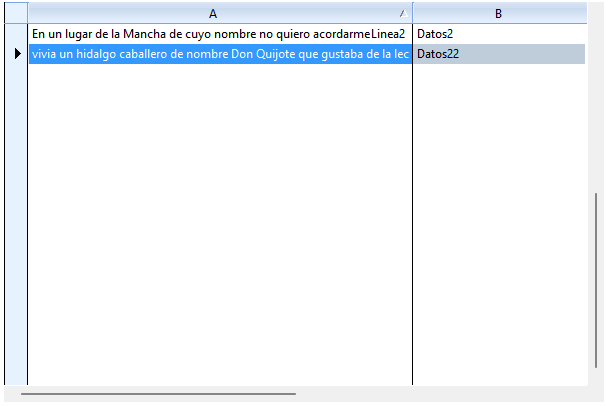
Dear Giovanny, please try with this sample and send me image of xbrowse
#include "fivewin.ch"
#include "xbrowse.ch"

function main()

local oWnd
local oGrid
local oBtn, oGet1, oGet2

   DEFINE WINDOW oWnd
//   oWnd:nHeight := ScreenHeight()
 //  oWnd:nWidth  := ScreenWidth()

   ACTIVATE WINDOW oWnd MAXIMIZED ON INIT Controles( oWnd )

Return nil

Function Controles( oWnd )

   local oGrid

   local aData := { { "En un lugar de la Mancha de cuyo nombre no quiero acordarme" + CRLF + "Linea2", "Datos2" }, ;
                    { "vivia un hidalgo caballero de nombre Don Quijote que gustaba de la lectura de libros de caballeria" + CRLF + "Linea21", "Datos22" } }

   @ 10, 151 XBROWSE oGrid ;
      SIZE 600, 400 PIXEL ;  /// -1, -1
      OF oWnd ;
      DATASOURCE aData;
      AUTOSORT ;
      AUTOCOLS ;
      CELL LINES NOBORDER

    WITH OBJECT oGrid

       :oCol(1):nWidth  := 300
       :oCol(2):nWidth  := 300
       //:nDataLines := 2
       :CreateFromCode()
    END

Return nil
Cristobal Navarro

Hay dos tipos de personas: las que te hacen perder el tiempo y las que te hacen perder la noci贸n del tiempo

El secreto de la felicidad no est谩 en hacer lo que te gusta, sino en que te guste lo que haces
Posts: 244
Joined: Mon Jun 05, 2006 09:39 PM
Re: How to Disable CRLF in xBrowse Column
Posted: Mon May 26, 2025 12:09 PM
cnavarro wrote: Dear Giovanny, please try with this sample and send me image of xbrowse
#include "fivewin.ch"
#include "xbrowse.ch"

function main()

local oWnd
local oGrid
local oBtn, oGet1, oGet2

   DEFINE WINDOW oWnd
//   oWnd:nHeight := ScreenHeight()
 //  oWnd:nWidth  := ScreenWidth()

   ACTIVATE WINDOW oWnd MAXIMIZED ON INIT Controles( oWnd )

Return nil

Function Controles( oWnd )

   local oGrid

   local aData := { { "En un lugar de la Mancha de cuyo nombre no quiero acordarme" + CRLF + "Linea2", "Datos2" }, ;
                    { "vivia un hidalgo caballero de nombre Don Quijote que gustaba de la lectura de libros de caballeria" + CRLF + "Linea21", "Datos22" } }

   @ 10, 151 XBROWSE oGrid ;
      SIZE 600, 400 PIXEL ;  /// -1, -1
      OF oWnd ;
      DATASOURCE aData;
      AUTOSORT ;
      AUTOCOLS ;
      CELL LINES NOBORDER

    WITH OBJECT oGrid

       :oCol(1):nWidth  := 300
       :oCol(2):nWidth  := 300
       //:nDataLines := 2
       :CreateFromCode()
    END

Return nil
Hi Navarro.
Your example is in 1 line.


I'll explain what happens.

I have 2 pieces of information that I want to present in 2 lines:
:bStrData         := {||AllTrim(::oDs_RegistroAtos:N_REGISTRO_ATOS_cEventoServico)+CRLF+;
                        AllTrim( G_SELO_PAR_N_ATO_PRATICADO(3,,::oDs_RegistroAtos:N_REGISTRO_ATOS_cAtoCiaSigla) ) }
If the first line exceeds the length of the cell, it will be presented in 3 lines, but since the height of the cell is only for 2 lines, the second line disappears because there was an automatic break in the first line.

I've already solved it by doing the method I posted previously.
Posts: 6755
Joined: Wed Feb 15, 2012 08:25 PM
Re: How to Disable CRLF in xBrowse Column
Posted: Mon May 26, 2025 12:20 PM

Ah!!, ok, ok, I had not understood his problem well

Cristobal Navarro

Hay dos tipos de personas: las que te hacen perder el tiempo y las que te hacen perder la noci贸n del tiempo

El secreto de la felicidad no est谩 en hacer lo que te gusta, sino en que te guste lo que haces
Posts: 8515
Joined: Tue Dec 20, 2005 07:36 PM
Re: How to Disable CRLF in xBrowse Column
Posted: Mon May 26, 2025 01:28 PM
Master Navarro, esto?

https://forums.fivetechsupport.com/viewtopic.php?f=3&t=27136

Regards, saludos.
Jo茫o Santos - S茫o Paulo - Brasil - Phone: +55(11)95150-7341
Posts: 6755
Joined: Wed Feb 15, 2012 08:25 PM
Re: How to Disable CRLF in xBrowse Column
Posted: Mon May 26, 2025 07:33 PM

Dear Joao, no, please wait

Cristobal Navarro

Hay dos tipos de personas: las que te hacen perder el tiempo y las que te hacen perder la noci贸n del tiempo

El secreto de la felicidad no est谩 en hacer lo que te gusta, sino en que te guste lo que haces

Continue the discussion