FiveTech Support Forums

FiveWin / Harbour / xBase community
Board index FiveWin for Harbour/xHarbour FWH 32 and 64 ToolBar Unicode problem-SOLVED
Posts: 866
Joined: Tue Oct 16, 2007 08:57 AM
FWH 32 and 64 ToolBar Unicode problem-SOLVED
Posted: Fri Jun 27, 2025 06:21 AM
Dear Antonio, All Users

I test build Sample\ToolBar4.prg code.

First Prg code is BIG5. Look Title Chinese word not work Red box
Button Text and Tooltip Text working fine.
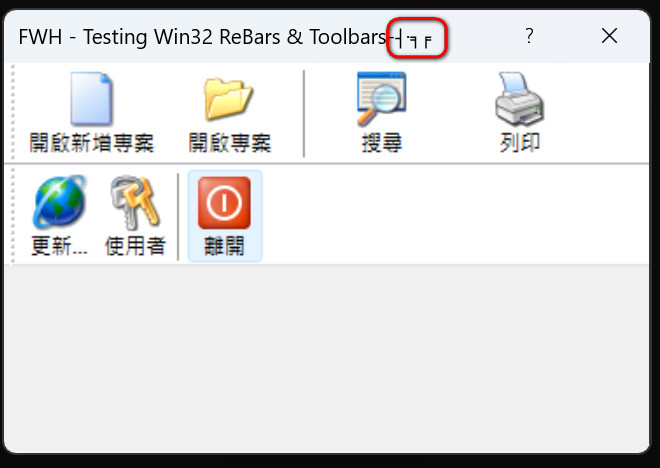

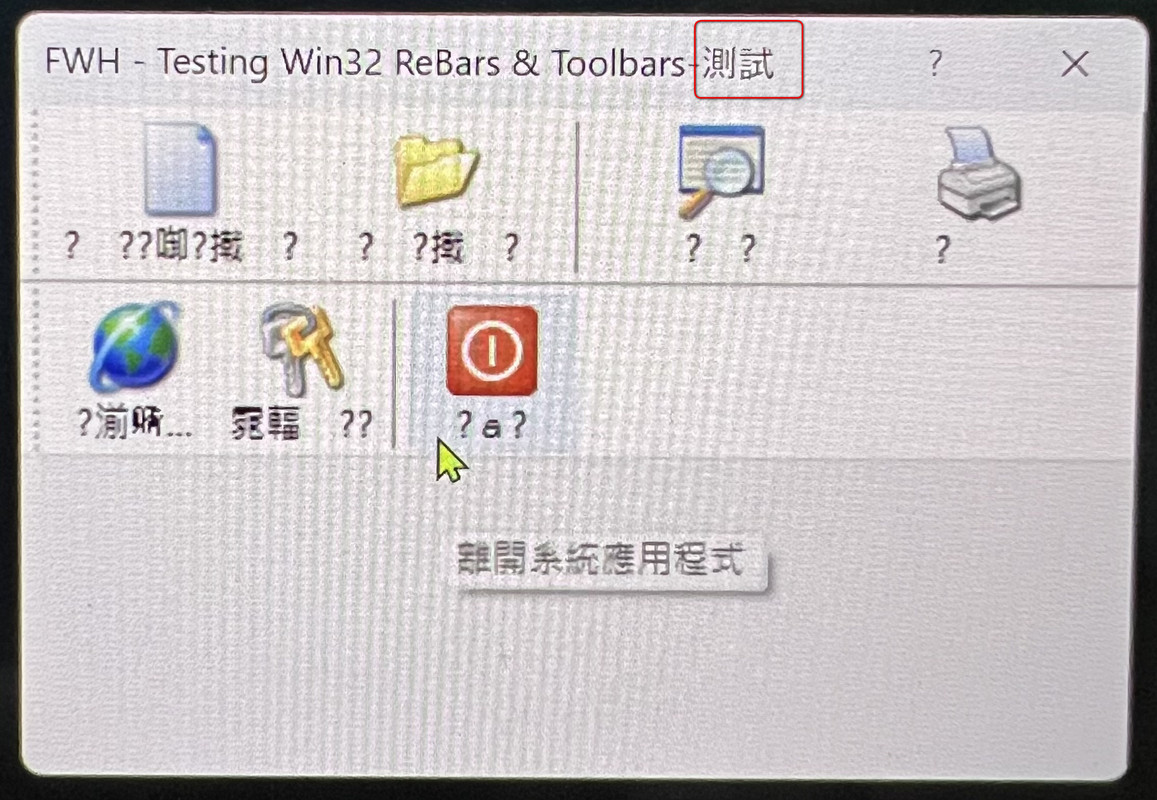
so I change Prg code BIG5 to DOS-UTF-8 and save as file. Run it
Look Title Chinese word Working fine Red box
But Button Chinese Text not work and Tooltip Text working fine.

// Win32 TReBar and TToolBar sample into DIALOGS

#include "FiveWin.ch"

REQUEST HB_Lang_ZH, HB_CODEPAGE_UTF8

function Main()

local oWnd, oReBar, oToolBar1, oToolBar2, oImageList1, oImageList2

DEFINE DIALOG oWnd NAME "DIALOG" TITLE "FWH - Testing Win32 ReBars & Toolbars-測試"

ACTIVATE DIALOG oWnd ;
ON INIT CREABARRA( @oImageList1, @oImageList2, oWnd )

oImageList1:End()
oImageList2:End()

return nil

FUNCTION CREABARRA( oImageList1, oImageList2, oWnd )

LOCAL oReBar, oToolBar1, oToolBar2

// First we build the imagelists with all the bitmaps
oImageList1 = TImageList():New( 32, 32 ) // width and height of bitmaps

oImageList1:AddMasked( TBitmap():Define( "new",, oWnd ), nRGB( 255, 0, 255 ) )
oImageList1:AddMasked( TBitmap():Define( "open",, oWnd ), nRGB( 255, 0, 255 ) )
oImageList1:AddMasked( TBitmap():Define( "search",, oWnd ), nRGB( 255, 0, 255 ) )
oImageList1:AddMasked( TBitmap():Define( "print",, oWnd ), nRGB( 255, 0, 255 ) )

oImageList2 = TImageList():New( 32, 32 ) // width and height of bitmaps
oImageList2:AddMasked( TBitmap():Define( "internet",, oWnd ), nRGB( 255, 0, 255 ) )
oImageList2:AddMasked( TBitmap():Define( "keys",, oWnd ), nRGB( 255, 0, 255 ) )
oImageList2:AddMasked( TBitmap():Define( "quit",, oWnd ), nRGB( 255, 0, 255 ) )

// Now we create the rebar
oReBar = TReBar():New( oWnd )

// Now we create the toolbars and add the buttons
oToolBar1 = TToolBar():New( oReBar, 50, 50, oImageList1 )
oToolBar1:AddButton( { || MsgInfo( "New" ) }, "新增", "開啟新增專案" )
oToolBar1:AddButton( { || MsgInfo( "Open" ) }, "開啟", "開啟專案" )
oToolBar1:AddSeparator()
oToolBar1:AddButton( { || MsgInfo( "Search" ) }, "搜尋", "搜尋" )
oToolBar1:AddButton( { || MsgInfo( "Print" ) }, "列印一張報表", "列印" )

oToolBar2 = TToolBar():New( oReBar, 50, 50, oImageList2 )
oToolBar2:AddButton( { || MsgInfo( "Upgrade" ) }, "Search for new versions",;
"更新..." )
oToolBar2:AddButton( { || MsgInfo( "Users" ) }, "Users management", "使用者" )
oToolBar2:AddSeparator()
oToolBar2:AddButton( { || oWnd:End() }, "離開系統應用程式", "離開" )

// We set the widths for each toolbar
oToolBar1:nWidth = 290
oToolBar2:nWidth = 300

// Now we insert the toolbars into the rebar
oReBar:InsertBand( oToolBar1 )
oReBar:InsertBand( oToolBar2 )

RETURN .T.

//---------------------------------------------------------------------------------------------------------------------//

INIT PROCEDURE inv_init

HB_LangSelect( "zh" )
HB_SetCodePage( "UTF8" )
HB_CDPSELECT( "UTF8" )

Fw_SetUnicode( .T. )

SET _3DLook ON
SET DELETE ON
SET SoftSeek On
SET DATE FORMAT "YYYY.MM.DD"
SET OPTIMIZE ON

RETURN NIL

Any idea or solution?
Best Regards,


Richard


Harbour 3.2.0dev (r2503251254) => Borland C++ v7.7 32bit

MySQL v8.0

Harbour 3.2.0dev (r2503251254) => Borland C++ v7.7 64bit
Posts: 866
Joined: Tue Oct 16, 2007 08:57 AM
Re: FWH 32 and 64 ToolBar Unicode problem
Posted: Sun Jun 29, 2025 01:39 PM
Dear Antonio,

Look it.

https://forums.fivetechsupport.com/viewtopic.php?p=263171&hilit=toolbar#p263171

I think Mr.Rao not finished this problem.
He think finished only FWH buttonbar..etc objects. Not ToolBar and Rebar Win32 component.

Any idea?
Best Regards,


Richard


Harbour 3.2.0dev (r2503251254) => Borland C++ v7.7 32bit

MySQL v8.0

Harbour 3.2.0dev (r2503251254) => Borland C++ v7.7 64bit
Posts: 44158
Joined: Thu Oct 06, 2005 05:47 PM
Re: FWH64 ToolBar Unicode problem
Posted: Sun Jun 29, 2025 06:45 PM

Dear Richard,

We need to understand what Mr. Rao did and apply it to these classes too

regards, saludos

Antonio Linares
www.fivetechsoft.com
Posts: 44158
Joined: Thu Oct 06, 2005 05:47 PM
Re: FWH64 ToolBar Unicode problem
Posted: Sun Jun 29, 2025 09:51 PM

Dear Richard,

I am reviewing Class TRebar and TToolbar and both have unicode support implemented by Rao.

What FWH version are you testing ?

regards, saludos

Antonio Linares
www.fivetechsoft.com
Posts: 866
Joined: Tue Oct 16, 2007 08:57 AM
Re: FWH 32 and 64 ToolBar Unicode problem
Posted: Sun Jun 29, 2025 11:54 PM
Antonio Linares wrote: Dear Richard,

I am reviewing Class TRebar and TToolbar and both have unicode support implemented by Rao.

What FWH version are you testing ?
Dear Antonio,

I use these version below:

FWH32 2504.02
FWH64 2504.02

Last testing. Not working.
Best Regards,


Richard


Harbour 3.2.0dev (r2503251254) => Borland C++ v7.7 32bit

MySQL v8.0

Harbour 3.2.0dev (r2503251254) => Borland C++ v7.7 64bit

Posts: 44158
Joined: Thu Oct 06, 2005 05:47 PM
Re: FWH 32 and 64 ToolBar Unicode problem
Posted: Mon Jun 30, 2025 03:55 AM
Dear Richard,

Is this correct ?

regards, saludos

Antonio Linares
www.fivetechsoft.com
Posts: 866
Joined: Tue Oct 16, 2007 08:57 AM
Re: FWH 32 and 64 ToolBar Unicode problem
Posted: Mon Jun 30, 2025 04:55 AM
Antonio Linares wrote: Dear Richard,

Is this correct ?

Dear Antonio,

You need to build two ToolBar4.prg code. One is save as big5 code PRG and another is save as UTF8 code PRG.
Best Regards,


Richard


Harbour 3.2.0dev (r2503251254) => Borland C++ v7.7 32bit

MySQL v8.0

Harbour 3.2.0dev (r2503251254) => Borland C++ v7.7 64bit

Posts: 44158
Joined: Thu Oct 06, 2005 05:47 PM
Re: FWH 32 and 64 ToolBar Unicode problem
Posted: Mon Jun 30, 2025 05:03 AM

Whats the difference in the above code that you posted ?

thanks

regards, saludos

Antonio Linares
www.fivetechsoft.com
Posts: 866
Joined: Tue Oct 16, 2007 08:57 AM
Re: FWH 32 and 64 ToolBar Unicode problem
Posted: Mon Jun 30, 2025 05:14 AM
Antonio Linares wrote: Whats the difference in the above code that you posted ?

thanks
Dear Antonio,

Sometimes we need to save PRG to UTF8 code.
Because Chinese word over 65535 big5 so Extend to UTF8
Ex.
I add "堃" Chinese Unicode word not big5
DEFINE DIALOG oWnd NAME "DIALOG" TITLE "FWH - Testing Win32 ReBars & Toolbars-測試-堃"
This is a big5 code PRG and "堃" Chinese word Become garbled


This is a UTF8 code PRG and "堃" Chinese word NO Problem
Best Regards,


Richard


Harbour 3.2.0dev (r2503251254) => Borland C++ v7.7 32bit

MySQL v8.0

Harbour 3.2.0dev (r2503251254) => Borland C++ v7.7 64bit
Posts: 44158
Joined: Thu Oct 06, 2005 05:47 PM
Re: FWH 32 and 64 ToolBar Unicode problem
Posted: Mon Jun 30, 2025 07:16 AM
Dear Richard,

Could you please review this and let mw know if you agree with it and if this could help us with this issue ?

https://x.com/i/grok/share/2b2KmGQXN6FNFHId4FAOwkRqT

many thanks!
regards, saludos

Antonio Linares
www.fivetechsoft.com
Posts: 866
Joined: Tue Oct 16, 2007 08:57 AM
Re: FWH 32 and 64 ToolBar Unicode problem
Posted: Mon Jun 30, 2025 01:21 PM
Antonio Linares wrote: Dear Richard,

Is this correct ?

Dear Antonio,

Yes, it's correct. How do make it? I want to know it...
Best Regards,


Richard


Harbour 3.2.0dev (r2503251254) => Borland C++ v7.7 32bit

MySQL v8.0

Harbour 3.2.0dev (r2503251254) => Borland C++ v7.7 64bit
Posts: 44158
Joined: Thu Oct 06, 2005 05:47 PM
Re: FWH 32 and 64 ToolBar Unicode problem
Posted: Tue Jul 01, 2025 04:21 AM
Dear Richard,

We have fixed the unicode support for Windows API toolbars.

We are sending you a new FWH 25.06 build

Many thanks for your feedback :!: :wink:
regards, saludos

Antonio Linares
www.fivetechsoft.com
Posts: 866
Joined: Tue Oct 16, 2007 08:57 AM
Re: FWH 32 and 64 ToolBar Unicode problem
Posted: Wed Jul 16, 2025 07:02 AM
Antonio Linares wrote: Dear Richard,

We have fixed the unicode support for Windows API toolbars.

We are sending you a new FWH 25.06 build

Many thanks for your feedback :!: :wink:
Dear Antonio,

I just testing Unicode support for Windows API toolbars. 32bit and 64bit working fine.

Thank you.
Best Regards,


Richard


Harbour 3.2.0dev (r2503251254) => Borland C++ v7.7 32bit

MySQL v8.0

Harbour 3.2.0dev (r2503251254) => Borland C++ v7.7 64bit

Continue the discussion