[BETA] autoCodeWeb – Click. Class. Clean CSS.
What is it?
A super-light tool for visually editing CSS classes — no projects, no account, no build.
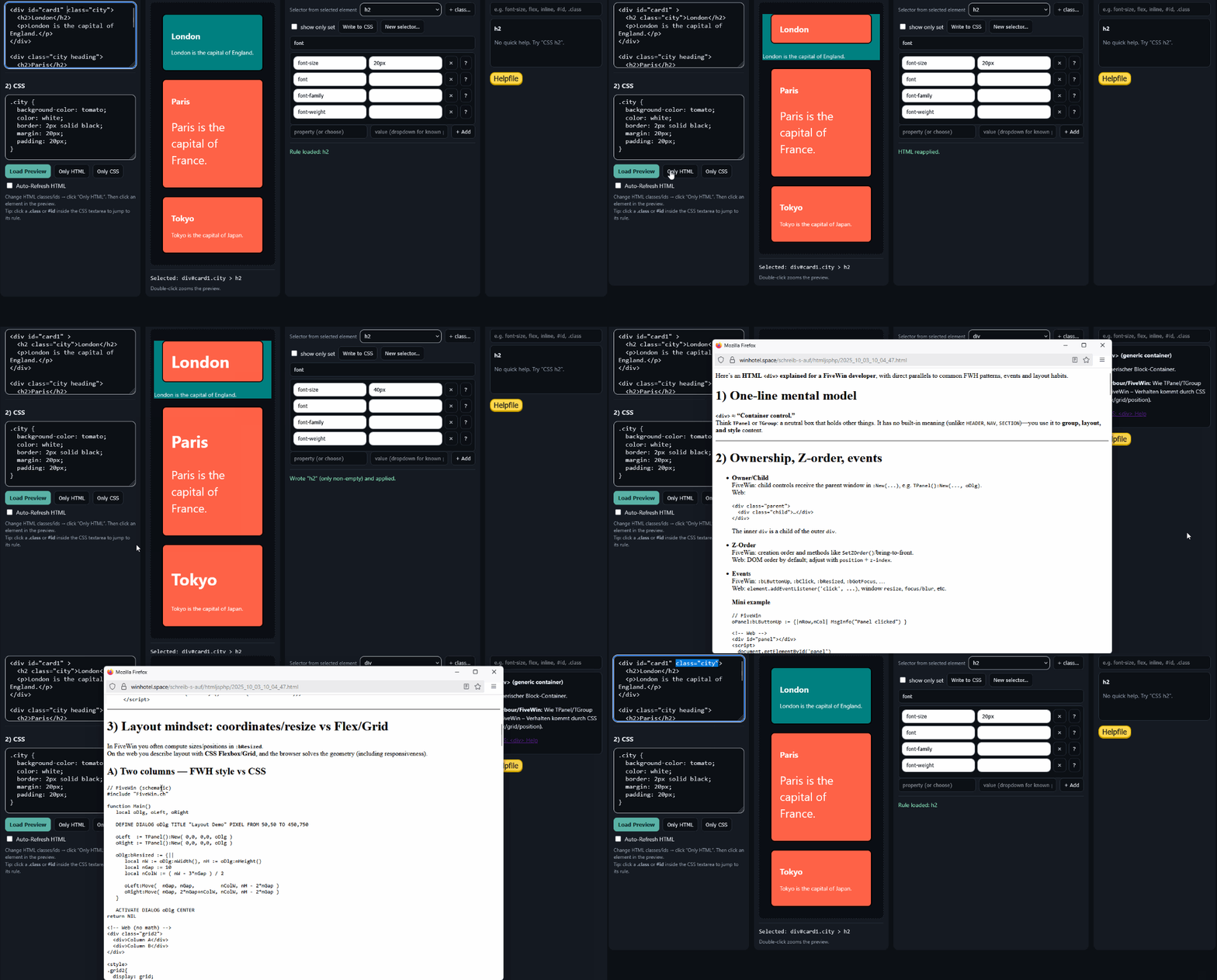
Paste HTML on the left, CSS next to it, click an element in the preview → pick a class, set values, write the block back.
Saves only the properties you set (clean diffs). Includes Quick Help with Harbour/FiveWin analogies.
Why not Fireworks / Why not the “big” tools?
Fireworks (legacy): graphics/slices focus, export magic.
autoCodeWeb: class-centric, writes directly into your CSS block. No lock-in.
Big site builders (Webflow, Pinegrow, Figma code plugins): powerful, but heavy.
autoCodeWeb: a single HTML file, runs locally, focused on one element / one class.
For switchers (Harbour/FiveWin/Xbase → Web)
Patch mindset instead of refactor sledgehammer: one class, two or three values, done.
Harbour analogies in help (Flex/Grid ↔ HBox/VBox, absolute ↔ @ ROW,COL, fr ↔ xBrowse columns).
Markup ↔ Styles kept intentionally separate (Auto-HTML-Refresh supports learning).
Core features (today)
Click in preview ⇒ class picker
Click a .class in the CSS textarea ⇒ editor jumps to that rule
Value datalists (display/position/flex/grid/typography …)
“Show only set” + writes only non-empty properties back
Quick Help (definition, units, examples, Harbour analogy)
Create new class (empty block)
Auto-Refresh HTML (debounced)
Try it in 2 minutes
Open the single file (autoCodeWeb.html).
Paste your HTML + CSS → click “Load Preview.”
In the preview, click a target element → pick a class.
Change 2–3 values (e.g., padding, font-size, background-color).
Click “Write to CSS” → copy the updated block into your real CSS.
Tip: Click a .class inside the CSS textarea — the editor jumps straight to that rule.
Mini-FAQ
Does it generate extra code?
No. It only writes what you set — otherwise your CSS stays untouched.
Do I need a build system?
No. It’s a single HTML file, runs locally.
Responsive work?
Currently manual (you edit the block). @media scopes are on the roadmap.
Roadmap (light & useful)
Presets: Flex row, Grid 2/3/12, Card/Button base
@media scopes: mobile/tablet/desktop
Export/Import: JSON snippets (mini design system)
Shortcuts: Ctrl+Enter HTML, Alt+Enter CSS
Specificity check: warn when a more specific rule overrides yours
What is it?
A super-light tool for visually editing CSS classes — no projects, no account, no build.
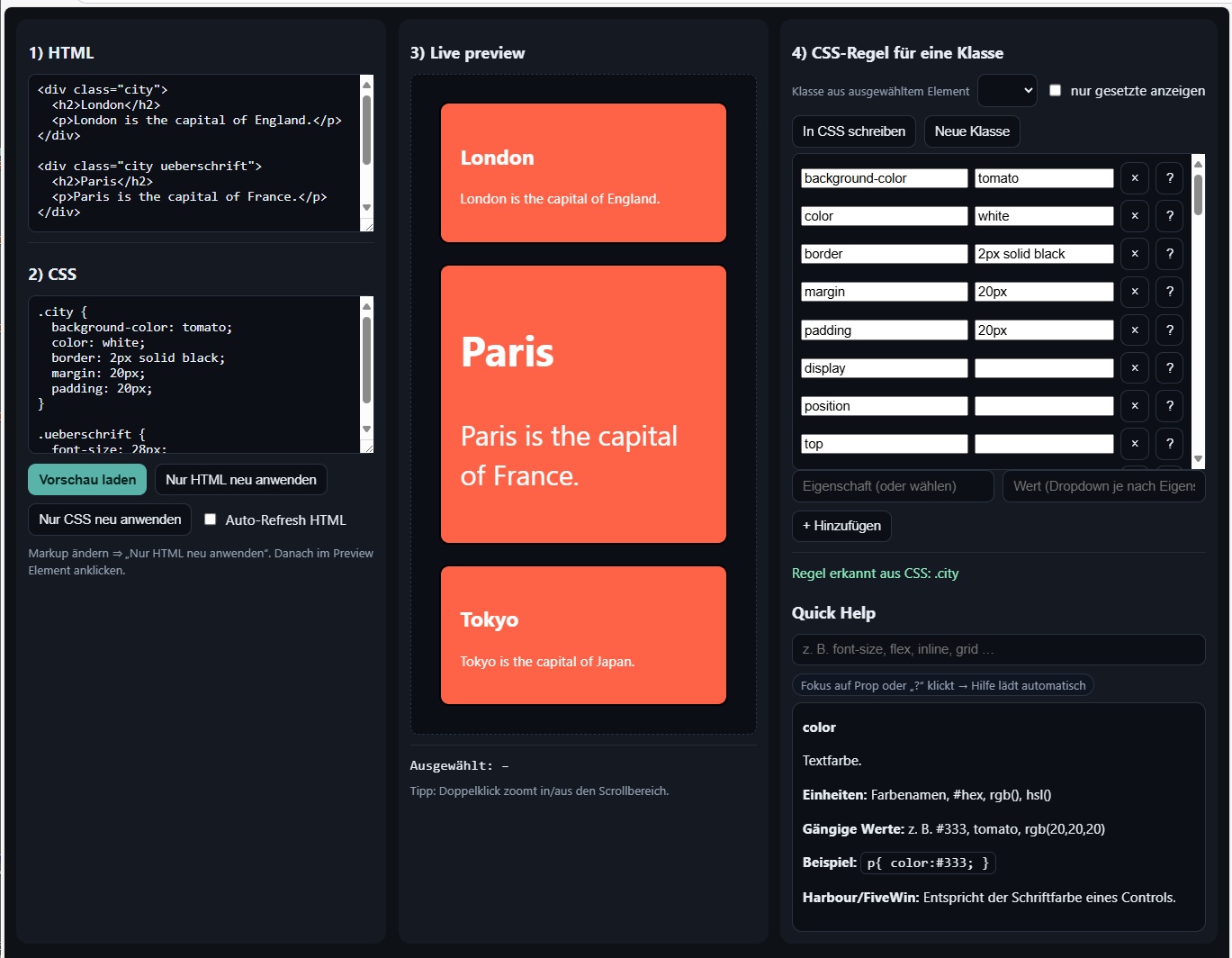
Paste HTML on the left, CSS next to it, click an element in the preview → pick a class, set values, write the block back.
Saves only the properties you set (clean diffs). Includes Quick Help with Harbour/FiveWin analogies.
Why not Fireworks / Why not the “big” tools?
Fireworks (legacy): graphics/slices focus, export magic.
autoCodeWeb: class-centric, writes directly into your CSS block. No lock-in.
Big site builders (Webflow, Pinegrow, Figma code plugins): powerful, but heavy.
autoCodeWeb: a single HTML file, runs locally, focused on one element / one class.
For switchers (Harbour/FiveWin/Xbase → Web)
Patch mindset instead of refactor sledgehammer: one class, two or three values, done.
Harbour analogies in help (Flex/Grid ↔ HBox/VBox, absolute ↔ @ ROW,COL, fr ↔ xBrowse columns).
Markup ↔ Styles kept intentionally separate (Auto-HTML-Refresh supports learning).
Core features (today)
Click in preview ⇒ class picker
Click a .class in the CSS textarea ⇒ editor jumps to that rule
Value datalists (display/position/flex/grid/typography …)
“Show only set” + writes only non-empty properties back
Quick Help (definition, units, examples, Harbour analogy)
Create new class (empty block)
Auto-Refresh HTML (debounced)
Try it in 2 minutes
Open the single file (autoCodeWeb.html).
Paste your HTML + CSS → click “Load Preview.”
In the preview, click a target element → pick a class.
Change 2–3 values (e.g., padding, font-size, background-color).
Click “Write to CSS” → copy the updated block into your real CSS.
Tip: Click a .class inside the CSS textarea — the editor jumps straight to that rule.
Mini-FAQ
Does it generate extra code?
No. It only writes what you set — otherwise your CSS stays untouched.
Do I need a build system?
No. It’s a single HTML file, runs locally.
Responsive work?
Currently manual (you edit the block). @media scopes are on the roadmap.
Roadmap (light & useful)
Presets: Flex row, Grid 2/3/12, Card/Button base
@media scopes: mobile/tablet/desktop
Export/Import: JSON snippets (mini design system)
Shortcuts: Ctrl+Enter HTML, Alt+Enter CSS
Specificity check: warn when a more specific rule overrides yours