Hi!,
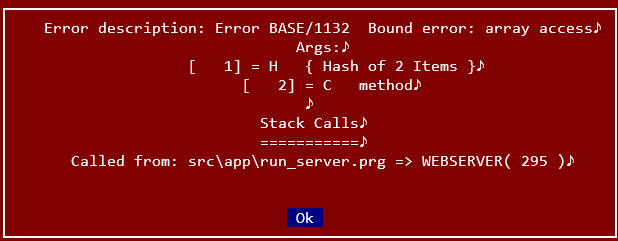
Can you show me what error message you're getting?
C.
"...programar es fácil, hacer programas es difĂcil..."
UT Page -> https://carles9000.github.io/
Forum UT -> https://discord.gg/bq8a9yGMWh
HIX -> https://github.com/carles9000/hix
Hi!,
Can you show me what error message you're getting?
C.
Hi Carles,
With this hix.json I get

hua wrote:Anything wrong with this hix.json? Got a message error config file
TIA
/* ------------------------------------ Hix config file Harbour Web Server ------------------------------------- */ { "app": { "name": "HIX", "version": "1.3a", "compilation": "(r2603301842)" }, "config": { "app_name": "MyApp 1.3a", "domain": "localhost", "https": false, "port": 80, "show_info": true, "path_root": "/", "index_root": false, "path_log": ".log", "path_tmp": ".tmp", "trace": false, "trace_view": false }, "folders": [], "status": [], "routes": [], "loader": [], "ssl": { "cert_public": "", "cert_key": "" }, "sets": { "dateformat": "dd/mm/yyyy", "decimals": 2, "deleted": false, "epoch": 1900, "exact": false, "exclusive": false, "fixed": false, "language": "EN", "softseek": false, "unique": false } }
Can run without error if using hix.json that comes pre-installed with hix.
But if I pasted this in,
"routes": [
{ "route": "/", "action": "html/login.html" },
{ "route": "/register", "action": "html/register.html" },
{ "route": "/login_auth", "action": "login_auth.prg" },
{ "route": "/register_save", "action": "register_save.prg" },
{ "route": "/admin/dashboard", "action": "admin_dash.prg" },
{ "route": "/admin/user_status", "action": "user_status.prg" }
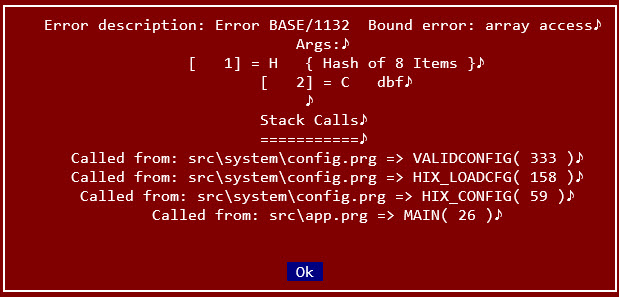
],when I start hix, I'll get this

/* ------------------------------------
Hix config file
Harbour Web Server
------------------------------------- */
{
"app":
{
"name": "HIX",
"version": "1.3a",
"compilation": "(r2603301842)"
},
"config":
{
"app_name": "MyApp 1.3a",
"domain": "localhost",
"https": false,
"port": 80,
"show_info": true,
"path_root": "/",
"index_root": false,
"path_log": ".log",
"path_tmp": ".tmp",
"trace": false,
"trace_view": false
},
"folders": [],
"status": [],
"routes": [],
"loader": [],
"ssl":
{
"cert_public": "",
"cert_key": ""
},
"sets":
{
"dateformat": "dd/mm/yyyy",
"decimals": 2,
"deleted": false,
"epoch": 1900,
"exact": false,
"exclusive": false,
"fixed": false,
"language": "EN",
"softseek": false,
"unique": false
},
"dbf":
{
"rddname": "DBFCDX"
},
"upload":
{
"size": 1000000,
"lifedays": 1,
"garbage": 20000000,
"allowed": ""
},
"sessions":
{
"path": ".sessions",
"name": "USESSID",
"prefix": "_sess",
"seed": "HiX@2025!",
"duration": 3600,
"lifedays": 3,
"garbage": 1000,
"crypt": false
},
"firewall":
{
"activate": false,
"type": "B",
"list": []
}
}Hi,
A route must have a method in every route, which is usually either GET or POST. You must specify this method in the JSON, for example:
{ "route": "/", "action": "html/login.html", "method": "GET" },...
If you don't know which method to use (understanding this concept is essential in web development), you can specify both:
{ "route": "/register_save", "action": "register_save.prg", "method": "GET,POST" },...
Try making these changes and let me know...
C.
Carles wrote:Hi,
Every route must have a method, which is usually either GET or POST. You must specify this method in the JSON, for example:
{ "route": "/", "action": "html/login.html", "method": "GET" },...
If you don't know which method to use (understanding this concept is essential in web development), you can specify both:
{ "route": "/register_save", "action": "register_save.prg", "method": "GET,POST" },...
Try making these changes and let me know...
C.
Thank you Adding "method" to route fix the issue.
Where can I read more on configuration in hix.json?
I am also facing 404 error on a login form created for my test. I am not sure what i have overlooked. All the files were created using gemini but it's still not working
Hi,
There is no information about hix.json. It's a configuration file that HIX handles through its own configuration options. If you want to let the AI ​​configure the JSON, you'll need to see what each program option does when you configure it and the resulting JSON file.
C.
Previous error was because AI assume I was on Linux so generated hix.json with end of line marker LF instead of CRLF.
So now no more directly editing hix.json but am changing settings within hix.exe itself.
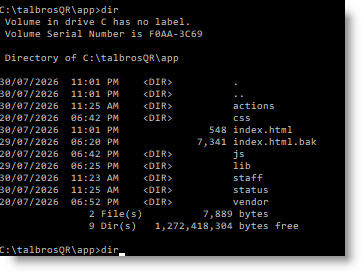
Now a new mystery to me. In the folder where hix.exe is I created a sub-folder called app and placed index.html here.
I then set Path Root to app. Why browsing localhost shows Hix startup page instead of my landing page app/index.html?
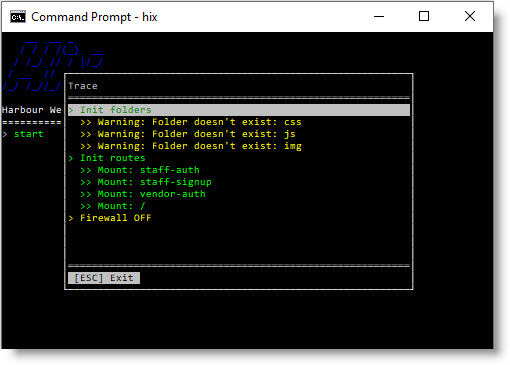
Inside app I created a few sub-folders; css, img but when I start hix it says css, img don't exist
TIA
Hi,
Put a simple html (10 lines) and i will try this afternoon...
Thanks
C.
xxxxx.yyyyy.com -> loads Hix default web page
xxxxx.yyyyyy.com/app -> returns 404
xxxxx.yyyyyy.com/app/index.html -> load the landing page correctly
{
"app_name": "My App",
"domain": "xxxxx.yyyyy.com",
"https": false,
"port": 80,
"show_info": true,
"path_root": "app",
"index_root": false,
"path_log": ".log",
"path_tmp": ".tmp",
"trace": true,
"trace_view": false
},Hua,
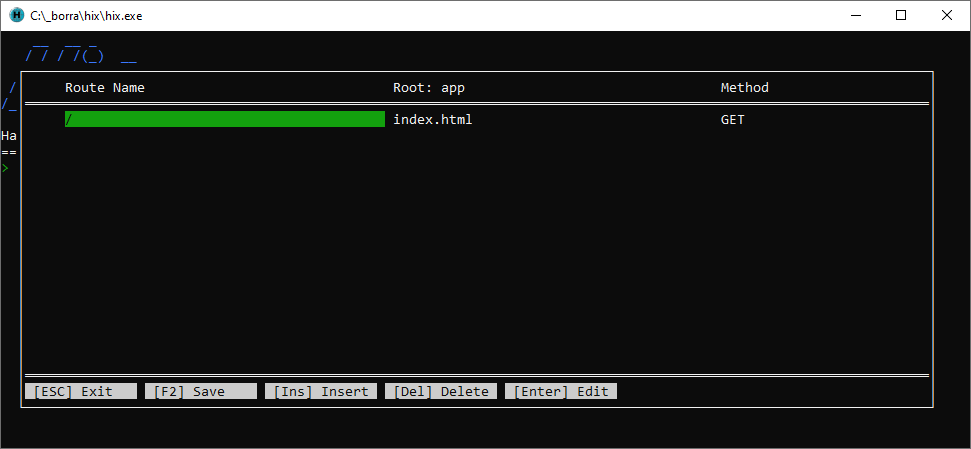
Define a route to the root directory and it should work.

C.
Thank you Carles.
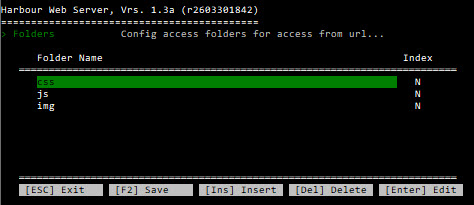
The only error remaining for now is this whenever I start the web server:

But the sub-folders do exist in app folder:

"folders":
[
{
"name": "css",
"index": false
},
{
"name": "js",
"index": false
},
{
"name": "img",
"index": false
}
],Hua,
When you define a folder, it's relative to the server's directory.
If you define
If you define
This is because you can enable a folder, for example, for data, reports, etc., independently of the web application's code.
Try defining
C.
Thank you very much for the assistance Carles.
Sorry for the noob questions :oops:
Dear Carles,
How to connect to Mariadb or MySql server?
Thanks in advance,