

Hi
We continue setting up our example...
Root
Now that we have a small module working, what we are going to do is bring order to our application. What we will do now is place the files (ticket.html and proc_ticket.prg) inside a directory that we will create with the name web (or whatever name you prefer).
The objective of this directory is to have our application's code inside it.
By default, HIX provides external visibility to the entire directory where it is installed.
We will change the parameter / to web. To do this, we will enter the > server command and change the root to "web".
From this moment on, everything will be referenced relative to the "web" folder, and from any browser, it will not be possible to access any directory above web.
If we start the server, we could access the module again via http://localhost/web/ticket.html
Routes
The objective now is to create a "friendly URL". The goal of a "friendly URL" is to create an easy-to-handle URL without referencing a specific location, file, etc.
"A Friendly URL is the part of a URL that comes after the domain extension in an easy-to-read format. The benefit of a Friendly URL is that it makes navigation easier - and it makes your links look prettier."
To do this, we will rename the current URLs:
Notice that we are creating shorter routes without file extensions. To do this, you must enter the > routes command and create a route name and specify which file relative to the root folder (in our case, web) it points to.
We will also indicate which verb types we will use to access each page. Understanding HTTP verbs is important in web development, but it's very easy. This is basic information and there are many pages, but you can consult, for example, this page:
https://www.w3schools.com/tags/ref_httpmethods.asp
In our case, we will access our ticket page directly from the browser, so we will use the GET method. In contrast, the "ticket" page will send the information to the "proc_ticket" page via the POST method.
The configuration in routes would be as follows:
We only need one more change in the code. In ticket.html we will change the action (which redirects to a page) from the filename proc_ticket.prg to the route name proc_ticket.
web/ticket.html
This is the meaning of the route. The form will execute what is defined in the proc_ticket route, not a specific file, but an identifier (route), and our server will take care of this. It is also important to understand that, for example, the proc_ticket route can ONLY be executed via POST. If you try to execute localhost/proc_ticket directly from the browser, our server will not allow it and will give you a "404 Page not found" error. This is also one of the aspects that will influence our security.
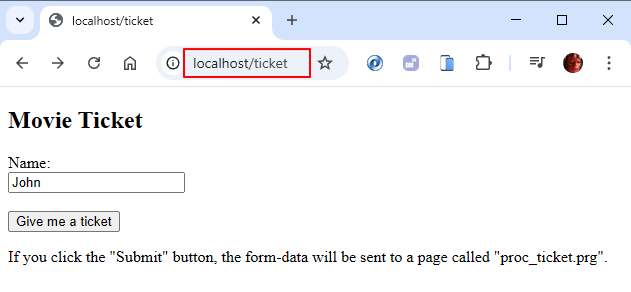
If we start the server once we have saved the changes, we will execute localhost/ticket and access our ticket module.
The server will take care of finding which page to execute. Notice that the user will not know what type of file we are executing (html, prg, ...) nor where it is located (in this case, in the web folder).
Is it easy ? :D
We continue setting up our example...
Root
Now that we have a small module working, what we are going to do is bring order to our application. What we will do now is place the files (ticket.html and proc_ticket.prg) inside a directory that we will create with the name web (or whatever name you prefer).
The objective of this directory is to have our application's code inside it.
By default, HIX provides external visibility to the entire directory where it is installed.
...
Root                          /
...Path Root webIf we start the server, we could access the module again via http://localhost/web/ticket.html
Routes
The objective now is to create a "friendly URL". The goal of a "friendly URL" is to create an easy-to-handle URL without referencing a specific location, file, etc.
"A Friendly URL is the part of a URL that comes after the domain extension in an easy-to-read format. The benefit of a Friendly URL is that it makes navigation easier - and it makes your links look prettier."
To do this, we will rename the current URLs:
Notice that we are creating shorter routes without file extensions. To do this, you must enter the > routes command and create a route name and specify which file relative to the root folder (in our case, web) it points to.
We will also indicate which verb types we will use to access each page. Understanding HTTP verbs is important in web development, but it's very easy. This is basic information and there are many pages, but you can consult, for example, this page:
https://www.w3schools.com/tags/ref_httpmethods.asp
In our case, we will access our ticket page directly from the browser, so we will use the GET method. In contrast, the "ticket" page will send the information to the "proc_ticket" page via the POST method.
The configuration in routes would be as follows:
> Routes            Config friendly routes

 Route Name     Root: web            Method
═════════════════════════════════════════════════
 ticket         ticket.html          GET
proc_ticket proc_ticket.prg POSTweb/ticket.html
...
  <form action="proc_ticket" method='post' >
    <label for="user_name">Name:</label><br>
    <input type="text" name="user_name" value="John"><br><br>
    <input type="submit" value="Give me a ticket">
  </form>
...If we start the server once we have saved the changes, we will execute localhost/ticket and access our ticket module.
The server will take care of finding which page to execute. Notice that the user will not know what type of file we are executing (html, prg, ...) nor where it is located (in this case, in the web folder).
Is it easy ? :D
Salutacions, saludos, regards
"...programar es fácil, hacer programas es difícil..."
UT Page -> https://carles9000.github.io/
Forum UT -> https://discord.gg/bq8a9yGMWh
HIX -> https://github.com/carles9000/hix
"...programar es fácil, hacer programas es difícil..."
UT Page -> https://carles9000.github.io/
Forum UT -> https://discord.gg/bq8a9yGMWh
HIX -> https://github.com/carles9000/hix