

Hi,
I'm not gonna explain the basics of AI, how to write good prompts, or how CSS works... we're just gonna use AI to help us transform our ticket request screen, ticket.html.
I gotta say, in just a few months, AI has completely shaken up the programming world, including the whole web dev scene and, of course, CSS. I'm blown away.
I can understand what the AI is suggesting, and I'm just trying to roll with it, coming from the perspective of someone who barely knows CSS.
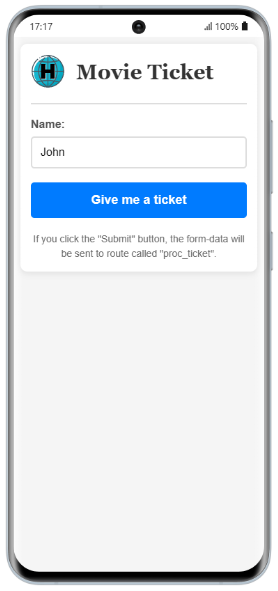
The result I got with my favorite AI (https://claude.ai/) is below, in case you want to try it out.
In this case, the result is as impressive as this one.
Let's do the same thing with the backend part, the part where our system gives the response.
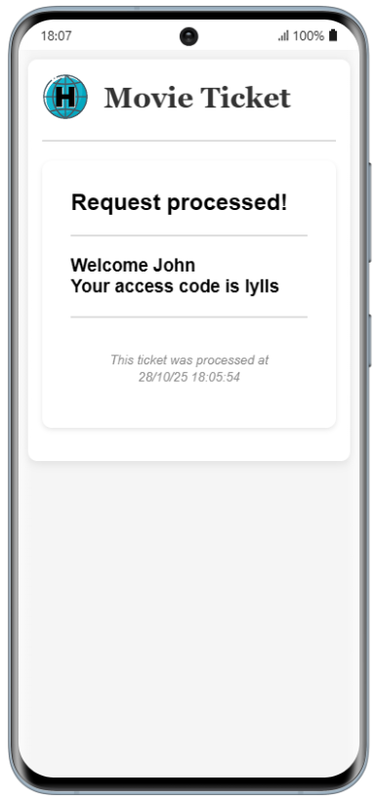
In my case, once I understood the first part of this chapter, the result from my AI is this:
The response we give is the following:
I'm not getting into the whole "AI yes or AI no" debate—that's a whole other conversation. The truth is, AI has come a really long way in just the last few months, and it can seriously help people who are just starting out. But in the end, that's everyone's own call.
I've always thought that if we're into programming, we should understand what we're doing, whether we have an AI assistant helping us out or not…
My two cents on AI is this: the more you know about a topic, the more AI can help you. The less you know, the harder it is to unlock its full potential—because how can you even understand or check if the solutions it gives you are any good?
C.
I'm not gonna explain the basics of AI, how to write good prompts, or how CSS works... we're just gonna use AI to help us transform our ticket request screen, ticket.html.
I gotta say, in just a few months, AI has completely shaken up the programming world, including the whole web dev scene and, of course, CSS. I'm blown away.
I can understand what the AI is suggesting, and I'm just trying to roll with it, coming from the perspective of someone who barely knows CSS.
The result I got with my favorite AI (https://claude.ai/) is below, in case you want to try it out.
<!DOCTYPE html>
<html>
<head>
  <meta name="viewport" content="width=device-width, initial-scale=1.0">
  <style>
    /* Reseteo básico para eliminar márgenes */
    * {
      margin: 0;
      padding: 0;
      box-sizing: border-box;
    }

    /* Estilo del cuerpo - fondo y fuente */
    body {
      font-family: Arial, sans-serif;
      background-color: #f5f5f5;
      padding: 20px;
    }

    /* Contenedor principal - centra todo */
    .container {
      max-width: 400px;
      margin: 0 auto;
      background-color: white;
      padding: 20px;
      border-radius: 10px;
      box-shadow: 0 2px 10px rgba(0,0,0,0.1);
    }

    /* Header con logo y título */
    .header {
      display: flex;
      align-items: center;
      gap: 15px;
      margin-bottom: 20px;
    }

    .header img {
      width: 50px;
    }

    .header b {
      font-size: 36px;
      color: #333;
      font-family: 'Georgia', serif;
      font-weight: bold;
    }

    /* Línea separadora */
    hr {
      border: none;
      border-top: 2px solid #ddd;
      margin: 20px 0;
    }

    /* Formulario */
    form {
      margin-bottom: 20px;
    }

    /* Etiqueta del campo */
    label {
      display: block;
      font-size: 16px;
      color: #555;
      margin-bottom: 8px;
      font-weight: bold;
    }

    /* Campo de texto */
    input[type="text"] {
      width: 100%;
      padding: 12px;
      font-size: 16px;
      border: 2px solid #ddd;
      border-radius: 5px;
      margin-bottom: 20px;
    }

    /* Botón de envío */
    input[type="submit"] {
      width: 100%;
      padding: 15px;
      font-size: 18px;
      font-weight: bold;
      color: white;
      background-color: #007bff;
      border: none;
      border-radius: 5px;
      cursor: pointer;
    }

    /* Efecto al tocar el botón */
    input[type="submit"]:active {
      background-color: #0056b3;
    }

    /* Texto informativo */
    p {
      font-size: 14px;
      color: #666;
      line-height: 1.5;
      text-align: center;
    }

    /* Para pantallas muy pequeñas */
    @media (max-width: 360px) {
      body {
        padding: 10px;
      }

      .container {
        padding: 15px;
      }

      .header b {
        font-size: 30px;
      }
    }
  </style>
</head>
<body>

  <div class="container">
    <div class="header">
      <img src="images/logo.png" alt="Logo"/>
      <b>Movie Ticket</b>
    </div>

    <hr>

    <form action="proc_ticket" method='post'>
      <label for="user_name">Name:</label>
      <input type="text" id="user_name" name="user_name" value="John">
      <input type="submit" value="Give me a ticket">
    </form>

    <p>If you click the "Submit" button, the form-data will be sent to route called "proc_ticket".</p>
  </div>

</body>
</html>Let's do the same thing with the backend part, the part where our system gives the response.
In my case, once I understood the first part of this chapter, the result from my AI is this:
#include 'hix.ch'

#define FILE_TICKET  	hb_dirbase() + 'ticket.dbf'
#define MAX_TIMEOUT 	5

function main()

	local lExist 	:= file( FILE_TICKET )
	local hData 	:= UPost()
    local cAlias, aDbf, cMessage

	hData[ 'user_name' ] := HB_HGetDef( hData, 'user_name', 'dummy' ) 	//	For adbench proccess

	if ! file( FILE_TICKET )

		aDbf    := {}
		AAdd(aDbf, { 'name', 'C', 40, 0 })
		AAdd(aDbf, { 'data', 'D',  8, 0 })
		AAdd(aDbf, { 'key'	, 'C',  5, 0 })

		dbCreate( FILE_TICKET, aDbf )

	endif

	USE ( FILE_TICKET ) SHARED NEW // VIA 'DBFCDX'

    cAlias := alias()

	(cAlias)->( Dbappend() )

	if (cAlias)->( TRlock() )

		(cAlias)->name 	:= hData[  'user_name' ]
		(cAlias)->data 	:= date()
		(cAlias)->key 		:= key()

		(cAlias)->( DbUnlock() )

	endif

    (cAlias)->( DbCommit() )

	cHtml := MyScreen( hData, cAlias )

    (cAlias)->( DbCloseArea() )

 RETU cHtml

//---------------------------------------------------//

function TRLock()

    LOCAL lRlock  	:= .F.
    LOCAL nIni  	:= Seconds()
    LOCAL cAlias  	:= Alias()
    LOCAL nElapsed

    WHILE !lRlock

		lRlock := (cAlias)->(DbRlock())

        if !lRlock
            nElapsed := Seconds() - nIni
            if nElapsed >= MAX_TIMEOUT
                EXIT  // Timeout
            endif
            hb_IdleSleep(0.001)  // 1ms sleep para no quemar CPU
        endif

    END

RETU lRlock

//---------------------------------------------------//

FUNCTION Key()

    LOCAL cKey 	:= ''
    LOCAL cWords 	:= 'abcdefghijklmnopqrstuvwxyz'
    LOCAL nI, nPos

    FOR nI := 1 TO 5
        nPos := hb_RandomInt(1, Len(cWords))
        cKey += SubStr(cWords, nPos, 1)
    NEXT

RETURN cKey

//---------------------------------------------------//

FUNCTION MyScreen( hData, cAlias )

	local cHtml := ''

	VIEW TO cHtml PARAMS hData, cAlias
<!DOCTYPE html>
<html>
<head>
    <meta charset="UTF-8">
    <meta name="viewport" content="width=device-width, initial-scale=1.0">
    <title>Request Processed</title>
    <style>
    * {
      margin: 0;
      padding: 0;
      box-sizing: border-box;
    }

    body {
      font-family: Arial, sans-serif;
      background-color: #f5f5f5;
      padding: 20px;
    }

    .header {
      display: flex;
      align-items: center;
      gap: 15px;
      margin-bottom: 20px;
    }

    .header img {
      width: 50px;
    }

    .header b {
      font-size: 36px;
      color: #333;
      font-family: 'Georgia', serif;
      font-weight: bold;
    }

    hr {
      border: none;
      border-top: 2px solid #ddd;
      margin: 20px 0;
    }

    .container {
      max-width: 400px;
      margin: 0 auto;
      background-color: white;
      padding: 20px;
      border-radius: 10px;
      box-shadow: 0 2px 10px rgba(0,0,0,0.1);
    }

	.content {
		background-color: white;
		padding: 30px;
		border-radius: 10px;
		box-shadow: 0 2px 5px rgba(0,0,0,0.1);
		margin-bottom: 20px;
	}

	small {
		color: #888;
		font-style: italic;
	}

	.footer {
		text-align: center;
		padding: 15px;
	}

    @media (max-width: 360px) {
      body {
        padding: 10px;
      }

      .container {
        padding: 15px;
      }

      .header b {
        font-size: 30px;
      }
    }
    </style>
</head>
<body>

	<div class="container">
		<div class="header">
			<img src="images/logo.png" alt="Logo"/>
			<b>Movie Ticket</b>
	</div>

	<hr>

    <div class="content">
        <h2>Request processed!</h2>
        <hr>
        <h3>Welcome <$ hData[ 'user_name' ] $><br>
  		    Your access code is <$ (cAlias)->key $>
		</h3>
        <hr>
        <div class="footer">
            <small>This ticket was processed at <$ dtoc( date() ) + ' ' + time() $></small>
        </div>
    </div>
</body>
</html>
	ENDTEXT

RETU cHtmlI'm not getting into the whole "AI yes or AI no" debate—that's a whole other conversation. The truth is, AI has come a really long way in just the last few months, and it can seriously help people who are just starting out. But in the end, that's everyone's own call.
I've always thought that if we're into programming, we should understand what we're doing, whether we have an AI assistant helping us out or not…
My two cents on AI is this: the more you know about a topic, the more AI can help you. The less you know, the harder it is to unlock its full potential—because how can you even understand or check if the solutions it gives you are any good?
C.
Salutacions, saludos, regards
"...programar es fácil, hacer programas es difícil..."
UT Page -> https://carles9000.github.io/
Forum UT -> https://discord.gg/bq8a9yGMWh
HIX -> https://github.com/carles9000/hix
"...programar es fácil, hacer programas es difícil..."
UT Page -> https://carles9000.github.io/
Forum UT -> https://discord.gg/bq8a9yGMWh
HIX -> https://github.com/carles9000/hix
