Hi,
This will be the last entry, but it's one of the most important in order to understand the power we have with HIX when creating a website/web service.
Alright, in this chapter we're gonna talk about load and performance testing for our Ticket project. We need to make sure our system can handle traffic spikes when multiple users hit it at once. This'll be more about concepts than code, but I think it's worth spending 10 minutes to read through it.
Our system has to handle situations where more than one user might request a ticket at the exact same millisecond. We're not just looking at how many users are making requests, but whether the system will crash if they all hit it simultaneously.
For this test, we're gonna run 100 requests with 5 concurrent users. What does that mean?
It means we're simulating how your website behaves when several people use it at the same time. Even though 5 users might not sound like much, we're talking about users processing in the same millisecond - not just connecting at different times.
What are we simulating?
Think of your website like a movie theater ticket counter:
• Request: Like someone in line saying "I want a ticket" - it's asking your server to do something
• 100 Requests: Total number of "tickets" we're trying to sell in this test
• User: One person in line
• 5 Concurrent Users: This is the key part - 5 people all asking for things at the same time
The Goal
We're testing:
1. Speed: How fast does the site handle each request with 5 users hammering it?
2. Stability: Does it crash or throw errors under pressure?
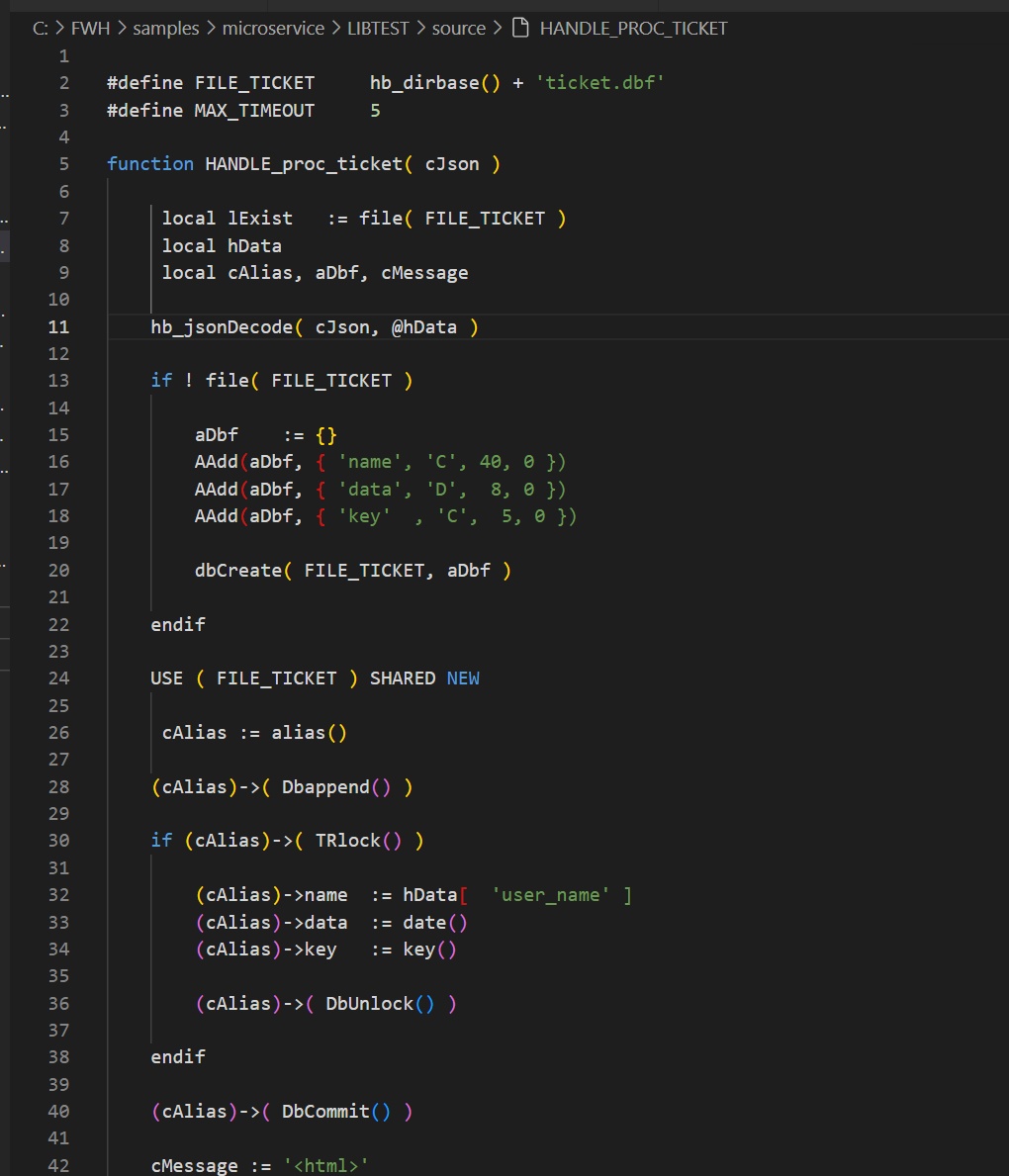
3. Data Handling: When 5 people are reading/writing data simultaneously, does our ticket.dbf file get corrupted? The system should handle this cleanly.
4. As you've seen, when we issue a ticket we add and lock a record. The TRlock() function already loops if the record is locked.
The Results
I used ApacheBench for this test. The results are pretty impressive:
The key things: no failures, and each ticket process takes about 22ms. That means our system could handle about 44 requests per second!
Remember - these 22ms aren't for some simple "Hello World" - this includes table I/O, HTML generation, the whole process.
Here's something interesting: when I tested with 100 requests but only 1 user, the system took 29ms. The concurrent test was faster because Harbour handles multiple threads efficiently - about 24% faster with concurrency!
The Basic Flow
1. User clicks "Get Ticket" in browser
2. Browser sends HTTP POST to our web service API
3. Load balancer routes to available application server
4. Server calls proc_ticket(...)
5. System handles tables - checks existence, appends data, updates, commits
6. Process completes
7. Server generates HTML/JSON response
8. Browser receives response
9. Interface updates with ticket confirmation
My Take
I've been programming for web environments for years. For the past 5 years we've been building tools to bring Harbour to the web. We have a Harbour server that's packed with features and honestly, I think it can handle 90% of the applications you want to build.
We don't need weird workarounds or other languages (PHP, Python, etc.), and we don't have to process our DBF files differently from our beloved RDD system. Our Harbour setup handles everything perfectly and lets us keep enjoying what we love.
Sure, web development isn't easy, but with AI tools now helping with front-end design, and with the backend/server configuration already solved for us... we're in a pretty good spot.
I think that with these explanations, you can see that with a "start" the change of environment begins very easily.
That’s all😊

C.
This will be the last entry, but it's one of the most important in order to understand the power we have with HIX when creating a website/web service.
Alright, in this chapter we're gonna talk about load and performance testing for our Ticket project. We need to make sure our system can handle traffic spikes when multiple users hit it at once. This'll be more about concepts than code, but I think it's worth spending 10 minutes to read through it.
Our system has to handle situations where more than one user might request a ticket at the exact same millisecond. We're not just looking at how many users are making requests, but whether the system will crash if they all hit it simultaneously.
For this test, we're gonna run 100 requests with 5 concurrent users. What does that mean?
It means we're simulating how your website behaves when several people use it at the same time. Even though 5 users might not sound like much, we're talking about users processing in the same millisecond - not just connecting at different times.
What are we simulating?
Think of your website like a movie theater ticket counter:
• Request: Like someone in line saying "I want a ticket" - it's asking your server to do something
• 100 Requests: Total number of "tickets" we're trying to sell in this test
• User: One person in line
• 5 Concurrent Users: This is the key part - 5 people all asking for things at the same time
The Goal
We're testing:
1. Speed: How fast does the site handle each request with 5 users hammering it?
2. Stability: Does it crash or throw errors under pressure?
3. Data Handling: When 5 people are reading/writing data simultaneously, does our ticket.dbf file get corrupted? The system should handle this cleanly.
4. As you've seen, when we issue a ticket we add and lock a record. The TRlock() function already loops if the record is locked.
The Results
I used ApacheBench for this test. The results are pretty impressive:
Concurrency Level:      5
Time taken for tests:   2.253 seconds
Complete requests:      100
Failed requests:        0
Requests per second:    44.38 [#/sec] (mean)
Time per request: 22.532 [ms] (mean, across all concurrent requests)Remember - these 22ms aren't for some simple "Hello World" - this includes table I/O, HTML generation, the whole process.
Here's something interesting: when I tested with 100 requests but only 1 user, the system took 29ms. The concurrent test was faster because Harbour handles multiple threads efficiently - about 24% faster with concurrency!
The Basic Flow
1. User clicks "Get Ticket" in browser
2. Browser sends HTTP POST to our web service API
3. Load balancer routes to available application server
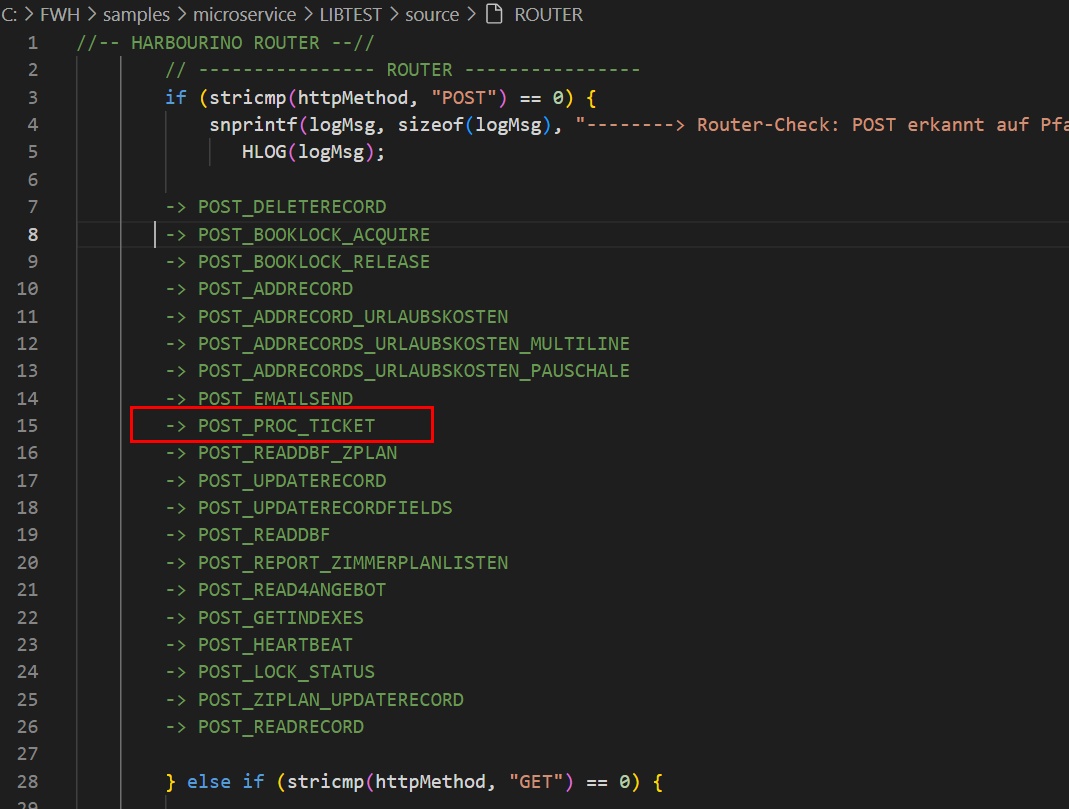
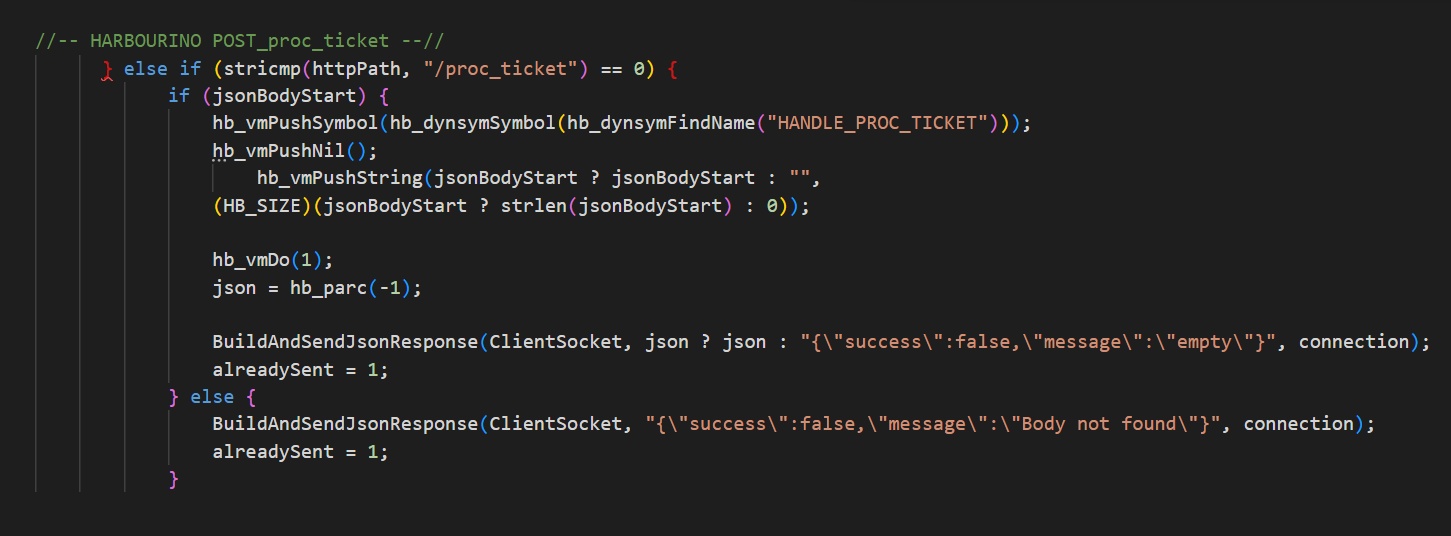
4. Server calls proc_ticket(...)
5. System handles tables - checks existence, appends data, updates, commits
6. Process completes
7. Server generates HTML/JSON response
8. Browser receives response
9. Interface updates with ticket confirmation
My Take
I've been programming for web environments for years. For the past 5 years we've been building tools to bring Harbour to the web. We have a Harbour server that's packed with features and honestly, I think it can handle 90% of the applications you want to build.
We don't need weird workarounds or other languages (PHP, Python, etc.), and we don't have to process our DBF files differently from our beloved RDD system. Our Harbour setup handles everything perfectly and lets us keep enjoying what we love.
Sure, web development isn't easy, but with AI tools now helping with front-end design, and with the backend/server configuration already solved for us... we're in a pretty good spot.
I think that with these explanations, you can see that with a "start" the change of environment begins very easily.
That’s all
C.
Salutacions, saludos, regards
"...programar es fácil, hacer programas es difícil..."
UT Page -> https://carles9000.github.io/
Forum UT -> https://discord.gg/bq8a9yGMWh
HIX -> https://github.com/carles9000/hix
"...programar es fácil, hacer programas es difícil..."
UT Page -> https://carles9000.github.io/
Forum UT -> https://discord.gg/bq8a9yGMWh
HIX -> https://github.com/carles9000/hix