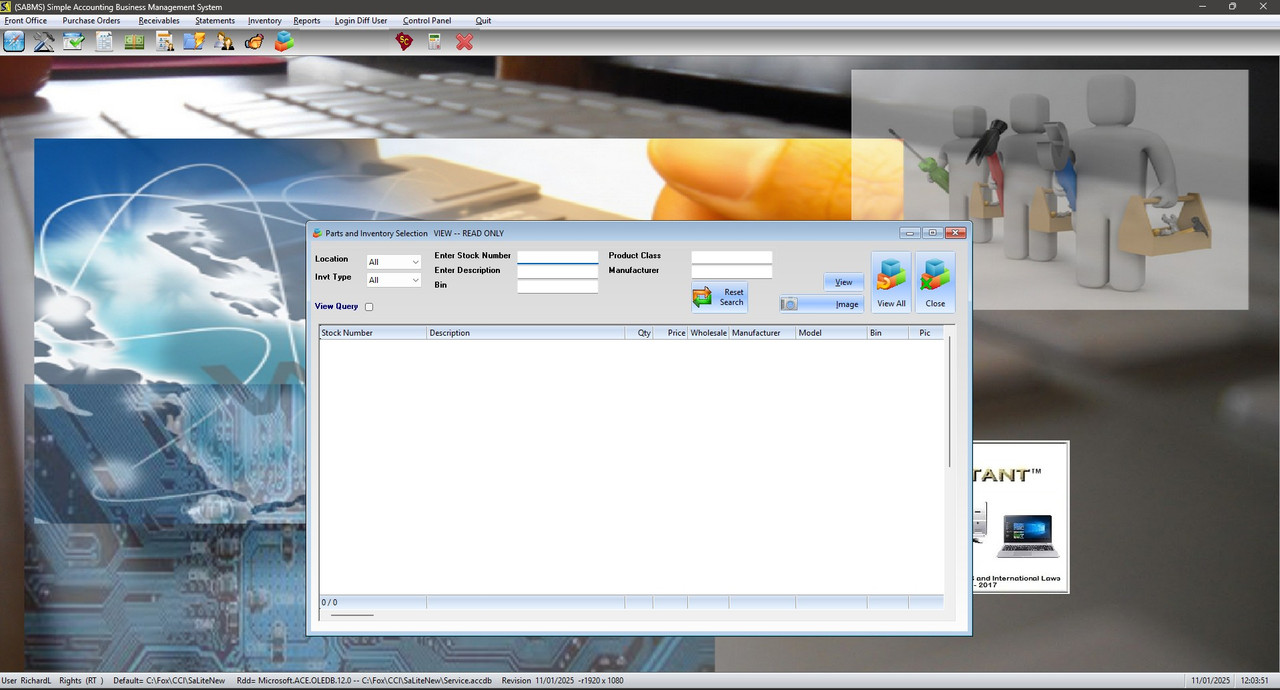
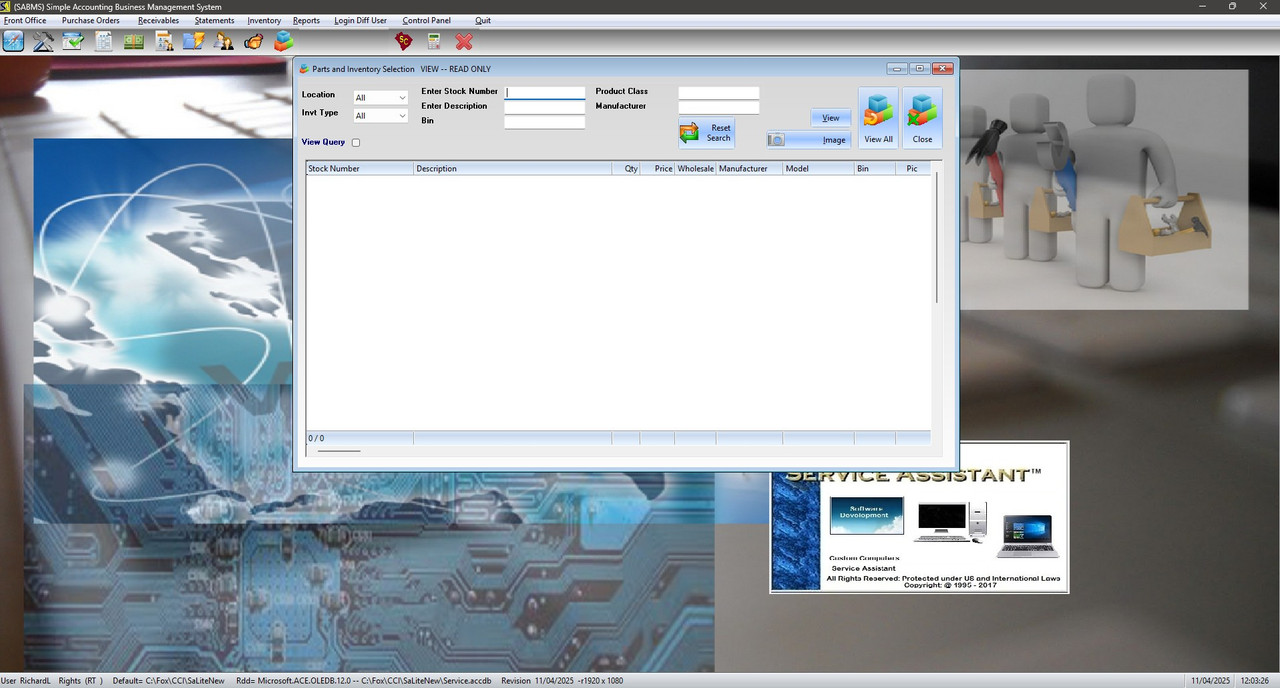
To All .. been a while since I have written much code .. got a request today to Center an MDICHILD xbrowse in the Center of the screen ??
was hoping it was a simple as adding Center to the
DEFINE ICON oIco RESOURCE "INVENTORY"
DEFINE WINDOW oWndChildA ;
FROM 0,0 to 39,125 ;
MDICHILD ;
OF oWnd ;
ICON oIco ;
TITLE xTITLE
DEFINE DIALOG oInvt RESOURCE "INVTBROW" of oWndChildA
REDEFINE xBROWSE oLBX ;
RECORDSET oRsInvt ;
COLUMNS "INVENTORY ID", ;
"DESCRIPTION", ;
"QTY", ;
"PRICE", ;
"PRICE1", ;
"MANUFACTURER", ;
"MODEL", ;
"BIN", ;
"LOCATION", ;
"INVENTORY TYPE", ;
"PRODUCT CLASS", ;
"UNIT", ;
"MSRPRICE" ;
COLSIZES 160,295,40,50,60,98,105,60,50,50,95,50,50 ;
HEADERS "Stock Number", ;
"Description", ;
"Qty", ;
"Price", ;
"Wholesale", ;
"Manufacturer", ;
"Model", ;
"Bin", ;
"Location", ;
"Type", ;
"Prod Class", ;
"Unit", ;
"Msrp" ;
ID 172 of oInvt ;
AUTOCOLS LINES AUTOSORT CELL CENTER // <<----------------------------- center here ??
oLbx:lRecordSelector := .f.
oLbx:lFooter := .t.
oCol := oLbx:aCols[ 1 ]
oCol:bFooter := { || Ltrim( Str( oLbx:KeyNo() ) ) + " / " + LTrim( Str( oLbx:KeyCount() ) ) }
oLbx:bChange := { || oCol:RefreshFooter() }
// pic
ADD oCol to oLbx at 9 HEADER 'Pic' size 60 //60
oLbx:aCols[ 9 ]:addbmpfile( "dcam16" )
oLbx:aCols[ 9 ]:addbmpfile( "cam16" )
oLbx:aCols[ 9 ]:bBmpData := { | lValue | If(oRsInvt:eof, ,If( (empty(oRsInvt:Fields("PicFileName"):Value) .or.;
oRsInvt:Fields("PicFileName"):Value = " "), 1, 2 )) }
oLbx:aCols[ 9 ]:lBtnTransparent := .t.
oLbx:aCols[ 9 ]:nHeadStrAlign := AL_CENTER
WITH OBJECT oLbx
:lTabLikeExcel := .t.
END
_BrowColor( oLbx )
oLbx:bLDblClick := { |nRow,nCol | _InvtView( "V", oWnd, oWndChildA, oRsInvt,oLbx ) }
REDEFINE SAY oSay1 ID 129 OF oInvt UPDATE
oSay1:SetFont( oFontB )
REDEFINE SAY oSay2 ID 131 OF oInvt UPDATE
oSay2:SetFont( oFontB )
REDEFINE SAY oSay3 ID 136 OF oInvt UPDATE
oSay3:SetFont( oFontB )
REDEFINE SAY oSay4 ID 138 OF oInvt UPDATE
oSay4:SetFont( oFontB )
REDEFINE SAY oSay5 ID 141 OF oInvt UPDATE
oSay5:SetFont( oFontB )
REDEFINE SAY oSay6 ID 130 OF oInvt UPDATE
oSay6:SetFont( oFontB )
REDEFINE SAY oSay7 ID 133 OF oInvt UPDATE
oSay7:SetFont( oFontB )
REDEFINE SAY oSay8 ID 140 OF oInvt UPDATE
oSay8:SetFont( oFontB )
oSay8:SetColor( CLR_BLUE )
REDEFINE COMBOBOX oLoc1 var cLoc1 ID 127 of oInvt ;
ITEMS aLoc ;
ON CHANGE ( _Isearch( oStockno, cStockno, oDesc, cDesc, ;
oBin, cBin, cLoc1, cType1, oPclass, cPclass, oMan, cMan, oLbx, oRsInvt, @cQuery, oQuery)) ;
UPDATE
REDEFINE COMBOBOX oType1 var cType1 ID 135 of oInvt ;
ITEMS aType1 ;
ON CHANGE ( _Isearch( oStockno, cStockno, oDesc, cDesc, ;
oBin, cBin, cLoc1, cType1, oPclass, cPclass, oMan, cMan, oLbx, oRsInvt, @cQuery, oQuery)) ;
UPDATE
REDEFINE CHECKBOX oViewQuery var lViewQuery ID 174 of oInvt ;
ON CLICK ( _ViewQuery( lViewQuery,oQuery) )
REDEFINE GET oStockno var cStockno ID 137 of oInvt ;
ON CHANGE ( _Isearch( oStockno, cStockno, oDesc, cDesc, ;
oBin, cBin, cLoc1, cType1, oPclass, cPclass, oMan, cMan, oLbx, oRsInvt,@cQuery, oQuery)) ;
UPDATE
REDEFINE GET oDesc var cDesc ID 139 of oInvt ;
ON CHANGE ( _Isearch( oStockno, cStockno, oDesc, cDesc, ;
oBin, cBin, cLoc1, cType1, oPclass, cPclass, oMan, cMan, oLbx, oRsInvt,@cQuery, oQuery)) ;
UPDATE
REDEFINE GET oBin var cBin ID 142 of oInvt ;
ON CHANGE ( _Isearch( oStockno, cStockno, oDesc, cDesc, ;
oBin, cBin, cLoc1, cType1, oPclass, cPclass, oMan, cMan, oLbx, oRsInvt,@cQuery, oQuery)) ;
UPDATE
REDEFINE GET oPclass var cPclass ID 128 of oInvt ;
ON CHANGE ( _Isearch( oStockno, cStockno, oDesc, cDesc, ;
oBin, cBin, cLoc1, cType1, oPclass, cPclass, oMan, cMan, oLbx, oRsInvt,@cQuery, oQuery)) ;
UPDATE
REDEFINE GET oMan var cMan ID 132 of oInvt ;
ON CHANGE ( _Isearch( oStockno, cStockno, oDesc, cDesc, ;
oBin, cBin, cLoc1, cType1, oPclass, cPclass, oMan, cMan, oLbx, oRsInvt,@cQuery, oQuery)) ;
UPDATE
REDEFINE GET oQuery var cQuery ID 134 of oInvt READONLY
REDEFINE BTNBMP oBtn8 ID 147 of oInvt ; // reset search
RESOURCE "RELOAD", "DRELOAD", "DRELOAD" ;
PROMPT "Reset"+CRLF+"Search" LEFT 2007;
ACTION ( oRsInvt:Filter := "[Inventory Id] = 'bogus'",;
cLoc1 := "All",;
cType1 := "All",;
cStockno := space(50),;
cDesc := space(50),;
cBin := space(50),;
cPclass := space(50),;
cMan := space(50),;
oLoc1:ReFresh(),;
oType1:ReFresh(),;
oStockno:ReFresh(),;
oStockno:ReFresh(),;
oDesc:ReFresh(),;
oBin:Refresh(),;
oPclass:ReFresh(),;
oMan:ReFresh(),oLbx:ReFresh() )
REDEFINE BTNBMP oBtn1 ID 160 PROMPT "View All" ;
RESOURCE "INVTALL" ;
of oInvt 2007 ;
ACTION ( oRsInvt:Filter := "",oLbx:ReFresh(),oLbx:SetFocus(),SysReFresh())
REDEFINE BTNBMP oBtn2 ID 161 PROMPT "&Add" CENTER ;
of oInvt 2007 ;
ACTION ( _InvtView( "A", oWnd, oWndChildA, oRsInvt,oLbx ))
REDEFINE BTNBMP oBtn3 ID 144 PROMPT "&Edit" CENTER ;
of oInvt 2007 ;
ACTION ( _InvtView( "E", oWnd, oWndChildA, oRsInvt,oLbx ))
REDEFINE BTNBMP oBtn4 ID 143 PROMPT "&Del" CENTER ;
of oInvt 2007 ;
Action _DeleteUm(oRsInvt,oLbx)
* action nil // dont forget to delete jInventoryTaxes
REDEFINE BTNBMP oBtn5 ID 145 PROMPT "&View" CENTER ;
of oInvt 2007 ;
ACTION ( _InvtView( "V", oWnd, oWndChildA, oRsInvt,oLbx ))
REDEFINE BTNBMP oBtn6 ID 146 PROMPT "&Image" LEFT ;
RESOURCE "CAMERA" ;
of oInvt 2007 ;
ACTION ( _ZoomFromBrow( oRsInvt,oWnd ))
REDEFINE BTNBMP oBtn7 ID 162 PROMPT "Close" ;
RESOURCE "INVTCANC" ;
of oInvt 2007 ;
ACTION (oWndChildA:End())
ACTIVATE DIALOG oInvt NOMODAL ;
ON INIT( If( lViewQuery = .t., oQuery:Show(),oQuery:Hide() ),;
_Hidum( cMode,oBtn2,oBtn3,oBtn4) );
VALID(!GETKEYSTATE( 27 ))
ACTIVATE WINDOW oWndChildA ;
ON INIT ( oInvt:Move( 0,0, oWndChildA:nWidth, oWndChildA:nHeight, .T. ), ;
         oWndChildA:bResized := {|| _ReSizeUm1( oInvt,oWndChildA,oLbx) }, ;

         oInvt:refresh(.t.));
VALID ( IIF( !lOK3, ExitPgm3(.T.,oWndChildA,oRsInvt,oLbx,@lOk3,oFontB), .F. ))
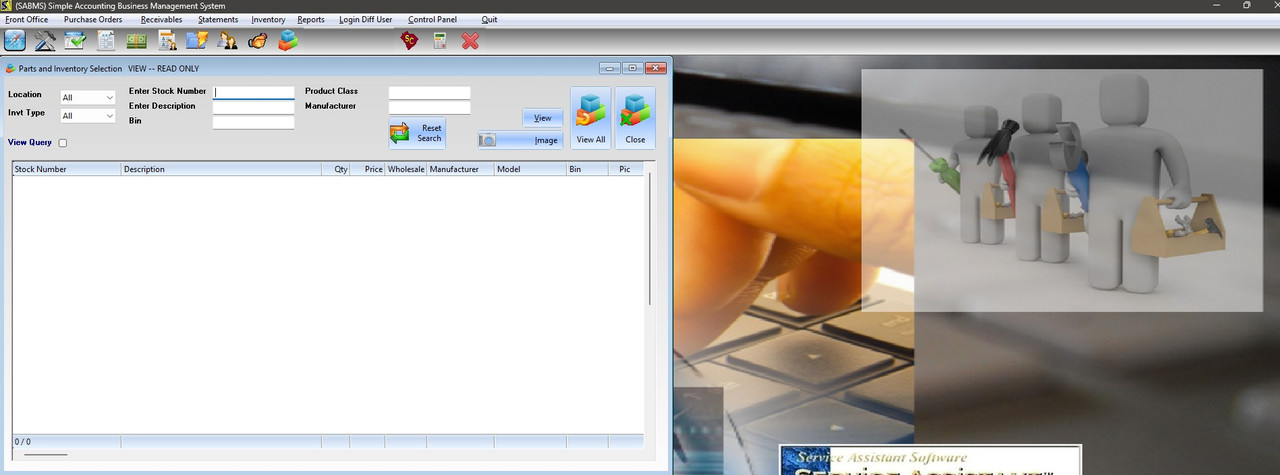
was hoping it was a simple as adding Center to the
DEFINE ICON oIco RESOURCE "INVENTORY"
DEFINE WINDOW oWndChildA ;
FROM 0,0 to 39,125 ;
MDICHILD ;
OF oWnd ;
ICON oIco ;
TITLE xTITLE
DEFINE DIALOG oInvt RESOURCE "INVTBROW" of oWndChildA
REDEFINE xBROWSE oLBX ;
RECORDSET oRsInvt ;
COLUMNS "INVENTORY ID", ;
"DESCRIPTION", ;
"QTY", ;
"PRICE", ;
"PRICE1", ;
"MANUFACTURER", ;
"MODEL", ;
"BIN", ;
"LOCATION", ;
"INVENTORY TYPE", ;
"PRODUCT CLASS", ;
"UNIT", ;
"MSRPRICE" ;
COLSIZES 160,295,40,50,60,98,105,60,50,50,95,50,50 ;
HEADERS "Stock Number", ;
"Description", ;
"Qty", ;
"Price", ;
"Wholesale", ;
"Manufacturer", ;
"Model", ;
"Bin", ;
"Location", ;
"Type", ;
"Prod Class", ;
"Unit", ;
"Msrp" ;
ID 172 of oInvt ;
AUTOCOLS LINES AUTOSORT CELL CENTER // <<----------------------------- center here ??
oLbx:lRecordSelector := .f.
oLbx:lFooter := .t.
oCol := oLbx:aCols[ 1 ]
oCol:bFooter := { || Ltrim( Str( oLbx:KeyNo() ) ) + " / " + LTrim( Str( oLbx:KeyCount() ) ) }
oLbx:bChange := { || oCol:RefreshFooter() }
// pic
ADD oCol to oLbx at 9 HEADER 'Pic' size 60 //60
oLbx:aCols[ 9 ]:addbmpfile( "dcam16" )
oLbx:aCols[ 9 ]:addbmpfile( "cam16" )
oLbx:aCols[ 9 ]:bBmpData := { | lValue | If(oRsInvt:eof, ,If( (empty(oRsInvt:Fields("PicFileName"):Value) .or.;
oRsInvt:Fields("PicFileName"):Value = " "), 1, 2 )) }
oLbx:aCols[ 9 ]:lBtnTransparent := .t.
oLbx:aCols[ 9 ]:nHeadStrAlign := AL_CENTER
WITH OBJECT oLbx
:lTabLikeExcel := .t.
END
_BrowColor( oLbx )
oLbx:bLDblClick := { |nRow,nCol | _InvtView( "V", oWnd, oWndChildA, oRsInvt,oLbx ) }
REDEFINE SAY oSay1 ID 129 OF oInvt UPDATE
oSay1:SetFont( oFontB )
REDEFINE SAY oSay2 ID 131 OF oInvt UPDATE
oSay2:SetFont( oFontB )
REDEFINE SAY oSay3 ID 136 OF oInvt UPDATE
oSay3:SetFont( oFontB )
REDEFINE SAY oSay4 ID 138 OF oInvt UPDATE
oSay4:SetFont( oFontB )
REDEFINE SAY oSay5 ID 141 OF oInvt UPDATE
oSay5:SetFont( oFontB )
REDEFINE SAY oSay6 ID 130 OF oInvt UPDATE
oSay6:SetFont( oFontB )
REDEFINE SAY oSay7 ID 133 OF oInvt UPDATE
oSay7:SetFont( oFontB )
REDEFINE SAY oSay8 ID 140 OF oInvt UPDATE
oSay8:SetFont( oFontB )
oSay8:SetColor( CLR_BLUE )
REDEFINE COMBOBOX oLoc1 var cLoc1 ID 127 of oInvt ;
ITEMS aLoc ;
ON CHANGE ( _Isearch( oStockno, cStockno, oDesc, cDesc, ;
oBin, cBin, cLoc1, cType1, oPclass, cPclass, oMan, cMan, oLbx, oRsInvt, @cQuery, oQuery)) ;
UPDATE
REDEFINE COMBOBOX oType1 var cType1 ID 135 of oInvt ;
ITEMS aType1 ;
ON CHANGE ( _Isearch( oStockno, cStockno, oDesc, cDesc, ;
oBin, cBin, cLoc1, cType1, oPclass, cPclass, oMan, cMan, oLbx, oRsInvt, @cQuery, oQuery)) ;
UPDATE
REDEFINE CHECKBOX oViewQuery var lViewQuery ID 174 of oInvt ;
ON CLICK ( _ViewQuery( lViewQuery,oQuery) )
REDEFINE GET oStockno var cStockno ID 137 of oInvt ;
ON CHANGE ( _Isearch( oStockno, cStockno, oDesc, cDesc, ;
oBin, cBin, cLoc1, cType1, oPclass, cPclass, oMan, cMan, oLbx, oRsInvt,@cQuery, oQuery)) ;
UPDATE
REDEFINE GET oDesc var cDesc ID 139 of oInvt ;
ON CHANGE ( _Isearch( oStockno, cStockno, oDesc, cDesc, ;
oBin, cBin, cLoc1, cType1, oPclass, cPclass, oMan, cMan, oLbx, oRsInvt,@cQuery, oQuery)) ;
UPDATE
REDEFINE GET oBin var cBin ID 142 of oInvt ;
ON CHANGE ( _Isearch( oStockno, cStockno, oDesc, cDesc, ;
oBin, cBin, cLoc1, cType1, oPclass, cPclass, oMan, cMan, oLbx, oRsInvt,@cQuery, oQuery)) ;
UPDATE
REDEFINE GET oPclass var cPclass ID 128 of oInvt ;
ON CHANGE ( _Isearch( oStockno, cStockno, oDesc, cDesc, ;
oBin, cBin, cLoc1, cType1, oPclass, cPclass, oMan, cMan, oLbx, oRsInvt,@cQuery, oQuery)) ;
UPDATE
REDEFINE GET oMan var cMan ID 132 of oInvt ;
ON CHANGE ( _Isearch( oStockno, cStockno, oDesc, cDesc, ;
oBin, cBin, cLoc1, cType1, oPclass, cPclass, oMan, cMan, oLbx, oRsInvt,@cQuery, oQuery)) ;
UPDATE
REDEFINE GET oQuery var cQuery ID 134 of oInvt READONLY
REDEFINE BTNBMP oBtn8 ID 147 of oInvt ; // reset search
RESOURCE "RELOAD", "DRELOAD", "DRELOAD" ;
PROMPT "Reset"+CRLF+"Search" LEFT 2007;
ACTION ( oRsInvt:Filter := "[Inventory Id] = 'bogus'",;
cLoc1 := "All",;
cType1 := "All",;
cStockno := space(50),;
cDesc := space(50),;
cBin := space(50),;
cPclass := space(50),;
cMan := space(50),;
oLoc1:ReFresh(),;
oType1:ReFresh(),;
oStockno:ReFresh(),;
oStockno:ReFresh(),;
oDesc:ReFresh(),;
oBin:Refresh(),;
oPclass:ReFresh(),;
oMan:ReFresh(),oLbx:ReFresh() )
REDEFINE BTNBMP oBtn1 ID 160 PROMPT "View All" ;
RESOURCE "INVTALL" ;
of oInvt 2007 ;
ACTION ( oRsInvt:Filter := "",oLbx:ReFresh(),oLbx:SetFocus(),SysReFresh())
REDEFINE BTNBMP oBtn2 ID 161 PROMPT "&Add" CENTER ;
of oInvt 2007 ;
ACTION ( _InvtView( "A", oWnd, oWndChildA, oRsInvt,oLbx ))
REDEFINE BTNBMP oBtn3 ID 144 PROMPT "&Edit" CENTER ;
of oInvt 2007 ;
ACTION ( _InvtView( "E", oWnd, oWndChildA, oRsInvt,oLbx ))
REDEFINE BTNBMP oBtn4 ID 143 PROMPT "&Del" CENTER ;
of oInvt 2007 ;
Action _DeleteUm(oRsInvt,oLbx)
* action nil // dont forget to delete jInventoryTaxes
REDEFINE BTNBMP oBtn5 ID 145 PROMPT "&View" CENTER ;
of oInvt 2007 ;
ACTION ( _InvtView( "V", oWnd, oWndChildA, oRsInvt,oLbx ))
REDEFINE BTNBMP oBtn6 ID 146 PROMPT "&Image" LEFT ;
RESOURCE "CAMERA" ;
of oInvt 2007 ;
ACTION ( _ZoomFromBrow( oRsInvt,oWnd ))
REDEFINE BTNBMP oBtn7 ID 162 PROMPT "Close" ;
RESOURCE "INVTCANC" ;
of oInvt 2007 ;
ACTION (oWndChildA:End())
ACTIVATE DIALOG oInvt NOMODAL ;
ON INIT( If( lViewQuery = .t., oQuery:Show(),oQuery:Hide() ),;
_Hidum( cMode,oBtn2,oBtn3,oBtn4) );
VALID(!GETKEYSTATE( 27 ))
ACTIVATE WINDOW oWndChildA ;
ON INIT ( oInvt:Move( 0,0, oWndChildA:nWidth, oWndChildA:nHeight, .T. ), ;
oWndChildA:bResized := {|| _ReSizeUm1( oInvt,oWndChildA,oLbx) }, ;
oInvt:refresh(.t.));
VALID ( IIF( !lOK3, ExitPgm3(.T.,oWndChildA,oRsInvt,oLbx,@lOk3,oFontB), .F. ))