FiveTech Support Forums

FiveWin / Harbour / xBase community
Board index mod_harbour HIX - Opcion Loader no funciona en Windows Server
Posts: 476
Joined: Sat Feb 03, 2007 06:36 AM
HIX - Opcion Loader no funciona en Windows Server
Posted: Wed Dec 24, 2025 06:53 PM

Hola Carles.
He probado la opcion:

Harbour Web Server, Vrs. 1.1 (r2511091314)
==========================================
Loader            Config loader modules

Y en mi computadora de desarrollo con Windows 11 funciona muy bien, pero al tratar de hacerlo en un servidor con Windows Server 2022, no funcionó lamentablemente. No carga los archivos que se le indican, pero como ya dije antes, en Windows 11 si funciona y tengo todo igual, en los mismos directorios en los dos Windows.

Te ha pasado esto Carles?

Saludos cordiales.

Carlos.

Posts: 44158
Joined: Thu Oct 06, 2005 05:47 PM
Re: HIX - Opcion Loader no funciona en Windows Server
Posted: Wed Dec 24, 2025 06:57 PM

Based on the screenshot you provided, it appears the user csincuir is encountering a classic and frustrating "It works on my machine" scenario with Harbour Web Server (HIX).

Here is an analysis of the problem and a breakdown of the most likely technical causes for why this works on Windows 11 (Development) but fails on Windows Server 2022 (Production).

Summary of the Issue

  • Software: Harbour Web Server, Version 1.1.
  • Feature Failing: The "Loader" option (Config loader modules).
  • Symptom: The server fails to load the indicated files/modules on Windows Server 2022.
  • Context: The directory structure and configuration are allegedly identical to the Windows 11 machine where it works perfectly.

---

Troubleshooting "Windows 11 vs. Windows Server" Discrepancies

Since the user claims the files and directories are identical, the issue is almost certainly environmental. Here are the most probable culprits to investigate:

1. File Permissions (The #1 Suspect)

Windows Server has significantly stricter default security than Windows 11.

  • The Issue: On Windows 11, the user is likely running the application as a local admin or a logged-in user with full rights to the folder. On Windows Server, if HIX is running as a Service (or even a standard user), it may not have Read/Execute permissions for the specific module files it is trying to load.
  • Solution: Check the Security tab of the folder where the modules reside. Ensure the user account running the HIX process has explicit access.

2. "Blocked" Files (Zone.Identifier)

  • The Issue: When files are copied from one computer to another (or downloaded) to a Windows Server, the OS often "blocks" execution of DLLs or executables as a security measure. Windows 11 might be more lenient or the user might have unblocked them previously.
  • Solution: Right-click the module files on the Server, go to Properties, and look for a checkbox at the bottom that says "Unblock" (Desbloquear).

3. Missing Dependencies (C++ Runtimes)

  • The Issue: Windows 11 (a desktop OS) comes pre-installed with many Visual C++ Redistributables and libraries to support games and apps. Windows Server 2022 is "cleaner" and minimal.
  • Solution: The "Loader" might be trying to load a DLL that depends on a C++ runtime that is missing on the server. Using a tool like Dependency Walker on the module files would reveal if they are missing system DLLs.

4. Execution Path vs. Working Directory

  • The Issue: If the application is launched differently on the Server (e.g., via a Task Scheduler, a Service, or a startup script), the "Current Working Directory" might default to C:\Windows\System32 instead of the application's folder.
  • Solution: Ensure the configuration uses absolute paths for the loader modules, or that the startup script explicitly sets the working directory before launching HIX.

5. Data Execution Prevention (DEP)

  • The Issue: Windows Server often enforces hardware-based DEP more strictly for non-system services, which can prevent legacy or dynamic code loading (common in Harbour/xBase applications).
  • Solution: Check if the HIX executable needs to be added to the DEP exclusion list in System Properties.

---

Drafting a Reply

If you are planning to reply to "csincuir", here is a suggested technical response in Spanish that addresses these points:

"Hola Carlos/csincuir,
Esto suele ocurrir por las políticas de seguridad de Windows Server, que son más estrictas que en Windows 11. Te sugiero revisar 3 cosas:

  1. Permisos de Archivo: Asegúrate de que los archivos que intentas cargar no estén "Bloqueados". Haz clic derecho en el archivo -> Propiedades -> casilla "Desbloquear" (Unblock).
  2. Dependencias: Windows Server no trae las librerías Visual C++ (Redistributables) que Windows 11 sí trae. Es posible que el módulo requiera una DLL que falta en el servidor.
  3. Rutas: Si ejecutas HIX como servicio, el "directorio de trabajo" puede ser distinto. Intenta usar rutas absolutas en la configuración.

¡Espero que sirva!"


---

Next Step: Would you like me to help you verify the dependencies of a specific Harbour file, or explain how to check the permissions on the server?

regards, saludos

Antonio Linares
www.fivetechsoft.com
Posts: 1283
Joined: Fri Feb 10, 2006 02:34 PM
Re: HIX - Opcion Loader no funciona en Windows Server
Posted: Thu Dec 25, 2025 11:05 AM

Hola

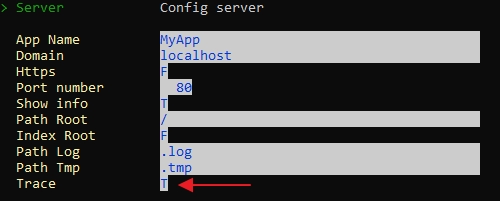
Te da algun error ? Lo que tendrias de hacer es activar "Trace" con el comando server

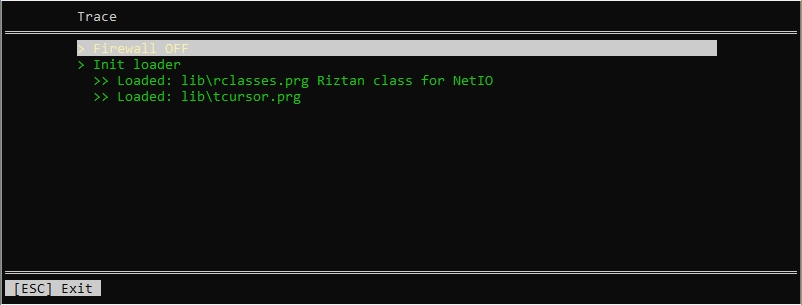
Cuando arrancas el servidor, HIX de teda un resumen de los principales parametros que ejecuta en el servidor antes de arrancar, entre ellos el loader. Y si tienes errores te los mostaria

C.

Salutacions, saludos, regards

"...programar es fácil, hacer programas es difícil..."

UT Page -> https://carles9000.github.io/
Forum UT -> https://discord.gg/bq8a9yGMWh
HIX -> https://github.com/carles9000/hix
Posts: 476
Joined: Sat Feb 03, 2007 06:36 AM
Re: HIX - Opcion Loader no funciona en Windows Server
Posted: Fri Dec 26, 2025 12:58 AM

Carles, definitivamente cada día se aprende algo nuevo. Con la opción "Trace" del comando "server" me pude dar cuenta que tenía una función repetida en mi programa. Corregí el problema y todo funcionó correctamente en el servidor Windows Server 2022.

Gracias Carles, cada día entiendo mas como funciona Hix.

Saludos cordiales.

Carlos.

Continue the discussion