FiveTech Support Forums

FiveWin / Harbour / xBase community
Board index FiveWin para Harbour/xHarbour Poner color a celdas de excel
Posts: 3358
Joined: Fri Oct 07, 2005 08:20 PM
Poner color a celdas de excel
Posted: Wed Feb 25, 2026 10:45 PM

Hola Foreros:

Busque en el foro pero no encontré la solución.

Necesito poner color a unas celdas de una hoja de excel.

Por favor un ejemplo

Saludos

SOI, s.a. de c.v.
estbucarm@gmail.com
http://www.soisa.mex.tl/
http://sqlcmd.blogspot.com/
Tel. (722) 174 44 45
Carpe diem quam minimum credula postero
Posts: 44158
Joined: Thu Oct 06, 2005 05:47 PM
Re: Poner color a celdas de excel
Posted: Wed Feb 25, 2026 11:10 PM

Estimado Armando,

Range("A1").Interior.ColorIndex = 3

Range("A2").Interior.ColorIndex = 5

Range("B2").Interior.Color = RGB(144, 238, 144)

regards, saludos

Antonio Linares
www.fivetechsoft.com
Posts: 8515
Joined: Tue Dec 20, 2005 07:36 PM
Re: Poner color a celdas de excel
Posted: Thu Feb 26, 2026 10:31 AM
// C:\FWH\SAMPLES\EXCCOLOR.PRG

#include "FiveWin.ch"

FUNCTION Excel_Colores()

LOCAL oExcel, oBook, oSheet

oExcel := TOleAuto():New( "Excel.Application" )
oBook  := oExcel:Workbooks:Add()
oSheet := oBook:ActiveSheet

// Poner datos
oSheet:Cells( 1, 1 ):Value := "Celda Azul"
oSheet:Cells( 2, 1 ):Value := "Celda Roja"
oSheet:Cells( 3, 1 ):Value := "Rango Amarillo"

// Cambiar colores
oSheet:Cells( 1, 1 ):Interior:Color := RGB( 0, 112, 192 ) // Azul oscuro
oSheet:Cells( 1, 1 ):Font:Color := CLR_WHITE              // Letra blanca

oSheet:Cells( 2, 1 ):Interior:ColorIndex := 3             // Rojo estándar

oSheet:Range( "A3:C3" ):Interior:Color := CLR_YELLOW      // Rango amarillo

oExcel:Visible := .T.

RETURN NIL

Regards, saludos.

João Santos - São Paulo - Brasil - Phone: +55(11)95150-7341
Posts: 1144
Joined: Mon Feb 05, 2007 07:15 PM
Re: Poner color a celdas de excel
Posted: Thu Feb 26, 2026 04:02 PM

Paisano !!!

  cRange :=  "A" + CSTR2(nRowIni ) + ":" + "J"+CSTR2( nRowFin ) 
  oRange := ::oSheet:Range( cRange )
  oRange:Interior:Color:= CLR_YELLOW
  oRange:Font:Color    := rgb(0,0,0)
  oRange:Font:Bold     := .t.
  oRange:Borders():LineStyle  := 2

Saludos !!!

Cesar Cortes Cruz

SysCtrl Software

Mexico


' Sin +- FWH es mejor "
Posts: 195
Joined: Sat Oct 22, 2005 01:17 PM
Re: Poner color a celdas de excel
Posted: Thu Feb 26, 2026 04:45 PM

Estimado César

Podríamos charlar por teams

Saludos Oscar

Saludos

Oscar

Fwh 23.10, bcc55

Posts: 8515
Joined: Tue Dec 20, 2005 07:36 PM
Re: Poner color a celdas de excel
Posted: Thu Feb 26, 2026 05:13 PM
sysctrl2 wrote:

Paisano !!!

  cRange :=  "A" + CSTR2(nRowIni ) + ":" + "J"+CSTR2( nRowFin ) 
  oRange := ::oSheet:Range( cRange )
  oRange:Interior:Color:= CLR_YELLOW
  oRange:Font:Color    := rgb(0,0,0)
  oRange:Font:Bold     := .t.
  oRange:Borders():LineStyle  := 2

Saludos !!!

Estimado César, ¿podrías proporcionarme un ejemplo completo para fines de documentación? ¿Con el mismo estilo que el que publiqué? Sería ideal.

Gracias,

Regards, saludos.

João Santos - São Paulo - Brasil - Phone: +55(11)95150-7341
Posts: 3358
Joined: Fri Oct 07, 2005 08:20 PM
Re: Poner color a celdas de excel
Posted: Thu Feb 26, 2026 05:49 PM

Amigos todos:

Muchas gracias por el decidido apoyo.

Todas las soluciones funcionan.

Hermoso foro.

Un abrazo

SOI, s.a. de c.v.
estbucarm@gmail.com
http://www.soisa.mex.tl/
http://sqlcmd.blogspot.com/
Tel. (722) 174 44 45
Carpe diem quam minimum credula postero
Posts: 1144
Joined: Mon Feb 05, 2007 07:15 PM
Re: Poner color a celdas de excel
Posted: Fri Feb 27, 2026 05:00 PM

Preparo un ejemplo funcional y lo pongo aqui, saludos !

Cesar Cortes Cruz

SysCtrl Software

Mexico


' Sin +- FWH es mejor "
Posts: 3358
Joined: Fri Oct 07, 2005 08:20 PM
Re: Poner color a celdas de excel
Posted: Fri Feb 27, 2026 06:55 PM

Gracias Paisano !

SOI, s.a. de c.v.
estbucarm@gmail.com
http://www.soisa.mex.tl/
http://sqlcmd.blogspot.com/
Tel. (722) 174 44 45
Carpe diem quam minimum credula postero
Posts: 1144
Joined: Mon Feb 05, 2007 07:15 PM
Re: Poner color a celdas de excel
Posted: Fri Feb 27, 2026 08:40 PM

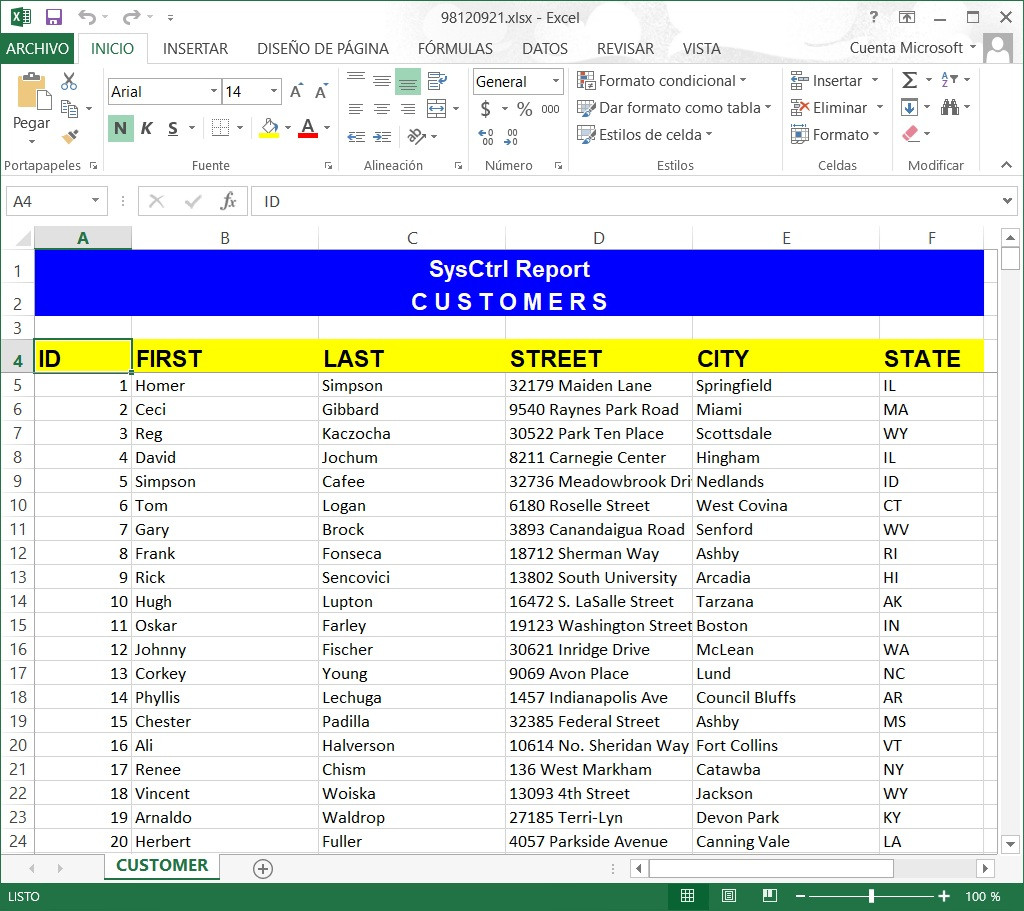
Amigos aquí un ejemplo
Generación de reportes en Excel
mejor técnica cuando es mucha información

#include "fivewin.ch"

/*
 - Reporte en Excel
 - by Cesar SysCtrl Software
 - 27-02-2026
 - fwh/samples
 - Buildh TESTXLS
*/

STATIC oExcel, oSheet, oBook, cFileXls
STATIC nRow, cText, oClip
STATIC nFormat, nPasteRow
STATIC cCust

REQUEST DBFCDX

FUNCTION Main()

   USE CUSTOMER NEW SHARED VIA "DBFCDX"
   SET ORDER TO TAG FIRST
   cCust := Alias()
   GO TOP
   browse()

   IF ! MsgYesNo("Enviamos los clientes a Excel ?")
      Return nil
   ENDIF

   SendToXls()

   DbCloseAll()

RETURN (.T.)

STATIC FUNCTION SendToXls()

   cFileXls := cTempFile(  "\"+CurDir()+'\tmp\'  , ".xlsx" )

   /*Iniciamos el Objete Excel*/
   IF ! InitObjectXls()
      RETURN NIL
   ENDIF

   /*datos a mostrar*/
   DatosCustomer()

   /*otras configuraciones del reporte*/
   SetupPage()

   /*finalizamos el objeto*/
   EndObjectXls()

RETURN (.T.)

STATIC FUNCTION InitObjectXls()
   LOCAL oError

   TRY
      oExcel := TOleAuto():New( "Excel.Application" )
   CATCH
   TRY
      oExcel := CreateObject( "Excel.Application" )
      CATCH oError
         Alert( "ERROR! al crear el objeto [" + Ole2TxtError()+ "]" + oError:description )
         RETURN .f.
      END
   END

   nRow := 1
   oExcel := CREATEOBJECT( "Excel.Application" )

   oBook  := oExcel:WorkBooks:Add()
   oSheet := oBook:Worksheets(1)
   oSheet:name := "CUSTOMER"
   oExcel:Sheets( "CUSTOMER"  ):Select()
   oSheet := oExcel:Get( "ActiveSheet" )
   nFormat := oBook:Get("FileFormat")
   oExcel:Visible = .T.

   cText := ""

RETURN .T.

STATIC Function EndObjectXls()

   if ! Empty( cText )
      oClip:SetText( cText )
      oSheet:Cells( nPasteRow, 1 ):Select()
      oSheet:Paste()
      oClip:Clear()
      cText    := ""
  endif

  if !File( "tmp" )
      lMkDir( "tmp" )
  endif

  TRY
    oBook:saveAS( cFileXls, nFormat )
  CATCH
    if !File( "C:\TEMP" )
      lMkDir( "C:\TEMP" )
    endif
    cFileXls := cTempFile(  'C:\temp\'  , ".xlsX" )
    oBook:saveAS( cFileXls , nFormat )
  END

  oExcel:Quit()

  MSGRUN( "Exportando a excel, por favor espere un momento: ", "Usuario", {|| Shellexecute( 0,"open", cFileXls )  } )
RETURN NIL

STATIC FUNCTION DatosCustomer()
   Encabezado()
   Titulos()
   Customers()
RETURN (.T.)

STATIC FUNCTION Encabezado()
   LOCAL nRowIni := 1
   LOCAL nRowFin := 2
   LOCAL cRange, oRange

   oSheet:Rows(nRow):RowHeight = 20 //ALTO DEL RENGLON
   oSheet:Cells( nRow, 1 ):Value = "SysCtrl Report"
   nRow ++
   oSheet:Rows(nRow):RowHeight = 20
   oSheet:Cells( nRow, 1 ):Value = "C U S T O M E R S"
   nRow +=2

   /*centramos los encabezados */
   cRange :=  "A" + Alltrim( cstr(nRowIni ) ) + ":" + "F"+Alltrim(cstr(nRowFin))
   oRange := oSheet:Range( cRange )
   oRange:Interior:Color:= CLR_HBLUE
   oRange:Font:Color    := CLR_WHITE
   oRange:Font:Name := "Arial"
   oRange:Font:Bold     := .t.
   oRange:Font:Size     := 14
   oRange:HorizontalAlignment := 7 //CENTRA EL RANGO DE CELDAS

RETURN (NIL)

STATIC FUNCTION Titulos()
   LOCAL cRange, oRange

   oSheet:Rows(nRow):RowHeight = 20
   oSheet:Cells( nRow, 1 ):Value = "ID"
   oSheet:Cells( nRow, 2 ):Value = "FIRST"
   oSheet:Cells( nRow, 3 ):Value = "LAST"
   oSheet:Cells( nRow, 4 ):Value = "STREET"
   oSheet:Cells( nRow, 5 ):Value = "CITY"
   oSheet:Cells( nRow, 6 ):Value = "STATE"

   cRange :=  "A" + Alltrim( cstr(nRow ) ) + ":" + "F"+Alltrim(cstr(nRow))
   oRange := oSheet:Range( cRange )
   oRange:Interior:Color:= CLR_YELLOW
   oRange:Font:Color    := CLR_BLACK
   oRange:Font:Name := "Arial"
   oRange:Font:Bold     := .t.
   oRange:Font:Size     := 14

   nRow++

RETURN (nil)

STATIC FUNCTION Customers()
   nPasteRow := nRow
   oClip := TClipBoard():New()
   cText := ""
   dbselectArea(cCust)
   DbGoTop()
   WHILE ! (cCust)->(Eof())
      cText += cStr( field->id )
      cText += chr(9) + field->first
      cText += chr(9) + field->last
      cText += chr(9) + field->street
      cText += chr(9) + field->city
      cText += chr(9) + field->state
      cText += CRLF
      nRow++
      

  if Len( cText ) > 16000
     oClip:SetText( cText )
     oSheet:Cells( nPasteRow, 1 ):Select()
     oSheet:Paste()
     oClip:Clear()
     cText       := ""
     nPasteRow   := ::nRow
  endif

  
  SysRefresh()
  DbSkip()
   END
RETURN (.T.)

STATIC FUNCTION SetupPage()
   oExcel:Range( "5:5" ):Select() //despues de los titulos hace un freeze
   oExcel:Application:ActiveWindow:FreezePanes := .T.

   /*ANCHO DE COLUMNAS*/
   oSheet:Columns("A:A"):ColumnWidth := 10
   oSheet:Columns("B:B"):ColumnWidth := 20
   oSheet:Columns("C:C"):ColumnWidth := 20
   oSheet:Columns("D:D"):ColumnWidth := 20
   oSheet:Columns("E:E"):ColumnWidth := 20

   /*AUTO ColumnWidth*/
   //oSheet:Columns( "A:F" ):AutoFit()

RETURN (NIL)
Saludos
Cesar SysCtrl Software :)

Cesar Cortes Cruz

SysCtrl Software

Mexico


' Sin +- FWH es mejor "
Posts: 1144
Joined: Mon Feb 05, 2007 07:15 PM
Re: Poner color a celdas de excel
Posted: Fri Feb 27, 2026 10:00 PM

un pequeño cambio en esta funcion

STATIC FUNCTION Customers()
   nPasteRow := nRow
   oClip := TClipBoard():New()
   cText := ""
   dbselectArea(cCust)
   DbGoTop()
   WHILE ! (cCust)->(Eof())
      cText += cStr( field->id )
      cText += chr(9) + field->first
      cText += chr(9) + field->last
      cText += chr(9) + field->street
      cText += chr(9) + field->city
      cText += chr(9) + field->state
      cText += CRLF
      nRow++
      if Len( cText ) > 16000
         oClip:SetText( cText )
         oSheet:Cells( nPasteRow, 1 ):Select()
         oSheet:Paste()
         oClip:Clear()
         cText       := ""
         nPasteRow   := ::nRow
      endif

  SysRefresh()
  DbSkip()
   END
RETURN (.T.)
Cesar Cortes Cruz

SysCtrl Software

Mexico


' Sin +- FWH es mejor "
Posts: 3358
Joined: Fri Oct 07, 2005 08:20 PM
Re: Poner color a celdas de excel
Posted: Fri Feb 27, 2026 11:57 PM

Muchas gracias paisano

SOI, s.a. de c.v.
estbucarm@gmail.com
http://www.soisa.mex.tl/
http://sqlcmd.blogspot.com/
Tel. (722) 174 44 45
Carpe diem quam minimum credula postero

Continue the discussion