

Hello friends,
The Problem: Why Web Development feels like Chaos to a Harbour Dev
In the Harbour world, we are kings of our environment. When a user opens a mask to edit a customer record, we know exactly who they are, we have an active lock on the DBF, and our variables stay in memory until we explicitly clear them.
In PHP, everything is different. Every time a user clicks "Save," the server "forgets" who the user is. It’s like a new person walking into your office every 5 seconds. To make it worse, data hits you from three different sides:
The URL (GET): ?app=zimmerplan&id=500
The Form (POST): Data from an input field.
The Modern Way (JSON Payload): Hidden data sent by JavaScript (e.g., {"action": "save"}).
The Use Case: Imagine you are writing a "Save Customer" routine. In standard PHP, you’d have to manually check: Is the user logged in? Did the ID come via the URL or the Form? Did they change their IP address since they logged in? If you forget one check in just one file, you have a security hole.
To bring back that "Harbour-like" stability and control, I’ve developed a pattern called the SSOT (Single Source of Truth) Request Adapter.
The Architecture: The "Security Funnel"
Instead of fishing for variables in $GET or $POST, we use a central Gateway (Router) and a Security Funnel (SSOT Adapter). By the time your business logic starts, you receive a single, taxatively defined array called $in.
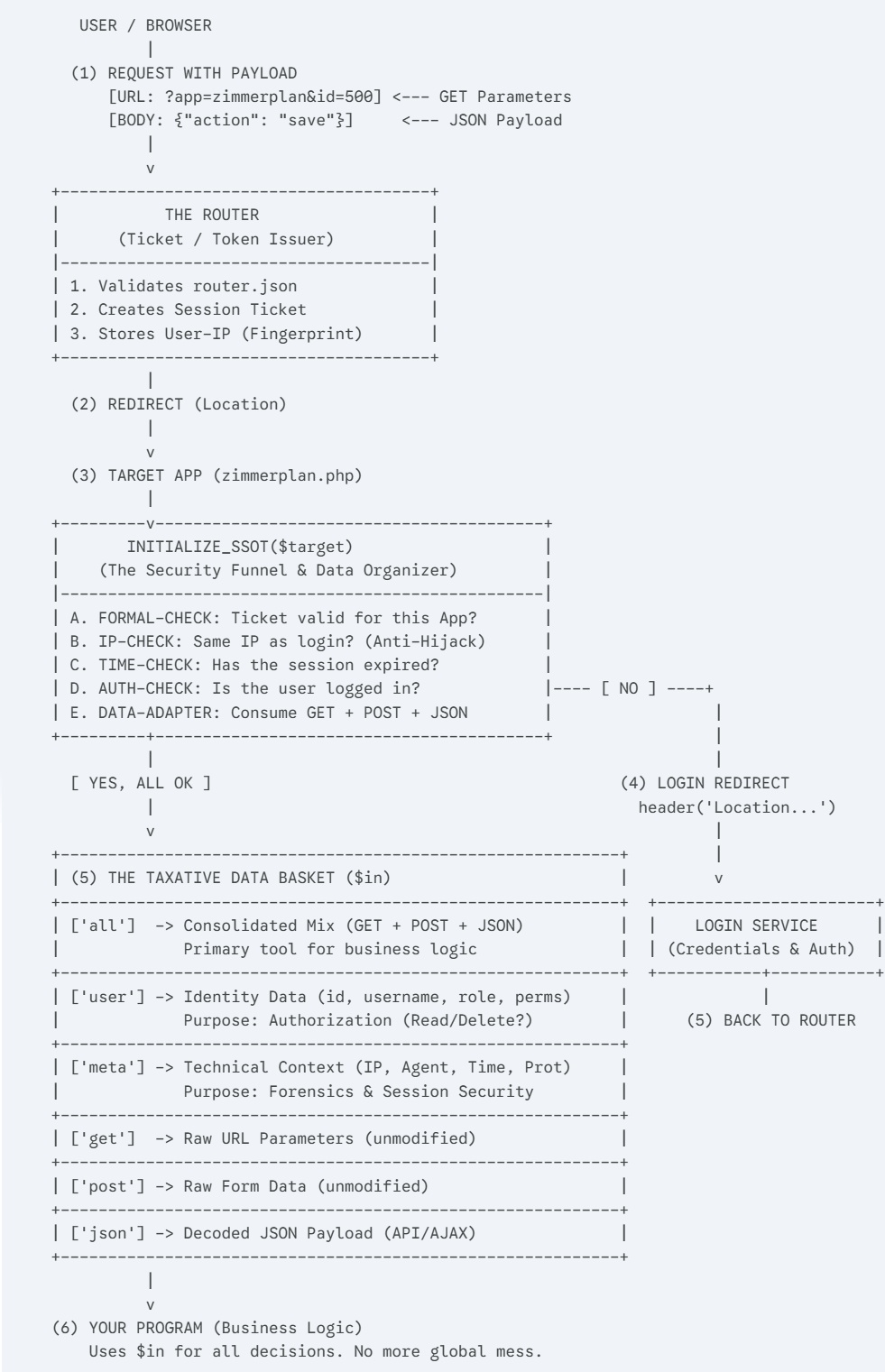
Why this works for us:
Strict Taxonomy: You know exactly what’s in the box. $in['user']['role'] tells you who is there, and $in['all']['id'] gives you the record ID, regardless of how it was sent.
Fail-Safe Redirection: If the "Security Funnel" detects an issue (expired session, IP change), it automatically shunts the user back to the Login Service (the red path in the schema).
Forensics: The ['meta'] block is a lifesaver for debugging. You can log exactly which browser and IP sent which JSON payload at what microsecond.
Clean Logic: Your actual application code (Step 6) stays 100% clean of security checks. It only runs if the environment is safe.
In Harbour terms, this is like having a pre-processed LPARAMETERS object that is guaranteed to be authenticated before your procedure even begins.
Think of this like a Header File in C or a Library in Harbour. By placing one single require at the very top of your PHP file, you activate the entire security funnel, the session tracking, and the data normalization. You don't just 'start a script'; you 'join the architecture'.
<?php
declare(strict_types=1);

/* -------------------------------------------------------------------------
   1. LOADING THE ADAPTER
   We use DOCUMENT_ROOT to ensure the path is always absolute from the base,
   regardless of how deep your script is located in subfolders.
   ------------------------------------------------------------------------- */
require_once $_SERVER['DOCUMENT_ROOT'] . '/shared/log_functions.php';
require_once $_SERVER['DOCUMENT_ROOT'] . '/shared/ssot_adapter.php';

/* -------------------------------------------------------------------------
   2. INITIALIZATION (The "Gatekeeper")
   This is where you define:
   - The target (App name for the Router-Check)
   - The required HTTP method (POST/GET)
   - The line number for the forensic log (__LINE__)
   ------------------------------------------------------------------------- */
$in = initialize_ssot('zimmerplan', 'POST', __LINE__);

/* -------------------------------------------------------------------------
   3. YOUR APPLICATION LOGIC
   From this point forward, you work exclusively with the "Data Basket" $in.
   The heavy lifting of security and sanitization is already done.
   ------------------------------------------------------------------------- */

if ($in['all']['action'] === 'save') {
    logline("PROCESS", "Saving room data for ID: " . $in['all']['id'], __LINE__);
    // ... your business logic goes here
}