

Dear Richard,
You do need updated FWH libs.
Please let me know which ones you need: 32 or 64, bcc or msvc ?
Dear Richard,
You do need updated FWH libs.
Please let me know which ones you need: 32 or 64, bcc or msvc ?
TFolderEx is located on the left.
Dear Yuri,
Here are the answers to both of your questions about
When you set the layout to
if ::nLayOut == LAYOUT_RIGHT .OR. ::nLayOut == LAYOUT_LEFT
   oFont := ::oFont:Escapement( If( ::nLayOut == LAYOUT_RIGHT, 2700, 900 ) )
   ::SetFont( oFont )
   oFont:End()
endif
``` [0-cite-0](#0-cite-0)

For `LAYOUT_LEFT`, the escapement is set to `900` (90 degrees), which rotates text bottom-to-top. The `PaintLR()` method then draws this rotated text using `DrawTextTransparent()`. [0-cite-1](#0-cite-1)

The same applies in `SetLayOut()` — switching to LEFT/RIGHT at runtime also recreates the font with the proper escapement: [0-cite-2](#0-cite-2)

So if you use `LEFT` in the command syntax, text is already written vertically. No extra work needed.

---

## 2. Even tab distribution — Use `STRETCH`

By default, each tab's size (height in LEFT layout) is calculated from the text width of its prompt:

```prg
nWidth = GetTextWidth( 0, StrTran( ::aPrompts[ n ], "&", "" ), ::oFont:hFont ) + TXTLPAD + TXTRPAD + nBmpWidth
``` [0-cite-3](#0-cite-3)

This is why tabs have different sizes depending on prompt length.

To make tabs **evenly distributed over the entire height** of the TFolderEx, use the **`STRETCH`** clause:

```prg
@ 0, 0 FOLDEREX oFld PIXEL ;
   PROMPT "Tab1", "Tab2", "Tab3" ;
   SIZE 200, 400 ;
   LEFT STRETCH
``` [0-cite-4](#0-cite-4)

Or set it programmatically:

```prg
oFld:lStretch := .T.
oFld:CalPos()
oFld:Refresh()
When
The stretch algorithm gives extra space to tabs that are smaller than the average, while tabs already larger keep their natural width. This effectively distributes them across the full height.
The perpendicular dimension (how wide the tab strip is on the left side) is controlled by
@ 0, 0 FOLDEREX oFld PIXEL ;
   PROMPT "Tab1", "Tab2", "Tab3" ;
   TAB HEIGHT 40 ;
   SIZE 200, 400 ;
LEFT STRETCHIf you need precise control over individual tab sizes, you can directly modify the
Everything is working fine. Thanks !
Is it possible with the FolderEx position Left or Right to show the text in bookmarks like this:
            T
            E
            S
TDear Yuri,
No, TFolderEx does not have built-in support for stacked vertical text (characters one below another like a column). What it currently supports is rotated text — the entire string is drawn at a 90° angle using font escapement.
The cleanest solution is to modify PaintLR() in source/classes/tfoldex.prg to add the same Chr(13) multiline support that PaintTB() has, combined with using a non-rotated font when multiline prompts are detected.
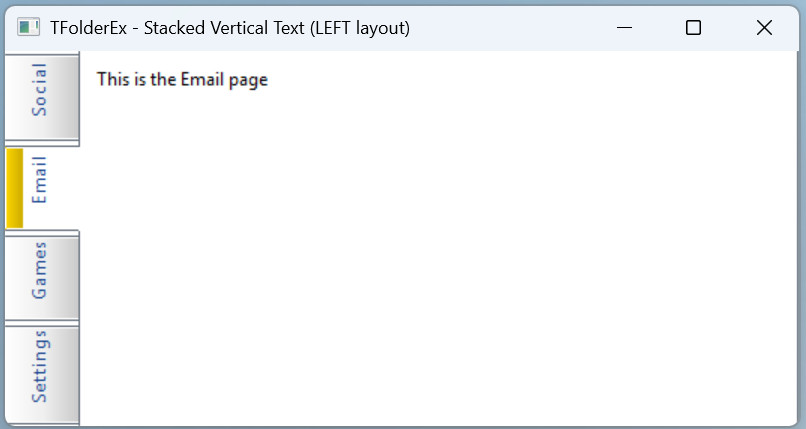
We have already enhanced method PaintLR() so this example works fine:
FWH\samples\test\testfx6.prg
// TFolderEx - Stacked vertical text on LEFT tabs using Chr(13)
// Demonstrates multiline support in PaintLR() for LEFT/RIGHT layouts

#include "FiveWin.ch"

function main()

   local oWnd, oFld

   DEFINE WINDOW oWnd TITLE "TFolderEx - Stacked Vertical Text (LEFT layout)"

   @ 3, 3 FOLDEREX oFld PIXEL ADJUST ;
      PROMPT StackVert( "Social" ), ;
             StackVert( "Email" ), ;
             StackVert( "Games" ), ;
             StackVert( "Settings" ) ;
      TAB HEIGHT 50 ;
      LEFT STRETCH

   @ 10, 10 SAY "This is the Social page"    OF oFld:aDialogs[ 1 ] PIXEL TRANSPARENT
   @ 10, 10 SAY "This is the Email page"     OF oFld:aDialogs[ 2 ] PIXEL TRANSPARENT
   @ 10, 10 SAY "This is the Games page"     OF oFld:aDialogs[ 3 ] PIXEL TRANSPARENT
   @ 10, 10 SAY "This is the Settings page"  OF oFld:aDialogs[ 4 ] PIXEL TRANSPARENT

   ACTIVATE WINDOW oWnd ;
      ON INIT oFld:Resize()

RETURN NIL

//----------------------------------------------------------------------------//
// Helper function: inserts Chr(13) + Chr(10) between each character

FUNCTION StackVert( cText )

   LOCAL cResult := ""
   LOCAL i

   FOR i := 1 TO Len( cText )
      cResult += SubStr( cText, i, 1 )
      IF i < Len( cText )
         cResult += Chr( 13 ) + Chr( 10 )
      ENDIF
   NEXT

RETURN cResult
Please let me know if you are using 32 bits and bcc, so we email you the updated FWH libs :idea:
Understood. Thank you. I'll try.
Please let me know if you are using 32 bits and bcc, so we email you the updated FWH libs
Antonio Linares wrote:Please let me know if you are using 32 bits and bcc, so we email you the updated FWH libs
Dear Antonio,
This is fwh2512 not upgrade and show it.
Antonio Linares wrote:Dear Richard,
You do need updated FWH libs.
Please let me know which ones you need: 32 or 64, bcc or msvc ?
Dear Antonio,
I test 32bit with bcc. 64bit bcc later...
Dear Richard,
Modified FWH libs (TFolderEx and cGetFile()) sent to your email :!:
Antonio Linares wrote:Dear Richard,
Modified FWH libs (TFolderEx and cGetFile()) sent to your email :!:
Dear Antonio,
I got it and work fine.
