FiveTech Support Forums

FiveWin / Harbour / xBase community
Board index FiveWin for Harbour/xHarbour Harbourino idea: form fields as template blocks
Posts: 6983
Joined: Fri Oct 07, 2005 07:07 PM
Harbourino idea: form fields as template blocks
Posted: Thu Mar 05, 2026 03:05 PM

Harbourino idea: form fields as template blocks

I’m posting this here because the Harbourino style works with FiveWin in exactly the same way.

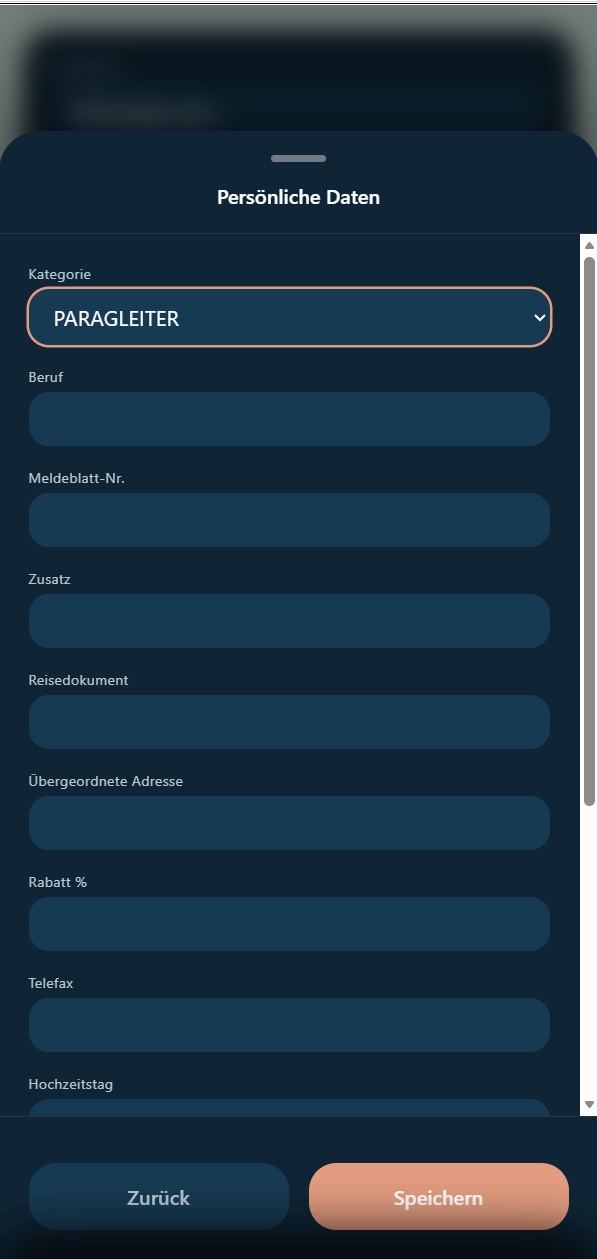
While experimenting today, I built a small example that simplifies a very common problem: repeating HTML form patterns everywhere.

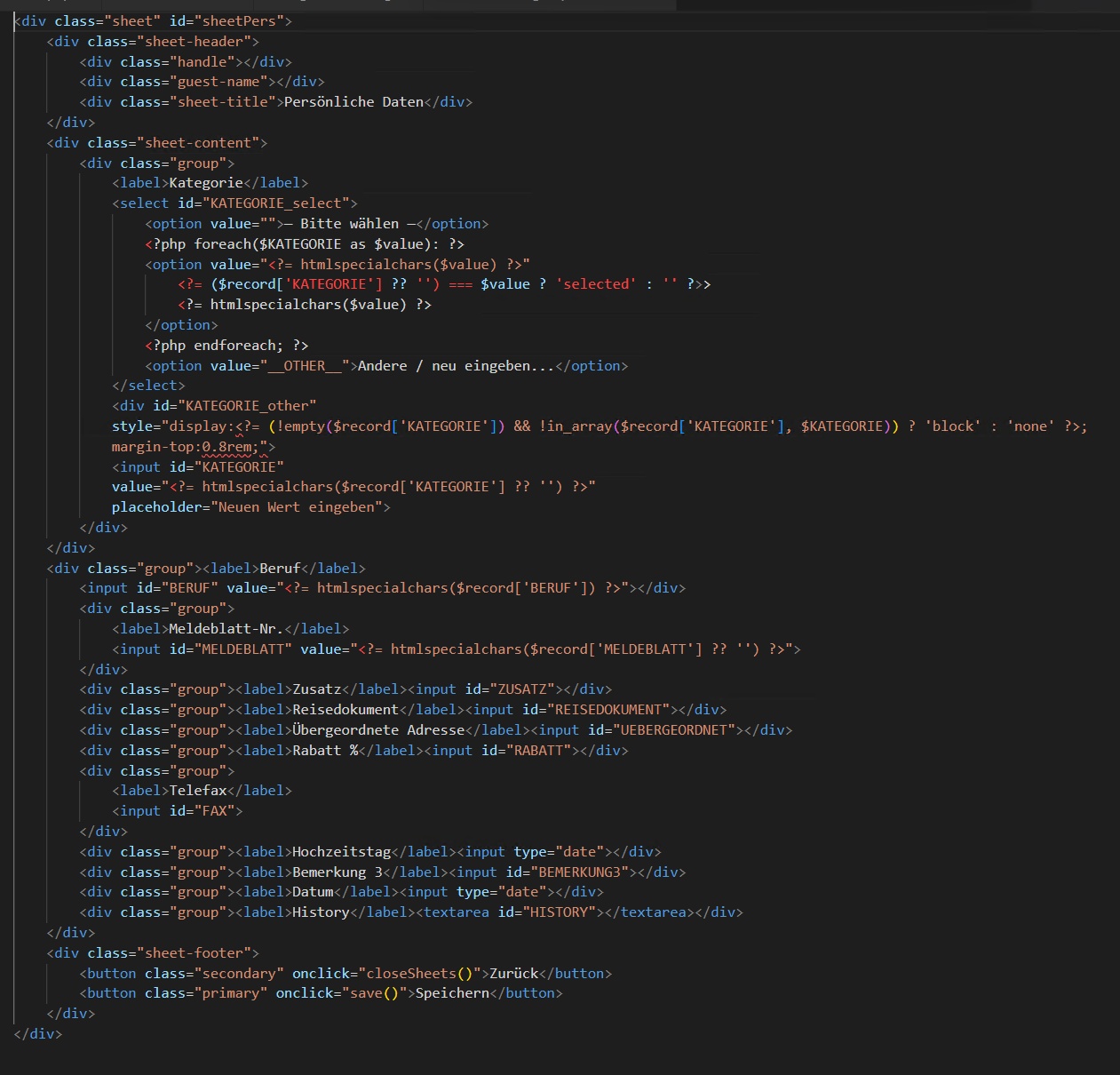
Typical pattern:

Code (html): Select all Collapse
<div class="group">
 <label>|caption|</label>
 <input id="|id|" value="<?= htmlspecialchars($record['|id|'] ?? '') ?>">
</div>

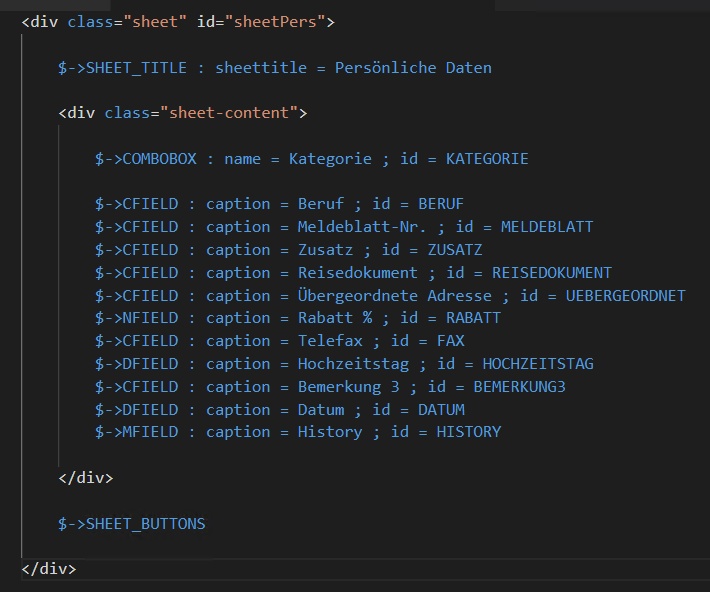
Instead of repeating this block across many files, Harbourino could allow something like:

$->CFIELD : caption = Meldeblatt-Nr. ; id = MELDEBLATT

which expands to the HTML above.

Why this helps

Most forms repeat the same structure dozens of times.
With a template block, you can centralize things like:

  • CSS classes
  • validation
  • default attributes
  • escaping
  • icons
  • required markers
  • responsive layout

Change it once in the template, and every field benefits.

Example.

Before

Code (html): Select all Collapse
<div class="group">
 <label>Telefax</label>
 <input id="FAX" value="<?= htmlspecialchars($record['FAX'] ?? '') ?>">
</div>

After

$->CFIELD : caption = Telefax ; id = FAX

Later I can change the template to:

Code (html): Select all Collapse
<input class="input" type="text" autocomplete="off">

…and it automatically applies everywhere.


---

Possible naming scheme

Classic Harbour style:

GET
GETDATE
GETNUM
MEMO
COMBO

But that may be a bit cryptic for non-Harbour developers.

Current idea:

CFIELD   text
NFIELD   number
DFIELD   date
MFIELD   textarea
COMBO    select
CHECK    checkbox

Example form:

$->CFIELD : caption = Beruf ; id = BERUF
$->CFIELD : caption = Meldeblatt-Nr. ; id = MELDEBLATT
$->CFIELD : caption = Zusatz ; id = ZUSATZ
$->NFIELD : caption = Rabatt % ; id = RABATT
$->CFIELD : caption = Telefax ; id = FAX
$->DFIELD : caption = Hochzeitstag ; id = HOCHZEITSTAG
$->MFIELD : caption = History ; id = HISTORY

Much easier to read and maintain.


---

Possible extensions

Because everything is abstracted, additional options become trivial:

$->CFIELD : caption = Name ; id = NAME ; required
$->CFIELD : caption = Beruf ; id = BERUF ; placeholder = Beruf
$->NFIELD : caption = Rabatt % ; id = RABATT ; type = number

At that point Harbourino starts to look like a small form DSL.


---

Important design goal

Harbourino does not exist at runtime.

The syntax is only used during the build / patch process.
After compilation, the code deployed to the server is plain HTML, JavaScript, prg, or PHP.

So Harbourino acts purely as a development-time abstraction layer.

You get:

  • less repetitive code
  • easier maintenance
  • no framework overhead
  • clean native output on the server

Posts: 44158
Joined: Thu Oct 06, 2005 05:47 PM
Re: Harbourino idea: form fields as template blocks
Posted: Thu Mar 05, 2026 08:47 PM

Dear Otto,

Just an idea: Couldn't you implement the same using Harbour's preprocessor ?

It may be interesting if you provide a detailed explanation about Harbourino design and how it works to provide it to deepwiki (or other agentic AI) to know its opinion and advise :idea:

regards, saludos

Antonio Linares
www.fivetechsoft.com
Posts: 6983
Joined: Fri Oct 07, 2005 07:07 PM
Re: Harbourino idea: form fields as template blocks
Posted: Thu Mar 05, 2026 10:29 PM

Dear Antonio,

thank you, this is a very good question.

At first sight, yes, part of this idea may look similar to something that could be done with Harbour's preprocessor.

But Harbourino evolved into something slightly different.

The main goal was not only macro replacement, but reducing the visible complexity of modern mixed code environments, especially when HTML, PHP, JavaScript and Harbour logic are all involved in the same project.

So Harbourino became more like a combination of:

  • preprocessor
  • include system
  • patcher
  • and a small DSL for recurring structures

For example, the form field idea is only one small part of it:

Code (text): Select all Collapse
$->CFIELD : caption = Telefax ; id = FAX

expands into the full HTML/PHP block.

But the same principle also applies to larger structures, because blocks can be nested with arbitrary depth and then patched together into the final target files.

So the difference from a classic preprocessor is that Harbourino is not only about token replacement, but about describing higher-level structures and expanding them into native output.

Another important point is that Harbourino does not exist at runtime.

It is only a development-time abstraction layer.
After patching/building, the deployed result is still plain PRG, PHP, HTML or JavaScript.

In that sense, I currently see Harbourino less as a framework and more as a way to let Harbour developers think again in terms of:

Code (text): Select all Collapse
form
field
tab
save

instead of directly working all the time with raw HTML, JS and mixed glue code.

That is also why I think it could perhaps be interesting for DeepWiki or another AI system: not so much as "just another preprocessor", but as an attempt to reduce visible complexity by using a small structured DSL plus patching.

If useful, I can write a more complete description of the Harbourino design and workflow.

Best regards,
Otto

Continue the discussion