

It need library: ./harbour/contrib/hbzebra and ./harbour/contrib/hbhpdf
TBarcodes.prg
#ifdef __FIVEWIN__
   #include "fivewin.ch"
#else
   #include "hbclass.ch"
   #define __MODHARBOUR__
#endif

#include "codebar.ch"

CLASS TCodeBars

   DATA aTypes HIDDEN

   DATA cCode
   DATA nFlags

   DATA hCodeBar
   DATA hData

   DATA nType, nWidth, nHeight, nWidthCode, nHeightCode

   METHOD New()
   METHOD End()

   METHOD DefError( nError )
   METHOD SetCode( cCode )
   METHOD SetFlags( nFlags )
   METHOD SetType( cnType )
   METHOD Reset()   INLINE ::End()


   #ifdef __FIVEWIN__
      METHOD Build()
   #endif


   METHOD DrawPdf( oPdf, nLeft, nTop ) // For mod_harbour / PDF drawing
   METHOD Rebuild()

ENDCLASS

//--------------------------------------//

METHOD New( nWidth, nHeight, nWidthCode, nHeightCode, cnType, cCode, nFlags ) CLASS TCodeBars

   hb_default( @nWidth, 200 )
   hb_default( @nHeight, 100 )
   hb_default( @nWidthCode, 1 )
   hb_default( @nHeightCode, 3 )


   ::aTypes = { { "EAN13"      , {| | hb_zebra_create_ean13( ::cCode, ::nFlags )      } },;
                { "EAN8"       , {| | hb_zebra_create_ean8( ::cCode, ::nFlags )       } },;
                { "UPCA"       , {| | hb_zebra_create_upca( ::cCode, ::nFlags )       } },;
                { "UPCE"       , {| | hb_zebra_create_upce( ::cCode, ::nFlags )       } },;
                { "ITF"        , {| | hb_zebra_create_itf( ::cCode, ::nFlags )        } },;
                { "MSI"        , {| | hb_zebra_create_msi( ::cCode, ::nFlags )        } },;
                { "CODABAR"    , {| | hb_zebra_create_codabar( ::cCode, ::nFlags )    } },;
                { "CODE11"     , {| | hb_zebra_create_code11( ::cCode, ::nFlags )     } },;
                { "CODE39"     , {| | hb_zebra_create_code39( ::cCode, ::nFlags )     } },; // note:2018.08.09:code39 有 flags 常用 HB_ZEBRA_FLAG_WIDE2_5
                { "CODE93"     , {| | hb_zebra_create_code93( ::cCode, ::nFlags )     } },;
                { "CODE128"    , {| | hb_zebra_create_code128( ::cCode, ::nFlags )    } },;
                { "PDF417"     , {| | NIL /*hb_zebra_create_pdf417( ::cCode, ::nFlags )     */} },;
                { "DATAMATRIX" , {| | hb_zebra_create_datamatrix( ::cCode, ::nFlags ) } },;
                { "QRCODE"     , {| | hb_zebra_create_qrcode( ::cCode, ::nFlags )     } } }

   ::nWidth  = nWidth
   ::nHeight = nHeight
   ::nWidthCode  = nWidthCode
   ::nHeightCode = nHeightCode

   ::SetType( cnType )
   ::SetCode( cCode )
   ::SetFlags( nFlags )


return Self

//--------------------------------------//

METHOD End() CLASS TCodeBars
   #ifdef __FIVEWIN__
      if ::hCodeBar != NIL
         DeleteObject( ::hCodeBar )
         ::hCodeBar := NIL
      endif
   #endif
   if ::hData != NIL
      hb_zebra_destroy( ::hData )
      ::hData := NIL
   endif
return NIL

//--------------------------------------//

METHOD Rebuild() CLASS TCodeBars
   ::Reset()
   #ifdef __FIVEWIN__
      ::Build()
   #endif
return NIL

//--------------------------------------//

#ifdef __FIVEWIN__
METHOD Build(nTop, nLeft) CLASS TCodeBars // mdy:WenSheng:2015.06.20:輸出時增加坐標起點位置

   local hBmpOld
   local hDCDesk := GetDC( GetDesktopWindow() ) // hDC1
   local hDCMem  := CreateCompatibleDC( hDCDesk ) // hDC2
   local hBrush  := CreateSolidBrush( 0 )
   local hBack   := CreateSolidBrush( CLR_WHITE )
   // add:WenSheng:2015.06.20:輸出時增加坐標起點位置
   DEFAULT nLeft   := 0,;
           nTop    := 0

   ::hCodeBar = CreateCompatibleBitMap( hDCDesk, ::nWidth, ::nHeight ) // hBmp
   hBmpOld    = SelectObject( hDCMem, ::hCodeBar )

   ::hData := Eval( ::aTypes[ ::nType ][ CODEBAR_BLOCK ] )

   ::DefError()
   FillRect( hDCMem, { 0, 0, ::nHeight, ::nWidth }, hBack )
   hb_zebra_draw( ::hData, {| x, y, w, h | FillRect( hDCMem, { y, x, y +  h, x + w }, hBrush ) }, nleft, nTop, ::nWidthCode, ::nHeightCode )

   SelectObject( hDCMem, hBmpOld )
   ReleaseDC( GetDesktopWindow(), hDCDesk )
   DeleteDC( hDCMem )
   DeleteObject( hBrush )
   DeleteObject( hBack )

return NIL
#endif

//--------------------------------------//

METHOD DrawPdf( oPdf, nLeft, nTop ) CLASS TCodeBars
   // add:WenSheng:2026.05.19:新增給 mod_harbour / PDF 向量繪圖之方法

   ::hData := Eval( ::aTypes[ ::nType ][ CODEBAR_BLOCK ] )
   ::DefError()

   if ::hData == NIL
      return NIL
   endif

   // 1. 設定著色為黑色
   HPDF_Page_SetRGBFill( oPdf:hPage, 0.0, 0.0, 0.0 )

   // 2. 進行繪製
   // 備註:PDF 坐標 Y 軸是由下往上算的。
   // 為了與 GDI 相同的 Top/Left 行為對齊,將 Y 坐標轉換為: oPdf:nHeight - y - h
   hb_zebra_draw( ::hData, {| x, y, w, h | HPDF_Page_Rectangle( oPdf:hPage, x, oPdf:nHeight - y - h, w, h ) }, nLeft, nTop, ::nWidthCode, ::nHeightCode )

   // 3. 填滿繪製的所有條紋矩形
   HPDF_Page_Fill( oPdf:hPage )

return NIL

//--------------------------------------//

METHOD SetCode( cCode ) CLASS TCodeBars

   if ! Empty( cCode )
      if ValType( cCode ) != "C"
         cCode = hb_valToStr( cCode )
      endif
      ::cCode = cCode
   endif

return NIL

//--------------------------------------//

METHOD SetFlags( nFlags ) CLASS TCodeBars

   ::nFlags = nFlags

return NIL

//--------------------------------------//

METHOD SetType( cnType ) class TCodeBars

   local cType

   if ( ( cType := ValType( cnType ) )$"CN" )
      if cType == "N"
         if cnType > 0 .and. cnType < 15
            ::nType = cnType
         endif
      else
         ::nType = AScan( ::aTypes, {| a | a[ CODEBAR_TYPE ] == Upper( cnType ) } )
      endif
   else
      ::nType = DEFAULT_CODEBAR
   endif

return NIL

//--------------------------------------//

METHOD DefError( ) CLASS TCodeBars
   local oError
   local nError := 0

   if ::hData != NIL
      nError = hb_zebra_geterror( ::hData )
   endif


   if nError != 0
      hb_zebra_destroy( ::hData )

  oError := ErrorNew()
  oError:SubSystem   = "TCODEBARS"
  oError:SubCode     = nError
  oError:Severity    = 2

  Eval( ErrorBlock(), oError )

   endif

RETURN nil

#ifdef __FIVEWIN__
#pragma BEGINDUMP
#include <hbapi.h>
#include <windows.h>

HB_FUNC( CREATECOMPATIBLEBITMAP ) // hDC, nWidth, nHeight
{
   hb_retnl( ( LONG ) CreateCompatibleBitmap( ( HDC ) hb_parnl( 1 ), hb_parnl( 2 ), hb_parnl( 3 ) ) );
}

#pragma ENDDUMP
#endif
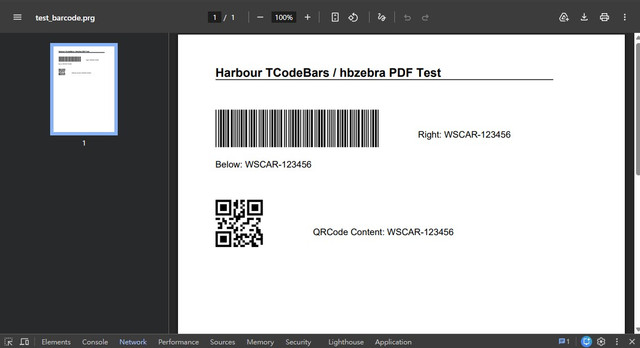
test_barcode.prg
<?prg
/*
  mod_harbour 條碼 PDF 輸出測試範例
*/
#include "hbclass.ch"
// 定義條碼常數
#define CODEBAR_CODE39         9
#define CODEBAR_QRCODE         14

function Main()
  local oPdf
  local oBar1, oBar2
  local hFont12, hFont16
  local cCodeVal := "WSCAR-123456"
  local cOutFile := "test_barcode_temp.pdf"

  // 建立 PDF 物件 (使用 A4 大小)
  oPdf := TPdf():New( cOutFile )
  oPdf:StartPage()

  // 載入 PDF 內建字型 (不需依賴外部 ttf)
  hFont12 := oPdf:DefineFont( "Helvetica", 12 )
  hFont16 := oPdf:DefineFont( "Helvetica-Bold", 16 )

  // 繪製測試標題
  oPdf:Say( 40, 50, "Harbour TCodeBars / hbzebra PDF Test", hFont16 )
  oPdf:Line( 60, 50, 60, 500, 1 )

  // ==========================================
  // 第一列:產生 Code39 條碼
  // ==========================================
  oBar1 := TCodeBars():New()
  oBar1:SetType( CODEBAR_CODE39 )
  oBar1:SetCode( cCodeVal )
  oBar1:nWidthCode  := 1.2  // 條紋單元寬度
  oBar1:nHeightCode := 50   // 條碼高度


  // 繪製條碼 (X: 50, Y: 100)
  oBar1:DrawPdf( oPdf, 50, 100 )
  oBar1:End()

  // 在條碼下方列印文字
  oPdf:Say( 165, 50, "Below: " + cCodeVal, hFont12 )

  // 在條碼右方列印文字
  oPdf:Say( 125, 320, "Right: " + cCodeVal, hFont12 )


  // ==========================================
  // 第二列:產生 QR Code
  // ==========================================
  oBar2 := TCodeBars():New()
  oBar2:SetType( CODEBAR_QRCODE )
  oBar2:SetCode( cCodeVal )
  oBar2:nWidthCode  := 3.0  // QR Code 單元寬度
  oBar2:nHeightCode := 3.0  // QR Code 單元高度


  // 繪製 QR Code (X: 50, Y: 220)
  oBar2:DrawPdf( oPdf, 50, 220 )
  oBar2:End()

  // 在 QR Code 右方列印說明文字
  oPdf:Say( 255, 180, "QRCode Content: " + cCodeVal, hFont12 )


  // 儲存並關閉 PDF
  oPdf:EndPage()
  oPdf:End()

  // ==========================================
  // 直接將產生的 PDF 串流回傳給瀏覽器顯示
  // ==========================================
  AP_SetContentType( "application/pdf" )
  AP_RWrite( hb_memoRead( cOutFile ) )


  // 刪除伺服器端的暫存 PDF 檔
  FErase( cOutFile )

  return nil
?>
line ID: ssbbstw
WeChat ID: ssbbstw
WeChat ID: ssbbstw