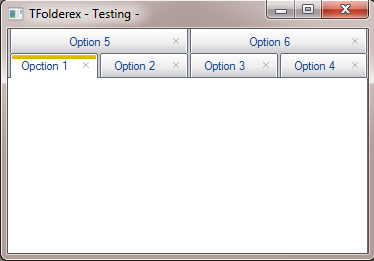
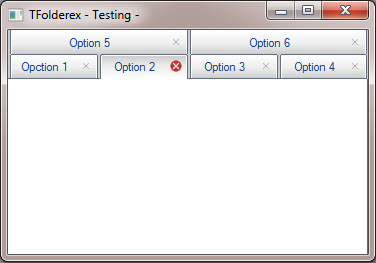
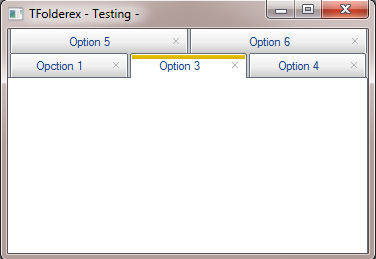
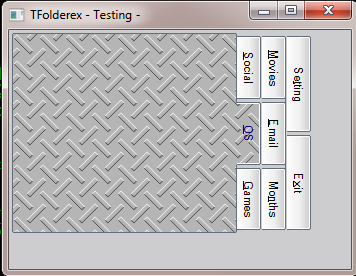
Vertical tabs is working in left side
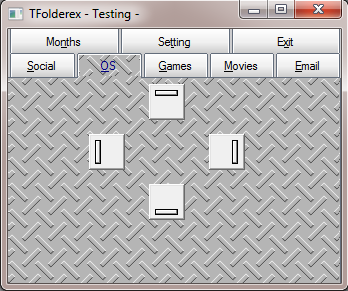
i'm working in right side now
Isla de Margarita Venezuela.
danielgarciagil@gmail.com
http://tdolphin.blogspot.com/
https://www.dropbox.com/referrals/NTI5Njk4MDc1OQ?src=global9
Congratulations Garcia, very good. This class will be incorporated in fwh build?
Wanderson
Yes, will be in next fivewin build
Very good.
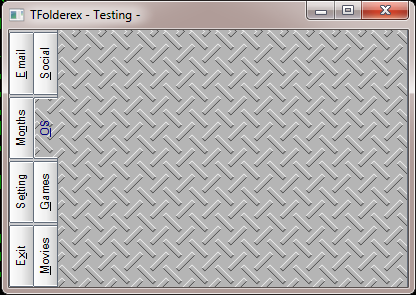
Vertical tabs on, you can put the title
horizontally?


#include "FiveWin.ch"
function main()
local oWnd, i, oBrush2
local oFld
DEFINE BRUSH oBrush2 FILE "..\bitmaps\backgrnd\metal.bmp"
DEFINE WINDOW oWnd TITLE "TFolderex - Testing -"
@ 3, 3 FOLDEREX oFld PIXEL ADJUST;
PROMPT "&Social", "&OS", "&Games", "&Movies", "&Email", "Mo&nths", "Se&tting", "E&xit";
ON PAINT TAB PaintTab( Self, nOption );
ON CHANGE ( If( nOption == 8, If( MsgYesNo( "Do you want exit??" ), ;
oWnd:End(), ( ::SetOption( nOldOption ), ::Refresh() ) ), ) );
ON PAINT TEXT( If( nOption == ::nOption .and. nOption == 2, CLR_BLUE, CLR_BLACK ) );
TOP OPTION 2 ALIGN 2, 2, 2
@ 5, 140 BUTTONBMP PROMPT "" BITMAP "..\bitmaps\bartop.bmp" OF oFld:aDialogs[ 2 ] PIXEL;
ACTION ( oFld:SetLayOut( 1 ) )
@ 105, 140 BUTTONBMP PROMPT "" BITMAP "..\bitmaps\barDown.bmp" OF oFld:aDialogs[ 2 ] PIXEL;
ACTION ( oFld:SetLayOut( 3 ) )
@ 55, 80 BUTTONBMP PROMPT "" BITMAP "..\bitmaps\barleft.bmp" OF oFld:aDialogs[ 2 ] PIXEL;
ACTION ( oFld:SetLayOut( 2 ) )
@ 55, 200 BUTTONBMP PROMPT "" BITMAP "..\bitmaps\barright.bmp" OF oFld:aDialogs[ 2 ] PIXEL;
ACTION ( oFld:SetLayOut( 4 ) )
oFld:aDialogs[ 2 ]:SetBrush( oBrush2 )
ACTIVATE WINDOW oWnd;
ON INIT oFld:Resize()
RETURN NIL
FUNCTION PaintTab( o, nOption )
LOCAL hBrush, hBmp, nLastRow
IF nOption == o:nOver .OR. nOption == o:nOption
o:SetAlphaLevel( nOption, 255 )
ELSE
o:SetAlphaLevel( nOption, 50 )
ENDIF
IF nOption == o:nOption .and. nOption == 2
hBmp = ReadBitmap( 0, "..\bitmaps\backgrnd\metal.bmp" )
hBrush = CreatePatternBrush( hBmp )
DeleteObject( hBmp )
IF o:nLayOut == 2
nLastRow = o:aPos[ o:aLines[ o:aOrder[ 1 ] ][ 1 ] ][ 1 ] + o:nFolderHeight
SetBrushOrgEx( o:hDC, nLastRow + 2, 1 )
ELSE
SetBrushOrgEx( o:hDC, 2, 2 )
ENDIF
RETURN hBrush
ENDIF
RETURN o:SetFldColors( o, nOption )
[code]Thanks Daniel and very good job!

Mda...
Sorry. I will not do that
For build differents styles tabs we need:
1) so many paint process or
2) so many bitmaps for build a tabs 1 for left side, 2 for center (we can expand) and 3 right side and all status, select, unselect, over selected, over unselect, disable, are 5 status x 3 bitmaps 15 bitmaps or
3) 1 bitmap and the class cut in 3 part, so we return to 1
4) we need differents process to control a "CLICK"
is more complicate... some times the simples things solve complex problems
the class was designed for maintain same appearance of windows's folder, but try change the esthetics and customizable
thanks for the suggestion
Could you implement a "close button" like the folders on chrome/firefox/etc... ?
sambomb wrote:Could you implement a "close button" like the folders on chrome/firefox/etc... ?
Great!
Did you test with 3 or more rows? The native has a "BUG" when more than 2 rows is used...
muito bom
teria exemplo utilizando resource ?
e para desabilitar uma aba da tab ?