

New Class TFolderEx, is a new folder class, fivewin own without Window API
Download Sample
some (custom) features:
* Multiline Tabs
* bitmap support, from file or resource
* Alpha bitmap support
* Separation tabs
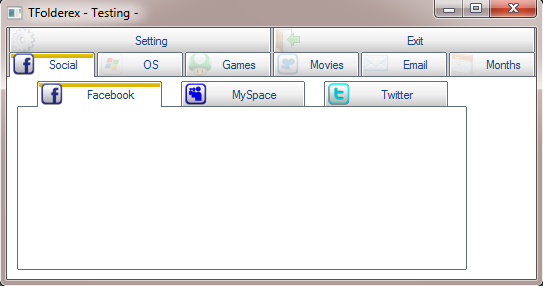
* Auto Adjust tabs position
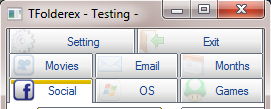
* Data bPopUp, block to evaluate for each tab
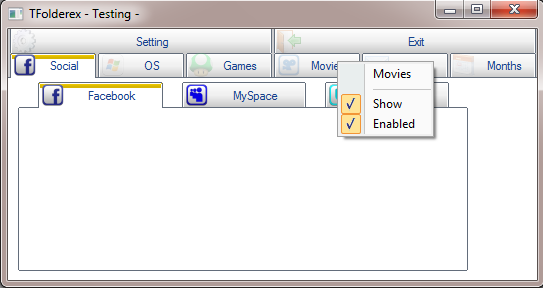
* Enable / Disable Tabs
* Show / Hide Tabs
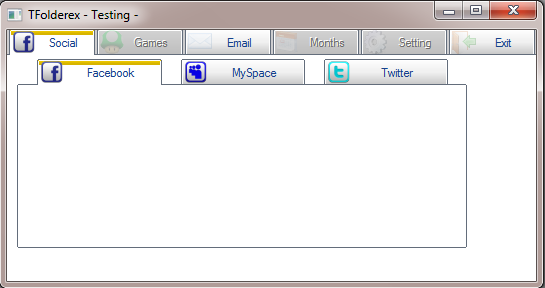
* Alpha Level adjustment
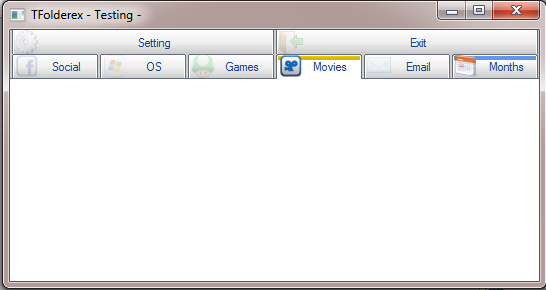
* Colors Tabs and Text
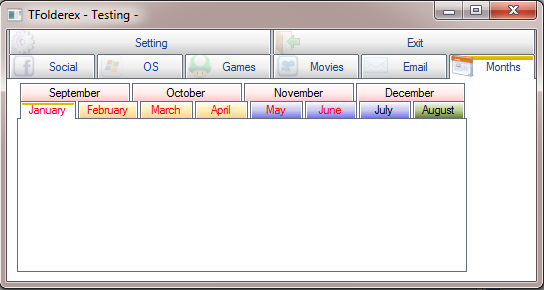
* Tab height and round corner adjustmen
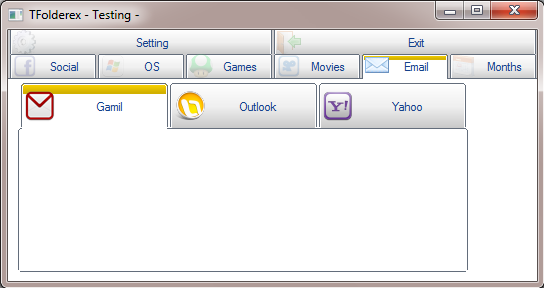
* Bitmap Align
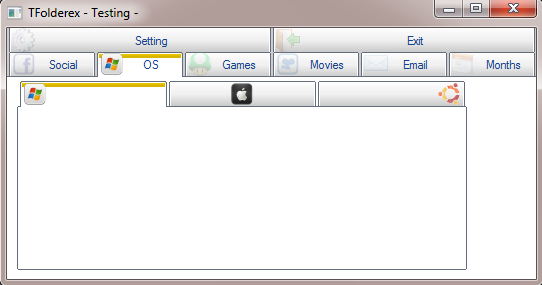
*Tabs Action (ON CHANGE)
Download Sample
Code sample
Method redefine is not supported yet
Download Sample
some (custom) features:
* Multiline Tabs
* bitmap support, from file or resource
* Alpha bitmap support
* Separation tabs
* Auto Adjust tabs position
* Data bPopUp, block to evaluate for each tab
* Enable / Disable Tabs
* Show / Hide Tabs
* Alpha Level adjustment
* Colors Tabs and Text
* Tab height and round corner adjustmen
* Bitmap Align
*Tabs Action (ON CHANGE)
Download Sample
Code sample
function main()
   local oWnd
   local oFld, oFld1
   local aMonths := {"January", "February", "March", ;
                     "April", "May", "June", ;
                     "July", "August", "September", ;
                     "October", "November", "December"}

    DEFINE WINDOW oWnd TITLE "TFolderex - Testing -"

   @ 3, 3 FOLDEREX oFld PIXEL ADJUST;
          PROMPT  "Social", "OS", "Games", "Movies", "Email", "Months", "Setting", "Exit";
          BITMAPS "facebook.bmp", "windows.bmp", "game.bmp", "viddler.bmp", "mail.bmp", "call.bmp", "settings.bmp", "logout.bmp";
          ON PAINT TAB PaintTab( Self, nOption );
          POPUP MenuTabs( Self, nOption );
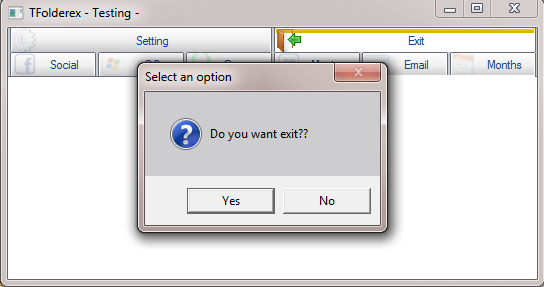
          ON CHANGE ( If( nOption == 8, If( MsgYesNo( "Do you want exit??" ), ;
                                           oWnd:End(), ( ::SetOption( nOldOption ), ::Refresh() ) ), ) )


   //Dialog Social
   @ 3,10 FOLDEREX OF oFld:aDialogs[ 1 ] PIXEL SIZE 450, 190 ;
         PROMPT "Facebook", "MySpace", "Twitter" ;
         BITMAPS "Facebook.bmp", "myspace.bmp", "Twitter.bmp";
         SEPARATOR 20


   //Dialog OS
   @ 3,10 FOLDEREX OF oFld:aDialogs[ 2 ] PIXEL SIZE 450, 190 ;
         PROMPT "", "", "";
         BITMAPS "windows.bmp", "apple.bmp", "ubuntu.bmp";
         ALIGN AL_LEFT, AL_CENTER, AL_RIGHT

   //Dialog Mail
   @ 3,10 FOLDEREX OF oFld:aDialogs[ 5 ] PIXEL SIZE 450, 190 ;
         PROMPT "Gamil", "Outlook", "Yahoo";
         BITMAPS "gmail.bmp", "Outlook.bmp", "yahoo.bmp";
         TAB HEIGHT 45 ROUND 5

   //Dialog Months
   // Suport Arrays and list
   @ 3,10 FOLDEREX OF oFld:aDialogs[ 6 ] PIXEL SIZE 450, 190 ;
         PROMPT aMonths ;
         TAB HEIGHT 18 ROUND 0;
         ON PAINT TAB ChangeClr( Self, nOption );
         ON PAINT TEXT ChangeTxtClr( Self, nOption )

   ACTIVATE WINDOW oWnd;
            ON INIT oFld:Resize()

RETURN NIL

FUNCTION PaintTab( o, nOption )

   IF nOption == o:nOver .OR. nOption == o:nOption
      o:SetAlphaLevel( nOption, 255 )
   ELSE
      o:SetAlphaLevel( nOption, 50 )
   ENDIF

RETURN o:SetFldColors( o, nOption )


FUNCTION ChangeClr( o, n )

   LOCAL nMonth := Month( Date() )
   LOCAL aGrad1 := { { 0.5, nRGB( 255, 255, 255 ), nRGB( 255, 240, 180 ) },;
                     { 0.5,  nRGB( 255, 240, 180 ), nRGB( 255, 200, 140 ) } }

   LOCAL aGrad2 := { { 0.5, nRGB( 255, 255, 255 ), nRGB( 200, 200, 240 ) },;
                     { 0.5,  nRGB( 200, 200, 240 ), nRGB( 100, 100, 240 ) } }

   LOCAL aGrad3 := { { 0.5, nRGB( 255, 255, 255 ), nRGB( 255, 240, 240 ) },;
                     { 0.5,  nRGB( 255, 240, 240 ), nRGB( 255, 200, 200 ) } }

   LOCAL aGradMonth := { { 0.5, nRGB( 255, 255, 255 ), nRGB( 185, 207, 147 ) },;
                         { 0.5,  nRGB( 185, 207, 147 ), nRGB( 85, 107, 47 ) } }

   LOCAL hBrush, aGrad

   IF n == nMonth
      aGrad = aGradMonth
   ELSE
      IF n > 0 .AND. n < 5
         aGrad = aGrad1
      ELSEIF n > 4 .AND. n < 9
         aGrad = aGrad2
      ELSE
         aGrad = aGrad3
      ENDIF
   ENDIF
   o:aGradUnSel = aGrad
   hBrush = o:SetFldColors( o, n )

RETURN hBrush

FUNCTION ChangeTxtClr( o, n )

   LOCAL nMonth := Month( Date() )
   LOCAL nClr := CLR_BLACK, ;
         nClr1 := CLR_HRED

   IF n > 0 .AND. n < 7
      nClr = nClr1
   ENDIF

RETURN nClr


FUNCTION MenuTabs( oFld, nOpt )
   LOCAL oMenu

   MENU oMenu POPUP 2007
      MENUITEM oFld:aPrompts[ nOpt ]
      SEPARATOR
      MenuAddItem( "Show", , ;
                    oFld:aVisible[ nOpt ], ,;
                    {|| If( oFld:aVisible[ nOpt ], ;
                            oFld:HideTab( nOpt ), ;
                            oFld:ShowTab( nOpt ) ) } )
      MenuAddItem( "Enabled", , ;
                    oFld:aEnable[ nOpt ], ,;
                    {|| If( oFld:aEnable[ nOpt ], ;
                            oFld:DisableTab( nOpt ), ;
                            oFld:EnableTab( nOpt ) ) } )
   ENDMENU

RETURN oMenu
Method redefine is not supported yet
our best documentation is the source code
Isla de Margarita Venezuela.
danielgarciagil@gmail.com
http://tdolphin.blogspot.com/
https://www.dropbox.com/referrals/NTI5Njk4MDc1OQ?src=global9
Isla de Margarita Venezuela.
danielgarciagil@gmail.com
http://tdolphin.blogspot.com/
https://www.dropbox.com/referrals/NTI5Njk4MDc1OQ?src=global9




 )
)