FiveTech Support Forums

FiveWin / Harbour / xBase community
Board index FiveWin for Harbour/xHarbour Metro-style with animated buttonbars => DOWNLOAD Rel. 1.2
Posts: 4043
Joined: Wed Dec 19, 2007 06:40 PM
Metro-style with animated buttonbars => DOWNLOAD Rel. 1.2
Posted: Sat Apr 20, 2013 11:44 AM
Hello,

I added a animated BUTTONBAR to sample METRPLST.prg
The left mouseclick works as a BARSWITCH.
The bar moves in from right to left and reverse.

I'm working on a modified sample, where there will be a defined subbar from the main-bar and more ...
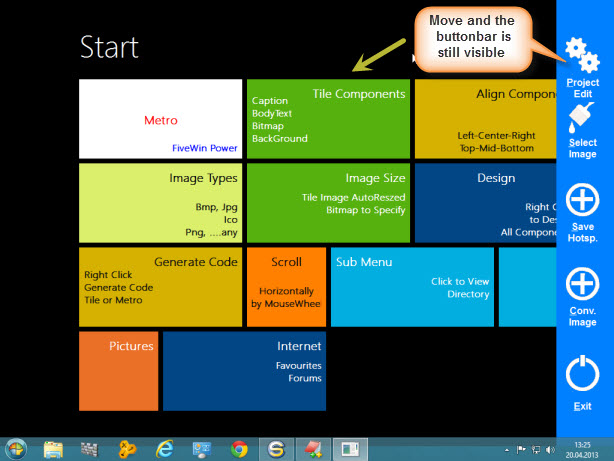
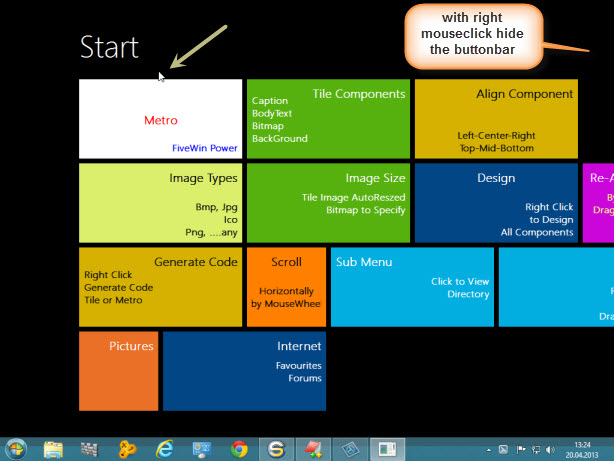


The used BMP's


Replace the MAIN-function with :

Code (fw): Select all Collapse
#include "fivewin.ch"
#include "xbrowse.ch"
#include "metropnl.ch"

static oMetro, oTools, oSBtn[6] 
static nClrBack   := CLR_GREEN, aRect[4]
static lBarDlg := .F., c_Path, c_Path1, oBarDlg
//----------------------------------------------------------------------------//

FUNCTION MAIN( cParam )
local oWnd, oBar, oMetro, oBrush
local cTitle := "Start"

SET DATE ITALIAN
SET CENTURY ON

oFont := TFont():New("Arial",0,-16,.F.,.T.,0,0,0,.F. )

aRect[3] := GetSysmetrics( 1 ) - 25 // Screen-Height
aRect[4] := GetSysmetrics( 0 ) // Screen-Width

c_path := cFilePath(GetModuleFileName( GetInstance() ) ) 
lChDir( "../" ) 
c_path1 := GetCurDir() + "\Bitmaps\AlphaBmp\" 
// Msgalert( c_path1)

DEFINE WINDOW oWnd TITLE cTitle STYLE nOr( WS_POPUP, WS_MAXIMIZE );
COLOR CLR_WHITE, CLR_GREEN

oMetro   := MakeMetroPanel( oWnd )

DEFINE BRUSH oBrush FILE '..\bitmaps\hires\earth.bmp' RESIZE
oMetro:SetBrush( oBrush )
oBrush:End()

oMetro:bRClicked := { |Row,Col,f,o| IIF( lBarDlg = .F., DLG_OPEN(), DLG_CLOSE() ) }
   
// oMetro:bRClicked := { |r,c,f,o| msginfo( 'HWND' + NUMTOHEX( oWnd:hWnd, 8 ) ) }

ACTIVATE WINDOW oWnd MAXIMIZED ;
ON INIT ( oMetro:Show(), ;
                  oWnd:Move( 0, 0, aRect[4], aRect[3], .f. ) , ; // Top, left, width, height
          SHOW_DLG(oWnd), oBarDlg:Move( 0, aRect[4], , aRect[3], .f. ) )

oFont:End()

RETURN NIL

//----------------------------------------------------------------------------//

FUNCTION SHOW_DLG(oWnd)

//                                                      Top,   Left               TO  Bottom,  Width
DEFINE DIALOG oBarDlg FROM 0,   aRect[4] - 100 TO aRect[3], aRect[4]  OF oWnd PIXEL ;
STYLE nOr( WS_POPUP, WS_VISIBLE )

@ 30, 2 BTNBMP oSBtn[1] OF oBarDlg PIXEL SIZE 40, 55 ;
NOBORDER ;
PROMPT "&Project" + CRLF + "Edit";
FILENAME c_path1 + "Tools.Bmp" ;
ACTION MsgAlert( "Button 1", "Bar-button" ) ; 
FONT oFont ;
TOP
oSBtn[1]:lTransparent := .t.   
oSBtn[1]:cTooltip :=  { "Load the" + CRLF + "PROJECT-editor","PROJECT-editor", 1, CLR_BLACK, 14089979 }
oSBtn[1]:SetColor( 16777215, )

@ 80, 2 BTNBMP oSBtn[2] OF oBarDlg PIXEL SIZE 40, 55 ;
NOBORDER ;
PROMPT "&Select" + CRLF + "Image" ;
FILENAME c_path1 + "Paint.Bmp" ;
ACTION MsgAlert( "Button 2", "Bar-button" ) ; 
FONT oFont ;
TOP
oSBtn[2]:lTransparent := .t.   
oSBtn[2]:cTooltip :=  { "SELECT / ADD" + CRLF + "a new Image","NEW Image", 1, CLR_BLACK, 14089979 }
oSBtn[2]:SetColor( 16777215, )

@ 150, 2 BTNBMP oSBtn[3] OF oBarDlg PIXEL SIZE 40, 55 ;
NOBORDER ;
PROMPT "&Save" + CRLF + "Hotsp.";
FILENAME c_path1 + "Save1.Bmp" ;
ACTION MsgAlert( "Button 3", "Bar-button" ) ; 
FONT oFont ;
TOP
oSBtn[3]:lTransparent := .t.   
oSBtn[3]:cTooltip :=  { "Save ALL" + CRLF + "Image-settings","IMAGE-save", 1, CLR_BLACK, 14089979 }
oSBtn[3]:SetColor( 16777215, )

@ 220, 2 BTNBMP oSBtn[4] OF oBarDlg PIXEL SIZE 40, 55 ;
NOBORDER ;
PROMPT "&Conv." + CRLF + "Image";
FILENAME c_path1 + "Save1.Bmp" ;
ACTION MsgAlert( "Button 4", "Bar-button" ) ; 
FONT oFont ;
TOP
oSBtn[4]:lTransparent := .t.   
oSBtn[4]:cTooltip :=  { "Save ALL" + CRLF + "Image-settings","IMAGE-save", 1, CLR_BLACK, 14089979 }
oSBtn[4]:SetColor( 16777215, )

@ 290, 2 BTNBMP oSBtn[5] OF oBarDlg PIXEL SIZE 40, 55 ;
NOBORDER ;
PROMPT "&Exit" ;
FILENAME c_path1 + "Quit.Bmp" ;
ACTION oWnd:End() ; 
FONT oFont ;
TOP
oSBtn[5]:lTransparent := .t.   
oSBtn[5]:cTooltip :=  { "EXIT the" + CRLF + "METRO-Demo","EXIT METRO-Demo", 1, CLR_BLACK, 14089979 }
oSBtn[5]:SetColor( 16777215, )

ACTIVATE DIALOG oBarDlg NOWAIT ;
ON INIT ( D_BACKGRD( oBarDlg, 1, 16744448 ) )

RETURN NIL

// ----------------------------------------------------------------------------

FUNCTION DLG_OPEN()
LOCAL nStepL := 0, nLPos := aRect[4]

lBarDlg := .T.
DO WHILE .T.
    nStepL := nStepL + 6
    IF nStepL >  100
        EXIT
    ENDIF
    INKEY(0.02)
    nLPos := aRect[4] - nStepL
    oBarDlg:Move( 0, nLPos, , aRect[3], .f. ) // Top, left, width, height
ENDDO

RETURN NIL

// ----------------------------------------------------------------------------

FUNCTION DLG_CLOSE()
LOCAL nStepL := 0, nLPos := aRect[4] - 100

lBarDlg := .F.
DO WHILE .T.
    nStepL := nStepL + 6
    IF nStepL >  100
        EXIT
    ENDIF
    INKEY(0.02)
    nLPos := nLPos + nStepL
    oBarDlg:Move( 0, nLPos, , aRect[3], .f. ) // Top, left, width, height
ENDDO

RETURN NIL

// --------  WINDOW / DIALOG - Background ---------------

FUNCTION D_BACKGRD( oDlg, nStyle, nColor1, nColor2, nMove, lDirect, cBrush, cImage ) 
LOCAL oBrush, hDC, aGrad, oImage
LOCAL aRect := GETCLIENTRECT( oDlg:hWnd )

IF nStyle = 1 // COLOR
    DEFINE BRUSH oBrush COLOR nColor1
    oDlg:SetBrush( oBrush )
    oBrush:End()
ENDIF
IF nStyle = 2 // GRADIENT Brush
    aGrad := { { nMove, nColor1, nColor2 }, { nMove, nColor2, nColor1 } }
    hDC = CreateCompatibleDC( oDlg:GetDC() )
    hBmp = CreateCompatibleBitMap( oDlg:hDC, oDlg:nWidth, oDlg:nHeight ) 
    hBmpOld = SelectObject( hDC, hBmp )
    GradientFill( hDC, 0, 0, oDlg:nHeight, oDlg:nWidth, aGrad, lDirect ) // .T: = Vertical
    DeleteObject( oDlg:hBrush )
    oBrush := TBrush():New( ,,,, hBmp )
    oBrush:Cargo  := aGrad
    SelectObject( hDC, hBmpOld )
    ReleaseDC(hDC)
    oDlg:SetBrush( oBrush )
    oBrush:End()
ENDIF
IF nStyle = 3 // BMP-BRUSH
    DEFINE BRUSH oBrush FILE c_path1 + cBrush
    oDlg:SetBrush( oBrush )
    oBrush:End()
ENDIF
IF nStyle = 4 // Image ADJUSTED
    IF FILE( c_path1 + cImage ) 
        DEFINE IMAGE oImage FILE c_path1 + cImage
        oBrush := TBrush():new( ,,,, ResizeBmp( oImage:hBitmap,  aRect[4], aRect[3], .T. ) ) 
        oImage:End()
        oDlg:SetBrush( oBrush )
        oBrush:End()
    ELSE
        IF !EMPTY(cImage)
            MsgAlert( "File : " + cImage + CRLF + ;
                    "does not exist" + CRLF + ; 
                        "to show Image !", "ATTENTION" ) 
        ENDIF
    ENDIF
ENDIF


Best Regards
Uwe :-)
Since 1995 ( the first release of FW 1.9 )

i work with FW.

If you have any questions about special functions, maybe i can help.
Posts: 4043
Joined: Wed Dec 19, 2007 06:40 PM
Re: Metro-style with animated buttonbar
Posted: Sat Apr 20, 2013 07:03 PM
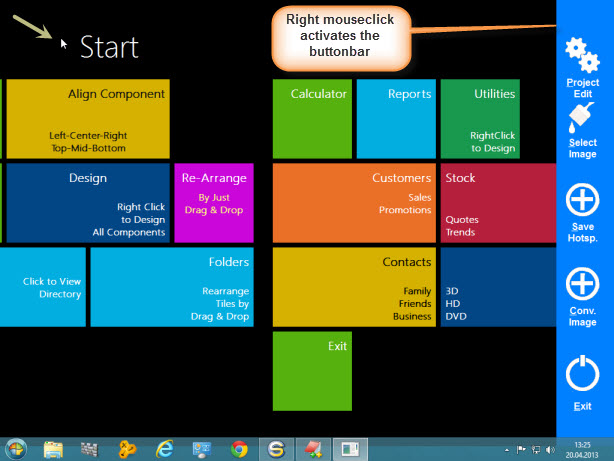
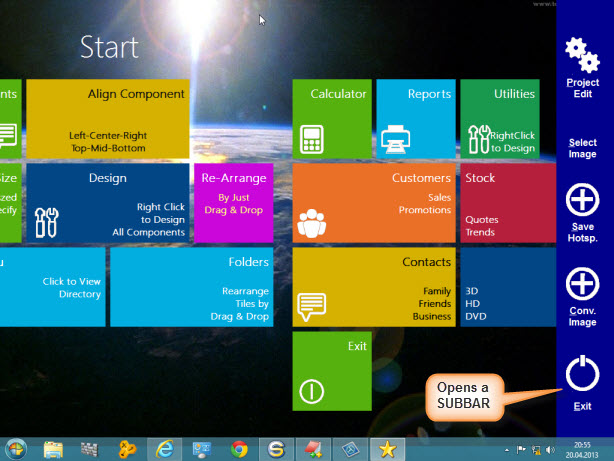
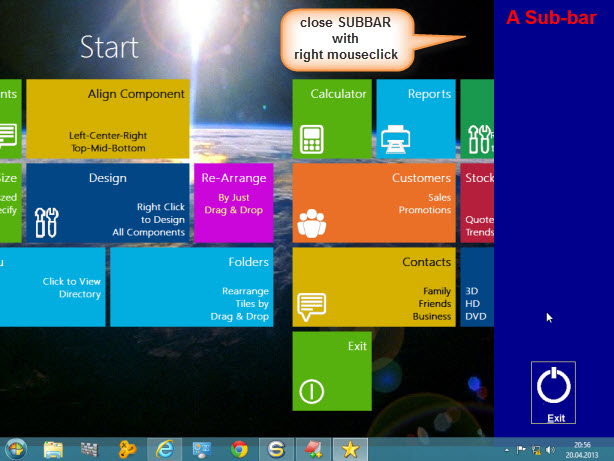
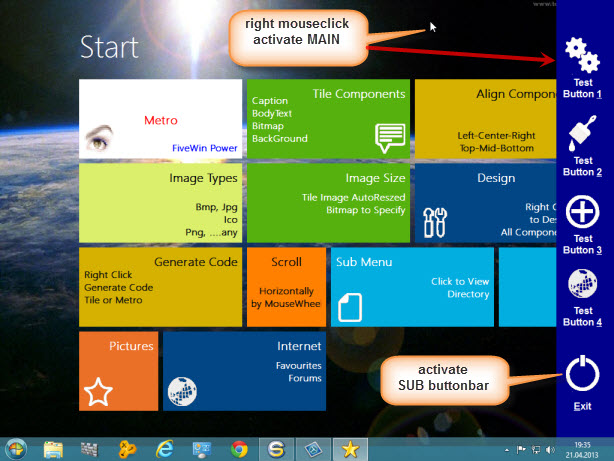
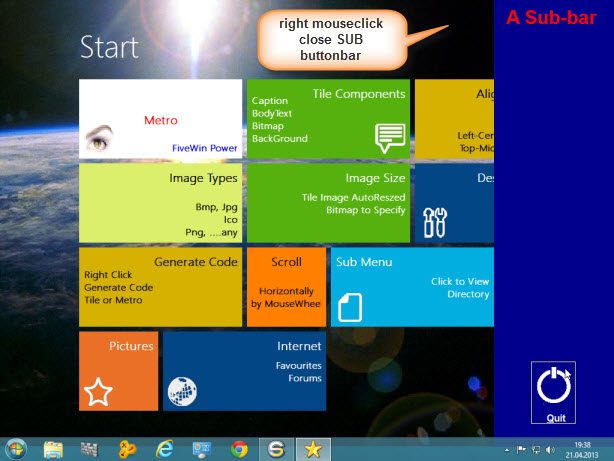
Added a animated SUBBAR like in Windows8
Moving the desktop, You can see, the bars are still visible on top.

I think the activation with a right mouseclick is a good solution,
not to mix with Window8 own buttonbars.


Best Regards
Uwe :-)
Since 1995 ( the first release of FW 1.9 )

i work with FW.

If you have any questions about special functions, maybe i can help.
Posts: 3358
Joined: Fri Oct 07, 2005 08:20 PM
Re: Metro-style with animated buttonbars ( like Windows8 )
Posted: Sat Apr 20, 2013 07:43 PM

Wue:

Nice job, as usual.

From which versión of FW can I use metro style?

Regards

SOI, s.a. de c.v.
estbucarm@gmail.com
http://www.soisa.mex.tl/
http://sqlcmd.blogspot.com/
Tel. (722) 174 44 45
Carpe diem quam minimum credula postero
Posts: 4043
Joined: Wed Dec 19, 2007 06:40 PM
Re: Metro-style with animated buttonbars ( like Windows8 )
Posted: Sat Apr 20, 2013 08:49 PM
Armando

October 2011
=====================

* New class TMetroPanel.Prg
Extended functionality, multiple metro panels, with inbuilt design and code generation facilities.
Please see samples\metrptst.prg for usage and functionality

I will add a sample with a working EXE and PRG as soon I finished some more tests.

Best Regards
Uwe :-)
Since 1995 ( the first release of FW 1.9 )

i work with FW.

If you have any questions about special functions, maybe i can help.
Posts: 3358
Joined: Fri Oct 07, 2005 08:20 PM
Re: Metro-style with animated buttonbars ( like Windows8 )
Posted: Sat Apr 20, 2013 09:46 PM

Uwe:

Thanks.

Regards

SOI, s.a. de c.v.
estbucarm@gmail.com
http://www.soisa.mex.tl/
http://sqlcmd.blogspot.com/
Tel. (722) 174 44 45
Carpe diem quam minimum credula postero
Posts: 4043
Joined: Wed Dec 19, 2007 06:40 PM
Re: Metro-style with animated buttonbars ( like Windows8 )
Posted: Sun Apr 21, 2013 10:52 AM
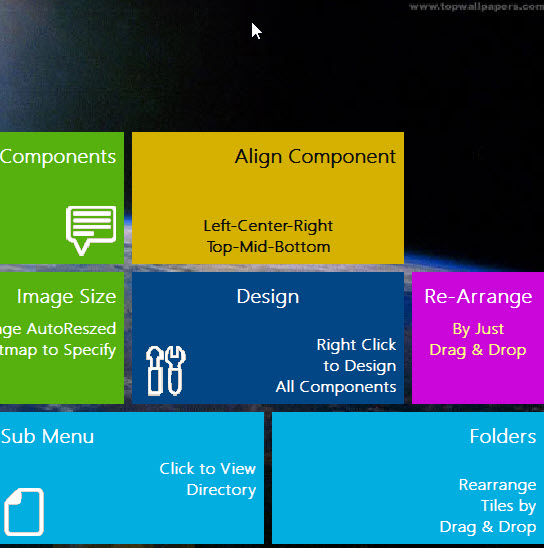
Some more tests

What happens, if a button is partial covered from the activated buttonbar ?
It works fine. The focused button is still working and doesn't destroy the buttonbar.
I#m glad to see, a focused button doesn't cover the buttonbar. The bar stays on top.
The buttonbar can be visible, until You don't need it anymore.

Without activated buttonbar


Button-action with activated buttonbar


Best Regards
Uwe :-)
Since 1995 ( the first release of FW 1.9 )

i work with FW.

If you have any questions about special functions, maybe i can help.
Posts: 566
Joined: Thu Aug 30, 2007 03:40 PM
Re: Metro-style with animated buttonbars ( like Windows8 )
Posted: Sun Apr 21, 2013 01:08 PM

hi, have a download link? thanks

Posts: 4043
Joined: Wed Dec 19, 2007 06:40 PM
Re: Metro-style with animated buttonbars ( like Windows8 )
Posted: Sun Apr 21, 2013 03:02 PM
Norberto,

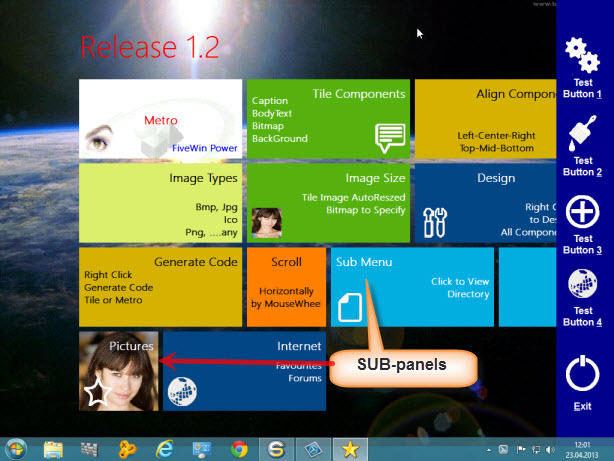
Added the animated SUBBAR

Download .
http://www.service-fivewin.de/fw-downlo ... robar1.zip


Best regards
Uwe :-) .
Since 1995 ( the first release of FW 1.9 )

i work with FW.

If you have any questions about special functions, maybe i can help.
Posts: 4043
Joined: Wed Dec 19, 2007 06:40 PM
Re: Metro-style with animated buttonbars => DOWNLOAD
Posted: Mon Apr 22, 2013 12:26 PM

Does it work like expected,
or any changes needed ( problems ) ?

Best Regards
Uwe :?:

Since 1995 ( the first release of FW 1.9 )

i work with FW.

If you have any questions about special functions, maybe i can help.
Posts: 3358
Joined: Fri Oct 07, 2005 08:20 PM
Re: Metro-style with animated buttonbars => DOWNLOAD
Posted: Mon Apr 22, 2013 04:45 PM

Uwe:

It looks so good, just a question:

When I click on "Clic to view Directory" button I see a new screen, then, How can I come back
to the main window?

Regards

SOI, s.a. de c.v.
estbucarm@gmail.com
http://www.soisa.mex.tl/
http://sqlcmd.blogspot.com/
Tel. (722) 174 44 45
Carpe diem quam minimum credula postero
Posts: 4043
Joined: Wed Dec 19, 2007 06:40 PM
Re: Metro-style with animated buttonbars => DOWNLOAD
Posted: Mon Apr 22, 2013 06:12 PM
Armando,

Yes it is a good question, how to move between defined metropanels.
I used only the first level from the sample, to test the bars.

There are two panel defines ( files and bitmaps ), to display the directory.
From there, it must be possible, to return to the main-screen.
I didn't check this.
I don't know, if there is a solution already, otherwise I have to find one.

i tested using a array oMetro[3]

DEFINE METROPANEL oMetro[2] OF oWnd TITLE "Files" ;
COLOR CLR_WHITE, nClrBack ;
oMetro[2]:bRClicked := { |Row,Col,f,o| oMetro[2]:End(), oMetro[1]:Show() }
..
..
A right mouseclick returns to the mainscreen, but using the same button again < Sub menu >. the creen is empty

Best Regards
Uwe :-)
Since 1995 ( the first release of FW 1.9 )

i work with FW.

If you have any questions about special functions, maybe i can help.
Posts: 4043
Joined: Wed Dec 19, 2007 06:40 PM
Re: Metro-style with animated buttonbars =&gt; DOWNLOAD
Posted: Tue Apr 23, 2013 10:07 AM
It is possible now, to SWITCH from SUB-panels to MAIN-screen with right mouseclick on desktop.
I used a logical var and the panels are created only once.

Inside function => METROFILES( oWnd, oMetro1 ) I added :

oMetro2:bRClicked := { |Row,Col,f,o| oMetro2:Hide(), oMetro1:Show() }

called from button :

DEFINE METROBUTTON oBtn OF oMetro1 ;
COLOR CLR_WHITE,RGB( 2, 174, 224 ) ;
CAPTION "Sub Menu" ;
ALIGN "TOPLEFT" ;
BITMAP c_path4 + "files.bmp" ;
BMPALIGN "BOTTOMLEFT" ;
SIZE 48, 48 ;
BODYTEXT "Click to View;Directory" ;
TEXTALIGN "MIDDLERIGHT" ;
LARGE ;
MENU IIF( lMetro[1] = .F., MetroFiles(oWnd, oMetro1), oMetro2:Show() )

Download .
http://www.service-fivewin.de/fw-downlo ... robar2.zip


Best regards
Uwe :-) .
Since 1995 ( the first release of FW 1.9 )

i work with FW.

If you have any questions about special functions, maybe i can help.
Posts: 3358
Joined: Fri Oct 07, 2005 08:20 PM
Re: Metro-style with animated buttonbars =&gt; DOWNLOAD Rel. 1.2
Posted: Thu Apr 25, 2013 12:48 AM

Uwe:

Now it Works fine.

Do you have a sample using a dialog?

Regards

SOI, s.a. de c.v.
estbucarm@gmail.com
http://www.soisa.mex.tl/
http://sqlcmd.blogspot.com/
Tel. (722) 174 44 45
Carpe diem quam minimum credula postero
Posts: 4043
Joined: Wed Dec 19, 2007 06:40 PM
Re: Metro-style with animated buttonbars =&gt; DOWNLOAD Rel. 1.3
Posted: Thu Apr 25, 2013 11:56 AM
Armando,

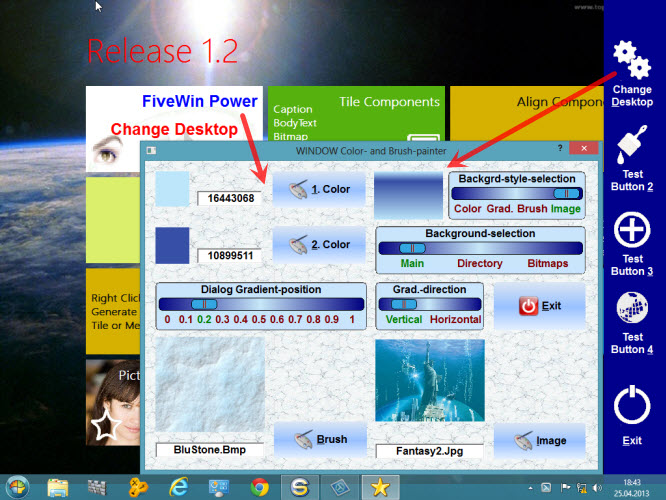
working on a Desktopchanger :
( works from Panel and Buttonbar )
1. select the background-style
2. select 1 of the 3 defined panels ( Main, directory or bitmaps )


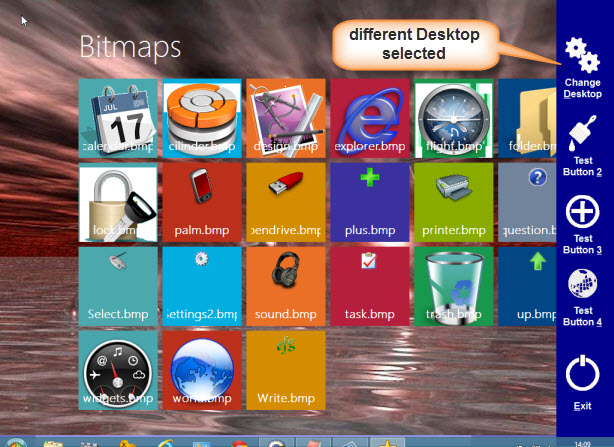
The result of the changed desktop of PANEL 3
The right mouseclick belongs to the panel close.
Only on Mainscreen, the right mouseclick moves the buttonbar ( hides ).


Best Regards
Uwe :-)
Since 1995 ( the first release of FW 1.9 )

i work with FW.

If you have any questions about special functions, maybe i can help.
Posts: 946
Joined: Thu Oct 06, 2005 07:05 PM
Re: Metro-style with animated buttonbars =&gt; DOWNLOAD
Posted: Thu May 09, 2013 02:19 PM

Uwe

Have you tried a nice looking gradient on a "metro like" xbrowse ? noborder etc...

the browse is placed on a dialog wher colors are present like in the sample touch.prg from fwh.

I am very interested in this

Thanks for help,

Richard

http://www.cbati.com

Uestudio
Fwh 13.05 Harbour 3.2 MSVC 2013