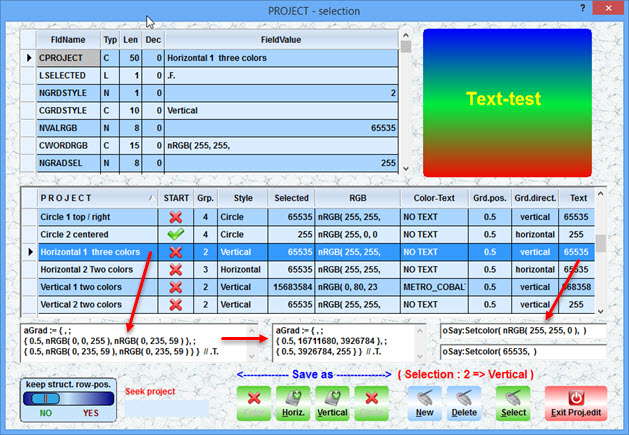
A extended project-manager.
Now You can copy and past a gradient-array from a project using RGB or numeric.
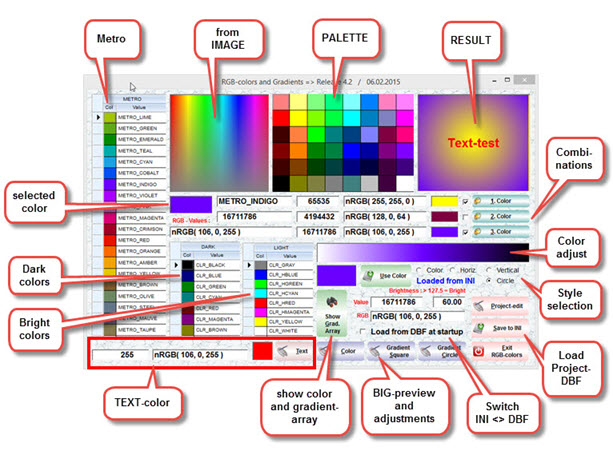
If You need the gradient-arrays from the main-dialog, You can open the Projectmanager
and copy the arrays from the multiline gets ( no need to save something ).
On opening it shows these values. Moving the browser-record, the values are related to the project.
The tool saves a lot of time, to find a nice combinatation of 3 colors and textcolor.
DOWNLOAD ( 3 MB ) :
http://www.service-fivewin.de/DOWNLOADS/RGB10.zip
 The description, creating a project
GRADIENT with 3 colors :
1. Select the 1., 2. and 3. color
-- use buttons < 1., 2. and 3. Color > and activate the checkboxes
-- A color brightness can be adjusted from the gradient-bitmap
-- and button < use color >
2. You can adjust the color-positions using a extra dialog
-- with selecting the button < Gradient square >. Close the dialog.
3. Select a radio < vertical or horizontal >
4. Next open the PROJECT-manager and select button < New >.
5. The project will be saved as a new record.
-- With a double-click on the 1. column, You can change the project-name
6. With a right-mouseclick on column 2 ( symbol )
-- You can select this project to be loaded at next start
-- ( activate the checkbox < load from DBF at startup > ( main-dialog )
-- otherwise the INI is used.
Just let me know, if still something is missing or wrong.
best regards
Uwe