FiveTech Support Forums

FiveWin / Harbour / xBase community
Board index FiveWin for Harbour/xHarbour Folder SAY background-color is still missing ?
Posts: 4043
Joined: Wed Dec 19, 2007 06:40 PM
Re: Folder SAY background-color is still missing ?
Posted: Sat Jan 14, 2017 03:10 PM
Enrico,

Your sample ( button transparent was missing )
I added background-colors to clear the result.


REDEFINE BTNBMP;
ID 101 OF oFld:aDialogs[ 1 ];
FILE "open.bmp";
NOBORDER TRANSPARENT

REDEFINE BTNBMP;
ID 102 OF oDlg;
FILE "open.bmp";
NOBORDER TRANSPARENT

regards
Uwe :-)
Since 1995 ( the first release of FW 1.9 )

i work with FW.

If you have any questions about special functions, maybe i can help.
Posts: 9020
Joined: Thu Oct 06, 2005 08:17 PM
Re: Folder SAY background-color is still missing ?
Posted: Sat Jan 14, 2017 03:14 PM

Please try using the theme manifest file.

EMG

Posts: 4043
Joined: Wed Dec 19, 2007 06:40 PM
Re: Folder SAY background-color is still missing ?
Posted: Sat Jan 14, 2017 06:13 PM

Enrico,
works as well

the download ( added some code to Your sample )

http://www.pflegeplus.com/DOWNLOADS/Fldtest1.zip

regards
Uwe :D

Since 1995 ( the first release of FW 1.9 )

i work with FW.

If you have any questions about special functions, maybe i can help.
Posts: 9020
Joined: Thu Oct 06, 2005 08:17 PM
Re: Folder SAY background-color is still missing ?
Posted: Sat Jan 14, 2017 06:29 PM

I repeat: please use my sample "as is". Just add the manifest file.

EMG

Posts: 3022
Joined: Fri Oct 07, 2005 01:45 PM
Re: Folder SAY background-color is still missing ?
Posted: Sat Jan 14, 2017 09:51 PM
Antonio, I tested as you asked. Please consider this:

The implemented code ( A segment of it ):
Code (fw): Select all Collapse
    // Define the workorder button bar
    REDEFINE BUTTONBAR oBar1 ID 101 SIZE 60,60 OF oWdlg1 2015
            oBar1:bClrGrad := aPubGrad
    DEFINE BUTTON oBtn11 OF oBar1 RESOURCE "HRPM" PROMPT "P/M's" TOOLTIP "View P/M Schedule" ;
            ACTION  (   oPMS := tPMStable():New( 1 ), oPMS:Display( oCurrentOrder:vehlic ) )
    DEFINE BUTTON oBtn13 OF oBar1 RESOURCE "HRTODO"  PROMPT "Needs" TOOLTIP "View Pending Recommendations" ;
        ACTION ( oRecommend := TRecommend():New( ):ViewActive( oCurrentOrder, oWorkLabor ) )

    DEFINE BUTTON oBtn12 OF oBar1 RESOURCE "ORDER" PROMPT "History" TOOLTIP "View Service History" ;
        ACTION  tServiceHistory():New( ):ShowDetail( 1, oCurrentOrder:vehlic )

       ....   Follow here with similar code for several more buttons on the top bar

AND THIS IS THE START OF THE LOWER BAR:

    // Define the general button bar
    REDEFINE BUTTONBAR oBar2 ID 102 SIZE 60,60 OF oFld:aDialogs[ 1 ] 2015
            oBar2:bClrGrad := aPubGrad
  // Vehicle
    MENU oPop02 POPUP
        MENUITEM "Select/Edit " + sLbl[1] ACTION ( ::SetUnit( ), oCurrentOrder:load(), ;
         nLbTx := oWOclient:clitxl, nPaTx := oWOclient:clitxr, ;
         oWdlg1:SetText( "Workorder: " + ::wrkord + "   Unit: " + ::ordveh + "   Client: " +  ::ordcom ), ;
         cVehDesc := TRIM( oWOunit:vehlic ) + " " + oWOunit:vehyer + " " + TRIM( oWOunit:Vehmak ) + " " + TRIM( oWOunit:Vehmod ), ;
         IIF( oWOclient:clirat = "HLD", MsgInfo( "URGENT - Check client notes" ), ), ;
         oFld:update( ) )
        MENUITEM "View information" ACTION oWOunit := FunShowSvcUnit( oWOunit )
        IF aPrms[2]
            MENUITEM "View photos" ACTION TPhotos():New( ):ShowPhoto( 2, ::vehlic )
        ENDIF
    ENDMENU
    DEFINE BUTTON oBtn21 OF oBar2 ACTION oBtn21:ShowPopup() ;
        RESOURCE sBMP[1] PROMPT sLbl[1] GROUP ;
        MENU oPop02 TOOLTIP ( sLbl[1] + "information" )
  // Client
    MENU oPop03 POPUP
    MENUITEM "Select/Edit Client" ACTION ( ::SetClient( ), ;
      oWdlg1:SetText( "Workorder: " + ::wrkord + "   Unit: " + ::ordveh + "   Client: " + ::ordcom ), ;
        IIF( aSrvUnt[8] = "HLD", MsgInfo( "URGENT - Check client notes" ), ),;
        oFld:update( ), oFld:refresh() )
    MENUITEM "View information" ACTION  oWOclient := FunShowCustomer( oWOclient )  // oWOclient:ShowCustomer( )
    
...  Plus more buttons


When building it with FWH 16.11, using xHarbour ( .com ) or Harbor/VC++ 2015 ( MSFT ), or with 16.12 and xHarbour.com, it displays correctly like this:



When building it with FWH 16.12 Harbour/MSVC 2015, we get this:
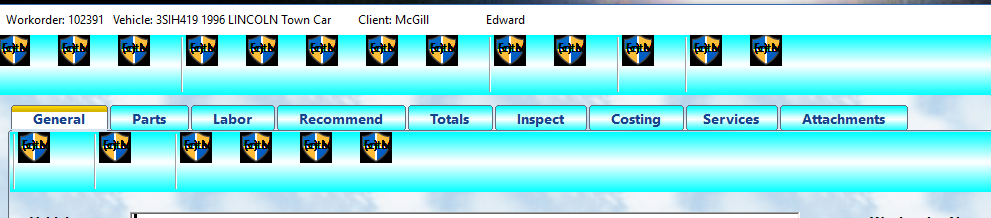


IN ALL BUILDS, THE EXACT SAME FILES ARE USED, EXCEPT FWH VERSION, THE EXACT SAME CODE IS COMPILED, AND THE SAME DATA SOURCE IS USED. THE ONLY DIFFERENCE IS THE MICROSOFT / HARBOUR BUILD USING 16.12.

In addition, in other cases, sometimes an xbrowse may not display ... showing only the very first cell with the rest of the space being blank, and at the same time, the text ( prompt ) for the buttons on the bitmap button bar will disappear. Again, these are all problems taking place only in 16.12.
Tim Stone
http://www.MasterLinkSoftware.com
http://www.autoshopwriter.com
timstone@masterlinksoftware.com
Using: FWH 23.10 with Harbour 3.2.0 / Microsoft Visual Studio Community 2022-24 32/64 bit
Posts: 44158
Joined: Thu Oct 06, 2005 05:47 PM
Re: Folder SAY background-color is still missing ?
Posted: Sun Jan 15, 2017 08:06 AM

Tim,

Did you use /FORCE:MULTIPLE ?

No difference ?

regards, saludos

Antonio Linares
www.fivetechsoft.com
Posts: 3022
Joined: Fri Oct 07, 2005 01:45 PM
Re: Folder SAY background-color is still missing ?
Posted: Mon Jan 16, 2017 08:49 PM

That IS the build using FORCE:MULTIPLE ...

Tim Stone
http://www.MasterLinkSoftware.com
http://www.autoshopwriter.com
timstone@masterlinksoftware.com
Using: FWH 23.10 with Harbour 3.2.0 / Microsoft Visual Studio Community 2022-24 32/64 bit
Posts: 44158
Joined: Thu Oct 06, 2005 05:47 PM
Re: Folder SAY background-color is still missing ?
Posted: Tue Jan 17, 2017 09:50 AM

so it keeps failing, right ?

regards, saludos

Antonio Linares
www.fivetechsoft.com
Posts: 3022
Joined: Fri Oct 07, 2005 01:45 PM
Re: Folder SAY background-color is still missing ?
Posted: Tue Jan 17, 2017 07:44 PM

Yes ... right now I have put 16.12's xbrowse in my build file, and use 16.11 to actually do the build. That gives me the seek bar in xbrowse, and all else works fine.

Perhaps the 17.01 release will be OK.

Tim

Tim Stone
http://www.MasterLinkSoftware.com
http://www.autoshopwriter.com
timstone@masterlinksoftware.com
Using: FWH 23.10 with Harbour 3.2.0 / Microsoft Visual Studio Community 2022-24 32/64 bit
Posts: 44158
Joined: Thu Oct 06, 2005 05:47 PM
Re: Folder SAY background-color is still missing ?
Posted: Wed Jan 18, 2017 11:32 AM

Tim,

I have emailed you modified FWH libs.

Please try it again using them, thanks

regards, saludos

Antonio Linares
www.fivetechsoft.com

Continue the discussion