FiveTech Support Forums

FiveWin / Harbour / xBase community
Board index FiveWin for Harbour/xHarbour Folder SAY background-color is still missing ?
Posts: 4043
Joined: Wed Dec 19, 2007 06:40 PM
Folder SAY background-color is still missing ?
Posted: Wed Jan 11, 2017 08:01 PM

Hello,

I noticed a old folderproblem of the missing SAY background-color.

Is there intermediately any solution ?

best regards
Uwe :?:

Since 1995 ( the first release of FW 1.9 )

i work with FW.

If you have any questions about special functions, maybe i can help.
Posts: 44158
Joined: Thu Oct 06, 2005 05:47 PM
Re: Folder SAY background-color is still missing ?
Posted: Thu Jan 12, 2017 07:59 AM

Uwe,

Could you provide a small example or a screenshot ? thanks

regards, saludos

Antonio Linares
www.fivetechsoft.com
Posts: 4043
Joined: Wed Dec 19, 2007 06:40 PM
Re: Folder SAY background-color is still missing ?
Posted: Thu Jan 12, 2017 10:38 AM
Antonio,

working on a new extended folder-sample :

Dlg-textbackground is ok, on folderpages SAYS are shown transparent
A defined SAY-backgroundcolor is not visible.
The problem has been posted some times ago


regards
Uwe :-)
Since 1995 ( the first release of FW 1.9 )

i work with FW.

If you have any questions about special functions, maybe i can help.
Posts: 44158
Joined: Thu Oct 06, 2005 05:47 PM
Re: Folder SAY background-color is still missing ?
Posted: Thu Jan 12, 2017 11:07 AM
Uwe,

Do you mean that the background of this SAY should be green ?


How are you setting the background of the folder pages ?
regards, saludos

Antonio Linares
www.fivetechsoft.com
Posts: 4043
Joined: Wed Dec 19, 2007 06:40 PM
Re: Folder SAY background-color is still missing ?
Posted: Thu Jan 12, 2017 11:26 AM
Antonio,

Yes the folder SAY-backgrounds I wanted green
I will post the complete sample as soon it is finished.

The different folderpage-backgrounds are called on Dlg-init

Code (fw): Select all Collapse
...
...
ACTIVATE DIALOG oDlg1 CENTER ;
ON INIT F_BACKGRD( oFld1, .T. )

RETURN NIL

// --------  FOLDER - Backgrounds ( n are the different folderpages ) ---------------

FUNCTION F_BACKGRD( oFld, lTransp ) 
LOCAL n, oDlg, hDC, oBrush, oImage, nRow := 0, nCol := 0 

oFld:lTransparent := lTransp

FOR n := 1 to Len( oFld:aDialogs ) 
    oDlg := oFld:aDialogs[ n ]
    hDC = CreateCompatibleDC( oDlg:GetDC() )
    IF n = 1
        IF !FILE( c_path1 + "Marble.bmp" )
            MsgAlert( "File : " + c_path1 + "Marble.bmp" + CRLF + ;
                    "does not exist to create" + CRLF + ; 
                    "Brush-Background !", "ATTENTION" ) 
        ELSE
            DEFINE BRUSH oBrush FILENAME c_path1 + "Marble.bmp" 
            oDlg:SetBrush( oBrush )
            RELEASE BRUSH oBrush
            ReleaseDC(hDC)
        ENDIF
    ENDIF
    IF n = 2
        DEFINE BRUSH oBrush COLOR 16107689
        oDlg:SetBrush( oBrush )
        RELEASE BRUSH oBrush
        ReleaseDC(hDC)
    ENDIF
    IF n = 3 // GRADIENT
        aGrad := { { 0.9, 16107689, 16777215 }, { 0.9, 16777215, 16107689 } }
        hDC = CreateCompatibleDC( oDlg:GetDC() )
        hBmp = CreateCompatibleBitMap( oDlg:hDC, oDlg:nRight * 2.1, ( oDlg:nBottom * 2.1 ) - 40 ) 
        hBmpOld = SelectObject( hDC, hBmp )
        GradientFill( hDC, 0, 0, ( oDlg:nBottom * 2.1 ) - 40, oDlg:nRight * 2.1, aGrad, .T. ) // .T: = Vertical
        DeleteObject( oDlg:oBrush:hBrush )
        oBrush := TBrush():New( ,,,, hBmp )
        oBrush:Cargo  := aGrad
        SelectObject( hDC, hBmpOld )
        oDlg:SetBrush( oBrush )
        RELEASE BRUSH oBrush
        ReleaseDC(hDC)
    ENDIF
    IF n = 4 // Image ADJUSTED
        DEFINE IMAGE oImage FILE c_path1 + "Backgrd.jpg" 
        oBrush := TBrush():new( ,,,, ResizeBmp( oImage:hBitmap, oDlg:nWidth, oDlg:nHeight, .T. ) ) 
        oImage:End()
        oDlg:SetBrush( oBrush )
        RELEASE BRUSH oBrush
        ReleaseDC(hDC)
    ENDIF
    IF n = 5 // Image ADJUSTED
        DEFINE IMAGE oImage FILE c_path1 + "Backgrd.jpg" 
        oBrush := TBrush():new( ,,,, ResizeBmp( oImage:hBitmap, oDlg:nWidth, oDlg:nHeight, .T. ) ) 
        oImage:End()
        oDlg:SetBrush( oBrush )
        RELEASE BRUSH oBrush
        ReleaseDC(hDC)
    ENDIF
    AEval( oDlg:aControls, { |o| IF( o:ClassName == "TSAY", ( o:SetColor( nTxtColor, 13885951 ), o:Refresh() ), NIL ) } )
NEXT

RETURN( NIL )


Another screenshot from page 3
testing different controls on each folderpage


regards
Uwe :-)
Since 1995 ( the first release of FW 1.9 )

i work with FW.

If you have any questions about special functions, maybe i can help.
Posts: 3022
Joined: Fri Oct 07, 2005 01:45 PM
Re: Folder SAY background-color is still missing ?
Posted: Thu Jan 12, 2017 07:31 PM

Is this with 16.12 ?

Antonio, I wonder if "transparency" could be contributing to the issues I discussed with you. Were there any changes in it's implementation from 16.11 to 16.12 ?

Tim

Tim Stone
http://www.MasterLinkSoftware.com
http://www.autoshopwriter.com
timstone@masterlinksoftware.com
Using: FWH 23.10 with Harbour 3.2.0 / Microsoft Visual Studio Community 2022-24 32/64 bit
Posts: 44158
Joined: Thu Oct 06, 2005 05:47 PM
Re: Folder SAY background-color is still missing ?
Posted: Fri Jan 13, 2017 09:09 AM

Uwe,

great example. I look forward to test it once you publish it. Many thanks

Tim,

Please use source/function/imgtxtio.prg from FWH 16.11 and compile it and link it as part of your app,
and lets see if this makes a difference. Many thanks for your feedback and tests

regards, saludos

Antonio Linares
www.fivetechsoft.com
Posts: 10733
Joined: Sun Nov 19, 2006 05:22 AM
Re: Folder SAY background-color is still missing ?
Posted: Fri Jan 13, 2017 04:29 PM

Mr Uwe

Can you please explain what is the problem?
You wanted SAY to be NOT transparent.
In your images, we see that the SAY is NOT transparent. That is what you wanted. Right?
If so what is the problem?

Regards


G. N. Rao.

Hyderabad, India
Posts: 4043
Joined: Wed Dec 19, 2007 06:40 PM
Re: Folder SAY background-color is still missing ?
Posted: Fri Jan 13, 2017 05:16 PM
Mr. Rao,

Including all possible controls I noticed
the missing backgroundcolor of SAY's inside folderpages.


from DIALOG is OK
//------------------------
@ 210, 225 SAY oSay[1] PROMPT "Testing SAY" SIZE 80, 15 FONT oFont2 OF oDlg1 PIXEL
oSay[1]:SetColor( nTxtColor, nBackColor )


inside FOLDERPAGE no background-color
//----------------------------------------------
@ 115, 10 SAY oSay[2] PROMPT "Testing SAY - color" SIZE 100, 15 FONT oFont2 OF oFld1:aDialogs[ 1 ] PIXEL
oSay[2]:SetColor( nTxtColor, nBackColor )


TRANSPARENT SAY works


regards
Uwe :-)
Since 1995 ( the first release of FW 1.9 )

i work with FW.

If you have any questions about special functions, maybe i can help.
Posts: 3022
Joined: Fri Oct 07, 2005 01:45 PM
Re: Folder SAY background-color is still missing ?
Posted: Fri Jan 13, 2017 05:48 PM
Antonio,

Just spotted that message. When I added the file, the link failed with Microsoft and the following logged errors:

Code (fw): Select all Collapse
FiveH32.lib(IMGTXTIO.obj) : error LNK2005: _HB_FUN_CALCTEXTWH already defined in imgtxtio.obj
FiveH32.lib(IMGTXTIO.obj) : error LNK2005: _HB_FUN_WNDSAYPALBMP already defined in imgtxtio.obj
FiveH32.lib(IMGTXTIO.obj) : error LNK2005: _HB_FUN_WINDOWFROMDC already defined in imgtxtio.obj
FiveH32.lib(IMGTXTIO.obj) : error LNK2005: _HB_FUN_SELECTCLIPRGN already defined in imgtxtio.obj
FiveH32.lib(IMGTXTIO.obj) : error LNK2005: _HB_FUN_WNDREADPALBMPEX already defined in imgtxtio.obj
FiveH32.lib(IMGTXTIO.obj) : error LNK2005: _HB_FUN_ISXHBCOM already defined in imgtxtio.obj
FiveH32.lib(IMGTXTIO.obj) : error LNK2005: _HB_FUN_FW_CREATEBITMAP already defined in imgtxtio.obj
FiveH32.lib(IMGTXTIO.obj) : error LNK2005: _HB_FUN_USEGDI already defined in imgtxtio.obj
FiveH32.lib(IMGTXTIO.obj) : error LNK2005: _HB_FUN_MEMORYBUFFERTYPE already defined in imgtxtio.obj
FiveH32.lib(IMGTXTIO.obj) : error LNK2005: _HB_FUN_FW_DRAWSHAPES already defined in imgtxtio.obj
FiveH32.lib(IMGTXTIO.obj) : error LNK2005: _HB_FUN_WEBPAGECONTENTS already defined in imgtxtio.obj
   Creating library asw2016.lib and object asw2016.exp
asw2016.exe : fatal error LNK1169: one or more multiply defined symbols found


Note, these are errors, not warnings ...
Tim Stone
http://www.MasterLinkSoftware.com
http://www.autoshopwriter.com
timstone@masterlinksoftware.com
Using: FWH 23.10 with Harbour 3.2.0 / Microsoft Visual Studio Community 2022-24 32/64 bit
Posts: 44158
Joined: Thu Oct 06, 2005 05:47 PM
Re: Folder SAY background-color is still missing ?
Posted: Fri Jan 13, 2017 08:45 PM

Tim,

Please try it again using /FORCE:MULTIPLE flag when linking

regards, saludos

Antonio Linares
www.fivetechsoft.com
Posts: 10733
Joined: Sun Nov 19, 2006 05:22 AM
Re: Folder SAY background-color is still missing ?
Posted: Sat Jan 14, 2017 01:17 AM
Mr Uwe

the missing backgroundcolor of SAY's inside folderpages.

Yes. I understood. Thanks for clarifying.
We need to find a solution for this.

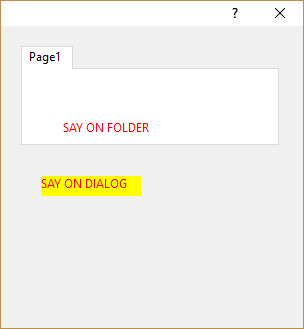
This is a reduced sample to demonstrate the issue.
Code (fw): Select all Collapse
#include "fivewin.ch"

function main()

   local oDlg, oFld, oSayDlg, oSayFld

   DEFINE DIALOG oDlg SIZE 300,300 PIXEL TRUEPIXEL

   @  20,20 FOLDER oFld SIZE 260,100 PIXEL OF oDlg PROMPTS "Page1"

   @  25,20 SAY "SAY ON FOLDER" SIZE 100,20 PIXEL OF oFld:aDialogs[ 1 ] ;
      COLOR CLR_HRED, CLR_YELLOW

   @ 150,40 SAY "SAY ON DIALOG" SIZE 100,20 PIXEL OF oDlg ;
      COLOR CLR_HRED, CLR_YELLOW

   ACTIVATE DIALOG oDlg CENTERED

return nil


Regards


G. N. Rao.

Hyderabad, India
Posts: 9020
Joined: Thu Oct 06, 2005 08:17 PM
Re: Folder SAY background-color is still missing ?
Posted: Sat Jan 14, 2017 10:20 AM
And while are you there, please look at this too (btnbmp on folder is not transparent):

Code (fw): Select all Collapse
#include "Fivewin.ch"


FUNCTION MAIN()

    LOCAL oDlg, oFld

    DEFINE DIALOG oDlg;
           RESOURCE "FOLDER"

    REDEFINE FOLDER oFld;
             ID 101 OF oDlg;
             PROMPTS "Test";
             DIALOGS "TEST"

    REDEFINE BTNBMP;
             ID 101 OF oFld:aDialogs[ 1 ];
             FILE "c:\fwh\bitmaps\open.bmp";
             NOBORDER

    REDEFINE BTNBMP;
             ID 102 OF oDlg;
             FILE "c:\fwh\bitmaps\open.bmp";
             NOBORDER

    REDEFINE BUTTON;
             ID 201 OF oDlg;
             ACTION oDlg:End()

    ACTIVATE DIALOG oDlg;
             CENTER

    RETURN NIL


Code (fw): Select all Collapse
FOLDER DIALOG 49, 52, 365, 295
STYLE DS_MODALFRAME | WS_POPUP | WS_CAPTION | WS_SYSMENU
CAPTION "Folder test"
FONT 8, "MS Sans Serif"
LANGUAGE LANG_NEUTRAL, SUBLANG_NEUTRAL
{
 CONTROL "", 101, "SysTabControl32", WS_CHILD | WS_VISIBLE, 5, 5, 265, 195
 CONTROL "&Close", 201, "BUTTON", BS_PUSHBUTTON | WS_CHILD | WS_VISIBLE | WS_TABSTOP, 5, 275, 40, 15
 CONTROL "", 102, "TBtnBmp", WS_CHILD | WS_VISIBLE, 280, 5, 30, 25
}


TEST DIALOG 49, 52, 365, 295
STYLE WS_CHILD
FONT 8, "MS Sans Serif"
LANGUAGE LANG_NEUTRAL, SUBLANG_NEUTRAL
{
 CONTROL "", 101, "TBtnBmp", WS_CHILD | WS_VISIBLE, 10, 10, 30, 25
}


EMG
Posts: 4043
Joined: Wed Dec 19, 2007 06:40 PM
Re: Folder SAY background-color is still missing ?
Posted: Sat Jan 14, 2017 01:49 PM
Enrico,

I couldn't detect any problems with BTNBMP with my testtool.
Like You can see, it works with gradient or transparent.
The fish-resource is called from a DLL.


@ 70, 100 BTNBMP oBtn OF oFld1:aDialogs[2] ;
SIZE 60, 60 PIXEL TRANSPARENT ;
NOBORDER ;
RESOURCE "FISH1" ;
ACTION ( IIF( lVisible[ 3 ] = .T., ( lVisible[ 3 ] := .F., oFld1:HideTab( 3 ) ), ;
( lVisible[ 3 ] := .T., oFld1:ShowTab( 3 ) ) ), oFld1:Refresh() ) ;
CENTER
oBtn:cTooltip := "Hide / Show TAB 3"


regards
Uwe :-)
Since 1995 ( the first release of FW 1.9 )

i work with FW.

If you have any questions about special functions, maybe i can help.
Posts: 9020
Joined: Thu Oct 06, 2005 08:17 PM
Re: Folder SAY background-color is still missing ?
Posted: Sat Jan 14, 2017 02:01 PM

Can you try my sample "as is", please?

EMG