FiveTech Support Forums

FiveWin / Harbour / xBase community
Board index FiveWin for Harbour/xHarbour Ribbon tab color MICROSOFT OFFICE 2016
Posts: 44158
Joined: Thu Oct 06, 2005 05:47 PM
Re: Ribbon tab color MICROSOFT OFFICE 2016
Posted: Sun May 07, 2017 08:54 AM
regards, saludos

Antonio Linares
www.fivetechsoft.com
Posts: 44158
Joined: Thu Oct 06, 2005 05:47 PM
Re: Ribbon tab color MICROSOFT OFFICE 2016
Posted: Sun May 07, 2017 08:56 AM
Silvio,

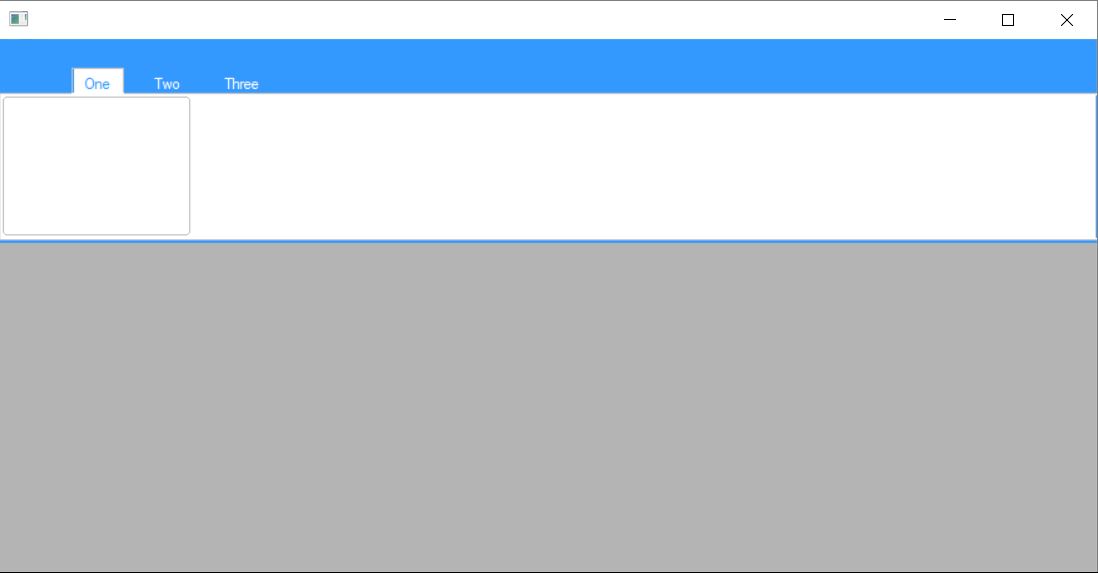
Silvio.Falconi wrote:Please try this style
Code (fw): Select all Collapse
#include "Fivewin.ch"
#include "Ribbon.ch"

#define COLOR_MENUHILIGHT            29  //051,153,255
#define COLOR_MENUBAR                30  //240,240,240


FUNCTION MAIN()

    LOCAL oWnd, oRBar, oRGrp, oBtn1

    DEFINE WINDOW oWnd

    DEFINE RIBBONBAR oRBar WINDOW oWnd PROMPT "One", "Two", "Three" HEIGHT 163 TOPMARGIN 45 2015

    oRBar:aClrTabTxt = { { | oSelf, nPrompt | If( nPrompt == oRBar:nOption, GetSysColor( COLOR_MENUHILIGHT ) , CLR_WHITE ) },;
                         { | oSelf, nPrompt | If( nPrompt == oRBar:nOption, GetSysColor( COLOR_MENUHILIGHT ) , CLR_WHITE ) },;
                         { | oSelf, nPrompt | If( nPrompt == oRBar:nOption, GetSysColor( COLOR_MENUHILIGHT ) , CLR_WHITE ) } }

    oRBar:nClrPaneRB = GetSysColor( COLOR_MENUHILIGHT )
    oRBar:aGradFld = { || { { 1, CLR_WHITE, CLR_WHITE } } }
    oRBar:aGradOver = { || { { 1, GetSysColor( COLOR_MENUHILIGHT ) , GetSysColor( COLOR_MENUHILIGHT )  } } }


    ADD GROUP oRGrp RIBBONBAR oRBar;
              TO OPTION 1

    oRGrp:aGradCaption = { { 1, CLR_WHITE, CLR_WHITE } }

    @ 2, 2 ADD BUTTON oBtn1 GROUP oRGrp ;
       SIZE oRGrp:nWidth / 2, oRGrp:nHeight - 18   ;
        action msginfo()

    oBtn1:bClrGradNormal = { | lPressed | If( lPressed,;
                             { { 1, RGB( 197, 197, 197 ), RGB( 197, 197, 197 ) } },;
                             { { 1, CLR_WHITE, CLR_WHITE } } ) }


    ACTIVATE WINDOW oWnd

    RETURN NIL


very nice :-)
regards, saludos

Antonio Linares
www.fivetechsoft.com
Posts: 44158
Joined: Thu Oct 06, 2005 05:47 PM
Re: Ribbon tab color MICROSOFT OFFICE 2016
Posted: Sun May 07, 2017 09:03 AM
regards, saludos

Antonio Linares
www.fivetechsoft.com
Posts: 9020
Joined: Thu Oct 06, 2005 08:17 PM
Re: Ribbon tab color MICROSOFT OFFICE 2016
Posted: Sun May 07, 2017 09:36 AM

Probably you added one or more items to the folder without adjusting aClrTabTxt accordingly.

EMG

Posts: 7317
Joined: Thu Oct 18, 2012 07:17 PM
Re: Ribbon tab color MICROSOFT OFFICE 2016
Posted: Sun May 07, 2017 09:41 AM
Antonio,
I wish arrived as this

https://support.office.com/en-us/article/Change-the-look-and-feel-of-Office-2016-for-Windows-with-Office-themes-63e65e1c-08d4-4dea-820e-335f54672310

please see the Dark gray theme
there is not the line on the bottom
Since from 1991/1992 ( fw for clipper Rel. 14.4 - Momos)

I use : FiveWin for Harbour March-April 2024 - Harbour 3.2.0dev (harbour_bcc770_32_20240309) - Bcc7.70 - xMate ver. 1.15.3 - PellesC - mail: silvio[dot]falconi[at]gmail[dot]com
Posts: 7317
Joined: Thu Oct 18, 2012 07:17 PM
Re: Ribbon tab color MICROSOFT OFFICE 2016
Posted: Sun May 07, 2017 03:27 PM

Antonio,
I think we can change these lines ( METHOD Paint() CLASS TRibbonBar )

hBrush2 = CreateSolidBrush( ::nClrPaneRB )
FillRect( hDCMem, aRect, hBrush2 )
because ::nClrPaneRB give the color to all ribbonbar but the line is down the group must be the same color of the back of the tab

Or

we must change the height of tab

Since from 1991/1992 ( fw for clipper Rel. 14.4 - Momos)

I use : FiveWin for Harbour March-April 2024 - Harbour 3.2.0dev (harbour_bcc770_32_20240309) - Bcc7.70 - xMate ver. 1.15.3 - PellesC - mail: silvio[dot]falconi[at]gmail[dot]com
Posts: 44158
Joined: Thu Oct 06, 2005 05:47 PM
Re: Ribbon tab color MICROSOFT OFFICE 2016
Posted: Mon May 08, 2017 10:28 AM

Silvio,

I have tried this:

hBrush2 = CreateSolidBrush( ::nClrPaneRB )
aRect[ 3 ] -= 3
FillRect( hDCMem, aRect, hBrush2 )
aRect[ 3 ] += 3

but then the color of those bottom lines is black

> because ::nClrPaneRB give the color to all ribbonbar but the line is down the group must be the same color of the back of the tab

What brush should we use for that black area ? I don't think that we should use the same color of the back of the current selected tab

regards, saludos

Antonio Linares
www.fivetechsoft.com
Posts: 7317
Joined: Thu Oct 18, 2012 07:17 PM
Re: Ribbon tab color MICROSOFT OFFICE 2016
Posted: Mon May 08, 2017 02:54 PM
Also Itried it and also I saw the black line
perhaps can change ( for 2016) the type of Brush from blue to white

something as

hBrush2 = CreateSolidBrush( ::nClrPaneRB )
//*FillRect( hDCMem, aRect, hBrush2 )

GradientFill( hDCMem, aRect[ 1 ] - 2, aRect[ 2 ] - 3, aRect[ 3 ] + 1, aRect[ 4 ] + 5,;
{ { 1, CLR_WHITE, CLR_WHITE } }, .T. )

aRect[ 3 ] -= 3
FillRect( hDCMem, aRect, hBrush2 )
aRect[ 3 ] += 3


Since from 1991/1992 ( fw for clipper Rel. 14.4 - Momos)

I use : FiveWin for Harbour March-April 2024 - Harbour 3.2.0dev (harbour_bcc770_32_20240309) - Bcc7.70 - xMate ver. 1.15.3 - PellesC - mail: silvio[dot]falconi[at]gmail[dot]com
Posts: 4840
Joined: Fri Nov 18, 2005 04:52 PM
Re: Ribbon tab color MICROSOFT OFFICE 2016
Posted: Mon May 08, 2017 03:57 PM
I notice that the tab design also needs some work. The focused tab seems to have an extra line around the border--probably from the 2013 design. The Microsoft ribbonbar 2016 design is clean without this line.


Regards,
James
FWH 18.05/xHarbour 1.2.3/BCC7/Windows 10
Posts: 44158
Joined: Thu Oct 06, 2005 05:47 PM
Re: Ribbon tab color MICROSOFT OFFICE 2016
Posted: Mon May 08, 2017 04:11 PM

Are we using the same font ?

James, yes, there are differences there also

And the groups should be painted different, just one vertical gray line on the right side

regards, saludos

Antonio Linares
www.fivetechsoft.com
Posts: 44158
Joined: Thu Oct 06, 2005 05:47 PM
Re: Ribbon tab color MICROSOFT OFFICE 2016
Posted: Mon May 08, 2017 04:13 PM
Silvio.Falconi wrote:Also Itried it and also I saw the black line
perhaps can change ( for 2016) the type of Brush from blue to white

something as

hBrush2 = CreateSolidBrush( ::nClrPaneRB )
//*FillRect( hDCMem, aRect, hBrush2 )

GradientFill( hDCMem, aRect[ 1 ] - 2, aRect[ 2 ] - 3, aRect[ 3 ] + 1, aRect[ 4 ] + 5,;
{ { 1, CLR_WHITE, CLR_WHITE } }, .T. )

aRect[ 3 ] -= 3
FillRect( hDCMem, aRect, hBrush2 )
aRect[ 3 ] += 3


Silvio, and what about the other Ribbon themes ? They will not look fine if we force white there
regards, saludos

Antonio Linares
www.fivetechsoft.com
Posts: 7317
Joined: Thu Oct 18, 2012 07:17 PM
Re: Ribbon tab color MICROSOFT OFFICE 2016
Posted: Mon May 08, 2017 07:32 PM
on test
Code (fw): Select all Collapse
oRBar:nClrPaneRB := MIN( ncolor1,ncolor2)


on class
Code (fw): Select all Collapse
hBrush2 =  CreateSolidBrush( ::nClrPaneRB )
   FillRect( hDCMem, aRect, hBrush2 )

   GradientFill( hDCMem, aRect[ 1 ] - 2, aRect[ 2 ] - 3, aRect[ 3 ] + 1, aRect[ 4 ] + 5,;
                    { { 1,  ::nClrPaneRB,CLR_WHITE  } }, .T. )

             aRect[ 3 ] -= 3
                FillRect( hDCMem, aRect, hBrush2 )
              aRect[ 3 ] += 3


some test ( with metro colors)

Orange


green


teal

steel


just my cent
Since from 1991/1992 ( fw for clipper Rel. 14.4 - Momos)

I use : FiveWin for Harbour March-April 2024 - Harbour 3.2.0dev (harbour_bcc770_32_20240309) - Bcc7.70 - xMate ver. 1.15.3 - PellesC - mail: silvio[dot]falconi[at]gmail[dot]com
Posts: 4840
Joined: Fri Nov 18, 2005 04:52 PM
Re: Ribbon tab color MICROSOFT OFFICE 2016
Posted: Mon May 08, 2017 10:18 PM
Antonio,

Silvio, and what about the other Ribbon themes? They will not look fine if we force white there


Maybe it would be easier to subclass for the new ribbonbar?

Hmm, I guess that would be a problem since you are using the preprocessor to call the class. I don't know how you could call a different class based on a parameter. But I don't know anything about preprocessors. Maybe:

define ribbonbar2016 ...?

Regards,
James
FWH 18.05/xHarbour 1.2.3/BCC7/Windows 10
Posts: 44158
Joined: Thu Oct 06, 2005 05:47 PM
Re: Ribbon tab color MICROSOFT OFFICE 2016
Posted: Tue May 09, 2017 05:48 AM

Silvio,

Have you tried it with the original FWH ribbon theme ?

Every change we do has to be tested with previous themes, to asure that we keep backwards compatibility

regards, saludos

Antonio Linares
www.fivetechsoft.com
Posts: 7317
Joined: Thu Oct 18, 2012 07:17 PM
Re: Ribbon tab color MICROSOFT OFFICE 2016
Posted: Tue May 09, 2017 10:34 AM

Exactly
we must use a logic new data l2016
and insert before my lines

hBrush2 = CreateSolidBrush( ::nClrPaneRB )
FillRect( hDCMem, aRect, hBrush2 )

IF ::l2016
GradientFill( hDCMem, aRect[ 1 ] - 2, aRect[ 2 ] - 3, aRect[ 3 ] + 1, aRect[ 4 ] + 5,;
{ { 1, ::nClrPaneRB,CLR_WHITE } }, .T. )
aRect[ 3 ] -= 3
FillRect( hDCMem, aRect, hBrush2 )
aRect[ 3 ] += 3
Endif

or you have another suggestion

Since from 1991/1992 ( fw for clipper Rel. 14.4 - Momos)

I use : FiveWin for Harbour March-April 2024 - Harbour 3.2.0dev (harbour_bcc770_32_20240309) - Bcc7.70 - xMate ver. 1.15.3 - PellesC - mail: silvio[dot]falconi[at]gmail[dot]com