FiveTech Support Forums

FiveWin / Harbour / xBase community
Board index FiveWin for Harbour/xHarbour Ribbon tab color MICROSOFT OFFICE 2016
Posts: 7318
Joined: Thu Oct 18, 2012 07:17 PM
Ribbon tab color MICROSOFT OFFICE 2016
Posted: Fri May 05, 2017 09:23 AM
Wich is the variable to change the color of the tab of a riboonbar ?

I wish make the rribbonbar as MICROSOFT OFFICE 2016


thanks
Since from 1991/1992 ( fw for clipper Rel. 14.4 - Momos)

I use : FiveWin for Harbour March-April 2024 - Harbour 3.2.0dev (harbour_bcc770_32_20240309) - Bcc7.70 - xMate ver. 1.15.3 - PellesC - mail: silvio[dot]falconi[at]gmail[dot]com
Posts: 44162
Joined: Thu Oct 06, 2005 05:47 PM
Re: Ribbon tab color MICROSOFT OFFICE 2016
Posted: Fri May 05, 2017 12:45 PM
Silvio,

Code (fw): Select all Collapse
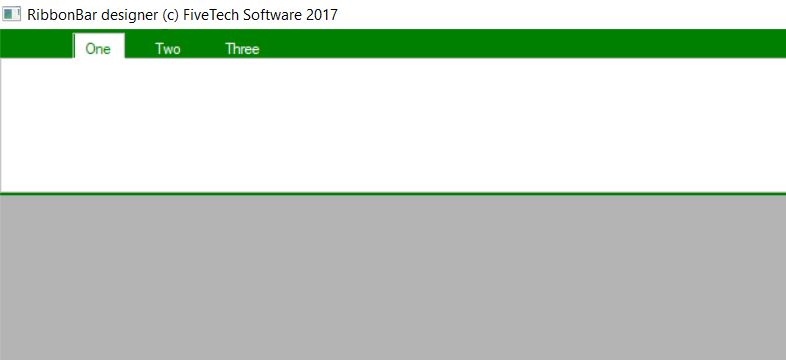
   DEFINE RIBBONBAR oRBar WINDOW oWnd PROMPT "One", "Two", "Three" HEIGHT 133 TOPMARGIN 25 2015

   oRBar:aClrTabTxt = { { | oSelf, nPrompt | If( nPrompt == oRBar:nOption, CLR_GREEN, CLR_WHITE ) },;
                        { | oSelf, nPrompt | If( nPrompt == oRBar:nOption, CLR_GREEN, CLR_WHITE ) },;
                        { | oSelf, nPrompt | If( nPrompt == oRBar:nOption, CLR_GREEN, CLR_WHITE ) } }
   oRBar:nClrPaneRB = CLR_GREEN
   oRBar:aGradFld = { || { { 1, CLR_WHITE, CLR_WHITE } } }
   oRBar:aGradOver = { || { { 1, CLR_GREEN, CLR_GREEN } } }


regards, saludos

Antonio Linares
www.fivetechsoft.com
Posts: 9022
Joined: Thu Oct 06, 2005 08:17 PM
Re: Ribbon tab color MICROSOFT OFFICE 2016
Posted: Sat May 06, 2017 08:59 AM
Please check this working sample:

Code (fw): Select all Collapse
#include "Fivewin.ch"
#include "Ribbon.ch"


FUNCTION MAIN()

    LOCAL oWnd, oRBar, oRGrp

    DEFINE WINDOW oWnd

    DEFINE RIBBONBAR oRBar WINDOW oWnd PROMPT "One", "Two", "Three" HEIGHT 133 TOPMARGIN 25 2015

    oRBar:aClrTabTxt = { { | oSelf, nPrompt | If( nPrompt == oRBar:nOption, CLR_GREEN, CLR_WHITE ) },;
                       { | oSelf, nPrompt | If( nPrompt == oRBar:nOption, CLR_GREEN, CLR_WHITE ) },;
                       { | oSelf, nPrompt | If( nPrompt == oRBar:nOption, CLR_GREEN, CLR_WHITE ) } }

    oRBar:nClrPaneRB = CLR_GREEN
    oRBar:aGradFld = { || { { 1, CLR_WHITE, CLR_WHITE } } }
    oRBar:aGradOver = { || { { 1, CLR_GREEN, CLR_GREEN } } }

    ADD GROUP oRGrp RIBBONBAR oRBar;
              TO OPTION 1

    @ 2, 2 ADD BUTTON GROUP oRGrp;
           SIZE oRGrp:nWidth - 5, oRGrp:nHeight - 18

    ACTIVATE WINDOW oWnd

    RETURN NIL


How to get rid of the pale cyan color in the label bar under the ribbon group? How to get rid of the orange/yellow color when the mouse is over the ribbon button?

EMG
Posts: 7318
Joined: Thu Oct 18, 2012 07:17 PM
Re: Ribbon tab color MICROSOFT OFFICE 2016
Posted: Sat May 06, 2017 09:59 AM
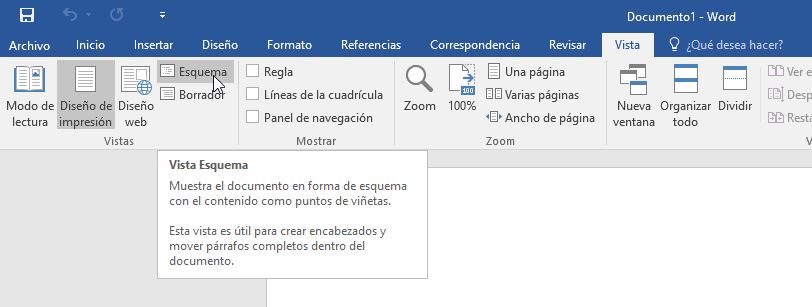
the sample of Antonio is good but on Microsoft 2016 the space from tab is more height from the tab ( also the width of the tab is more) and at bottom thereis not the green line
I tried to change the size of part where there are the tabs of the ribbon but I not Found where I must change it
then we must not colorize the line on the bottom

see the green ribbon of this snap

Since from 1991/1992 ( fw for clipper Rel. 14.4 - Momos)

I use : FiveWin for Harbour March-April 2024 - Harbour 3.2.0dev (harbour_bcc770_32_20240309) - Bcc7.70 - xMate ver. 1.15.3 - PellesC - mail: silvio[dot]falconi[at]gmail[dot]com
Posts: 7318
Joined: Thu Oct 18, 2012 07:17 PM
Re: Ribbon tab color MICROSOFT OFFICE 2016
Posted: Sat May 06, 2017 10:13 AM
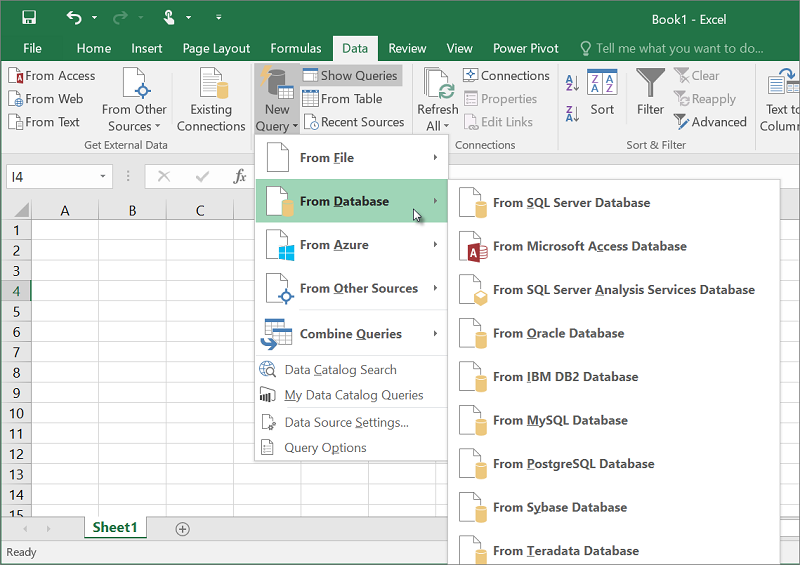
Color Button
the back color of the button seem have a gray color as you can see on this picture


then the menu of the button (with menu) have a green color as you can see in this picture


I think the same color of the topbar


Change the style
then on Office 2016 there is a menu popup where is possible change the style of ribbonbar

Since from 1991/1992 ( fw for clipper Rel. 14.4 - Momos)

I use : FiveWin for Harbour March-April 2024 - Harbour 3.2.0dev (harbour_bcc770_32_20240309) - Bcc7.70 - xMate ver. 1.15.3 - PellesC - mail: silvio[dot]falconi[at]gmail[dot]com
Posts: 44162
Joined: Thu Oct 06, 2005 05:47 PM
Re: Ribbon tab color MICROSOFT OFFICE 2016
Posted: Sat May 06, 2017 10:47 AM
Enrico,

> How to get rid of the pale cyan color in the label bar under the ribbon group ?

oRGrp:aGradCaption = { { 1, CLR_WHITE, CLR_WHITE } }

> How to get rid of the orange/yellow color when the mouse is over the ribbon button ?

oBtn1:bClrGradNormal = { | lPressed | If( lPressed,;
{ { 1, RGB( 197, 197, 197 ), RGB( 197, 197, 197 ) } },;
{ { 1, CLR_WHITE, CLR_WHITE } } ) }

ribbon2016.prg
Code (fw): Select all Collapse
#include "Fivewin.ch"
#include "Ribbon.ch"

FUNCTION MAIN()

    LOCAL oWnd, oRBar, oRGrp, oBtn1

    DEFINE WINDOW oWnd

    DEFINE RIBBONBAR oRBar WINDOW oWnd PROMPT "One", "Two", "Three" HEIGHT 133 TOPMARGIN 25 2015

    oRBar:aClrTabTxt = { { | oSelf, nPrompt | If( nPrompt == oRBar:nOption, CLR_GREEN, CLR_WHITE ) },;
                       { | oSelf, nPrompt | If( nPrompt == oRBar:nOption, CLR_GREEN, CLR_WHITE ) },;
                       { | oSelf, nPrompt | If( nPrompt == oRBar:nOption, CLR_GREEN, CLR_WHITE ) } }

    oRBar:nClrPaneRB = CLR_GREEN
    oRBar:aGradFld = { || { { 1, CLR_WHITE, CLR_WHITE } } }
    oRBar:aGradOver = { || { { 1, CLR_GREEN, CLR_GREEN } } }

    ADD GROUP oRGrp RIBBONBAR oRBar;
              TO OPTION 1

    oRGrp:aGradCaption = { { 1, CLR_WHITE, CLR_WHITE } }

    @ 2, 2 ADD BUTTON oBtn1 GROUP oRGrp ;
       SIZE oRGrp:nWidth / 2, oRGrp:nHeight - 18

    oBtn1:bClrGradNormal = { | lPressed | If( lPressed,;
                             { { 1, RGB( 197, 197, 197 ), RGB( 197, 197, 197 ) } },;
                             { { 1, CLR_WHITE, CLR_WHITE } } ) }    

    ACTIVATE WINDOW oWnd

    RETURN NIL
regards, saludos

Antonio Linares
www.fivetechsoft.com
Posts: 9022
Joined: Thu Oct 06, 2005 08:17 PM
Re: Ribbon tab color MICROSOFT OFFICE 2016
Posted: Sat May 06, 2017 10:54 AM

Antonio,

thank you, it works. Are the pale cyan and orange/yellow colors part of the official 2015 theme? If no, why not remove it in the class? It's annoying to do it for each group and button.

EMG

Posts: 44162
Joined: Thu Oct 06, 2005 05:47 PM
Re: Ribbon tab color MICROSOFT OFFICE 2016
Posted: Sat May 06, 2017 11:00 AM
Silvio,

> the back color of the button seem have a gray color as you can see on this picture

Already implemented in my previous example:

oBtn1:bClrGradNormal = { | lPressed | If( lPressed,;
{ { 1, RGB( 197, 197, 197 ), RGB( 197, 197, 197 ) } },;
{ { 1, CLR_WHITE, CLR_WHITE } } ) }
regards, saludos

Antonio Linares
www.fivetechsoft.com
Posts: 44162
Joined: Thu Oct 06, 2005 05:47 PM
Re: Ribbon tab color MICROSOFT OFFICE 2016
Posted: Sat May 06, 2017 11:03 AM
Enrico Maria Giordano wrote:Antonio,

thank you, it works. Are the pale cyan and orange/yellow colors part of the official 2015 theme? If no, why not remove it in the class? It's annoying to do it for each group and button.

EMG


lets first fine tune the 2016 ribbon theme colors and shapes, then we do the right fixes in the classes
regards, saludos

Antonio Linares
www.fivetechsoft.com
Posts: 44162
Joined: Thu Oct 06, 2005 05:47 PM
Re: Ribbon tab color MICROSOFT OFFICE 2016
Posted: Sat May 06, 2017 11:05 AM

and we also fix and properly implement the 2015 style

regards, saludos

Antonio Linares
www.fivetechsoft.com
Posts: 9022
Joined: Thu Oct 06, 2005 08:17 PM
Re: Ribbon tab color MICROSOFT OFFICE 2016
Posted: Sat May 06, 2017 11:14 AM

Antonio,

great, thank you! :-)

EMG

Posts: 7318
Joined: Thu Oct 18, 2012 07:17 PM
Re: Ribbon tab color MICROSOFT OFFICE 2016
Posted: Sat May 06, 2017 05:15 PM
Thanks Antonio

two last question


If you look at the figure ( to where number 1) the ribbon2016 between the ribbon tabs and the window border there must be more space

on that space ribbonbar 2016 have small buttons

Then the line below (where I put the number 2) there is not
I checked in all styles (blue, green, orange, purple, etc.) the line is white not green or can be there is a hgray line ...perhaps...
Since from 1991/1992 ( fw for clipper Rel. 14.4 - Momos)

I use : FiveWin for Harbour March-April 2024 - Harbour 3.2.0dev (harbour_bcc770_32_20240309) - Bcc7.70 - xMate ver. 1.15.3 - PellesC - mail: silvio[dot]falconi[at]gmail[dot]com
Posts: 7318
Joined: Thu Oct 18, 2012 07:17 PM
Re: Ribbon tab color MICROSOFT OFFICE 2016
Posted: Sat May 06, 2017 05:37 PM
first problem correct with

DEFINE RIBBONBAR oRBar WINDOW oWnd PROMPT "One", "Two", "Three" HEIGHT 163 TOPMARGIN 45 2015
Since from 1991/1992 ( fw for clipper Rel. 14.4 - Momos)

I use : FiveWin for Harbour March-April 2024 - Harbour 3.2.0dev (harbour_bcc770_32_20240309) - Bcc7.70 - xMate ver. 1.15.3 - PellesC - mail: silvio[dot]falconi[at]gmail[dot]com
Posts: 7318
Joined: Thu Oct 18, 2012 07:17 PM
Re: Ribbon tab color MICROSOFT OFFICE 2016
Posted: Sat May 06, 2017 05:43 PM
Please try this style
Code (fw): Select all Collapse
#include "Fivewin.ch"
#include "Ribbon.ch"

#define COLOR_MENUHILIGHT            29  //051,153,255
#define COLOR_MENUBAR                30  //240,240,240


FUNCTION MAIN()

    LOCAL oWnd, oRBar, oRGrp, oBtn1

    DEFINE WINDOW oWnd

    DEFINE RIBBONBAR oRBar WINDOW oWnd PROMPT "One", "Two", "Three" HEIGHT 163 TOPMARGIN 45 2015

    oRBar:aClrTabTxt = { { | oSelf, nPrompt | If( nPrompt == oRBar:nOption, GetSysColor( COLOR_MENUHILIGHT ) , CLR_WHITE ) },;
                         { | oSelf, nPrompt | If( nPrompt == oRBar:nOption, GetSysColor( COLOR_MENUHILIGHT ) , CLR_WHITE ) },;
                         { | oSelf, nPrompt | If( nPrompt == oRBar:nOption, GetSysColor( COLOR_MENUHILIGHT ) , CLR_WHITE ) } }

    oRBar:nClrPaneRB = GetSysColor( COLOR_MENUHILIGHT )
    oRBar:aGradFld = { || { { 1, CLR_WHITE, CLR_WHITE } } }
    oRBar:aGradOver = { || { { 1, GetSysColor( COLOR_MENUHILIGHT ) , GetSysColor( COLOR_MENUHILIGHT )  } } }


    ADD GROUP oRGrp RIBBONBAR oRBar;
              TO OPTION 1

    oRGrp:aGradCaption = { { 1, CLR_WHITE, CLR_WHITE } }

    @ 2, 2 ADD BUTTON oBtn1 GROUP oRGrp ;
       SIZE oRGrp:nWidth / 2, oRGrp:nHeight - 18   ;
        action msginfo()

    oBtn1:bClrGradNormal = { | lPressed | If( lPressed,;
                             { { 1, RGB( 197, 197, 197 ), RGB( 197, 197, 197 ) } },;
                             { { 1, CLR_WHITE, CLR_WHITE } } ) }


    ACTIVATE WINDOW oWnd

    RETURN NIL
Since from 1991/1992 ( fw for clipper Rel. 14.4 - Momos)

I use : FiveWin for Harbour March-April 2024 - Harbour 3.2.0dev (harbour_bcc770_32_20240309) - Bcc7.70 - xMate ver. 1.15.3 - PellesC - mail: silvio[dot]falconi[at]gmail[dot]com
Posts: 555
Joined: Wed Jul 31, 2013 01:14 PM
Re: Ribbon tab color MICROSOFT OFFICE 2016
Posted: Sun May 07, 2017 12:09 AM
Hoal, alguien puede informarme que hago mal. Me da error, soloc opiando el ejemplo.
Code (fw): Select all Collapse
Application
===========
   Path and name: C:\Fuentes\TodoCuentas\zonacuentas.Exe (32 bits)
   Size: 5,637,632 bytes
   Compiler version: Harbour 3.2.0dev (r1703231115)
   FiveWin  version: FWH 17.04
   C compiler version: Borland/Embarcadero C++ 7.0 (32-bit)
   Windows version: 6.2, Build 9200 

   Time from start: 0 hours 0 mins 21 secs 
   Error occurred at: 06/05/2017, 21:06:46
   Error description: Error BASE/1132  Bound error: array access
   Args:
     [   1] = A   { ... } length: 3
     [   2] = N   5

Stack Calls
===========
   Called from: .\source\classes\TRIBBON.PRG => (b)TRIBBONBAR_PAINTFLD( 837 )
   Called from: .\source\classes\TRIBBON.PRG => TRIBBONBAR:PAINTFLD( 859 )
   Called from: .\source\classes\TRIBBON.PRG => TRIBBONBAR:PAINT( 675 )
   Called from: .\source\classes\TRIBBON.PRG => (b)TRIBBONBAR( 158 )
   Called from: .\source\classes\TRIBBON.PRG => TRIBBONBAR:DISPLAY( 0 )
   Called from: .\source\classes\CONTROL.PRG => TCONTROL:HANDLEEVENT( 1697 )
   Called from: .\source\classes\TRIBBON.PRG => TRIBBONBAR:HANDLEEVENT( 1159 )
   Called from: .\source\classes\WINDOW.PRG => _FWH( 3325 )
   Called from:  => UPDATEWINDOW( 0 )
   Called from: .\source\classes\WINDOW.PRG => TMDIFRAME:ACTIVATE( 1013 )
   Called from: zonacuentas.PRG => MAIN( 434 )


Gracias, saludos.
Dario Fernandez

FWH 2501, Harbour, MVS2022 Community, MySql & MariaDB, Dbf/Cdx VSCode.

Maldonado - Uruguay