FiveTech Support Forums

FiveWin / Harbour / xBase community
Board index FiveWin for Harbour/xHarbour FW_GetMonitor() doesn't work
Posts: 10733
Joined: Sun Nov 19, 2006 05:22 AM
Re: FW_GetMonitor() doesn't work
Posted: Tue Jan 29, 2019 12:29 PM

Mr. Frose

Nice approach :-)
We will adopt that with very minor modifications.
We will post the revised code here for your testing

Regards


G. N. Rao.

Hyderabad, India
Posts: 392
Joined: Tue Mar 10, 2009 11:54 AM
Re: FW_GetMonitor() doesn't work
Posted: Tue Jan 29, 2019 12:45 PM

yes the function should be independent of the display settings.
There is still a little drawback: the monitor numbers are normally not synchronous with the numbers in the Windows display settings, but for my needs this is not critical. :)

Windows 11 Pro 22H2 22621.1848

Microsoft (R) Windows (R) Resource Compiler Version 10.0.10011.16384

Harbour 3.2.0dev (r2008190002)

FWH 23.10 x86
Posts: 392
Joined: Tue Mar 10, 2009 11:54 AM
Re: FW_GetMonitor() doesn't work
Posted: Tue Jan 29, 2019 12:47 PM
We will post the revised code here for your testing

Ok :-) :-)
Windows 11 Pro 22H2 22621.1848

Microsoft (R) Windows (R) Resource Compiler Version 10.0.10011.16384

Harbour 3.2.0dev (r2008190002)

FWH 23.10 x86
Posts: 10733
Joined: Sun Nov 19, 2006 05:22 AM
Re: FW_GetMonitor() doesn't work
Posted: Thu Jan 31, 2019 11:45 PM
Code (fw): Select all Collapse
function FW_GetMonitor( nRow, nCol )  // POINT r,c [OR] nMonitor, [or] oWnd/hWnd No params: primary monitor

   local aInfo, oMonitor, x, y, nMonitor, nMax, hWnd, aRect

   if nRow == nil .and. nCol == nil
      oMonitor   := TMonitor():New( MonitorInfoFromRC( 20, 20 ) )
   elseif HB_ISNUMERIC( nRow ) .and. HB_ISNUMERIC( nCol )
      aInfo       := MonitorInfoFromRC( nRow, nCol )
      if !Empty( aInfo )
         oMonitor := TMonitor():New( aInfo )
      endif
   elseif PCount() == 1
      if HB_ISOBJECT( nRow ) .and. nRow:IsKindOf( "TWINDOW" )
         nRow     := nRow:hWnd
      endif
      if ValType( nRow ) != "N"
         nRow     := 1
      endif
      if IsWindow( nRow )
         aInfo    := MonitorInfoFromRC( nRow )
         if aInfo != nil
            oMonitor := TMonitor():New( aInfo )
         endif
      else
         nMax  := Max( 1, Min( nRow, FW_ActiveMonitors() ) )
         aRect    := FW_VirtualScreen()
         x        := aRect[ 2 ] + 100
         for nMonitor := 1 to nMax
            for y := aRect[ 1 ] + 100 to aRect[ 3 ] step 100
               aInfo := MonitorInfoFromRC( y, x )
               if !Empty( aInfo )
                  EXIT
               endif
            next
            if Empty( aInfo ) // should not happen
               return nil
            endif
            x     := aInfo[ 4 ] + 100
         next nMonitor
         oMonitor    := TMonitor():New( aInfo )
      endif

   endif

return oMonitor


Mr. Frose
Can you please check the revised function with your 3 monitors arranged in different arrangements?

And can you also check this new function?
Code (fw): Select all Collapse
function FW_GetAllMonitors()

   local aMonitors   := {}
   local aRect, x, y, aInfo, nMonitors, nMonitor

   nMonitors   := FW_ActiveMonitors()
   aRect       := FW_VirtualScreen()

   x     := aRect[ 2 ] + 100
   do while x < aRect[ 4 ]
      aInfo    := nil
      for y := aRect[ 1 ] + 100 to aRect[ 3 ] step 100
         aInfo := MonitorInfoFromRC( y, x )
         if !Empty( aInfo )
            EXIT
         endif
      next
      if Empty( aInfo )
         EXIT
      endif
      AAdd( aMonitors, TMonitor():New( aInfo ) )
      x     := aInfo[ 4 ] + 100
   enddo

return aMonitors
Regards


G. N. Rao.

Hyderabad, India
Posts: 392
Joined: Tue Mar 10, 2009 11:54 AM
Re: FW_GetMonitor() doesn't work
Posted: Fri Feb 01, 2019 09:52 AM
Good afternoon Mr. Rao,

thank god it's friday :-)

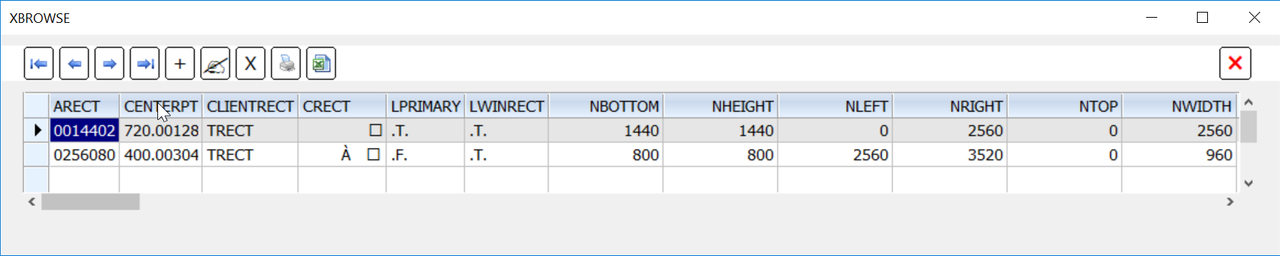
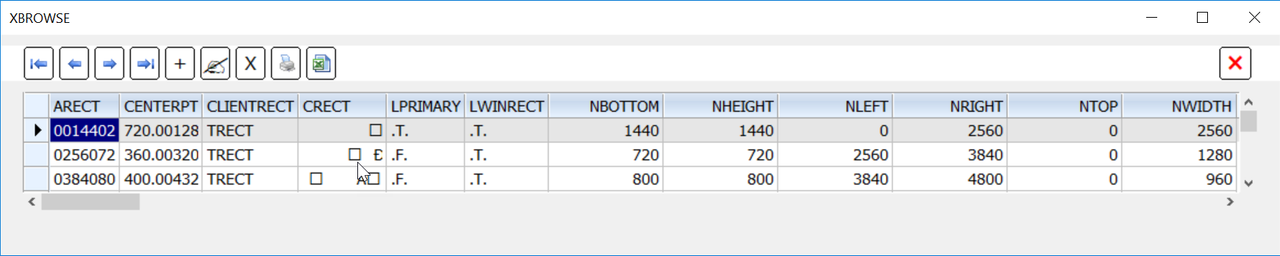
For a 'linear' setup 1-2-3 its working:


But not for a non linear setup, e. g. 1-3-2:


- FW_GetMonitor( 1 ) is ok
- FW_GetMonitor( 2 ) returns the coordinates of display 3!
- FW_GetMonitor( 3 ) returns NIL even though FW_ActiveMonitors() returns 3
- Consequentially FW_GetAllMonitors() returns an array with the dimension 2, the coordinates of display 1 and 3


Some other questions and wishes:
- Nothing found about oMonitor:lWinRect, what is the purpose of it?
- What is the aim of oMonitor:cRect? Do you want to fill it with ArraysString( aRect ), I would appreciate it
- It would be helpful to integrate the Array rcWork in the class TMonitor, to get the information where the task bar(s) are nested

Best regards and until later
Frank
Windows 11 Pro 22H2 22621.1848

Microsoft (R) Windows (R) Resource Compiler Version 10.0.10011.16384

Harbour 3.2.0dev (r2008190002)

FWH 23.10 x86
Posts: 10733
Joined: Sun Nov 19, 2006 05:22 AM
Re: FW_GetMonitor() doesn't work
Posted: Fri Feb 01, 2019 10:51 AM
Mr. Frank

Thank you very much.
I am able to test with 2 monitors only. I do need your help.
I guess your function should be working correctly in case if the 2nd setup 1-3-2.
What are the 3 Rects you are getting with your function?
Now that you understood the logic fully, can you help to correct the logic in my function?

Today is Friday. May I know when will you be resuming work and be able to help me?


- Nothing found about oMonitor:lWinRect, what is the purpose of it?

This is data inherited from base class TRect.
DATA lWinRect is .T. by default.
When this is .T., the calculations of width and height adopt Windows' logic which is relevant to us.
height = bottom - top and width = right - left.
When .F., the calculations are normal, i.e.,
height = botton - top + 1 and width = right - left + 1.
For our purpose, we should not disturb this data.

- What is the aim of oMonitor:cRect? Do you want to fill it with ArraysString( aRect ), I would appreciate it

cRect is formatted like C Language RECT struct to be directly used with Windows API functions.
This is not of use in application programs.

- It would be helpful to integrate the Array rcWork in the class TMonitor, to get the information where the task bar(s) are nested

Keeping it as a TRect object has more advanatages as you may notice in due course.

Thanking you for your help and also expecting more help from you before release of FWH1901
Regards


G. N. Rao.

Hyderabad, India
Posts: 7317
Joined: Thu Oct 18, 2012 07:17 PM
Re: FW_GetMonitor() doesn't work
Posted: Fri Feb 01, 2019 11:07 AM

Why I not have this functions?
I wish try the test also I...

Turbo Incremental Link 6.70 Copyright (c) 1997-2014 Embarcadero Technologies, Inc.
Error: Unresolved external '_HB_FUN_TMONITOR' referenced from C:\WORK\ERRORI\MONITORS\OBJ\TEST.OBJ
Error: Unresolved external '_HB_FUN_MONITORINFOFROMRC' referenced from C:\WORK\ERRORI\MONITORS\OBJ\TEST.OBJ
Warning: Public symbol '_HB_FUN_FW_GETMONITOR' defined in both module C:\WORK\ERRORI\MONITORS\OBJ\TEST.OBJ and C:\WORK\ERRORI\MONITORS\OBJ\GETSYSIN.OBJ
Error: Unable to perform link

Since from 1991/1992 ( fw for clipper Rel. 14.4 - Momos)

I use : FiveWin for Harbour March-April 2024 - Harbour 3.2.0dev (harbour_bcc770_32_20240309) - Bcc7.70 - xMate ver. 1.15.3 - PellesC - mail: silvio[dot]falconi[at]gmail[dot]com
Posts: 10733
Joined: Sun Nov 19, 2006 05:22 AM
Re: FW_GetMonitor() doesn't work
Posted: Fri Feb 01, 2019 11:25 AM

You have all these functions in FWH1812

Regards


G. N. Rao.

Hyderabad, India
Posts: 7317
Joined: Thu Oct 18, 2012 07:17 PM
Re: FW_GetMonitor() doesn't work
Posted: Fri Feb 01, 2019 12:21 PM

strange make error

Since from 1991/1992 ( fw for clipper Rel. 14.4 - Momos)

I use : FiveWin for Harbour March-April 2024 - Harbour 3.2.0dev (harbour_bcc770_32_20240309) - Bcc7.70 - xMate ver. 1.15.3 - PellesC - mail: silvio[dot]falconi[at]gmail[dot]com
Posts: 392
Joined: Tue Mar 10, 2009 11:54 AM
Re: FW_GetMonitor() doesn't work
Posted: Fri Feb 01, 2019 04:58 PM
Good morning Mr. Rao,

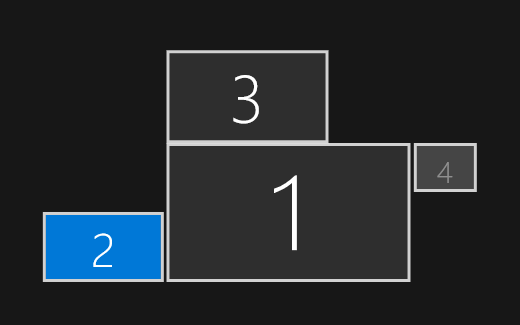
IMHO you have to scan the complete virtual screen, because the user can arrange the displays in all different order and obviously the original code 'caughts' a point with isn't within the virtual screen :-) , so the loop ends with an exit, before all monitors are scanned. Nevertheless the following code works for me:
Code (fw): Select all Collapse
function FW_GetAllMonitors()

   local aMonitors   := {}
   local aRect, nRow, nCol, aInfo, caInfo, nMonitors, nMonitor := 0

   nMonitors   := FW_ActiveMonitors()
   aRect       := FW_VirtualScreen()

   for nRow := aRect[ 1 ] + 100 to aRect[ 3 ] step 100
      for nCol := aRect[ 2 ] + 100 to aRect[ 4 ] step 100
         aInfo := MonitorInfoFromRC( nRow, nCol )
         IF HB_IsArray( aInfo )
            caInfo := Str( aInfo[ 1 ] ) + ", " + Str( aInfo[ 2 ] ) + ", " + Str( aInfo[ 3 ] ) + ", " + Str( aInfo[ 4 ] )
            IF AScan( aMonitors, { | x | x[ 2 ] == caInfo } ) == 0
               nMonitor ++
               AAdd( aMonitors, { nMonitor, caInfo, aInfo, TMonitor():New( aInfo ) } )
            ENDIF
         ENDIF
         IF nMonitor >= nMonitors
            EXIT
         ENDIF
      next nCol
      IF nMonitor >= nMonitors
         EXIT
      ENDIF
   next nRow

return aMonitors


For FW_GetMonitor( nMonitor) I have a pragmatically but workable solution, that's the main thing :-) :
Code (fw): Select all Collapse
STATIC aMonitors_static

function FW_GetMonitor( nRow, nCol )  // POINT r,c [OR] nMonitor, [or] oWnd/hWnd No params: primary monitor
   ...
      else
         IF HB_IsNIL( aMonitors_static )
            aMonitors_static := FW_GetAllMonitors()
         ENDIF
         oMonitor := aMonitors_static[ nRow, 4 ]
      endif
    ...
return oMonitor

Thank you for the other informations regarding oMonitor:lWinRect.
What are the 3 Rects you are getting with your function?

They are the direct returns from MonitorInfoFromRC(), I have integrated them in the aMonitors[ 3 ] == aInfo :-)
cRect is formatted like C Language RECT struct to be directly used with Windows API functions.
This is not of use in application programs.

Ok, put it in aMonitors[ 2 ] == caInfo :-)

Best regards and a nice weekend
Frank

post scriptum: If I find the time, I will test the functions with 4 displays in a very strange order later this WE, I'll give you an info about the results
Windows 11 Pro 22H2 22621.1848

Microsoft (R) Windows (R) Resource Compiler Version 10.0.10011.16384

Harbour 3.2.0dev (r2008190002)

FWH 23.10 x86
Posts: 392
Joined: Tue Mar 10, 2009 11:54 AM
Re: FW_GetMonitor() doesn't work
Posted: Fri Feb 01, 2019 05:23 PM
I wrote:
post scriptum: If I find the time, I will test the functions with 4 displays in a very strange order later this WE, I'll give you an info about the results

Ooops, promised too much, even I can connect 4 monitors to my Thunderbolt Dock TB16, only 3 monitors were supported simultaneously. When I extend desktop to the fourth monitor the other one (connected via display port) switch off and vice versa.
Windows 11 Pro 22H2 22621.1848

Microsoft (R) Windows (R) Resource Compiler Version 10.0.10011.16384

Harbour 3.2.0dev (r2008190002)

FWH 23.10 x86

Continue the discussion