FiveTech Support Forums

FiveWin / Harbour / xBase community
Board index FiveWin for Harbour/xHarbour FW_GetMonitor() doesn't work
Posts: 392
Joined: Tue Mar 10, 2009 11:54 AM
FW_GetMonitor() doesn't work
Posted: Mon Jan 28, 2019 06:35 AM
Hi,

want to use the function FW_GetMonitor() to get the aRect's of all active monitors, but when calling the FW_GetMonitor( i ) ends the app with an unknown error:
Code (fw): Select all Collapse
FUNCTION main()
   LOCAL oMonitor
   LOCAL i
   LOCAL nMonitors
   LOCAL aMonitors := {}
   IF HB_IsNIL( nMonitors ) .OR. HB_IsNIL( aMonitors )
      nMonitors := FW_ActiveMonitors()
      aMonitors := {}
      FOR i := 1 to nMonitors
        // app ends with an unknown error
        oMonitor := FW_GetMonitor( i )
        AAdd( aMonitors, oMonitor:aRect )
      NEXT i
   ENDIF
RETURN NIL

When invoking the getsysin.prg, the build process ends with these errors:
Code (fw): Select all Collapse
Generating object output to 'compiled\getsysin.obj'...
getsysin.prg(520): error: Redefinition of 'HMONITOR__' previously defined at C:\xHB\c_include\win\windef.h(182).
getsysin.prg(523): error: Redefinition of 'tagMONITORINFO' previously defined at C:\xHB\c_include\win\winuser.h(3755).

Understanding that there is a conflict with the xHarbour.com environment, but not really knowing what to do now :-)
Please, can someone help
Windows 11 Pro 22H2 22621.1848

Microsoft (R) Windows (R) Resource Compiler Version 10.0.10011.16384

Harbour 3.2.0dev (r2008190002)

FWH 23.10 x86
Posts: 10733
Joined: Sun Nov 19, 2006 05:22 AM
Re: FW_GetMonitor() doesn't work
Posted: Mon Jan 28, 2019 02:53 PM

The problem could be with the commercial version.
Working well with all versions of xharbour/harbour bcc/msvc 32/64 bits.

Regards


G. N. Rao.

Hyderabad, India
Posts: 6755
Joined: Wed Feb 15, 2012 08:25 PM
Re: FW_GetMonitor() doesn't work
Posted: Mon Jan 28, 2019 03:16 PM
Cristobal Navarro

Hay dos tipos de personas: las que te hacen perder el tiempo y las que te hacen perder la noción del tiempo

El secreto de la felicidad no está en hacer lo que te gusta, sino en que te guste lo que haces
Posts: 10733
Joined: Sun Nov 19, 2006 05:22 AM
Re: FW_GetMonitor() doesn't work
Posted: Mon Jan 28, 2019 03:47 PM
Mr. Cristobal

I do not think that is his problem. He is getting compilation errors with getsysin.prg.

Mr. Frose

Please try commenting these lines in getsysin.prg and try
Code (fw): Select all Collapse
DECLARE_HANDLE(HMONITOR);

typedef struct tagMONITORINFO
{
    DWORD   cbSize;
    RECT    rcMonitor;
    RECT    rcWork;
    DWORD   dwFlags;
} MONITORINFO, *LPMONITORINFO;
Regards


G. N. Rao.

Hyderabad, India
Posts: 392
Joined: Tue Mar 10, 2009 11:54 AM
Re: FW_GetMonitor() doesn't work
Posted: Tue Jan 29, 2019 08:14 AM
Good afternoon Mr. Rao,

thank you very much for your answer.

The app compiles now with the commented lines, but it errors with <i> greater than 1:
Code (fw): Select all Collapse
Application
===========
   Path and name: C:\xharbour\my_source\tmonitor.exe (32 bits)
   Size: 3,363,840 bytes
   Compiler version: xHarbour build 1.2.1 Intl. (SimpLex) (Rev. 9382)
   FiveWin  version: FWH 18.12
   C compiler version: XCC ISO C Compiler 2.70
   Windows version: 6.2, Build 9200 

   Time from start: 0 hours 0 mins 15 secs 
   Error occurred at: 01/29/19, 09:02:08
   Error description: Error BASE/1068  Argument error: array access
   Args:
     [   1] = U   
     [   2] = N   4

Stack Calls
===========
   Called from: getsysin.prg => FW_GETMONITOR( 375 )
   Called from: C:\xharbour\my_source\tmonitor.prg => MAIN( 23 )

System
======
   CPU type: Intel(R) Core(TM) i7-8706G CPU @ 3.10GHz 3096 Mhz
   Hardware memory: 1 megs

   Free System resources: 90 %
        GDI    resources: 90 %
        User   resources: 90 %

   Windows total applications running: 4
      1 ,                                                                                                     
      2 , C:\xharbour\my_source\tmonitor.exe                                                                  
      3 DDE Server Window, C:\Windows\System32\ole32.dll                                                                       
      4 G, C:\Windows\WinSxS\x86_microsoft.windows.gdiplus_6595b64144ccf1df_1.1.17134.523_none_73d8c7959f75cd2 

Variables in use
================
   Procedure     Type   Value
   ==========================
   FW_GETMONITOR
     Param   1:    N    2
     Local   1:    U    
     Local   2:    U    
     Local   3:    U    
     Local   4:    N    2580
     Local   5:    N    2
     Local   6:    N    2
     Local   7:    U    
     Local   8:    U    
     Local   9:    N    4
     Local  10:    U    
     Local  11:    L    .F.
   MAIN
     Local   1:    O    Class: TMONITOR
     Local   2:    N    2
     Local   3:    N    3
     Local   4:    A    Len:    1
     Local   5:    N    66182
     Local   6:    A    Len:    4
     Local   7:    A    Len:    4

and I don't know/understand why :-)
Perhaps there is a speciality in my display settings with 3 monitors of different sizes, tried two different setups with no luck :-)
Windows 11 Pro 22H2 22621.1848

Microsoft (R) Windows (R) Resource Compiler Version 10.0.10011.16384

Harbour 3.2.0dev (r2008190002)

FWH 23.10 x86
Posts: 10733
Joined: Sun Nov 19, 2006 05:22 AM
Re: FW_GetMonitor() doesn't work
Posted: Tue Jan 29, 2019 09:02 AM
It seems, in the line 374
Code (fw): Select all Collapse
            aInfo    := MonitorInfoFromRC( 20, x )

aInfo returned is NIL.

Can you please try
FW_GetMonitor( 1 )
FW_GetMonitor( 2 )
and
FW_Get_Monitor( 3 )
in separate lines and see for which monitor we are getting this error?
Regards


G. N. Rao.

Hyderabad, India
Posts: 392
Joined: Tue Mar 10, 2009 11:54 AM
Re: FW_GetMonitor() doesn't work
Posted: Tue Jan 29, 2019 09:23 AM
FW_GetMonitor( 2 ) crashes.

Code (fw): Select all Collapse
Variables in use
================
   Procedure     Type   Value
   ==========================
   FW_GETMONITOR
     Param   1:    N    2
     Local   1:    U    
     Local   2:    U    
     Local   3:    U    
     Local   4:    N    2580
     Local   5:    N    2
     Local   6:    N    2
     Local   7:    U    
     Local   8:    U    
     Local   9:    N    4
     Local  10:    U    
     Local  11:    L    .F.
Windows 11 Pro 22H2 22621.1848

Microsoft (R) Windows (R) Resource Compiler Version 10.0.10011.16384

Harbour 3.2.0dev (r2008190002)

FWH 23.10 x86
Posts: 392
Joined: Tue Mar 10, 2009 11:54 AM
Re: FW_GetMonitor() doesn't work
Posted: Tue Jan 29, 2019 09:27 AM
Mr. Rao,

the crash ist in the next line 375:
Code (fw): Select all Collapse
 x        := aInfo[ 4 ] + 20
because the return value of MonitorInfoFromRC() is 0!

IMHO MonitorInfoFromRC() always returns 0, if the point isn't on the virtual screen :-) :-)
Windows 11 Pro 22H2 22621.1848

Microsoft (R) Windows (R) Resource Compiler Version 10.0.10011.16384

Harbour 3.2.0dev (r2008190002)

FWH 23.10 x86
Posts: 10733
Joined: Sun Nov 19, 2006 05:22 AM
Re: FW_GetMonitor() doesn't work
Posted: Tue Jan 29, 2019 10:02 AM
MonitorInfoFromRC() always returns 0, if the point isn't on the virtual screen


It should return NIL in such case.

1) May I know the screen resolutions of the 3 monitors you are using?
2) Also can you please let me know the Rect of MonitorInfo for the first monitor?
3) Please see line 374
Code (fw): Select all Collapse
            aInfo    := MonitorInfoFromRC( 20, x )

Can you please try different values like 100,200,300, etc in the place of 20 I used in the above line?
Regards


G. N. Rao.

Hyderabad, India
Posts: 392
Joined: Tue Mar 10, 2009 11:54 AM
Re: FW_GetMonitor() doesn't work
Posted: Tue Jan 29, 2019 10:29 AM
1 - 3860 x 2160 -Primary, main display
2 - 2560 x 1440
3 - 2560 x 1080


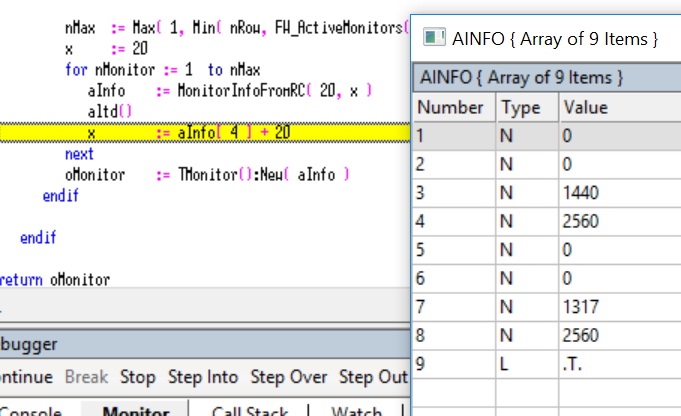
rcMonitor 0 0 1440 2560
rcWork 0 0 1317 2560^

From the debugger:
Windows 11 Pro 22H2 22621.1848

Microsoft (R) Windows (R) Resource Compiler Version 10.0.10011.16384

Harbour 3.2.0dev (r2008190002)

FWH 23.10 x86
Posts: 392
Joined: Tue Mar 10, 2009 11:54 AM
Re: FW_GetMonitor() doesn't work
Posted: Tue Jan 29, 2019 10:40 AM
Can you please try different values like 100,200,300, etc in the place of 20 I used in the above line?


Notthing change, aInfo is always NIL with nMonitor is 2
Windows 11 Pro 22H2 22621.1848

Microsoft (R) Windows (R) Resource Compiler Version 10.0.10011.16384

Harbour 3.2.0dev (r2008190002)

FWH 23.10 x86

Posts: 10733
Joined: Sun Nov 19, 2006 05:22 AM
Re: FW_GetMonitor() doesn't work
Posted: Tue Jan 29, 2019 11:20 AM

Your primary monitor seems to be
2 - 2560 x 1440
Because top and left are 0,0 for this monitor,

Can you please call the function
FW_VirtualScreen() --> aVirtualScreenRect
and let me know the Rect values?

Regards


G. N. Rao.

Hyderabad, India
Posts: 392
Joined: Tue Mar 10, 2009 11:54 AM
Re: FW_GetMonitor() doesn't work
Posted: Tue Jan 29, 2019 11:40 AM
Your primary monitor seems to be
2 - 2560 x 1440
Because top and left are 0,0 for this monitor,
I don't understand :-)

my current display settings are:

FW_VirtualScreen() :aRect - {0,-2560,1440,6400}

I tried this 'linear' setup with same behaviour:

FW_VirtualScreen() :aRect - {0,0,1440,8960}
Windows 11 Pro 22H2 22621.1848

Microsoft (R) Windows (R) Resource Compiler Version 10.0.10011.16384

Harbour 3.2.0dev (r2008190002)

FWH 23.10 x86

Posts: 392
Joined: Tue Mar 10, 2009 11:54 AM
Re: FW_GetMonitor() doesn't work
Posted: Tue Jan 29, 2019 12:12 PM
Dear Mr. Rao,

look at this code:
Code (fw): Select all Collapse
      FOR i := aRect_virtual[ 1 ] TO aRect_virtual[ 3 ] STEP 100
         FOR j := aRect_virtual[ 2 ] TO aRect_virtual[ 4 ] STEP 100
            aRect := MonitorInfoFromRC( i, j )
            IF HB_IsArray( aRect )
               cZwschn := ArrayToString(  aRect, ", " ) 
               IF AScan( acMonitors, cZwschn ) == 0
                  nMonitor ++
                  AAdd( aMonitors, { nMonitor, aRect } )
                  AAdd( acMonitors, cZwschn )
               ENDIF
            ENDIF
            IF nMonitor >= nMonitors
               EXIT
            ENDIF
         NEXT j
         IF nMonitor >= nMonitors
            EXIT
         ENDIF
      NEXT i


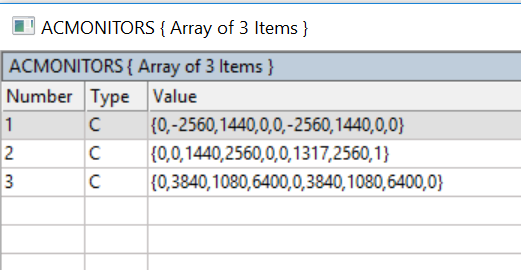
I finally got want I want, an array with the screen coordinates of all active monitors:


Thank you very much for your assistant. :-) :-)

Perhaps you can optimize this and implement it in the getsysin.prg for the next release :-)
Windows 11 Pro 22H2 22621.1848

Microsoft (R) Windows (R) Resource Compiler Version 10.0.10011.16384

Harbour 3.2.0dev (r2008190002)

FWH 23.10 x86
Posts: 10733
Joined: Sun Nov 19, 2006 05:22 AM
Re: FW_GetMonitor() doesn't work
Posted: Tue Jan 29, 2019 12:22 PM
  1. I need to modify the function a little. I will post the modification
  2. Still, the function should work for your 2nd configuration. Monitors 1,2,3
Regards


G. N. Rao.

Hyderabad, India