FiveTech Support Forums

FiveWin / Harbour / xBase community
Board index FiveWin for Harbour/xHarbour oWnd:oClient := oPanel
Posts: 7317
Joined: Thu Oct 18, 2012 07:17 PM
Re: oWnd:oClient := oPanel
Posted: Wed May 29, 2019 11:21 AM
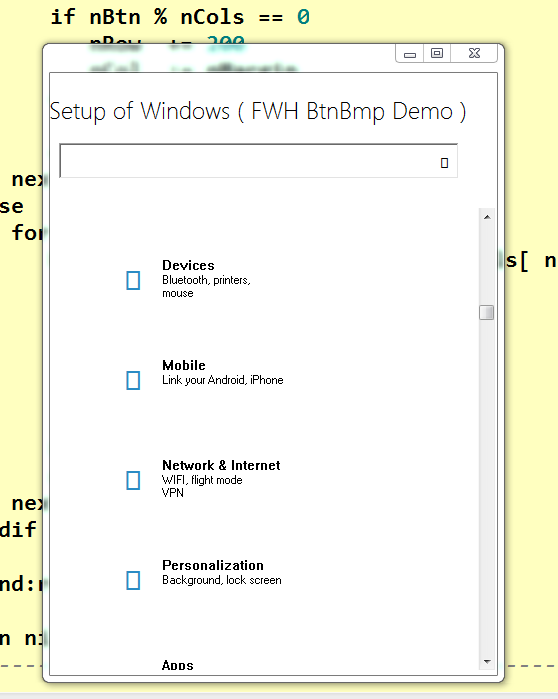
Now run good also in vertical


Code (fw): Select all Collapse
#include "FiveWin.ch"
 #define LAYOUT_TOP     1
#define LAYOUT_LEFT    2
static oDlg

//----------------------------------------------------------------------------//

function Main()

   Local oPanelScroll
   Local oFont1,oFontG
   Local oSay
   Local oGet
   local cFind      := ""
   local cPrompt    := "Setup of Windows ( FWH BtnBmp Demo )"


   DEFINE FONT oFont1 NAME "Segoe UI Light" SIZE 0,-24
 DEFINE FONT oFontG NAME "Segoe UI" SIZE 0,-18


 DEFINE DIALOG oDlg  SIZE 880,600 ;
PIXEL TRUEPIXEL RESIZABLE //FONT oFont

 oDlg:setcolor(CLR_BLACK,CLR_WHITE)

   @ 20, 160 SAY oSay PROMPT cPrompt OF oDlg PIXEL FONT oFont1 SIZE 420, 40
   @ 70, 170 GET oGet VAR    cFind   OF oDlg PIXEL FONT oFontG SIZE 400, 36
   *  CUEBANNER "Find a setting"

                 oSay:lTransparent:=.t.

oDlg:bResized := <||
local oRect := oDlg:GetCliRect()

WndResize( oPanelScroll,oSay,oGet,oRect)

RETURN nil
>

   oDlg:nWidth    := 850
   oDlg:nHeight   := 800


ACTIVATE DIALOG oDlg CENTERED ;
 ON INIT( oPanelScroll := CreatePanel( oDlg,oGet ),;
          oPanelScroll:CheckResize(),;
          eval(oDlg:bResized)              )   //, )
return nil

//----------------------------------------------------------------------------//
    function CreatePanel( oDlg,oGet )
      local oPanel
     local oBold
     local aGrad  := { { 1, RGB( 216, 230, 238 ), RGB( 103, 154, 194 ) } }
     local aBtns    := { ;
                      { "System" + CRLF + "Screen, notifications," + CRLF + "power", 0xE770, { || Dummy() } }, ;
                      { "Devices" + CRLF + "Bluetooth, printers," + CRLF + "mouse", 0xE772, { || Dummy() } }, ;
                      { "Mobile" + CRLF + "Link your Android, iPhone" + CRLF, 0xE1C9, { || Dummy() } }, ;
                      { "Network && Internet" + CRLF + "WIFI, flight mode" + CRLF + "VPN", 0xE12b, { || Dummy() } }, ;
                      { "Personalization" + CRLF + "Background, lock screen" + CRLF, 0xE771, { || Dummy() } }, ;
                      { "Apps" + CRLF + "Uninstall defaults" + CRLF + "Optional Features", 0xE179, { || Dummy() } }, ;
                      { "Account" + CRLF + "Your account, email sync" + CRLF + "Work family", 0xE77B, { || Dummy() } }, ;
                      { "Time and language" + CRLF + "Voice, region, date" + CRLF, 0xE775, { || Dummy() } }, ;
                      { "Games" + CRLF + "Game bar, DVR," + CRLF + "retransmission and game mode", 0xE909, { || Dummy() } }, ;
                      { "Accessibility" + CRLF + "Narrator, magnifying glass," + CRLF + "high contrast", 0xE776, { || Dummy() } }, ;
                      { "Cortana" + CRLF + "Language of Cortana," + CRLF + "permissions, notifications", 0xECCA, { || Dummy() } }, ;
                      { "Privacy" + CRLF + "Location Camera" + CRLF, 0xE1F6, { || Dummy() } }, ;
                      { "Update && Security" + CRLF + "Windows Update" + CRLF + "Recovery", 0xE777, { || Dummy() } } ;
                     }

   local nRow       := 10
   local nCol       := 10
   local nClrBack   := CLR_WHITE
   local nW         := 200
   local nH         := 140
   local nCBorder   := 0xC38B2B
   local nClrText   := CLR_BLACK
   local nClrBorder := 0xE6E6E6

   DEFINE FONT oFont  NAME "Segoe UI" SIZE 0,-14

   DEFINE FONT oBold  NAME "Segoe UI" SIZE 0,-14 BOLD


     WITH OBJECT oGet
      :bAction       := { || Dummy() }
      :cBmpName      := 0xE11A
      :lBtnTransparent  := .t.
      :CreateButton()
   END


     oPanel   := TScrollPanel():New( 135,010,180,550,oDlg, .t. )
     oPanel:nRightMargin     := 2
     oPanel:nBottomMargin    := 5
     oPanel:WinStyle(WS_BORDER, .f.)
     oPanel:setcolor(CLR_WHITE,CLR_WHITE)


   For x = 1 to Len( aBtns )
      if x > 1
         if Mod( x, 5 ) = 1
            nRow += 200
            nCol := 10
         else
            nCol += 200
         endif
      endif
      @ nRow, nCol BTNBMP oBtn PROMPT aBtns[ x ][ 1 ]  ;
         RESOURCE aBtns[ x ][ 2 ] SIZE nW, nH PIXEL OF oPanel FLAT NOBORDER ;
         COLOR nClrText, nClrBack
         WITH OBJECT oBtn
            :bAction     := aBtns[ x ][ 3 ]
            :nClrBorder  := nClrBorder
            :bColorMap   := { | o | o:lBorder := o:lMOver, nCBorder }
            :oFontBold   := oBold
            :lRound      := .F.
         END
   Next x

      oPanel:SetRange()

      RELEASE FONT oFont, oBold
 return oPanel
//----------------------------------------------------------------------------//
  //----------------------------------------------------------------------------//

static function Dummy()
Return nil

//----------------------------------------------------------------------------//
static function WndResize( oWnd,oSay,oGet,oRect1 )

   local oRect    := oWnd:GetCliRect()

   local nMargin, nRow, nCol, nCols, nBtnWidth, nBtns, nBtn, oBtn, n

   *for n := 1 to 2
      oSay:nLeft := ( oRect1:nWidth - oSay:nWidth ) / 2
      oGet:nLeft := ( oRect1:nWidth - oGet:nWidth ) / 2
   *next

   oSay:lTransparent:=.t.


   nBtnWidth   := 200
   nCols       := Min( 5, Int( oRect:nWidth / nBtnWidth ) - 1 )
   nMargin     := ( oRect:nWidth - nCols * nBtnWidth ) / 2

   nBtns       := Len( oWnd:aControls ) 

   nRow        := 100
   nCol        := nMargin

   if nCols > 2
      for nBtn := 1 to nBtns
         WITH OBJECT ( oBtn := oWnd:aControls[ nBtn  ] )
            :cCaption  := Trim( oBtn:cCaption )
            :nTop      := nRow
            :nLeft     := nCol
            :nWidth    := 200
            :nHeight   := 140
            :nLayOut   := LAYOUT_TOP
         END
         if nBtn % nCols == 0
            nRow  += 200
            nCol  := nMargin
         else
            nCol  += nBtnWidth
         endif
      next
   else
      for nBtn := 1 to nBtns
         WITH OBJECT ( oBtn := oWnd:aControls[ nBtn  ] )
            :cCaption  += " "
            :nTop      := nRow
            :nLeft     := 30
            :nWidth    := oRect:nWidth - 60
            :nHeight   := 80
            :nLayOut   := LAYOUT_LEFT
         END
         nRow  += 100
      next
   endif

   oWnd:refresh(.t.)

return nil
//----------------------------------------------------------------------------//
Since from 1991/1992 ( fw for clipper Rel. 14.4 - Momos)

I use : FiveWin for Harbour March-April 2024 - Harbour 3.2.0dev (harbour_bcc770_32_20240309) - Bcc7.70 - xMate ver. 1.15.3 - PellesC - mail: silvio[dot]falconi[at]gmail[dot]com
Posts: 7317
Joined: Thu Oct 18, 2012 07:17 PM
Re: oWnd:oClient := oPanel
Posted: Wed May 29, 2019 11:26 AM

sorry there was an error I update the message above

Since from 1991/1992 ( fw for clipper Rel. 14.4 - Momos)

I use : FiveWin for Harbour March-April 2024 - Harbour 3.2.0dev (harbour_bcc770_32_20240309) - Bcc7.70 - xMate ver. 1.15.3 - PellesC - mail: silvio[dot]falconi[at]gmail[dot]com
Posts: 6983
Joined: Fri Oct 07, 2005 07:07 PM
Re: oWnd:oClient := oPanel
Posted: Wed May 29, 2019 12:02 PM
Hello Silvio,
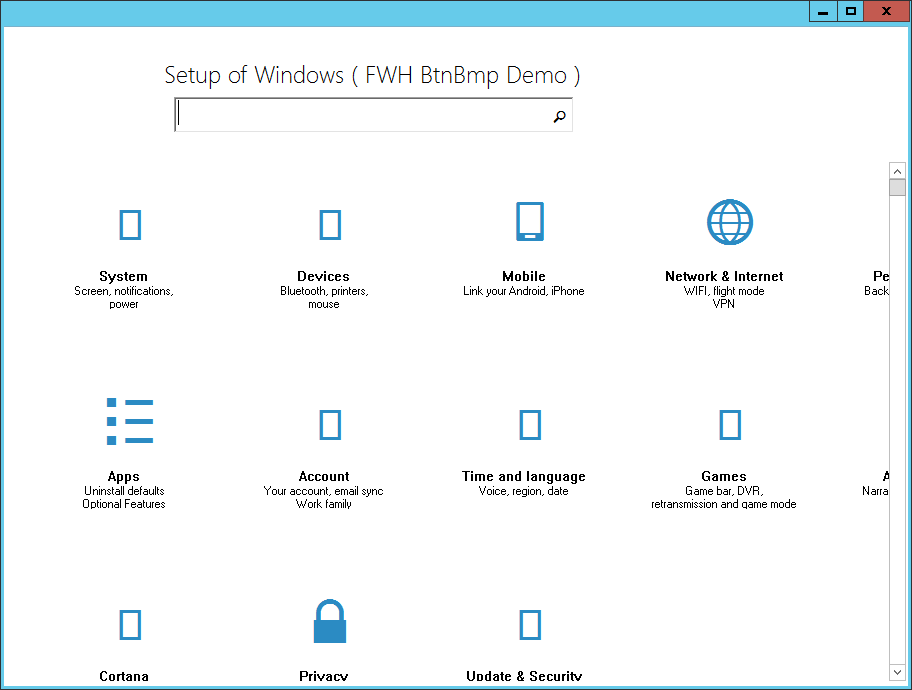
now I changed registry.

HKEY_CURRENT_USER\Control Panel\Desktop\WindowMetrics
To make your window borders as small as possible, double-click BorderWidth and set it to 0, and then double-click PaddedBoderWidth and set it to 0.

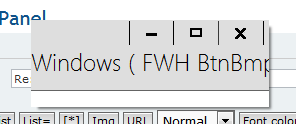
Here is the result:
Thank you and best regards
Otto
Posts: 7317
Joined: Thu Oct 18, 2012 07:17 PM
Re: oWnd:oClient := oPanel
Posted: Wed May 29, 2019 05:47 PM

perhaps is good not modify the registry of win10

Since from 1991/1992 ( fw for clipper Rel. 14.4 - Momos)

I use : FiveWin for Harbour March-April 2024 - Harbour 3.2.0dev (harbour_bcc770_32_20240309) - Bcc7.70 - xMate ver. 1.15.3 - PellesC - mail: silvio[dot]falconi[at]gmail[dot]com
Posts: 6983
Joined: Fri Oct 07, 2005 07:07 PM
Re: oWnd:oClient := oPanel
Posted: Wed May 29, 2019 06:02 PM

Silvio,
on WINDOWS 10 all looks good - not so on WINDOWS SERVER 2012 R2.
Therefore I changed registry.
Thank you for your help
Otto

Posts: 7317
Joined: Thu Oct 18, 2012 07:17 PM
Re: oWnd:oClient := oPanel
Posted: Wed May 29, 2019 08:24 PM
Otto wrote:Silvio,
on WINDOWS 10 all looks good - not so on WINDOWS SERVER 2012 R2.
Therefore I changed registry.
Thank you for your help
Otto


I cannnot try it on a windows server 2012 R2 I think I have also windows server 2003 at school but I must ask to my engineer who is in charge of the data processing center, I am only responsible for 2 computer labs as this : ( windows seven)

Since from 1991/1992 ( fw for clipper Rel. 14.4 - Momos)

I use : FiveWin for Harbour March-April 2024 - Harbour 3.2.0dev (harbour_bcc770_32_20240309) - Bcc7.70 - xMate ver. 1.15.3 - PellesC - mail: silvio[dot]falconi[at]gmail[dot]com
Posts: 4043
Joined: Wed Dec 19, 2007 06:40 PM
Re: oWnd:oClient := oPanel
Posted: Wed May 29, 2019 08:37 PM
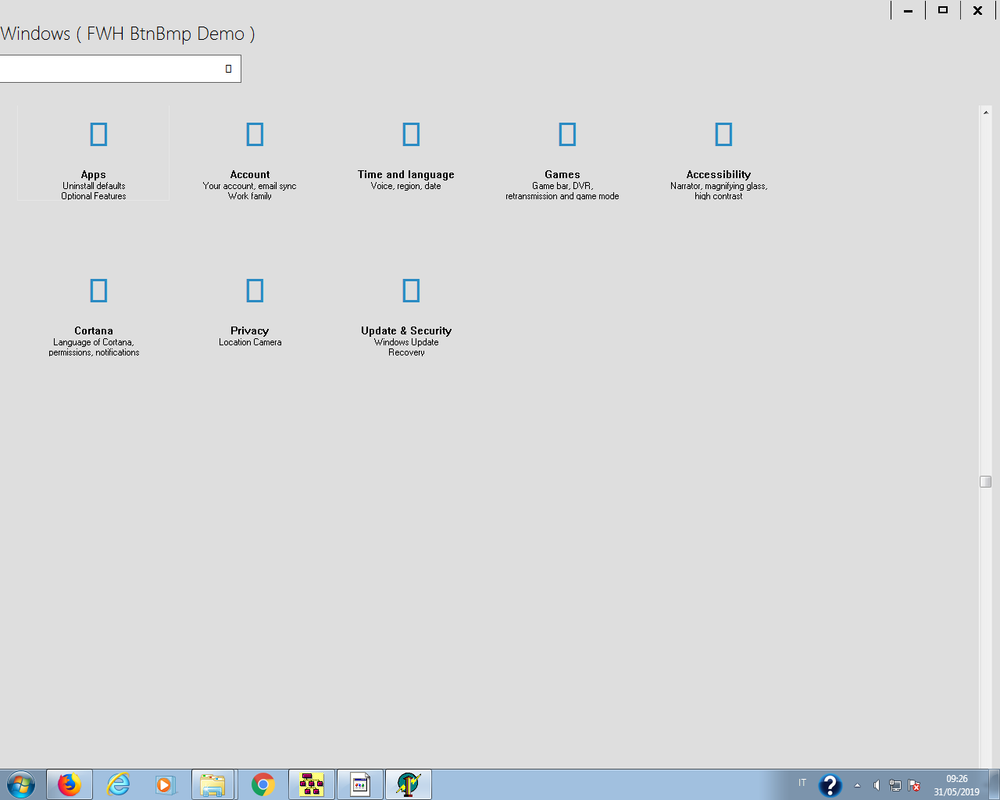
My solution

no border and resizing of using a WINDOW

instead of a border for resizing there are 8 pixel defined on the right and bottom
between the panel and borders
for moving the windows there are 24 pixel on the top
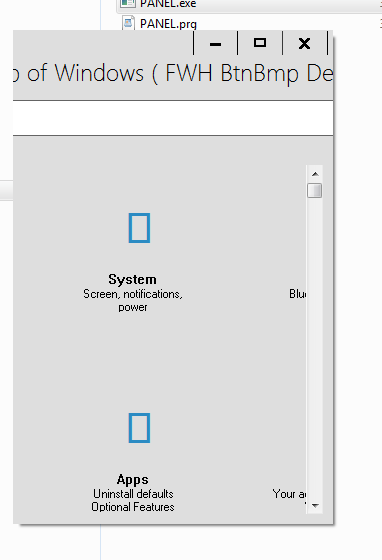
The panel is resized as well
the second picture shows the hight resized.


regards
Uwe :-)
Since 1995 ( the first release of FW 1.9 )

i work with FW.

If you have any questions about special functions, maybe i can help.
Posts: 6983
Joined: Fri Oct 07, 2005 07:07 PM
Re: oWnd:oClient := oPanel
Posted: Wed May 29, 2019 08:57 PM

Hello Uwe,
would you be so kind to post your solution.
Thank you in advace
Otto

Posts: 4043
Joined: Wed Dec 19, 2007 06:40 PM
Re: oWnd:oClient := oPanel
Posted: Thu May 30, 2019 06:52 AM
Otto,

no problem.
What do You want to show on resizing :-)
resized images inside the panel as well
or keeping the original size
The same belongs to the top area
only adjusted ( centered ) or resized :-)

I think resizing from the top doesn't make sense
because the area is used for window-moving.
And from the left :-)

Because3 of NO border I'm using a defined area on right and bottom for resizing ( green ).

Since 1995 ( the first release of FW 1.9 )

i work with FW.

If you have any questions about special functions, maybe i can help.
Posts: 6983
Joined: Fri Oct 07, 2005 07:07 PM
Re: oWnd:oClient := oPanel
Posted: Thu May 30, 2019 04:07 PM

Hello Uwe,
thanks for your offer.
it would be fine if you show for the moment how to move and resize the window.
Today is Ascension Day, that's why I did not work during the day.
Best regards
Otto

Posts: 4043
Joined: Wed Dec 19, 2007 06:40 PM
Re: oWnd:oClient := oPanel
Posted: Thu May 30, 2019 05:13 PM

Hello Otto,

the download ( full ) :

http://www.pflegeplus.com/DOWNLOADS/Panel1.zip

There are cursor-changes on the top, right and bottom-area
For resizing there is a defined space between the panel and the outline of the window
( the same effect like a defined border )
I would like to have a quiter refresh on resize, maybe possible :?:
Resized is defined from right and bottom. Top only for moving the window.
I think from left it doesn't make much sense.

regards
Uwe :D

Since 1995 ( the first release of FW 1.9 )

i work with FW.

If you have any questions about special functions, maybe i can help.
Posts: 6983
Joined: Fri Oct 07, 2005 07:07 PM
Re: oWnd:oClient := oPanel
Posted: Thu May 30, 2019 06:39 PM

Hello Uwe,
thank you. This is exactly what I need.
There are still some problems with draging and resizing.
Please try.
Programm start - drag and then click inside the scrollbar. This does not work. You have to click on the Scroller then it works.
I can't resize bottom to a larger value.

In some cases if you want to drag the window to the left you have to position mouse cursor to the right side of the caption line.
Thank you for your work and best regards

Otto

Posts: 7317
Joined: Thu Oct 18, 2012 07:17 PM
Re: oWnd:oClient := oPanel
Posted: Fri May 31, 2019 07:30 AM
Uwe,Otto

there are 3 problems

if you resize the window as this :


and then press the middle button to resize maximized look the get and the say controls


also i buttons are moved


then if resize as this :


you cannot see the buttons as I made I (one down another and the controls say and get on middle of window)

see here https://i.postimg.cc/VNr0n2W1/vet.png


then there are dragging problems which is why I had used a DIALOG RESIZABLE and not a WINDOW

even if in theory a dialog... is the daughter of a window class
Since from 1991/1992 ( fw for clipper Rel. 14.4 - Momos)

I use : FiveWin for Harbour March-April 2024 - Harbour 3.2.0dev (harbour_bcc770_32_20240309) - Bcc7.70 - xMate ver. 1.15.3 - PellesC - mail: silvio[dot]falconi[at]gmail[dot]com
Posts: 4043
Joined: Wed Dec 19, 2007 06:40 PM
Re: oWnd:oClient := oPanel
Posted: Fri May 31, 2019 10:33 AM
I Changed from window to dialog :-)
now it works fine without problems like You can see the images resized and maximized.
I added some space between panel and border it is better for resizing

Otto wrote
There are still some problems with draging and resizing.
Please try.
Programm start - drag and then click inside the scrollbar.
This does not work. You have to click on the Scroller then it works.
I can't resize bottom to a larger value.
In some cases if you want to drag the window to the left you have
to position mouse cursor to the right side of the caption line.


Silvio wrote
you cannot see the buttons as I made I (one down another and the controls say and get on middle of window)


then there are dragging problems which is why I had used a DIALOG RESIZABLE and not a WINDOW


regards
Uwe :-)
Since 1995 ( the first release of FW 1.9 )

i work with FW.

If you have any questions about special functions, maybe i can help.
Posts: 6983
Joined: Fri Oct 07, 2005 07:07 PM
Re: oWnd:oClient := oPanel
Posted: Fri May 31, 2019 11:59 AM

Hallo Uwe,
soll ich das ZIP-file nochmals herunterladen.
Nochmals vielen Dank und liebe Grüße
Otto