FiveTech Support Forums

FiveWin / Harbour / xBase community
Board index FiveWin for Harbour/xHarbour oWnd:oClient := oPanel
Posts: 4043
Joined: Wed Dec 19, 2007 06:40 PM
Re: oWnd:oClient := oPanel
Posted: Fri May 31, 2019 12:04 PM

Otto,

I still want to do some finetuning
but will publich a new release in the meantime for testing.
It will be panel2.zip

regards
Uwe :D

Since 1995 ( the first release of FW 1.9 )

i work with FW.

If you have any questions about special functions, maybe i can help.
Posts: 4043
Joined: Wed Dec 19, 2007 06:40 PM
Re: oWnd:oClient := oPanel
Posted: Fri May 31, 2019 12:15 PM

Hello Otto,

the new download changes from window to dialog :

http://www.pflegeplus.com/DOWNLOADS/Panel2.zip

There will be still some improvements of the calculations for dialog-resizing
working with a calculated resize-factor.

regards
Uwe :D

Since 1995 ( the first release of FW 1.9 )

i work with FW.

If you have any questions about special functions, maybe i can help.
Posts: 7317
Joined: Thu Oct 18, 2012 07:17 PM
Re: oWnd:oClient := oPanel
Posted: Fri May 31, 2019 04:30 PM

Uwe,
I can restrict but if I try to enlarge I find it very difficult to take the edge of the window with the mouse

Since from 1991/1992 ( fw for clipper Rel. 14.4 - Momos)

I use : FiveWin for Harbour March-April 2024 - Harbour 3.2.0dev (harbour_bcc770_32_20240309) - Bcc7.70 - xMate ver. 1.15.3 - PellesC - mail: silvio[dot]falconi[at]gmail[dot]com
Posts: 4043
Joined: Wed Dec 19, 2007 06:40 PM
Re: oWnd:oClient := oPanel
Posted: Sun Jun 02, 2019 06:48 PM
More tests and improvements.

Style change on resizing to col 1 and 2
the system-button is used for colour-changes
You can make a border visible on button-focus.
To hide the border just use the panel colour
Colours are saved to a INI-file

the new download :

http://www.pflegeplus.com/DOWNLOADS/Panel3.zip


rearanged colours with no button-border


regards
Uwe :-)
Since 1995 ( the first release of FW 1.9 )

i work with FW.

If you have any questions about special functions, maybe i can help.
Posts: 4043
Joined: Wed Dec 19, 2007 06:40 PM
Re: oWnd:oClient := oPanel
Posted: Mon Jun 03, 2019 12:14 PM
I added small buttons to the resizec-caption-area
for quick resizing.
Now it is possible to resize by mouse or using a button
To display the buttons is optional and can be defined inside the setup-dialog.
All this will be included in release 2.2

another question :
I would like to have a list of the predefined buttons and cursors
is that possible :-) ( 13 buttons are included )

CursorCatch() and CursorSize() is used
I would like to change CursorCatch() to arrow left/right and arrow up/down
If not exists I will define the needed cursors


regards
Uwe :-)
Since 1995 ( the first release of FW 1.9 )

i work with FW.

If you have any questions about special functions, maybe i can help.
Posts: 6983
Joined: Fri Oct 07, 2005 07:07 PM
Re: oWnd:oClient := oPanel
Posted: Mon Jun 03, 2019 06:00 PM
Hello Uwe,
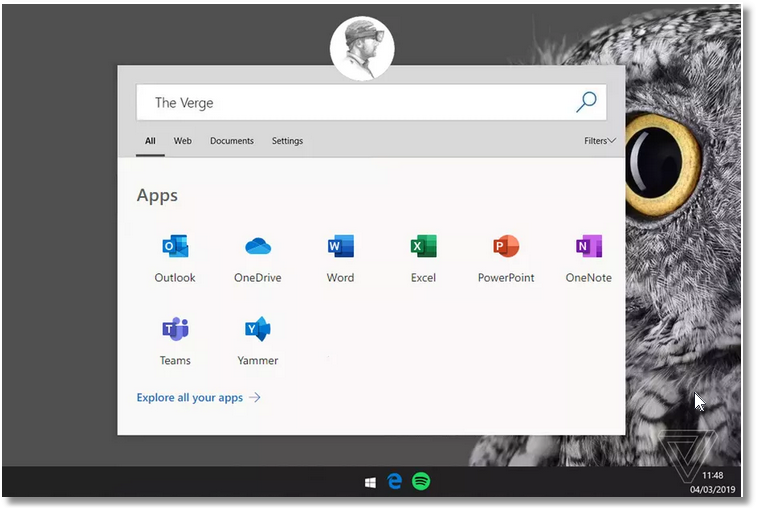
it seems that the new WINDOWS lite comming this summer will come with such a start screen.
Thank you for your work
Otto


Posts: 4043
Joined: Wed Dec 19, 2007 06:40 PM
Re: oWnd:oClient := oPanel
Posted: Mon Jun 03, 2019 06:21 PM
Hello Otto,

funny it nearly looks the same. :-)

but I included many more options like
color-settings, optional button-border on focus, quick dialog-resize ....

more extensions are possible, I'm open for any ideas.

I changed my first idea resizing by percent.
Now You can select any combination of visible columns and rows on button-click.
Don't care about adjustment needed by mouse-resizing.
works great :-)


regards
Uwe :-)
Since 1995 ( the first release of FW 1.9 )

i work with FW.

If you have any questions about special functions, maybe i can help.
Posts: 6983
Joined: Fri Oct 07, 2005 07:07 PM
Re: oWnd:oClient := oPanel
Posted: Mon Jun 03, 2019 06:54 PM

Hello Uwe,
have you seen that there is also a TAB nnavigation.
We should have TAB to select different panels and then inside the panels we need to open and close icon bars.
Best regards
Otto

Posts: 4043
Joined: Wed Dec 19, 2007 06:40 PM
Re: oWnd:oClient := oPanel
Posted: Mon Jun 03, 2019 07:19 PM
Otto,

good idea :-)

This is the new setup
everything is optional


regards
Uwe :-)
Since 1995 ( the first release of FW 1.9 )

i work with FW.

If you have any questions about special functions, maybe i can help.
Posts: 4043
Joined: Wed Dec 19, 2007 06:40 PM
Re: oWnd:oClient := oPanel
Posted: Wed Jun 05, 2019 11:56 AM
Otto,

with the help from Christobal, now we can select a tab and fill a panel with any objects we like
The panel is created only once, showing the group of objects defined with a selected tab..
With tab 3 You can see that the panel shows a buttonbar and some other defined objects.

have you seen that there is also a TAB nnavigation.
We should have TAB to select different panels and then
inside the panels we need to open and close icon bars.


I think You mean a buttonbar :-)

The left part of the panel with selected tab 3
Better using these tabs instead of normal tabs
or maybe much better replacing the tabs with
a row of small flat buttons on top for a better design :-)


regards
Uwe :-)
Since 1995 ( the first release of FW 1.9 )

i work with FW.

If you have any questions about special functions, maybe i can help.

Continue the discussion