
I want to include navigation prompts in my edit dialog
i.e. Top,Bottom,Skip
How do I update the record object to contain the details of the newly selected browse row.
Regards
Peter
I want to include navigation prompts in my edit dialog
i.e. Top,Bottom,Skip
How do I update the record object to contain the details of the newly selected browse row.
Regards
Peter
XBROWSER "CUSTOMER.DBF" FASTEDIT
Yes the demo example that Silvio has given is what I want to acheive
I want to have my edit dialog be able to navigate through the records,so when I move through the
browse the record object gets updated to reflect the new browse record that has focus.
Regards
Peter
reds wrote:Yes the demo example that Silvio has given is what I want to acheive
I want to have my edit dialog be able to navigate through the records,so when I move through the
browse the record object gets updated to reflect the new browse record that has focus.
Regards
Peter
18.12
Many thanks
Peter
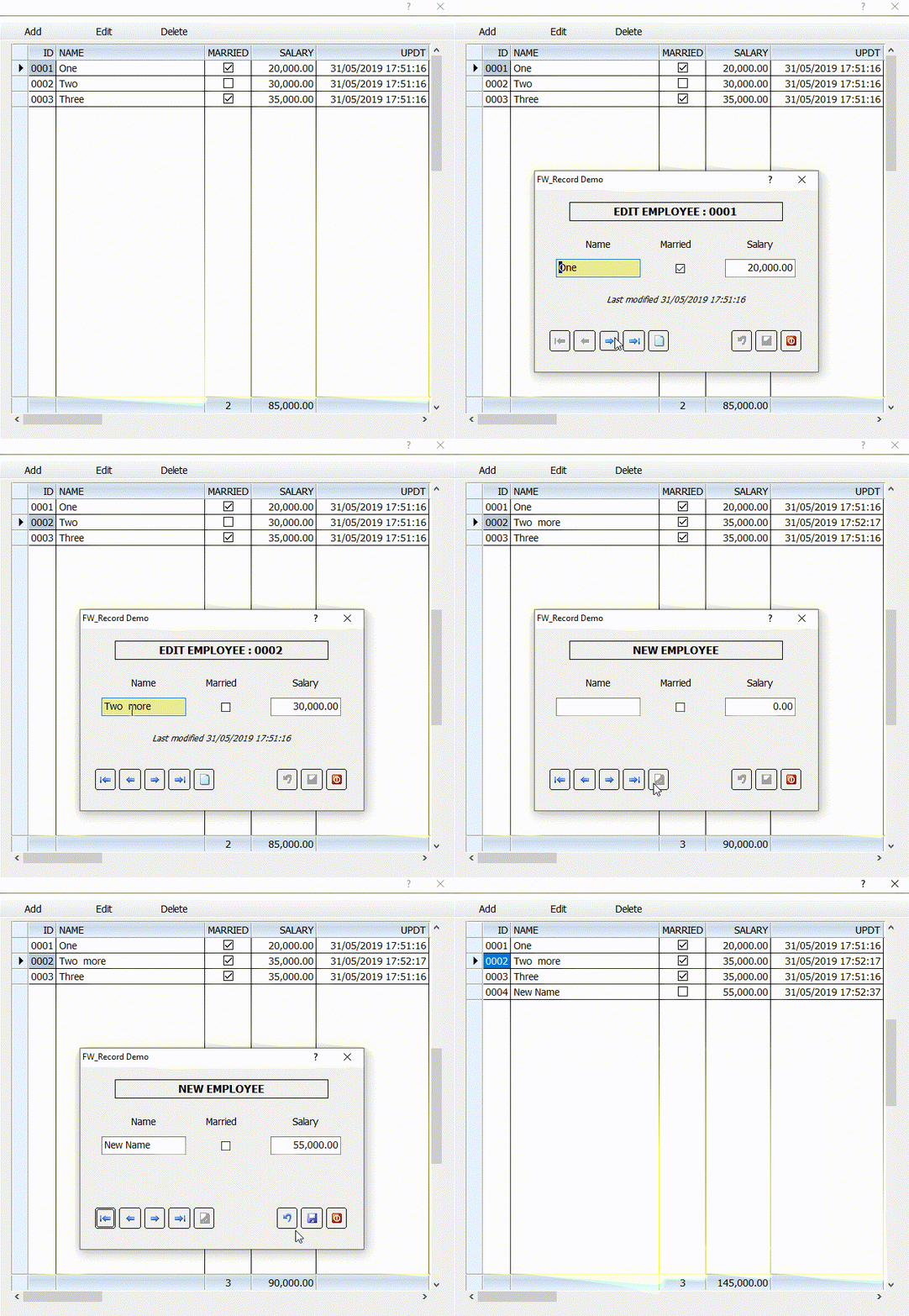
#include "fivewin.ch"

REQUEST DBFCDX

//----------------------------------------------------------------------------//

function Main()

   CreateTestDbf()

   USE TESTEDIT NEW VIA "DBFCDX" SHARED

   TestBrowse()   // Browse and Edit
   TestEdit()     // Edit without browse

   CLOSE TESTEDIT

return nil

//----------------------------------------------------------------------------//

INIT PROCEDURE PrgInit

   SET DATE BRITISH
   SET CENTURY ON
   SET TIME FORMAT TO "HH:MM:SS"
   SET DELETED ON

   FWNumFormat( "B", .t. )  // "B" for British
   SetGetColorFocus()

return

//----------------------------------------------------------------------------//

static function TestBrowse()

   local oDlg, oFont, oBar, oBrw

   DEFINE FONT oFont NAME "TAHOMA" SIZE 0,-14
   DEFINE DIALOG oDlg SIZE 650,600 PIXEL TRUEPIXEL FONT oFont
   DEFINE BUTTONBAR oBar OF oDlg SIZE 100,32 2010

   @ 40,20 XBROWSE oBrw SIZE -20,-20 PIXEL OF oDlg ;
      DATASOURCE "TESTEDIT" AUTOCOLS ;
      CELL LINES NOBORDER FOOTERS FASTEDIT

   WITH OBJECT oBrw
      :nEditTypes       := EDIT_GET
      WITH OBJECT :id
         :cEditPicture  := "@L 9999"
      END
      WITH OBJECT :Married
         :SetCheck()
         :nFooterType   := AGGR_COUNT
         :bSumCondition := { |v,o| v } // count married only
      END
      WITH OBJECT :Salary
         :nFooterType   := AGGR_SUM
      END
      :nStretchCol   := 2
      :MakeTotals()
      //
      :bEdit         := { |oRec| MyEditDlg( oRec ) }  // Standard for all browses
      //
      :CreateFromCode()
   END

   // --> Add/Edit/Delete Actions common to all browses
   DEFINE BUTTON OF oBar PROMPT "Add"     ACTION oBrw:EditSource( .t. )
   DEFINE BUTTON OF oBar PROMPT "Edit"    ACTION oBrw:EditSource()
   DEFINE BUTTON OF oBar PROMPT "Delete"  ACTION oBrw:Delete()
   // <-- End of standard buttons


   ACTIVATE DIALOG oDlg CENTERED

   RELEASE FONT oFont

return nil

//----------------------------------------------------------------------------//

static function TestEdit()

   local oRec

   oRec  := FW_Record():New( "TESTEDIT" )
   oRec:bEdit := { |o| MyEditDlg( o ) }
   oRec:Edit( nil, .t. )  // 2nd parameter .t. to enable navigation

return nil

//----------------------------------------------------------------------------//

static function MyEditDlg( oRec )

   local oDlg, oFont,oBold, oItalic, oBtn, oSay

   // Note: If oRec:RecNo is 0, it is a new record for append

   DEFINE FONT oFont   NAME "TAHOMA" SIZE 0,-14
   DEFINE FONT oBold   NAME "TAHOMA" SIZE 0,-15 BOLD
   DEFINE FONT oItalic NAME "TAHOMA" SIZE 0,-12 ITALIC

   DEFINE DIALOG oDlg SIZE 400,260 PIXEL TRUEPIXEL FONT oFont TITLE "FW_Record Demo"

   @ 20,50 SAY oSay PROMPT { || If( oRec:RecNo == 0, "NEW EMPLOYEE", "EDIT EMPLOYEE : " + STRZERO( oRec:ID, 4 ) ) } ;
      SIZE 300,24 PIXEL OF oDlg CENTER VCENTER UPDATE FONT oBold

   @  70, 30 SAY "Name"    SIZE 120,24 PIXEL OF oDlg CENTER
   @  70,150 SAY "Married" SIZE 100,24 PIXEL OF oDlg CENTER
   @  70,270 SAY "Salary"  SIZE 100,24 PIXEL OF oDlg CENTER

   @ 100, 30 GET oRec:Name SIZE 120,26 PIXEL OF oDlg UPDATE VALID !Empty( oRec:Name )
   @ 100,200 CHECKBOX oRec:Married PROMPT "" SIZE 26,26 PIXEL OF oDlg UPDATE
   @ 100,270 GET oRec:Salary SIZE 100,26 PIXEL OF oDlg UPDATE PICTURE "99,999.99" RIGHT ;
         VALID ( oRec:Salary > 0 )

   @ 150,30 SAY { || If( oRec:RecNo == 0, "", ;
      "Last modified " + TTOC( oRec:updt ) ) } SIZE 340,24 PIXEL OF oDlg UPDATE CENTER ;
      FONT oItalic

   // valid for entire record. This is checked before saving
   oRec:bValid := <||
      if Empty( oRec:Name )
         MsgAlert( "Name can not be empty" )
         return .f.
      endif
      if oRec:Salary <= 0.00
         MsgAlert( "Salary should be a positive number" )
         return .f.
      endif
      return .t.
      >

   // --> Following button actions should exactly be the same for all dialogs

   @ 200, 20 BTNBMP oBtn RESOURCE FWBitmap( "top2" )      SIZE 32,32 PIXEL OF oDlg FLAT TOOLTIP "First"  ;
            WHEN oRec:CanGoUp() ACTION ( oRec:GoTop(), oDlg:Update() )
   @ 200, 55 BTNBMP oBtn RESOURCE FWBitmap( "previous2" ) SIZE 32,32 PIXEL OF oDlg FLAT TOOLTIP "Previous"  ;
            WHEN oRec:CanGoUp() ACTION ( oRec:GoUp(), oDlg:Update() )
   @ 200, 90 BTNBMP oBtn RESOURCE FWBitmap( "next2" )     SIZE 32,32 PIXEL OF oDlg FLAT TOOLTIP "Next"  ;
            WHEN oRec:CanGoDn() ACTION ( oRec:GoDown(), oDlg:Update() )
   @ 200,125 BTNBMP oBtn RESOURCE FWBitmap( "bottom2" )   SIZE 32,32 PIXEL OF oDlg FLAT TOOLTIP "Last"  ;
            WHEN oRec:CanGoDn() ACTION ( oRec:GoBottom(), oDlg:Update() )
   @ 200,160 BTNBMP oBtn RESOURCE FWBitmap( "new16" )   SIZE 32,32 PIXEL OF oDlg FLAT TOOLTIP "New"  ;
            WHEN !Empty( oRec:RecNo ) ACTION ( oRec:Load( .t. ), oDlg:Update() )

   @ 200,278 BTNBMP oBtn RESOURCE FWBitmap( "undo16" )   SIZE 32,32 PIXEL OF oDlg FLAT TOOLTIP "Undo"  ;
            WHEN oRec:Modified() ACTION ( oRec:Undo(), oDlg:Update(), oDlg:SetFocus() )
   oBtn:lCancel   := .t.
   @ 200,313 BTNBMP oBtn RESOURCE FWBitmap( "save" )   SIZE 32,32 PIXEL OF oDlg FLAT TOOLTIP "Save"  ;
            WHEN oRec:Modified() ACTION ( oRec:Save( .t. ), oDlg:Update() )
   @ 200,348 BTNBMP oBtn RESOURCE FWBitmap( "exit2" )   SIZE 32,32 PIXEL OF oDlg FLAT TOOLTIP "Close"  ;
            ACTION ( oDlg:End() )
   oBtn:lCancel   := .t.

   // <-- End of buttons


   oDlg:bPainted := { || oDlg:Box( oSay:nTop-1, oSay:nLeft-1, oSay:nBottom+2, oSay:nRight+2 ) }

   ACTIVATE DIALOG oDlg CENTERED VALID oRec:CloseMsg()

   RELEASE FONT oFont, oBold, oItalic

return nil

//----------------------------------------------------------------------------//

static function CreateTestDbf()

   local aCols := { ;
      { "ID",     "+",  4, 0 }, ;
      { "NAME",   "C", 10, 0 }, ;
      { "MARRIED","L",  1, 0 }, ;
      { "SALARY", "N",  8, 2 }, ;
      { "UPDT",   "=",  8, 0 }  }

   local aData := { ;
      { "One",    .t., 20000 }, ;
      { "Two",    .f., 30000 }, ;
      { "Three",  .t., 35000 }  }

   DBCREATE( "TESTEDIT", aCols, "DBFCDX", .T., "TED" )
   FW_ArrayToDBF( aData, "NAME,MARRIED,SALARY" )
   CLOSE TED

//   XBROWSER "TESTEDIT.DBF" FASTEDIT

return nil

//----------------------------------------------------------------------------//oBrw:bEdit := { |oRec| Yourfunction (oRec ) }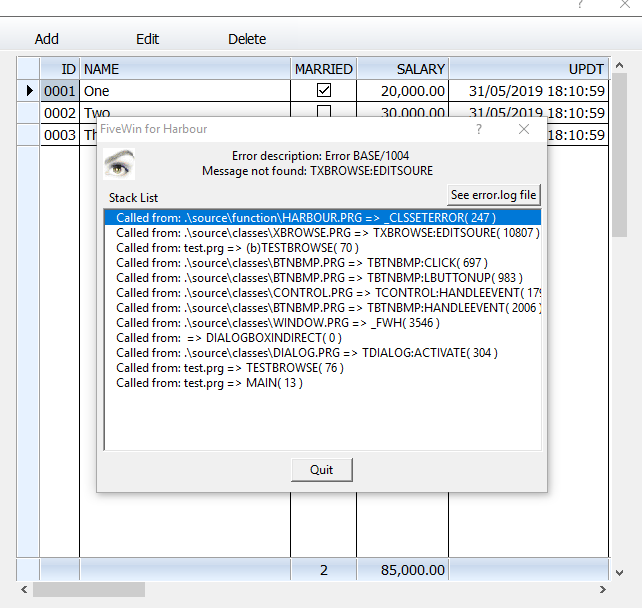
is it compatible with tdatabase ?
#include "fivewin.ch"

REQUEST DBFCDX

//----------------------------------------------------------------------------//

function Main()

   local oDbf

   CreateTestDbf()

   oDbf        := TDatabase():Open( nil, "TESTEDIT", "DBFCDX", .T. )
   oDbf:bEdit  := { |oRec| MyEditDlg( oRec ) }

   TestBrowse( oDbf )   // Browse and Edit
   TestEdit( oDbf )     // Edit without browse

   oDbf:Close()

return nil

//----------------------------------------------------------------------------//

INIT PROCEDURE PrgInit

   SET DATE BRITISH
   SET CENTURY ON
   SET TIME FORMAT TO "HH:MM:SS"
   SET DELETED ON

   FWNumFormat( "B", .t. )  // "B" for British
   SetGetColorFocus()

return

//----------------------------------------------------------------------------//

static function TestBrowse( oDbf )

   local oDlg, oFont, oBar, oBrw

   DEFINE FONT oFont NAME "TAHOMA" SIZE 0,-14
   DEFINE DIALOG oDlg SIZE 650,600 PIXEL TRUEPIXEL FONT oFont
   DEFINE BUTTONBAR oBar OF oDlg SIZE 100,32 2010

   @ 40,20 XBROWSE oBrw SIZE -20,-20 PIXEL OF oDlg ;
      DATASOURCE oDbf AUTOCOLS ;
      CELL LINES NOBORDER FOOTERS FASTEDIT

   WITH OBJECT oBrw
      :nEditTypes       := EDIT_GET
      WITH OBJECT :id
         :cEditPicture  := "@L 9999"
      END
      WITH OBJECT :Married
         :SetCheck()
         :nFooterType   := AGGR_COUNT
         :bSumCondition := { |v,o| v } // count married only
      END
      WITH OBJECT :Salary
         :nFooterType   := AGGR_SUM
         :cFooterPicture:= NUMPICT( 10, 2 )
      END
      :nStretchCol   := 2
      :MakeTotals()
      //
      :CreateFromCode()
   END

   // --> Add/Edit/Delete Actions common to all browses
   DEFINE BUTTON OF oBar PROMPT "Add"     ACTION oBrw:EditSource( .t. )
   DEFINE BUTTON OF oBar PROMPT "Edit"    ACTION oBrw:EditSource()
   DEFINE BUTTON OF oBar PROMPT "Delete"  ACTION oBrw:Delete()
   // <-- End of standard buttons


   ACTIVATE DIALOG oDlg CENTERED

   RELEASE FONT oFont

return nil

//----------------------------------------------------------------------------//

static function TestEdit( oDbf )

   local oRec

   oRec  := oDbf:Record()
   oRec:Edit( nil, .t. )  // 2nd parameter .t. to enable navigation

return nil

//----------------------------------------------------------------------------//

static function MyEditDlg( oRec )

   local oDlg, oFont,oBold, oItalic, oBtn, oSay

   // Note: If oRec:RecNo is 0, it is a new record for append

   DEFINE FONT oFont   NAME "TAHOMA" SIZE 0,-14
   DEFINE FONT oBold   NAME "TAHOMA" SIZE 0,-15 BOLD
   DEFINE FONT oItalic NAME "TAHOMA" SIZE 0,-12 ITALIC

   DEFINE DIALOG oDlg SIZE 400,260 PIXEL TRUEPIXEL FONT oFont TITLE "FW_Record Demo"

   @ 20,50 SAY oSay PROMPT { || If( oRec:RecNo == 0, "NEW EMPLOYEE", "EDIT EMPLOYEE : " + STRZERO( oRec:ID, 4 ) ) } ;
      SIZE 300,24 PIXEL OF oDlg CENTER VCENTER UPDATE FONT oBold

   @  70, 30 SAY "Name"    SIZE 120,24 PIXEL OF oDlg CENTER
   @  70,150 SAY "Married" SIZE 100,24 PIXEL OF oDlg CENTER
   @  70,270 SAY "Salary"  SIZE 100,24 PIXEL OF oDlg CENTER

   @ 100, 30 GET oRec:Name SIZE 120,26 PIXEL OF oDlg UPDATE VALID !Empty( oRec:Name )
   @ 100,200 CHECKBOX oRec:Married PROMPT "" SIZE 26,26 PIXEL OF oDlg UPDATE
   @ 100,270 GET oRec:Salary SIZE 100,26 PIXEL OF oDlg UPDATE PICTURE "99,999.99" RIGHT ;
         VALID ( oRec:Salary > 0 )

   @ 150,30 SAY { || If( oRec:RecNo == 0, "", ;
      "Last modified " + TTOC( oRec:updt ) ) } SIZE 340,24 PIXEL OF oDlg UPDATE CENTER ;
      FONT oItalic

   // valid for entire record. This is checked before saving
   oRec:bValid := <||
      if Empty( oRec:Name )
         MsgAlert( "Name can not be empty" )
         return .f.
      endif
      if oRec:Salary <= 0.00
         MsgAlert( "Salary should be a positive number" )
         return .f.
      endif
      return .t.
      >

   // --> Following button actions should exactly be the same for all dialogs

   @ 200, 20 BTNBMP oBtn RESOURCE FWBitmap( "top2" )      SIZE 32,32 PIXEL OF oDlg FLAT TOOLTIP "First"  ;
            WHEN oRec:CanGoUp() ACTION ( oRec:GoTop(), oDlg:Update() )
   @ 200, 55 BTNBMP oBtn RESOURCE FWBitmap( "previous2" ) SIZE 32,32 PIXEL OF oDlg FLAT TOOLTIP "Previous"  ;
            WHEN oRec:CanGoUp() ACTION ( oRec:GoUp(), oDlg:Update() )
   @ 200, 90 BTNBMP oBtn RESOURCE FWBitmap( "next2" )     SIZE 32,32 PIXEL OF oDlg FLAT TOOLTIP "Next"  ;
            WHEN oRec:CanGoDn() ACTION ( oRec:GoDown(), oDlg:Update() )
   @ 200,125 BTNBMP oBtn RESOURCE FWBitmap( "bottom2" )   SIZE 32,32 PIXEL OF oDlg FLAT TOOLTIP "Last"  ;
            WHEN oRec:CanGoDn() ACTION ( oRec:GoBottom(), oDlg:Update() )
   @ 200,160 BTNBMP oBtn RESOURCE FWBitmap( "new16" )   SIZE 32,32 PIXEL OF oDlg FLAT TOOLTIP "New"  ;
            WHEN !Empty( oRec:RecNo ) ACTION ( oRec:Load( .t. ), oDlg:Update() )

   @ 200,278 BTNBMP oBtn RESOURCE FWBitmap( "undo16" )   SIZE 32,32 PIXEL OF oDlg FLAT TOOLTIP "Undo"  ;
            WHEN oRec:Modified() ACTION ( oRec:Undo(), oDlg:Update(), oDlg:SetFocus() )
   oBtn:lCancel   := .t.
   @ 200,313 BTNBMP oBtn RESOURCE FWBitmap( "save" )   SIZE 32,32 PIXEL OF oDlg FLAT TOOLTIP "Save"  ;
            WHEN oRec:Modified() ACTION ( oRec:Save( .t. ), oDlg:Update() )
   @ 200,348 BTNBMP oBtn RESOURCE FWBitmap( "exit2" )   SIZE 32,32 PIXEL OF oDlg FLAT TOOLTIP "Close"  ;
            ACTION ( oDlg:End() )
   oBtn:lCancel   := .t.

   // <-- End of buttons


   oDlg:bPainted := { || oDlg:Box( oSay:nTop-1, oSay:nLeft-1, oSay:nBottom+2, oSay:nRight+2 ) }

   ACTIVATE DIALOG oDlg CENTERED VALID oRec:CloseMsg()

   RELEASE FONT oFont, oBold, oItalic

return nil

//----------------------------------------------------------------------------//

static function CreateTestDbf()

   local oDbf
   local aCols := { ;
      { "ID",     "+",  4, 0 }, ;
      { "NAME",   "C", 10, 0 }, ;
      { "MARRIED","L",  1, 0 }, ;
      { "SALARY", "N",  8, 2 }, ;
      { "UPDT",   "=",  8, 0 }  }

   local aData := { ;
      { "One",    .t., 20000 }, ;
      { "Two",    .f., 30000 }, ;
      { "Three",  .t., 35000 }  }

   oDbf  := TDatabase():Create( "TESTEDIT", aCols, "DBFCDX", "*" )
// oDbf:Append( "NAME,MARRIED,SALARY", aData )  // This also works
   oDbf:ArrayToDbf( aData, "NAME,MARRIED,SALARY" ) // This also works
   oDbf:Close()

return nil

//----------------------------------------------------------------------------//When you are using DBFCDX, you need not open indexes separately. You need to do that for DBFNTX only.
If you open the DBF with DBFCDX all the index tags in the .cdx file are all automatically opened.
Just open the DBF and set order to any tag you want.
Use oDbf:SetOrder( "tagname" ) followed by oDbf:GoTop()
ok
on normal code I opened all files and then on each procedure I made
SELECT CU (CU AREA OF CUSTOMER)
now how I can make to not repeat the string each time tdatabase()......
I wrong the message


