FiveTech Support Forums

FiveWin / Harbour / xBase community
Board index FiveWin for Harbour/xHarbour New TprogressWheel
Posts: 7318
Joined: Thu Oct 18, 2012 07:17 PM
Re: New TprogressWheel
Posted: Thu Sep 12, 2019 05:31 PM
ukoenig wrote:Silvio,

that looks great.
I will add the GDIPlus-version as a download to this toppic.
It is nearly finished. Still the color-, speed- and size-selection must be added.
Maybe sound-support ?

In the moment I'm working on some projects the same time.
That makes it a bit difficult. :-)

regards
Uwe :-)


sound ....what's mean ?
Since from 1991/1992 ( fw for clipper Rel. 14.4 - Momos)

I use : FiveWin for Harbour March-April 2024 - Harbour 3.2.0dev (harbour_bcc770_32_20240309) - Bcc7.70 - xMate ver. 1.15.3 - PellesC - mail: silvio[dot]falconi[at]gmail[dot]com
Posts: 4043
Joined: Wed Dec 19, 2007 06:40 PM
Re: New TprogressWheel
Posted: Thu Sep 12, 2019 05:54 PM

Silvio,

I mean playing optional a wav-file during a selected process.
I will add this option.

regards
Uwe :D

Since 1995 ( the first release of FW 1.9 )

i work with FW.

If you have any questions about special functions, maybe i can help.
Posts: 7318
Joined: Thu Oct 18, 2012 07:17 PM
Re: New TprogressWheel
Posted: Fri Sep 13, 2019 08:35 AM
ukoenig wrote:Silvio,

I mean playing optional a wav-file during a selected process.
I will add this option.

regards
Uwe :-)

I don't understand what it is for? we have done a circular TProgress / TMeter class are necessary for other procedures. I can use the tprogress to index an archive or an array. the indefinite command could be used instead of the cursor wait on / wait off but put a sound to do what I didn't understand ... do you want to scan every position? you can insert a sound for each oProgress:nposition
Since from 1991/1992 ( fw for clipper Rel. 14.4 - Momos)

I use : FiveWin for Harbour March-April 2024 - Harbour 3.2.0dev (harbour_bcc770_32_20240309) - Bcc7.70 - xMate ver. 1.15.3 - PellesC - mail: silvio[dot]falconi[at]gmail[dot]com
Posts: 7318
Joined: Thu Oct 18, 2012 07:17 PM
Re: New TprogressWheel
Posted: Fri Sep 13, 2019 08:44 AM

Dear Friends,

then I want to conclude for so many are asking me also in the private mailbox:

When I publish something or ask for something it is always the same story, the extensive questions and the same unpleasant comments.

Some do not like my collaboration with the community and I am aware of it

So it was for so many classes I did

So I preferred to deliver the TprogressWheel class to Antonio Linares who will include it in the new fivewin package, this to avoid further discussion.

I can answer your questions about the class TProgressWheel so I gave full availability to Antonio Linares but did not accuse me of other things that I did not do.

I thank you for your cooperation

Since from 1991/1992 ( fw for clipper Rel. 14.4 - Momos)

I use : FiveWin for Harbour March-April 2024 - Harbour 3.2.0dev (harbour_bcc770_32_20240309) - Bcc7.70 - xMate ver. 1.15.3 - PellesC - mail: silvio[dot]falconi[at]gmail[dot]com
Posts: 4043
Joined: Wed Dec 19, 2007 06:40 PM
Re: New TprogressWheel
Posted: Fri Sep 13, 2019 08:45 AM

Silvio,

I mean just a background-sound during the process ( message ).

regards
Uwe :D

Since 1995 ( the first release of FW 1.9 )

i work with FW.

If you have any questions about special functions, maybe i can help.
Posts: 7318
Joined: Thu Oct 18, 2012 07:17 PM
Re: New TprogressWheel
Posted: Fri Sep 13, 2019 08:47 AM
you can do it
as you do it with tProgress class it is the same ( change only the geometric figure)


DEFINE TIMER oTimer INTERVAL 50 ACTION (oMeter:SetPos(++nPos), iif(nPos>500,oTimer:End(), yourfunction_sound_here)) OF oDlg
ACTIVATE TIMER oTimer
Since from 1991/1992 ( fw for clipper Rel. 14.4 - Momos)

I use : FiveWin for Harbour March-April 2024 - Harbour 3.2.0dev (harbour_bcc770_32_20240309) - Bcc7.70 - xMate ver. 1.15.3 - PellesC - mail: silvio[dot]falconi[at]gmail[dot]com
Posts: 880
Joined: Fri Jan 12, 2007 08:35 PM
Re: New TprogressWheel
Posted: Sun Aug 02, 2020 03:44 AM

Estan muy bonitos :D

Que es mejor que programar? creo que nada :)
Atropellada pero aqui ando :P

I love Fivewin

séʌǝɹ ןɐ ɐʇsǝ opunɯ ǝʇsǝ
Posts: 10733
Joined: Sun Nov 19, 2006 05:22 AM
Re: New TprogressWheel
Posted: Sun Aug 02, 2020 06:09 AM

Works with harbour/xharbour 32/64 bits, bcc/msvc/gcc

Regards


G. N. Rao.

Hyderabad, India
Posts: 880
Joined: Fri Jan 12, 2007 08:35 PM
Re: New TprogressWheel
Posted: Sun Aug 02, 2020 07:16 AM
nageswaragunupudi wrote:Works with harbour/xharbour 32/64 bits, bcc/msvc/gcc


si ya vi los ejemplos :-)

pero a un no se como usarlo no deja de girar :-) :-)

me pueden orientar :-)


if i already saw the examples :-)

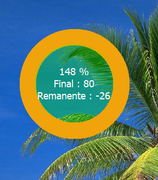
but I don't know how to use it, it doesn't stop spinning :-) :-)

can guide me


Code (fw): Select all Collapse
function miresp2()
local afiles,N

local oDlg, oBrush, oFont, oText, oSmal, oTimer, bAct, bRem, bTimer
local nActual := 0, nTotal := 255, nAdd := 1
local aMeter[ 1 ]
local nRow, lAnimate := .f.

DEFINE BRUSH oBrush FILE "..\bitmaps\sea.bmp" RESIZE

   DEFINE FONT  oFont  NAME "VERDANA" SIZE 0,-20 BOLD
   DEFINE FONT  oText  NAME "TAHOMA" SIZE 0,-18
   DEFINE FONT  oSmal  NAME "TAHOMA" SIZE 0,-14

   DEFINE DIALOG oDlg SIZE 800,600 PIXEL TRUEPIXEL ;
      FONT oFont BRUSH oBrush ;
      TITLE "PROGRESS WHEEL CLASS : " + FWVERSION

 nRow  := 80


afiles:= Directory("c:\mimaterial\data\*.*")


For N:= 1 to len(afiles)


lzCopyfile("c:\mimaterial\data\" + afiles[N,1], "c:\respaldoMT\data\"+afiles[N,1] ) 


Next

nTotal := N

nActual:= 0

@ nRow, 40 WHEELMETER aMeter[ 1 ] SIZE 200,200 PIXEL OF oDlg ;
      POS nActual RANGE 0, nTotal ;
      ANIMACOLOR METRO_AMBER ;
      BACKCOLOR  METRO_STEEL ;
      INNERCOLOR 0x5000ff00 ;
      INNERDIA 0.7 ;
      TEXT { || "Final : " + cValToChar( nActual ) + CRLF + "Remanente : " + cValToChar( nTotal - nActual ) } ;
      FONT oText TEXTCOLOR CLR_WHITE

lAnimate:=.t.


 bTimer   := <||
      if lAnimate
         nActual  := nAnd( nActual += nAdd, 255 )
         AEval( aMeter, { |o| o:SetPos( nActual ) } )
                endif
      return nil
     >

   oDlg:bInit  := <||
      DEFINE TIMER oTimer INTERVAL 150 OF oDlg
      oTimer:bAction := bTimer
      oTimer:Activate()
      return nil
      >


    if nActual=N
WinExec("Explorer.EXE " + "c:\respaldoMT\")

endif

ACTIVATE DIALOG oDlg CENTERED

return nil


Saluditos :-):
Que es mejor que programar? creo que nada :)
Atropellada pero aqui ando :P

I love Fivewin

séʌǝɹ ןɐ ɐʇsǝ opunɯ ǝʇsǝ
Posts: 10733
Joined: Sun Nov 19, 2006 05:22 AM
Re: New TprogressWheel
Posted: Mon Aug 03, 2020 04:25 AM
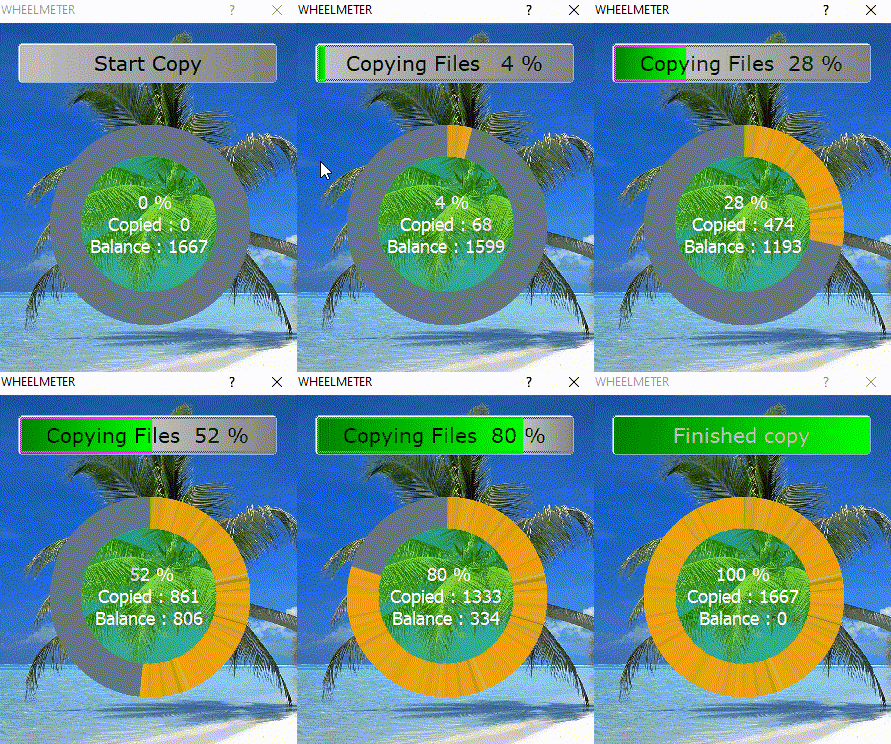
Code (fw): Select all Collapse
#include "fivewin.ch"

function Main()

   local cFolderFWH  := "c:\fwh\"
   local cFolderSRC  := cFolderFWH + "samples\"
   local cFolderDST  := cFolderFWH + "copytest\"
   local aFiles      := DIRECTORY( cFolderSRC + "*.*" )
   local nFiles      := Len( aFiles )
   local cFiles      := LTrim( Str( nFiles ) )
   local nFile       := 0
   local oDlg, oBtn, oMeter, oFont, oBold, oBrush

   lMkFullPath( cFolderDST )

   DEFINE BRUSH oBrush FILE cFolderFWH + "bitmaps\sea.bmp" RESIZE
   DEFINE FONT oFont NAME "TAHOMA" SIZE 0,-18
   DEFINE FONT oBold NAME "VERDANA" SIZE 0,-20
   DEFINE DIALOG oDlg SIZE 300,350 PIXEL TRUEPIXEL FONT oFont BRUSH oBrush ;
      TITLE "WHEELMETER"

   @ 20,20 BTNBMP oBtn PROMPT { || If( nFile == 0, ;
      "Start Copy", If( nFile >= nFiles, "Finished copy", ;
      TRANSFORM( nFile*100.0/nFiles, "Copying Files ### %" ) ) ) } ;
      SIZE 260,40 PIXEL FONT oBold 2007 CENTER WHEN nFile == 0 UPDATE ;
      GRADIENT { || { { nFile/nFiles, CLR_GREEN, CLR_HGREEN }, ;
                      { 1 - ( nFile/nFiles ), CLR_LIGHTGRAY, CLR_GRAY }, .F. } }

   oBtn:bAction := <|oBtn|
      for nFile := 1 to nFiles
         COPY FILE ( cFolderSRC + aFiles[ nFile, 1 ] ) TO ( cFolderDST + aFiles[ nFile, 1 ] )
         oMeter:SetPos( nFile )
         oDlg:Update()
         SysRefresh()
      next
      return nil
      >

@  100,50 WHEELMETER oMeter SIZE 200,200 PIXEL OF oDlg ;
      POS nFile RANGE 0, nFiles ;
      ANIMACOLOR METRO_AMBER ;
      BACKCOLOR  METRO_STEEL ;
      INNERCOLOR 0x5000ff00 ;
      INNERDIA 0.67 ;
      TEXT { || "Copied : " + cValToChar( nFile ) + CRLF + "Balance : " + cValToChar( nFiles - nFile ) } ;
      FONT oFont TEXTCOLOR CLR_WHITE

   ACTIVATE DIALOG oDlg CENTERED
   RELEASE FONT oFont, oBold
   RELEASE BRUSH oBrush

return nil


Note: This sample also demonstrates how to show progress meter on BTNBMP itself.
Regards


G. N. Rao.

Hyderabad, India
Posts: 109
Joined: Mon Apr 30, 2012 09:10 AM
Re: New TprogressWheel
Posted: Mon Aug 03, 2020 07:48 AM

Very nice!!!

And reindexing?

Posts: 10733
Joined: Sun Nov 19, 2006 05:22 AM
Re: New TprogressWheel
Posted: Mon Aug 03, 2020 11:52 AM
Code (fw): Select all Collapse
nIndexed := 0

@ r,c WHEELMETER oMeter .... POS nIndexed RANGE 0, LASTREC() ...

INDEX ON ..... EVAL { || oMeter:SetPos( nIndexed += 100 ) } EVERY 100 ....
Regards


G. N. Rao.

Hyderabad, India
Posts: 880
Joined: Fri Jan 12, 2007 08:35 PM
Re: New TprogressWheel
Posted: Tue Aug 04, 2020 03:41 AM
Hello, I already tried to make it work automatically without needing the button, but I have not succeeded, what can I do?


nageswaragunupudi wrote:
Code (fw): Select all Collapse
#include "fivewin.ch"

function Main()

   local cFolderFWH  := "c:\fwh\"
   local cFolderSRC  := cFolderFWH + "samples\"
   local cFolderDST  := cFolderFWH + "copytest\"
   local aFiles      := DIRECTORY( cFolderSRC + "*.*" )
   local nFiles      := Len( aFiles )
   local cFiles      := LTrim( Str( nFiles ) )
   local nFile       := 0
   local oDlg, oBtn, oMeter, oFont, oBold, oBrush

   lMkFullPath( cFolderDST )

   DEFINE BRUSH oBrush FILE cFolderFWH + "bitmaps\sea.bmp" RESIZE
   DEFINE FONT oFont NAME "TAHOMA" SIZE 0,-18
   DEFINE FONT oBold NAME "VERDANA" SIZE 0,-20
   DEFINE DIALOG oDlg SIZE 300,350 PIXEL TRUEPIXEL FONT oFont BRUSH oBrush ;
      TITLE "WHEELMETER"

   @ 20,20 BTNBMP oBtn PROMPT { || If( nFile == 0, ;
      "Start Copy", If( nFile >= nFiles, "Finished copy", ;
      TRANSFORM( nFile*100.0/nFiles, "Copying Files ### %" ) ) ) } ;
      SIZE 260,40 PIXEL FONT oBold 2007 CENTER WHEN nFile == 0 UPDATE ;
      GRADIENT { || { { nFile/nFiles, CLR_GREEN, CLR_HGREEN }, ;
                      { 1 - ( nFile/nFiles ), CLR_LIGHTGRAY, CLR_GRAY }, .F. } }

   oBtn:bAction := <|oBtn|
      for nFile := 1 to nFiles
         COPY FILE ( cFolderSRC + aFiles[ nFile, 1 ] ) TO ( cFolderDST + aFiles[ nFile, 1 ] )
         oMeter:SetPos( nFile )
         oDlg:Update()
         SysRefresh()
      next
      return nil
      >

@  100,50 WHEELMETER oMeter SIZE 200,200 PIXEL OF oDlg ;
      POS nFile RANGE 0, nFiles ;
      ANIMACOLOR METRO_AMBER ;
      BACKCOLOR  METRO_STEEL ;
      INNERCOLOR 0x5000ff00 ;
      INNERDIA 0.67 ;
      TEXT { || "Copied : " + cValToChar( nFile ) + CRLF + "Balance : " + cValToChar( nFiles - nFile ) } ;
      FONT oFont TEXTCOLOR CLR_WHITE

   ACTIVATE DIALOG oDlg CENTERED
   RELEASE FONT oFont, oBold
   RELEASE BRUSH oBrush

return nil


Note: This sample also demonstrates how to show progress meter on BTNBMP itself.
Que es mejor que programar? creo que nada :)
Atropellada pero aqui ando :P

I love Fivewin

séʌǝɹ ןɐ ɐʇsǝ opunɯ ǝʇsǝ
Posts: 880
Joined: Fri Jan 12, 2007 08:35 PM
Re: New TprogressWheel
Posted: Tue Aug 04, 2020 07:23 AM
Me auto contesto con oDlg:bStart := {||Eval( oBtn:bAction ),nFile == 0 } puedo ejecutarlo automáticamente :-)


I auto reply with oDlg: bStart: = {|| Eval (oBtn: bAction), nFile == 0} I can run it automatically :-)


AIDA wrote:Hello, I already tried to make it work automatically without needing the button, but I have not succeeded, what can I do?


nageswaragunupudi wrote:
Code (fw): Select all Collapse
#include "fivewin.ch"

function Main()

   local cFolderFWH  := "c:\fwh\"
   local cFolderSRC  := cFolderFWH + "samples\"
   local cFolderDST  := cFolderFWH + "copytest\"
   local aFiles      := DIRECTORY( cFolderSRC + "*.*" )
   local nFiles      := Len( aFiles )
   local cFiles      := LTrim( Str( nFiles ) )
   local nFile       := 0
   local oDlg, oBtn, oMeter, oFont, oBold, oBrush

   lMkFullPath( cFolderDST )

   DEFINE BRUSH oBrush FILE cFolderFWH + "bitmaps\sea.bmp" RESIZE
   DEFINE FONT oFont NAME "TAHOMA" SIZE 0,-18
   DEFINE FONT oBold NAME "VERDANA" SIZE 0,-20
   DEFINE DIALOG oDlg SIZE 300,350 PIXEL TRUEPIXEL FONT oFont BRUSH oBrush ;
      TITLE "WHEELMETER"

   @ 20,20 BTNBMP oBtn PROMPT { || If( nFile == 0, ;
      "Start Copy", If( nFile >= nFiles, "Finished copy", ;
      TRANSFORM( nFile*100.0/nFiles, "Copying Files ### %" ) ) ) } ;
      SIZE 260,40 PIXEL FONT oBold 2007 CENTER WHEN nFile == 0 UPDATE ;
      GRADIENT { || { { nFile/nFiles, CLR_GREEN, CLR_HGREEN }, ;
                      { 1 - ( nFile/nFiles ), CLR_LIGHTGRAY, CLR_GRAY }, .F. } }

   oBtn:bAction := <|oBtn|
      for nFile := 1 to nFiles
         COPY FILE ( cFolderSRC + aFiles[ nFile, 1 ] ) TO ( cFolderDST + aFiles[ nFile, 1 ] )
         oMeter:SetPos( nFile )
         oDlg:Update()
         SysRefresh()
      next
      return nil
      >

@  100,50 WHEELMETER oMeter SIZE 200,200 PIXEL OF oDlg ;
      POS nFile RANGE 0, nFiles ;
      ANIMACOLOR METRO_AMBER ;
      BACKCOLOR  METRO_STEEL ;
      INNERCOLOR 0x5000ff00 ;
      INNERDIA 0.67 ;
      TEXT { || "Copied : " + cValToChar( nFile ) + CRLF + "Balance : " + cValToChar( nFiles - nFile ) } ;
      FONT oFont TEXTCOLOR CLR_WHITE

   ACTIVATE DIALOG oDlg CENTERED
   RELEASE FONT oFont, oBold
   RELEASE BRUSH oBrush

return nil


Note: This sample also demonstrates how to show progress meter on BTNBMP itself.
Que es mejor que programar? creo que nada :)
Atropellada pero aqui ando :P

I love Fivewin

séʌǝɹ ןɐ ɐʇsǝ opunɯ ǝʇsǝ
Posts: 10733
Joined: Sun Nov 19, 2006 05:22 AM
Re: New TprogressWheel
Posted: Tue Aug 04, 2020 09:32 AM
Autostart and autoclose the meter
Code (fw): Select all Collapse
#include "fivewin.ch"

function Main()

   local cFolderFWH  := "c:\fwh\"
   local cFolderSRC  := cFolderFWH + "samples\"
   local cFolderDST  := cFolderFWH + "copytest\"
   local aFiles      := DIRECTORY( cFolderSRC + "*.*" )
   local nFiles      := Len( aFiles )
   local cFiles      := LTrim( Str( nFiles ) )
   local nFile       := 0
   local oDlg, oBtn, oMeter, oFont, oBold, oBrush

   lMkFullPath( cFolderDST )

   ? "Start copying with circular meter"

   DEFINE BRUSH oBrush FILE cFolderFWH + "bitmaps\sea.bmp" RESIZE
   DEFINE FONT oFont NAME "TAHOMA" SIZE 0,-18
   DEFINE FONT oBold NAME "VERDANA" SIZE 0,-20
   DEFINE DIALOG oDlg SIZE 300,300 PIXEL TRUEPIXEL FONT oFont BRUSH oBrush ;
      TITLE "WHEELMETER"

   @  50,50 WHEELMETER oMeter SIZE 200,200 PIXEL OF oDlg ;
         POS nFile RANGE 0, nFiles ;
         ANIMACOLOR METRO_AMBER ;
         BACKCOLOR  METRO_STEEL ;
         INNERCOLOR 0x5000ff00 ;
         INNERDIA 0.67 ;
         TEXT { || "Copied : " + cValToChar( nFile ) + CRLF + "Balance : " + cValToChar( nFiles - nFile ) } ;
         FONT oFont TEXTCOLOR CLR_WHITE

   oDlg:bStart := <||
      for nFile := 1 to nFiles
         COPY FILE ( cFolderSRC + aFiles[ nFile, 1 ] ) TO ( cFolderDST + aFiles[ nFile, 1 ] )
         oMeter:SetPos( nFile )
         SysRefresh()
      next
      oDlg:End()
      return nil
      >

   ACTIVATE DIALOG oDlg CENTERED
   RELEASE FONT oFont, oBold
   RELEASE BRUSH oBrush

   ? "Copied all files"

return nil
Regards


G. N. Rao.

Hyderabad, India