FiveTech Support Forums

FiveWin / Harbour / xBase community
Board index FiveWin for Harbour/xHarbour New TprogressWheel
Posts: 9
Joined: Thu Jul 01, 2021 06:20 PM
Re: New TprogressWheel
Posted: Tue Jul 06, 2021 08:20 PM
Hello.

Thanks for the help. It works now =).
i have one question:
Its not posible to run this meter:

https://postimg.cc/z3GzKhXT

With the actual version?.
If its possible, can someone help me with a sample
Posts: 1818
Joined: Wed Oct 26, 2005 02:49 PM
Re: New TprogressWheel
Posted: Tue Jul 06, 2021 10:27 PM

Me uno a la conversación :D

Alguien tiene un ejemplo de uso de un WHEELMETER usando la clausula lIndefinite

De antemano gracias

Saludos
LEANDRO AREVALO
Bogotá (Colombia)
https://hymlyma.com
https://hymplus.com/
leandroalfonso111@gmail.com
leandroalfonso111@hotmail.com

[ Turbo Incremental Link64 6.98 Embarcadero 7.70 ] [ FiveWin 25.01 ] [ xHarbour 64 bits) ]
Posts: 7318
Joined: Thu Oct 18, 2012 07:17 PM
Re: New TprogressWheel
Posted: Wed Jul 07, 2021 07:25 AM
Jiloilo wrote:Hello.

Thanks for the help. It works now =).
i have one question:
Its not posible to run this meter:

https://postimg.cc/z3GzKhXT

With the actual version?.
If its possible, can someone help me with a sample


yes you can do it
Since from 1991/1992 ( fw for clipper Rel. 14.4 - Momos)

I use : FiveWin for Harbour March-April 2024 - Harbour 3.2.0dev (harbour_bcc770_32_20240309) - Bcc7.70 - xMate ver. 1.15.3 - PellesC - mail: silvio[dot]falconi[at]gmail[dot]com
Posts: 9
Joined: Thu Jul 01, 2021 06:20 PM
Re: New TprogressWheel
Posted: Thu Jul 08, 2021 01:44 AM
Silvio.Falconi wrote:
Jiloilo wrote:Hello.

Thanks for the help. It works now =).
i have one question:
Its not posible to run this meter:

https://postimg.cc/z3GzKhXT

With the actual version?.
If its possible, can someone help me with a sample


yes you can do it


Ok, but can you give me a sample . If it has a cost, can you send me the price to this email:
jesusdelamora@ciberpaq.com.mx
Posts: 1818
Joined: Wed Oct 26, 2005 02:49 PM
Re: New TprogressWheel
Posted: Thu Jul 08, 2021 08:45 AM
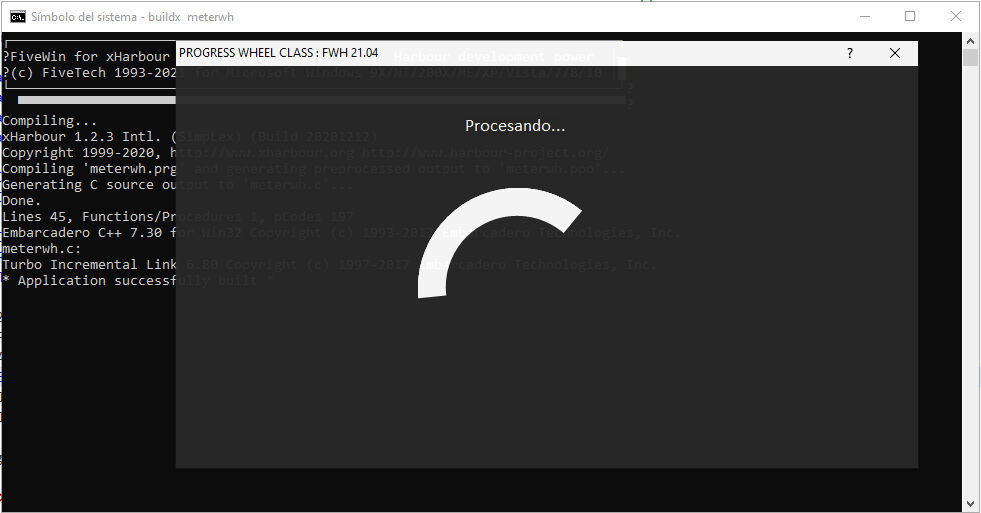
Amigo Jiloilo, basándome en samples\meterwh.prg, cree este ejemplo, espero te sirva.

Code (fw): Select all Collapse
#include "fivewin.ch"

// ProgressWheel class FWH 1908

//----------------------------------------------------------------------------//

function Main()

   local oDlg, oFont, oText
   local nActual := 0, nTotal := 255
   Local oMeter
   Local nGris :=  rgb(41,41,41)

   DEFINE FONT  oFont  NAME "Calibri" SIZE 0,-20 BOLD
   DEFINE FONT  oText  NAME "Calibri" SIZE 0,-18

   DEFINE DIALOG oDlg SIZE 740,400 PIXEL TRUEPIXEL ;
      FONT oFont  COLORS CLR_WHITE,nGris;
      TITLE "PROGRESS WHEEL CLASS : " + FWVERSION

   @ 120, 240 WHEELMETER oMeter SIZE 200,200 PIXEL OF oDlg ;
      POS nActual RANGE 0, nTotal ;
      ANIMACOLOR CLR_WHITE ;
      BACKCOLOR  nGris ;
      INNERCOLOR nGris ;
      INNERDIA 0.7 

   oDlg:bInit  := <||
        oMeter:Indefinite(.T.)
      >
    
   oDlg:bPainted := <|hDC|
      local nRow  := 0
      oDlg:SayText( "Procesando...", { nRow,  40, nRow +70, 640 }, "B", oText, CLR_WHITE )
      return nil
      >

    oDlg:nOpacity    := 500

   ACTIVATE DIALOG oDlg CENTERED
   RELEASE FONT oFont, oText

return nil

//----------------------------------------------------------------------------//


Saludos
LEANDRO AREVALO
Bogotá (Colombia)
https://hymlyma.com
https://hymplus.com/
leandroalfonso111@gmail.com
leandroalfonso111@hotmail.com

[ Turbo Incremental Link64 6.98 Embarcadero 7.70 ] [ FiveWin 25.01 ] [ xHarbour 64 bits) ]
Posts: 1818
Joined: Wed Oct 26, 2005 02:49 PM
Re: New TprogressWheel
Posted: Thu Jul 08, 2021 09:05 AM
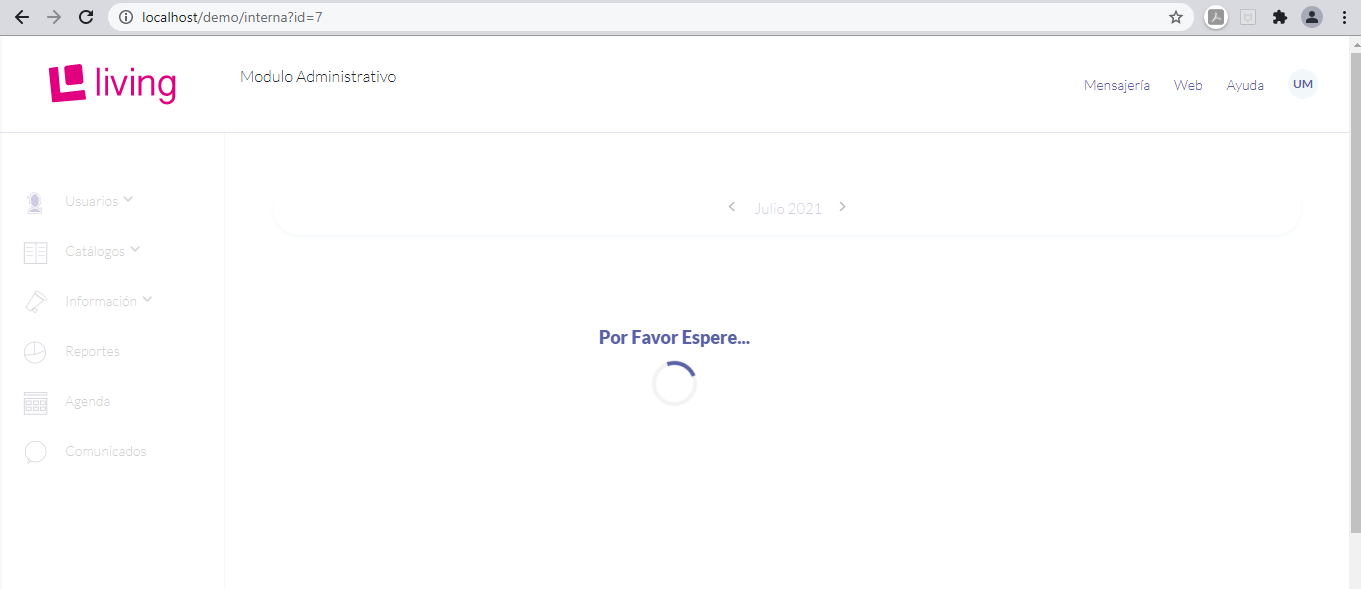
Amigos con base en este ejemplo que cree, me surge una idea, me gustaría colocar ese meter en movimiento, sobrepuesto cuando estoy corriendo algún proceso largo en la aplicación. ¿Cómo hago para que ese dialogo se pinte cubriendo toda la ventana principal de la aplicación?, Algo similar a lo que se muestra en la imagen.


Espero haberme hecho entender, de antemano gracias.
Saludos
LEANDRO AREVALO
Bogotá (Colombia)
https://hymlyma.com
https://hymplus.com/
leandroalfonso111@gmail.com
leandroalfonso111@hotmail.com

[ Turbo Incremental Link64 6.98 Embarcadero 7.70 ] [ FiveWin 25.01 ] [ xHarbour 64 bits) ]
Posts: 9
Joined: Thu Jul 01, 2021 06:20 PM
Re: New TprogressWheel
Posted: Thu Jul 08, 2021 04:11 PM
leandro wrote:Amigo Jiloilo, basándome en samples\meterwh.prg, cree este ejemplo, espero te sirva.

Code (fw): Select all Collapse
#include "fivewin.ch"

// ProgressWheel class FWH 1908

//----------------------------------------------------------------------------//

function Main()

   local oDlg, oFont, oText
   local nActual := 0, nTotal := 255
   Local oMeter
   Local nGris :=  rgb(41,41,41)

   DEFINE FONT  oFont  NAME "Calibri" SIZE 0,-20 BOLD
   DEFINE FONT  oText  NAME "Calibri" SIZE 0,-18

   DEFINE DIALOG oDlg SIZE 740,400 PIXEL TRUEPIXEL ;
      FONT oFont  COLORS CLR_WHITE,nGris;
      TITLE "PROGRESS WHEEL CLASS : " + FWVERSION

   @ 120, 240 WHEELMETER oMeter SIZE 200,200 PIXEL OF oDlg ;
      POS nActual RANGE 0, nTotal ;
      ANIMACOLOR CLR_WHITE ;
      BACKCOLOR  nGris ;
      INNERCOLOR nGris ;
      INNERDIA 0.7 

   oDlg:bInit  := <||
        oMeter:Indefinite(.T.)
      >
    
   oDlg:bPainted := <|hDC|
      local nRow  := 0
      oDlg:SayText( "Procesando...", { nRow,  40, nRow +70, 640 }, "B", oText, CLR_WHITE )
      return nil
      >

    oDlg:nOpacity    := 500

   ACTIVATE DIALOG oDlg CENTERED
   RELEASE FONT oFont, oText

return nil

//----------------------------------------------------------------------------//


Asi es. Muchas gracias =)
Posts: 1818
Joined: Wed Oct 26, 2005 02:49 PM
Re: New TprogressWheel
Posted: Mon Jul 12, 2021 12:38 AM
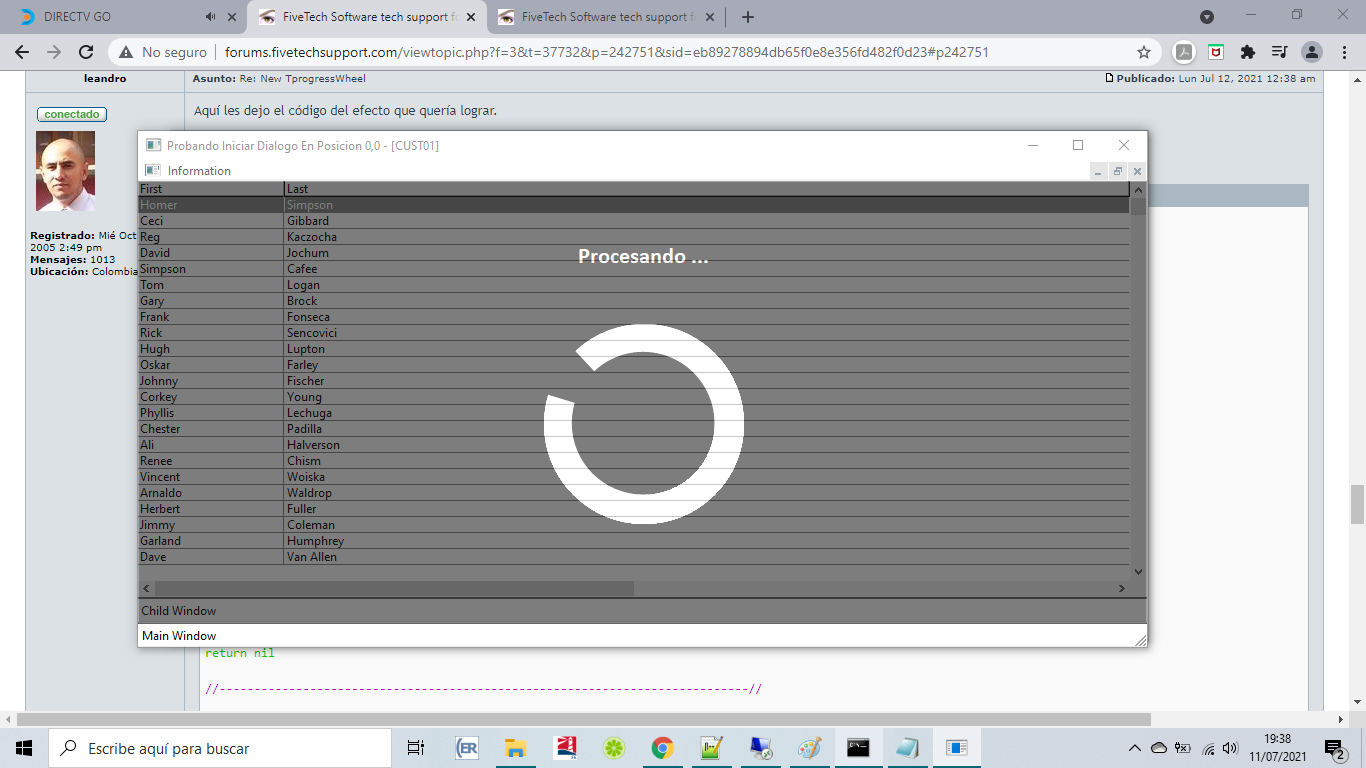
Aquí les dejo el código del efecto que quería lograr.

Espero sea de utilidad


Code (fw): Select all Collapse
#include "FiveWin.ch"

static oWnd
static oDlg
static aCoor
static oWndChild, oBrw
static cAlias

//----------------------------------------------------------------------------//

function Main()
    Local oBar

   DEFINE WINDOW oWnd TITLE "Probando Iniciar Dialogo En Posicion 0,0" ;
    MDI ;
    MENU BuildMenu()

    SET MESSAGE OF oWnd TO "Main Window" 2015

    oWnd:bInit = { || CustomerBrowse(),progreso(oWnd,.F.) }

   ACTIVATE WINDOW oWnd 

return nil

//----------------------------------------------------------------------------//

function BuildMenu()

   local oMenu

   MENU oMenu
      MENUITEM "&Information"
      MENU
         MENUITEM "Abrir" ACTION progreso(oWnd)
         SEPARATOR
         MENUITEM "Cerrar" ACTION oDlg:End()
      ENDMENU

   ENDMENU

return oMenu

STATIC FUNCTION progreso(oVnt,lMod,lInde)

    Local nTopR := 0
    Local nLeftR := 0
    Local nGris :=  rgb(25,25,25)
    Local nActual := 0, nTotal := 255
    Local oMeter,oText,oTxt
    Local cbInicia
    Local cbAjusta
    Local cTxt := "Procesando ..."
    
    DEFAULT lMod := .F.
    DEFAULT lInde := .T.

    DEFINE FONT oText NAME "Calibri" SIZE 0,-22 BOLD

    DEFINE DIALOG oDlg FROM nTopR, nLeftR TO nTopR + 54, nLeftR + 70 PIXEL TRUEPIXEL ;
            STYLE nOr(WS_POPUP,WS_BORDER) OF oVnt COLORS CLR_WHITE,nGris

    @ 140, 240 WHEELMETER oMeter SIZE 200,200 PIXEL OF oDlg ;
        POS nActual RANGE 0, nTotal ;
        ANIMACOLOR CLR_WHITE ;
        BACKCOLOR  nGris ;
        INNERCOLOR nGris ;
        INNERDIA 0.7 ;
        FONT oText

    @ 60 , 0 SAY oTxt VAR cTxt SIZE 20 , 22 PIXEL OF oDlg UPDATE FONT oText COLORS CLR_WHITE,nGris CENTER

    cbInicia  := <||
            Local nTopR := 0
            Local nLeftR := 0
            aCoor := ClientToScreen( oVnt:hWnd, { nTopR, nLeftR } )
            oDlg:nWidth := oVnt:nWidth - ( GetSysMetrics( 32 ) * 2 )
            oDlg:nHeight := oVnt:nHeight - ( GetSysMetrics( 15 ) + GetSysMetrics( 4 ) + ( GetSysMetrics( 33 ) * 2 ) + oVnt:oMsgBar:nHeight )
            oDlg:setpos(aCoor[1],aCoor[2])  
            oMeter:nLeft := ( oDlg:nWidth - oMeter:nWidth ) / 2
            oTxt:nWidth := oDlg:nWidth 
            return nil
        >
    
    oDlg:bStart = { || EVAL(cbInicia) }

    if lInde
        oDlg:bInit  := <||
            oMeter:Indefinite(.T.)
          >
    endif

    oDlg:nOpacity    := 400
    oDlg:lModal := lMod
    
    cbAjusta := <||
            Local nTopR := oDlg:nTop
            Local nLeftR := oDlg:nLeft
            aCoor := ClientToScreen( oVnt:hWnd, { nTopR, nLeftR } ) 
            oDlg:nWidth := oVnt:nWidth - ( GetSysMetrics( 32 ) * 2 )
            oDlg:nHeight := oVnt:nHeight - ( GetSysMetrics( 15 ) + GetSysMetrics( 4 ) + ( GetSysMetrics( 33 ) * 2 ) + oVnt:oMsgBar:nHeight )
            oDlg:setpos(aCoor[1],aCoor[2])  
            oMeter:nLeft := ( oDlg:nWidth - oMeter:nWidth ) / 2
            oTxt:nWidth := oDlg:nWidth 
            return nil
    >
    
    oVnt:bMoved  := <||
            EVAL(cbAjusta)
        >   
    
    oVnt:bResized  := <||
            EVAL(cbAjusta)
        >   
        
    ACTIVATE DIALOG oDlg 

return .t.

//----------------------------------------------------------------------------//

function CustomerBrowse()
   USE Customer NEW ALIAS ( cAlias := GetNewAlias( "CUST" ) ) SHARED

   DEFINE WINDOW oWndChild MDICHILD TITLE Alias()
   
    SET MESSAGE OF oWndChild TO "Child Window" 2015   

   @ 0, 0 LISTBOX oBrw ;
      FIELDS  ( cAlias )->First, ( cAlias )->Last ;
      HEADERS "First",           "Last"

   oWndChild:SetControl( oBrw )

   ACTIVATE WINDOW oWndChild MAXIMIZED;
      VALID oBrw:lCloseArea()

return nil

//----------------------------------------------------------------------------//

function GetNewAlias( cDbfName )

   static n := 0

return cDbfName + StrZero( ++n, 2 )

//----------------------------------------------------------------------------//
Saludos
LEANDRO AREVALO
Bogotá (Colombia)
https://hymlyma.com
https://hymplus.com/
leandroalfonso111@gmail.com
leandroalfonso111@hotmail.com

[ Turbo Incremental Link64 6.98 Embarcadero 7.70 ] [ FiveWin 25.01 ] [ xHarbour 64 bits) ]
Posts: 7318
Joined: Thu Oct 18, 2012 07:17 PM
Re: New TprogressWheel
Posted: Mon Jul 12, 2021 08:56 AM

Sorry ,
I not understood which is the problem
do you saw the sample test fwteam published ?

Since from 1991/1992 ( fw for clipper Rel. 14.4 - Momos)

I use : FiveWin for Harbour March-April 2024 - Harbour 3.2.0dev (harbour_bcc770_32_20240309) - Bcc7.70 - xMate ver. 1.15.3 - PellesC - mail: silvio[dot]falconi[at]gmail[dot]com
Posts: 514
Joined: Sun Oct 16, 2005 03:32 AM
Re: New TprogressWheel
Posted: Tue Jul 13, 2021 02:26 AM

Leandro, excelente.

Gracias. :)

Saludos,


Carlos Gallego


*** FWH-25.12, xHarbour 1.3.1 Build 20241008, Borland C++7.70, PellesC, ADS 11.1***

Posts: 7318
Joined: Thu Oct 18, 2012 07:17 PM
Re: New TprogressWheel
Posted: Tue Jul 13, 2021 07:04 AM
Cgallegoa wrote:Leandro, excelente.

Gracias. :-)


Leandro ????????

I am the creator of TprogressWheel class together with Antonino Perricone, Leandro is not the creator of the class !!!!

there is an exhaustive example in the fwh \ sample folder

I didn't understand what you want to prove


leandro's example creates a child with customer, dbf and with the gray wheel class always spinning, what's the use?

i am ignorant i really don't understand the logical sense of leandro's test

if you wish insert a whhel on xbrowse
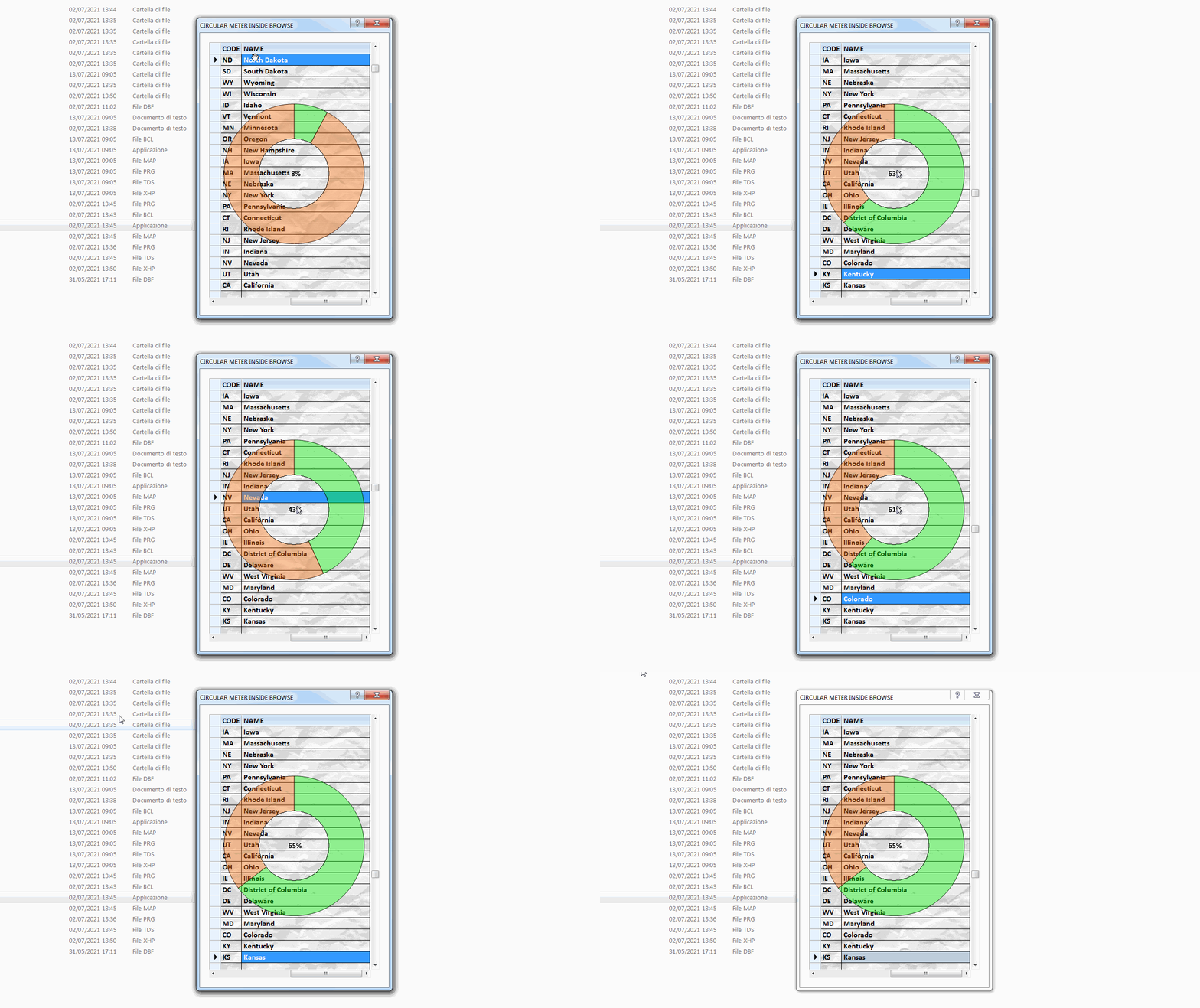


Code (fw): Select all Collapse
function MeterInBackGround()

   local oDlg, oFont, oBrwFont, oBrush, oBrw

   USE STATES SHARED VIA "DBFCDX"

   DEFINE BRUSH oBrush FILE "..\bitmaps\backgrnd\paper2.bmp"
   DEFINE FONT oBrwFont NAME "CALIBRI" SIZE 0,-16 BOLD
   DEFINE FONT oFont NAME "TAHOMA" SIZE 0,-14
   DEFINE DIALOG oDlg SIZE 400,600 PIXEL TRUEPIXEL ;
      FONT oFont TITLE "CIRCULAR METER INSIDE BROWSE"

   @ 20,20 XBROWSE oBrw SIZE -20,-20 PIXEL OF oDlg ;
      DATASOURCE "STATES" AUTOCOLS CELL LINES ;
      NOBORDER FONT oBrwFont

   WITH OBJECT oBrw
      :lTransparent  := .t.
      :nStretchCol   := STRETCHCOL_WIDEST
      :bPaintBack     := <||
         FillRect( oBrw:GetDC(), GetClientRect( oBrw:hWnd ), oBrush:hBrush )
         PaintCircularMeter( oBrw, {130,30,430,330}, 0.5, oBrw:KeyNo, oBrw:nLen, ;
            { 0x6000ff00, 0x60FA6800 } )
         oBrw:ReleaseDC()
         return nil
         >

      :CreateFromCode()
   END

   ACTIVATE DIALOG oDlg CENTERED
   RELEASE FONT oFont, oBrwFont
   RELEASE BRUSH oBrush

   CLOSE DATA

return nil
Since from 1991/1992 ( fw for clipper Rel. 14.4 - Momos)

I use : FiveWin for Harbour March-April 2024 - Harbour 3.2.0dev (harbour_bcc770_32_20240309) - Bcc7.70 - xMate ver. 1.15.3 - PellesC - mail: silvio[dot]falconi[at]gmail[dot]com
Posts: 7318
Joined: Thu Oct 18, 2012 07:17 PM
Re: New TprogressWheel
Posted: Tue Jul 13, 2021 07:17 AM
Jiloilo wrote:
Silvio.Falconi wrote:New Release With Gradient


Hello, can i have this source code of this sample. thanks =)


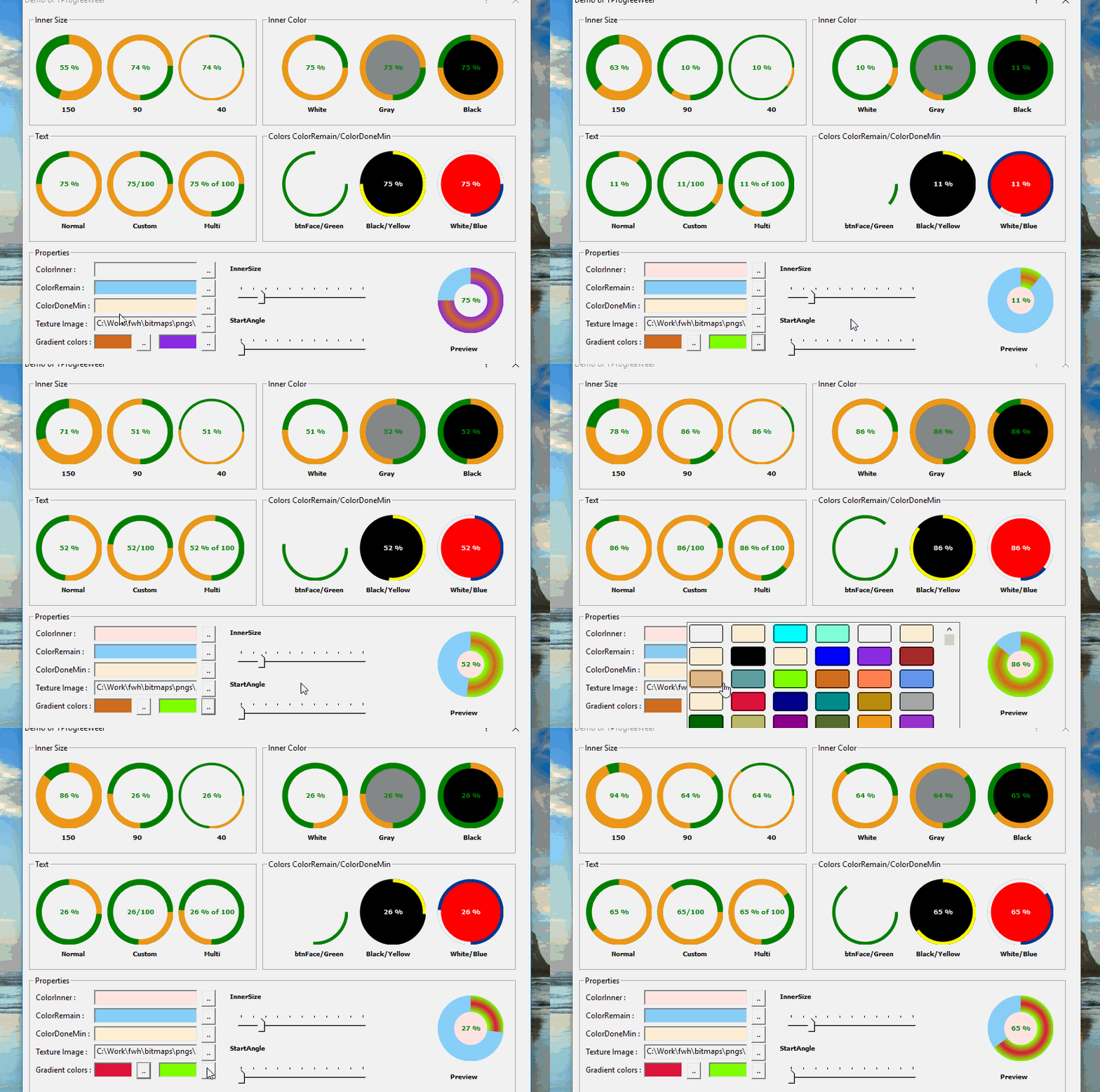
this test sample is not released, I made it to test the class for all commands simultaneously
it use our private library I not released too
Please to use the class see the sample of folder sample of fwh
Since from 1991/1992 ( fw for clipper Rel. 14.4 - Momos)

I use : FiveWin for Harbour March-April 2024 - Harbour 3.2.0dev (harbour_bcc770_32_20240309) - Bcc7.70 - xMate ver. 1.15.3 - PellesC - mail: silvio[dot]falconi[at]gmail[dot]com
Posts: 514
Joined: Sun Oct 16, 2005 03:32 AM
Re: New TprogressWheel
Posted: Wed Jul 14, 2021 12:20 AM

Silvio,

Ok man, congratulations to you and Antonino Perricone for your class, it's excellent, and congratulations also to Leandro for a good example.

Sorry, i didn't mean to bother you.

Take it easy, don´t worry, be happy. :-)

Saludos,


Carlos Gallego


*** FWH-25.12, xHarbour 1.3.1 Build 20241008, Borland C++7.70, PellesC, ADS 11.1***

Continue the discussion