FWH TPrinter class is able to read and render all the above images. All FWH image functions and classes can handle these images.
But FWHPDF can read and render 2.png only. Reads 1.png as blank image and crashes while reading 3.png.
The problem is not with FWH.
FWPDF is basically a wrapper for harupdf library functions. In addition, FWH added some additional imaging functionality that is not possible with the in-built functions of libharu.
Libharu has inbuilt functions for png and jpg files/image buffers. In addition, it has one function to read images from memory formtted in its proprietory format.
HPDF_LoadPngImageFromFile
HPDF_LoadJpegImageFromFile

HPDF_LoadPngImageFromMem
HPDF_LoadJpegImageFromMem

HPDF_LoadRawImageFromMem
Libharu, on its own, can not read any other file types. In all such cases, FWH reads the images with its own functions and then generates suitable buffer in the memory and uses HPDF_LoadPngImageFromMem() for alpha images and HPDF_LoadRawImageFromMem() for non-alpha images. Except FWPdf, no other wrapper class like TPdf can handle images other than png and jpeg.
This is how FWH extends the capabilities of libharu and enables FWPDF class to handle any image type.
In the case of above images, both HPDF_LoadPngImageFromFile and HPDF_LoadPngImageFromMem fail to read 1.png and 3.png. We may call it limitation of libharu or incompatibility of our images with the libharu's built-in functions.
I have used PixelFormer.exe to import both 1.png and 3.png and re-export them in png format to 11.png and 33.png. This conversion also reduced the sizes of the files drastically.
1.png (1,006,696 bytes) --> 11.png (165,938 bytes)
3.png (   86,227 bytes) --> 33.png ( 83,362 bytes)
Now, libharu is able to read these new images and this is the program using the new images;
#include "fivewin.ch"

REQUEST FWHARU

function Main()

   local oPrn, oFont, oPen, oBrush
   local cPdfFile
   local uImage
   local nRow, nCol, nWidth, nHeight
   local s1, s2

   TPrinter():lUseHaruPDF  := .t.

   if MsgYesNo( "HaruPdf?" )
      cPdfFile := "test.pdf"
   endif

   PRINT oPrn PREVIEW FILE cPdfFile
   DEFINE FONT oFont NAME "ARIAL" SIZE 0,-20 OF oPrn
   DEFINE PEN oPen WIDTH 1 OF oPrn
   DEFINE BRUSH oBrush FILE "c:\fwh\bitmaps\backgrnd\browback.bmp"

   PAGE

   nWidth := nHeight := 2
   nRow  := 1
   nCol  := 0.75

   uImage   := "https://imagizer.imageshack.com/img923/1482/4FId0E.png"
   oPrn:Box( nRow, nCol, nRow + nHeight, nCol + nWidth, oPen, nil, nil, "INCHES" )
   @ nRow, nCol PRINT TO oPrn IMAGE uImage SIZE nWidth, nHeight INCHES

   nCol     += 0.5 + nWidth
   uImage   := "http://byte-one.com/2.png"
   oPrn:Box( nRow, nCol, nRow + nHeight, nCol + nWidth, oPen, nil, nil, "INCHES" )
   @ nRow, nCol PRINT TO oPrn IMAGE uImage SIZE nWidth, nHeight INCHES

   nCol     += 0.5 + nWidth
   uImage   := "https://imagizer.imageshack.com/img924/4041/WWsR34.png"
   oPrn:Box( nRow, nCol, nRow + nHeight, nCol + nWidth, oPen, nil, nil, "INCHES" )
   @ nRow, nCol PRINT TO oPrn IMAGE uImage SIZE nWidth, nHeight INCHES

   nWidth   := 6
   nHeight  := 3
   nRow     := 3.5
   nCol     := 1

   uImage   := "https://imagizer.imageshack.com/img923/1482/4FId0E.png"
   oPrn:Box( nRow, nCol, nRow + nHeight, nCol + nWidth, oPen, oBrush, nil, "INCHES" )
   @ nRow, nCol PRINT TO oPrn IMAGE uImage SIZE nWidth, nHeight INCHES

   nWidth   := 6
   nHeight  := 1
   nRow     := 7.0
   nCol     := 1

   uImage   := "https://imagizer.imageshack.com/img924/4041/WWsR34.png"
   oPrn:Box( nRow, nCol, nRow + nHeight, nCol + nWidth, oPen, nil, nil, "INCHES" )
   @ nRow, nCol PRINT TO oPrn IMAGE uImage SIZE nWidth, nHeight INCHES

   ENDPAGE
   ENDPRINT

   RELEASE FONT oFont
   RELEASE PEN  oPen
   RELEASE BRUSH oBrush

return nil
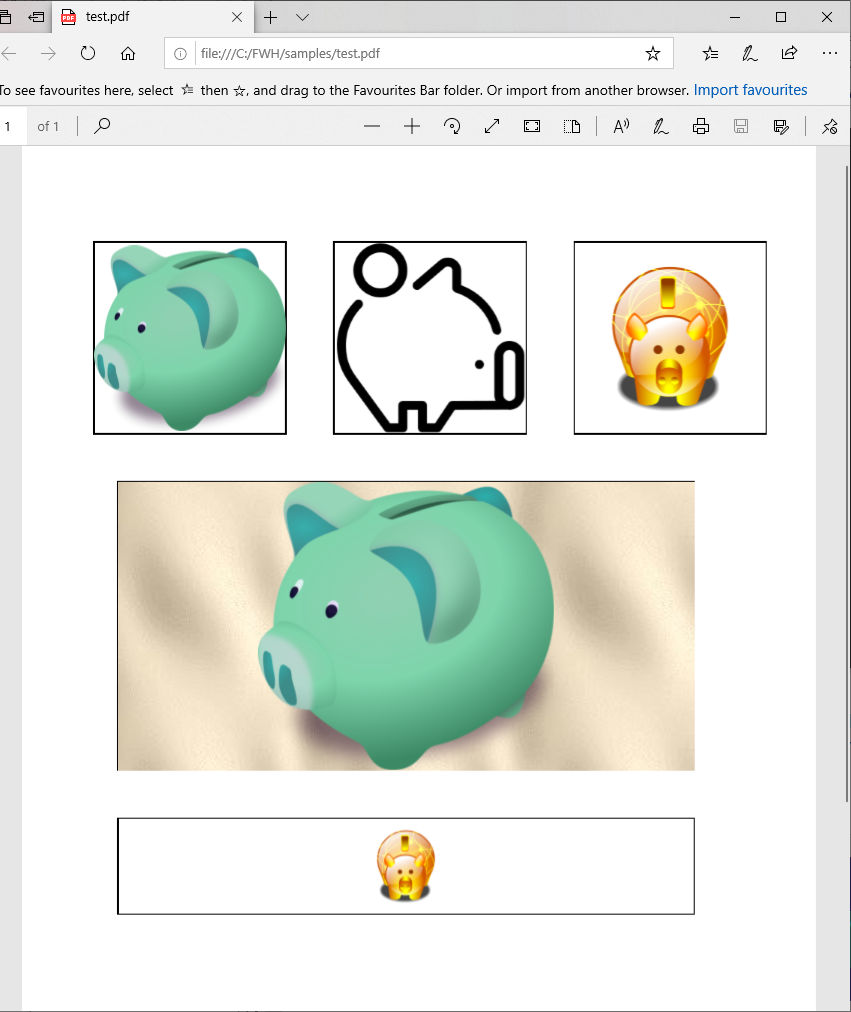
We are further examing the issue in these lines.
libharu depends on zlib and pnglib. We are using the png.lib in our (x)Harbour libraries. We need to see if there is a need to replace or update this lib.


