FiveTech Support Forums

FiveWin / Harbour / xBase community
Board index FiveWin for Harbour/xHarbour Mr. Nages please: HARU PDF Bugs/Extensions
Posts: 1048
Joined: Mon Oct 24, 2005 09:54 AM
Mr. Nages please: HARU PDF Bugs/Extensions
Posted: Sun Jan 26, 2020 02:31 PM
Not functioning:
Code (fw): Select all Collapse
oPrn:say(nRow,nCol,cText,oFont,,,,1)
oPrn:say(nRow,nCol,cText,oFont,,,,2)


To add in Tpdf:
Code (fw): Select all Collapse
   DATA nXoffset INIT 0
   DATA nYoffset INIT 0


To add oPrn:Sayimage(…) as this is better quality as oPrn:Saybitmap(...)
Regards,
Günther
---------------------------------
office@byte-one.com
Posts: 1048
Joined: Mon Oct 24, 2005 09:54 AM
Re: HARU PDF Bugs/Extensions
Posted: Wed Feb 05, 2020 11:28 AM

Please Mr. Nages, show to that!
Thanks

Regards,
Günther
---------------------------------
office@byte-one.com
Posts: 1048
Joined: Mon Oct 24, 2005 09:54 AM
Re: Mr. Nages please: HARU PDF Bugs/Extensions
Posted: Thu Feb 13, 2020 01:14 PM

Mr. Nages, have you any answer?
Thanks

Regards,
Günther
---------------------------------
office@byte-one.com
Posts: 10733
Joined: Sun Nov 19, 2006 05:22 AM
Re: Mr. Nages please: HARU PDF Bugs/Extensions
Posted: Thu Feb 13, 2020 01:41 PM

please wait

Regards


G. N. Rao.

Hyderabad, India
Posts: 1048
Joined: Mon Oct 24, 2005 09:54 AM
Re: Mr. Nages please: HARU PDF Bugs/Extensions
Posted: Thu Feb 27, 2020 01:11 PM

Mr. Nages, is this corrected in 20.02?

Regards,
Günther
---------------------------------
office@byte-one.com
Posts: 1048
Joined: Mon Oct 24, 2005 09:54 AM
Re: Mr. Nages please: HARU PDF Bugs/Extensions
Posted: Mon Mar 02, 2020 04:10 PM
As workaround in fwpdf.prg i make this correction:
Code (fw): Select all Collapse
....
DEFAULT nWidth :=  0
....   
DO CASE
   CASE nPad == NIL .OR. nPad == HPDF_TALIGN_LEFT //.OR. Empty( nWidth )   //removed
....

and now is functioning.
But this is not correct code, as nWidth is not respected as in printer.prg!!!!
Regards,
Günther
---------------------------------
office@byte-one.com
Posts: 10733
Joined: Sun Nov 19, 2006 05:22 AM
Re: Mr. Nages please: HARU PDF Bugs/Extensions
Posted: Tue Mar 03, 2020 05:51 AM
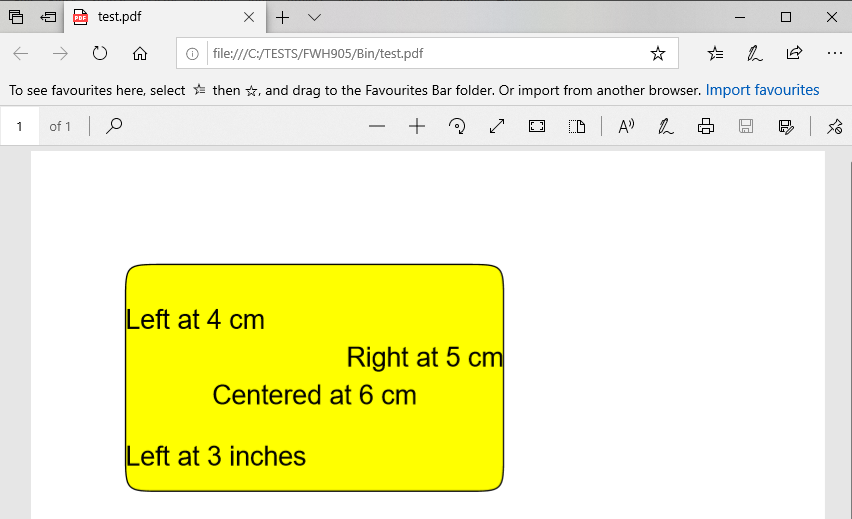
This is a working sample, without any changes to the FWH libraries:
Code (fw): Select all Collapse
#include "fivewin.ch"
#include "report.ch"

REQUEST FWHARU

function Main()

   local oPrn, oFont, oPen
   local cPdfFile

   TPrinter():lUseHaruPDF  := .t.
   cPdfFile := "test.pdf"

   PRINT oPrn PREVIEW FILE cPdfFile
   DEFINE FONT oFont NAME "ARIAL" SIZE 0,-20 OF oPrn
   DEFINE PEN oPen WIDTH 1 OF oPrn

   PAGE

   oPrn:RoundBox( 3, 2.5, 9, 12.5, 1, 1, oPen, CLR_YELLOW, nil, "CM" )
   oPrn:Say( 4, 2.5,   "Left at 4 cm",     oFont, 10, nil, nil, 0, "CM" )
   oPrn:Say( 5, 2.5,   "Right at 5 cm",    oFont, 10, nil, nil, 1, "CM" )
   oPrn:Say( 6, 2.5,   "Centered at 6 cm", oFont, 10, nil, nil, 2, "CM" )
   oPrn:Say( 3, 0.984, "Left at 3 inches", oFont, 10, nil, nil, 0, "INCHES" )

   ENDPAGE
   ENDPRINT

   RELEASE FONT oFont
   RELEASE PEN  oPen

return nil


If instead of
Code (fw): Select all Collapse
   cPdfFile := "test.pdf"

cPdfFile is set to NIL, the output will go to print preview.
Regards


G. N. Rao.

Hyderabad, India
Posts: 1048
Joined: Mon Oct 24, 2005 09:54 AM
Re: Mr. Nages please: HARU PDF Bugs/Extensions
Posted: Tue Mar 03, 2020 09:40 AM
Please try without nWidth!
Code (fw): Select all Collapse
oPrn:RoundBox( 3, 2.5, 9, 12.5, 1, 1, oPen, CLR_YELLOW, nil, "CM" )
   oPrn:Say( 4, 2.5,   "Left at 4 cm",     oFont, , nil, nil, 0, "CM" )
   oPrn:Say( 5, 2.5,   "Right at 5 cm",    oFont, , nil, nil, 1, "CM" )
   oPrn:Say( 6, 2.5,   "Centered at 6 cm", oFont, , nil, nil, 2, "CM" )
   oPrn:Say( 3, 0.984, "Left at 3 inches", oFont, , nil, nil, 0, "INCHES" )
Regards,
Günther
---------------------------------
office@byte-one.com
Posts: 10733
Joined: Sun Nov 19, 2006 05:22 AM
Re: Mr. Nages please: HARU PDF Bugs/Extensions
Posted: Tue Mar 03, 2020 10:08 AM

If we do not provide width, the text is aligned left.

Regards


G. N. Rao.

Hyderabad, India
Posts: 10733
Joined: Sun Nov 19, 2006 05:22 AM
Re: Mr. Nages please: HARU PDF Bugs/Extensions
Posted: Tue Mar 03, 2020 10:11 AM
byte-one wrote:As workaround in fwpdf.prg i make this correction:
Code (fw): Select all Collapse
....
DEFAULT nWidth :=  0
....   
DO CASE
   CASE nPad == NIL .OR. nPad == HPDF_TALIGN_LEFT //.OR. Empty( nWidth )   //removed
....

and now is functioning.
But this is not correct code, as nWidth is not respected as in printer.prg!!!!


nWidth is respected.
Regards


G. N. Rao.

Hyderabad, India
Posts: 1048
Joined: Mon Oct 24, 2005 09:54 AM
Re: Mr. Nages please: HARU PDF Bugs/Extensions
Posted: Tue Mar 03, 2020 11:23 AM

Sorry, but this is not compatible with printer.prg!! I never use nWidth and then the align right or center are not respected.

Regards,
Günther
---------------------------------
office@byte-one.com
Posts: 10733
Joined: Sun Nov 19, 2006 05:22 AM
Re: Mr. Nages please: HARU PDF Bugs/Extensions
Posted: Thu Mar 05, 2020 05:18 AM

To add oPrn:Sayimage(…) as this is better quality as oPrn:Saybitmap(...)


We recommend using oPrn:PrintImage(...) introduced in FWH1510 and enhanced in FWH1604 for all future developments.

This method supersedes both the old methods SayBitmap() and SayImage(), which exist to support legacy applications created prior to 2016. These methods may be treated as deprecated for future development.

Syntax:
Code (fw): Select all Collapse
METHOD PrintImage( nRow, nCol, uImage, nWidth, nHeight, lStretch, nAlpha, lTransp, lGray, cUnits, cAlign, cURL )

FWPdf ignores nAlpha, lTransp and lGray
TPrinter ignores cURL

1,2,4,5) nRow, nCol, nWidth, nHeight specify the bounding rectangle.
3) uImage is any image source.
4) lStretch. If true, the image is stretched to fill the rectangle, ignoring the aspect ratio. Default is .f.
In this case, the image is shrunk if width or height exceeds the size of the rectangle and centered inside the rectangle (if cAlign is nil)
10) cUnits can be "MM", "CM", "INCHES". It is highly recommended not to use pixels to have compatibility between printer and fwpdf.
11) cAlign: Combination of "T" for top or "B" for bottom combined with "L" for left or "R" for right. Eg: "TL", "BR", etc. If not speicified the image is centered.
12) cURL: Ignored by TPrinter. In case of FWPdf, if a URL is specified, clicking on the image on the pdf will navigate to the URL.
Example: Build pdfharu1.prg and click on olga's image.

We highly recommend using the command syntax for this method:
Code (fw): Select all Collapse
#xcommand @ <nRow>, <nCol> PRINT TO <prn> IMAGE <img> ;
      [SIZE <nWidth> [,<nHeight>] ] ;
      [<unit: PIXEL,MM,CM,INCHES,SCREEN>] ; // do not use PIXEL/SCREEN
      [<lStr: STRETCH>] ;
      [ ALPHALEVEL <nAlpha>] ; // ignored by fwpdf
      [<lNoTrn: NOTRANSPARENT>] ; // ignored by fwpdf
      [<lGray: GRAY> ] ;  // ignored by fwpdf
      [ALIGN <aln>] ;
      [URL <cURL> ] ; // ignored by TPrinter
      [LASTROW <lrow>] ;
   => ;
      [<lrow> := ] <prn>:PrintImage( <nRow>, <nCol>, <img>, [<nWidth>], [<nHeight>], ;
            [<.lStr.>], [<nAlpha>], [!<.lNoTrn.>], [<.lGray.>], [<(unit)>], [<aln>], [<cURL>] )
Regards


G. N. Rao.

Hyderabad, India
Posts: 10733
Joined: Sun Nov 19, 2006 05:22 AM
Re: Mr. Nages please: HARU PDF Bugs/Extensions
Posted: Thu Mar 05, 2020 11:12 AM
To add in Tpdf:
Code:
DATA nXoffset INIT 0
DATA nYoffset INIT 0


May we know why these DATA are necessary. All methods are working without any errors without these DATAs
Regards


G. N. Rao.

Hyderabad, India
Posts: 10733
Joined: Sun Nov 19, 2006 05:22 AM
Re: Mr. Nages please: HARU PDF Bugs/Extensions
Posted: Thu Mar 05, 2020 11:18 AM
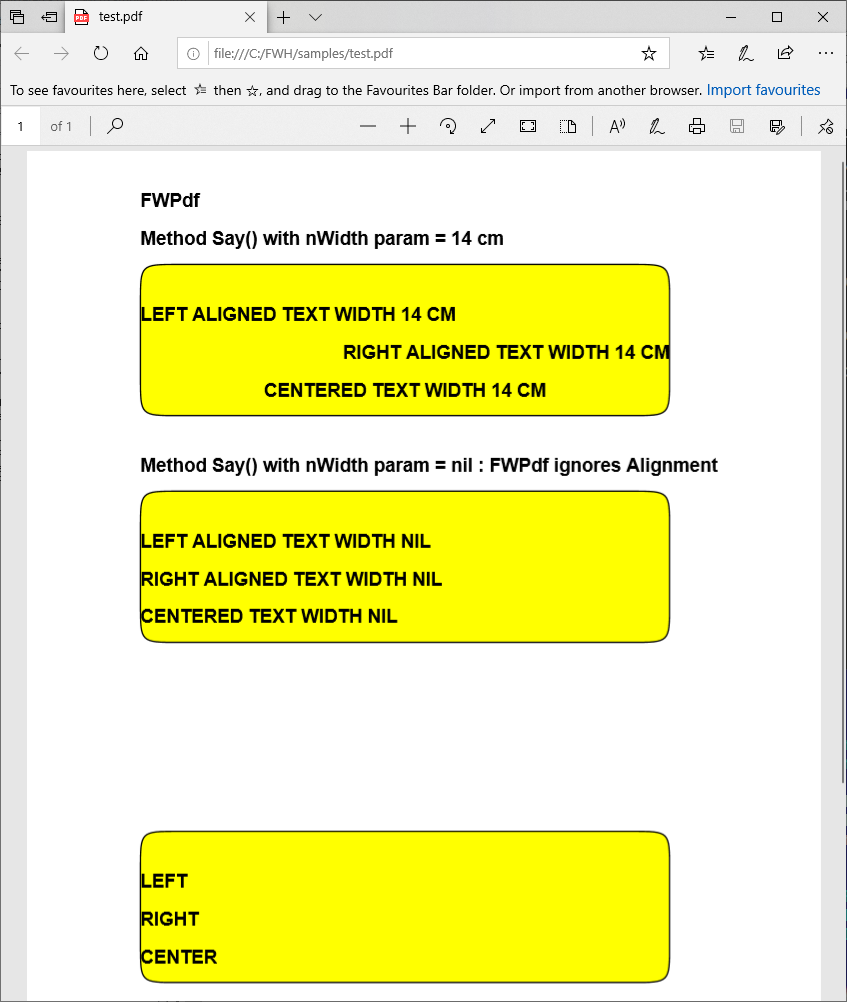
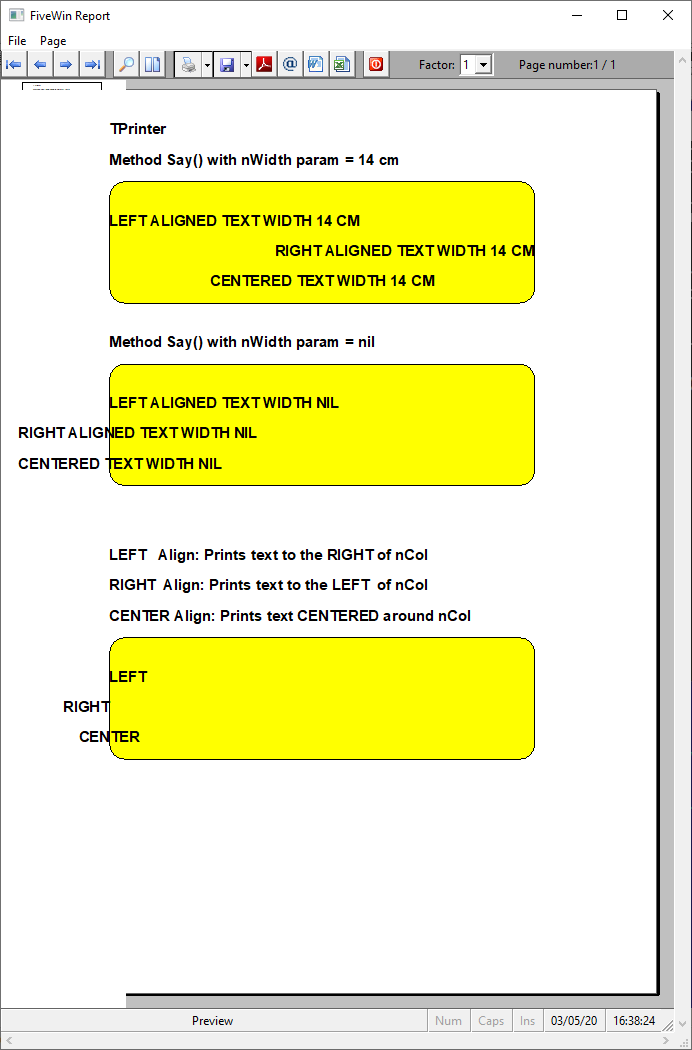
Now, reviewing the issue of compatibility of the behavior of the method Say() when nWidth parameter is nil and nPad is Right/Center.

This program shows the difference in the behaviour.
Code (fw): Select all Collapse
#include "fivewin.ch"
#include "report.ch"

REQUEST FWHARU

function Main()

   local oPrn, oFont, oPen, nWidth
   local cPdfFile

   TPrinter():lUseHaruPDF  := .t.

   if MsgYesNo( "Output to PDF?" )
      cPdfFile := "test.pdf"
   endif

   PRINT oPrn PREVIEW FILE cPdfFile
   DEFINE FONT oFont NAME "ARIAL" SIZE 0,-14 BOLD OF oPrn
   DEFINE PEN oPen WIDTH 1 OF oPrn

   PAGE

   nWidth   := 14

   oPrn:Say( 1, 3, If( cPdfFile == nil, "TPrinter", "FWPdf" ), oFont, nil, nil, nil, 0, "CM" )
   oPrn:Say( 2, 3, "Method Say() with nWidth param = 14 cm", oFont, nil, nil, nil, 0, "CM" )

   oPrn:RoundBox( 3, 3, 7, 17, 1, 1, oPen, CLR_YELLOW, nil, "CM" )
   oPrn:Say(  4, 3, "LEFT ALIGNED TEXT WIDTH 14 CM",   oFont, nWidth, nil, nil, 0, "CM" )
   oPrn:Say(  5, 3, "RIGHT ALIGNED TEXT WIDTH 14 CM",  oFont, nWidth, nil, nil, 1, "CM" )
   oPrn:Say(  6, 3, "CENTERED TEXT WIDTH 14 CM", oFont, nWidth, nil, nil, 2, "CM" )

   nWidth   := nil

   oPrn:Say(  8, 3, "Method Say() with nWidth param = nil" + ;
      If( cPdfFile == nil, "", " : FWPdf ignores Alignment" ), oFont, nil, nil, nil, 0, "CM" )
   oPrn:RoundBox( 9, 3, 13, 17, 1, 1, oPen, CLR_YELLOW, nil, "CM" )
   oPrn:Say( 10, 3, "LEFT ALIGNED TEXT WIDTH NIL",   oFont, nWidth, nil, nil, 0, "CM" )
   oPrn:Say( 11, 3, "RIGHT ALIGNED TEXT WIDTH NIL",  oFont, nWidth, nil, nil, 1, "CM" )
   oPrn:Say( 12, 3, "CENTERED TEXT WIDTH NIL", oFont, nWidth, nil, nil, 2, "CM" )

   if cPdfFile == nil
   oPrn:Say( 15, 3, "LEFT   Align: Prints text to the RIGHT of nCol", oFont, nil, nil, nil, 0, "CM" )
   oPrn:Say( 16, 3, "RIGHT  Align: Prints text to the LEFT  of nCol", oFont, nil, nil, nil, 0, "CM" )
   oPrn:Say( 17, 3, "CENTER Align: Prints text CENTERED around nCol", oFont, nil, nil, nil, 0, "CM" )
   endif

   oPrn:RoundBox( 18, 3, 22, 17, 1, 1, oPen, CLR_YELLOW, nil, "CM" )
   oPrn:Say( 19, 3, "LEFT",   oFont, nWidth, nil, nil, 0, "CM" )
   oPrn:Say( 20, 3, "RIGHT",  oFont, nWidth, nil, nil, 1, "CM" )
   oPrn:Say( 21, 3, "CENTER", oFont, nWidth, nil, nil, 2, "CM" )

   ENDPAGE
   ENDPRINT

   RELEASE FONT oFont
   RELEASE PEN  oPen

return nil


FWPDF:


TPRINTER class


What is your advice now please?
Regards


G. N. Rao.

Hyderabad, India
Posts: 1048
Joined: Mon Oct 24, 2005 09:54 AM
Re: Mr. Nages please: HARU PDF Bugs/Extensions
Posted: Thu Mar 05, 2020 12:06 PM
Please make the same behavour in both classes as i print out the same document to printer and make a pdf with haru.
In Tprinter you have in code from ::say(...)
Code (fw): Select all Collapse
if empty(nWidth)
    ....LEFT
    ....Right
    ...center
else   //nWidth are NOT empty
    ....same as now in fwpdf only
endif

The same logic you should use in fwpdf!

To add in Tpdf:
Code:
DATA nXoffset INIT 0
DATA nYoffset INIT 0

For Tprinter it is nessacary to use this for check the first pixel the printer are able to print. These datas are only required for compatibility from code.
Regards,
Günther
---------------------------------
office@byte-one.com