

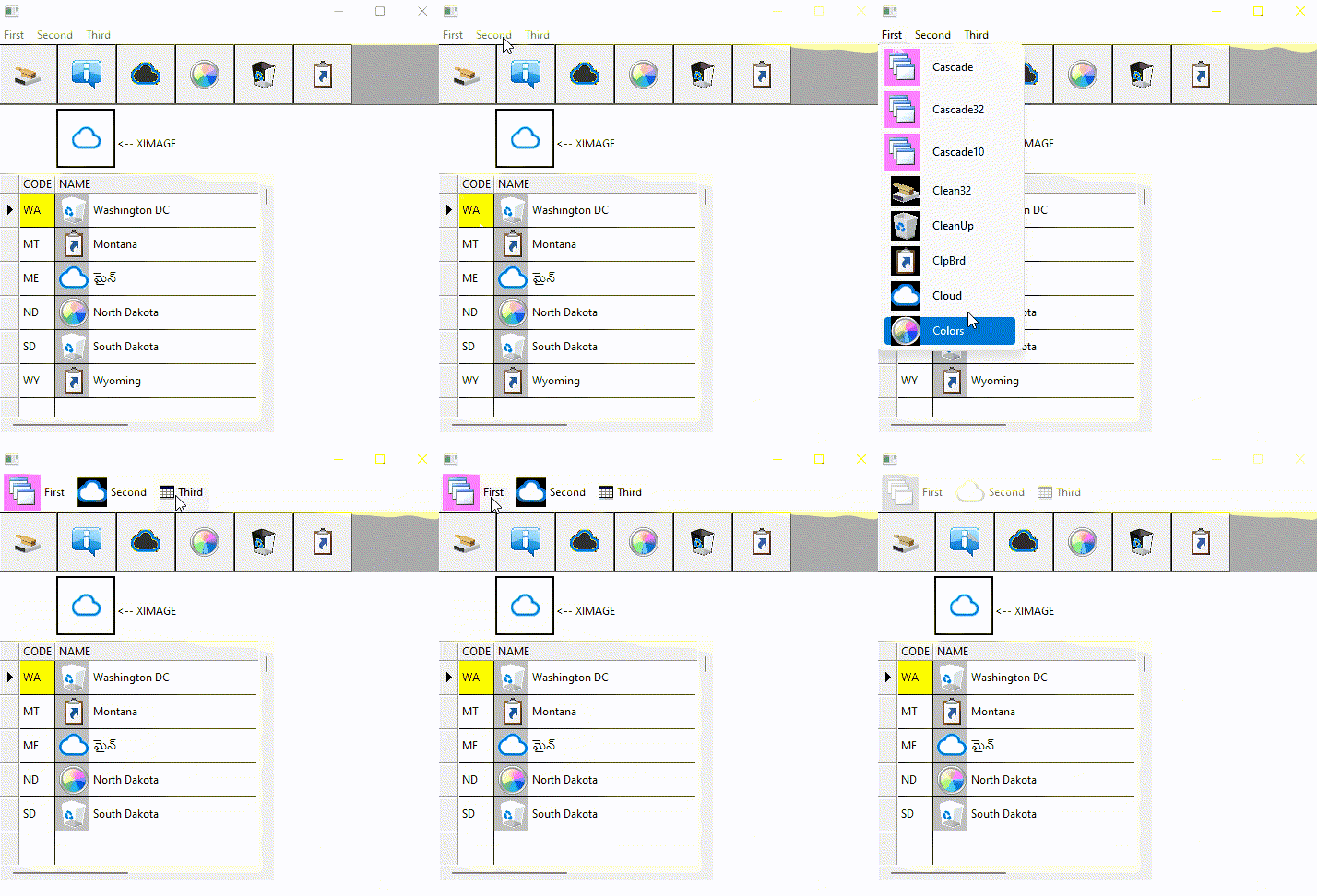
These styles work with Menu, BtnBmp, Buttonbar and Message Bar ( TMsgBar ), XBrowse
Regards
G. N. Rao.
Hyderabad, India
G. N. Rao.
Hyderabad, India
These styles work with Menu, BtnBmp, Buttonbar and Message Bar ( TMsgBar ), XBrowse
function TestMenu()

   local oWnd, oMenu, oBar, oImage, oBrw

   USE STATES

   DEFINE WINDOW oWnd MENU MyMenu()
   DEFINE BUTTONBAR oBar SIZE 64,64

   DEFINE BUTTON OF oBar RESOURCE "CLEAN32"
   DEFINE BUTTON OF oBar RESOURCE "ABOUTJ"
   DEFINE BUTTON OF oBar RESOURCE "CLOUD"
   DEFINE BUTTON OF oBar RESOURCE "COLORS"
   DEFINE BUTTON OF oBar RESOURCE "CLEANUP"
   DEFINE BUTTON OF oBar RESOURCE "CLIPBOARD"

   @  70,64 XIMAGE oImage SOURCE "CLOUD" SIZE 64,64 OF oWnd
   @ 100,130 SAY "<-- XIMAGE" SIZE 100,24 PIXEL OF oWnd

   @ 140, 0 XBROWSE oBrw SIZE 300,-20 PIXEL OF oWnd ;
      DATASOURCE "STATES" AUTOCOLS ;
      CELL LINES NOBORDER

   WITH OBJECT oBrw
      :l2007   := .f.
      WITH OBJECT :aCols[ 2 ]
         :AddBitmap( { "CLEANUP", "CLIPBOARD", "CLOUD", "COLORS" } )
         :bBmpData   := { || ( oBrw:BookMark - 1 ) % 4 + 1 }
         :nClrBmpBack := CLR_HGRAY
      END
      :CreateFromCode()
   END

   oWnd:nWidth    := 500
   oWnd:nHeight   := 500

   ACTIVATE WINDOW oWnd CENTERED

return nil

function MyMenu()

   local oMenu

   MENU oMenu //2007
      MENUITEM "First"      RESOURCE "CASCADE32"
      MENU
         // from FWH/bitmaps/32x32 folder
         MENUITEM "Cascade"   FILE "c:\fwh\bitmaps\32x32\cascade.bmp"
         MENUITEM "Cascade32" RESOURCE "CASCADE32"
         MENUITEM "Cascade10" RESOURCE "CASCADE10"
         // Mr.Jimmy's bitmaps
         MENUITEM "Clean32" RESOURCE "CLEAN32"
         MENUITEM "CleanUp" FILE "c:\jimmy\bitmaps\no_dpi\cleanup.bmp" //RESOURCE "CLEANUP"
         MENUITEM "ClpBrd"  RESOURCE "CLIPBOARD"
         MENUITEM "Cloud"   RESOURCE "CLOUD"
         MENUITEM "Colors"  RESOURCE "COLORS"
      ENDMENU
      MENUITEM "Second" RESOURCE "CLOUD"
      MENUITEM "Third" FILE "c:\fwh\bitmaps\16x16\browse.bmp"
   ENDMENU

return oMenuABOUTJ 10 "c:\jimmy\bitmaps\no_dpi\about.bmp"
CLEAN32 10 "c:\jimmy\bitmaps\no_dpi\clean32.bmp"
CLEANUP 10 "c:\jimmy\bitmaps\no_dpi\cleanup.bmp"
CLIPBOARD 10 "c:\jimmy\bitmaps\no_dpi\clipboard.bmp"
CLOUD 10 "c:\jimmy\bitmaps\no_dpi\cloud.bmp"
COLORS 10 "c:\jimmy\bitmaps\no_dpi\colors.bmp"
CASCADE32 BITMAP "c:\fwh\bitmaps\32x32\cascade.bmp"
CASCADE10 10 "c:\fwh\bitmaps\32x32\cascade.bmp"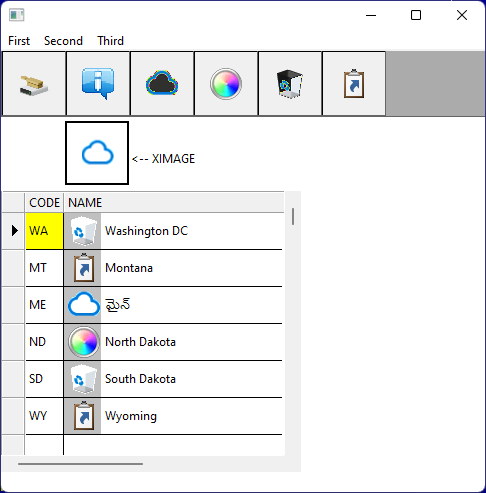
#include "FiveWin.ch"

//----------------------------------------------------------------------------//

static oWnd

function Main()

   DEFINE WINDOW oWnd FROM 1, 5 TO 20, 70 ;
      TITLE FWVERSION + ":Classic Menu Bitmaps" ;
      MENU BuildMenu()

   ACTIVATE WINDOW oWnd

return nil

//----------------------------------------------------------------------------//

function BuildMenu()

LOCAL oMenu

MENU oMenu
  MENUITEM "&File" RESOURCE "OPEN"
    MENU
      MENUITEM "&Open" ;
          RESOURCE "OPEN" ;
          ACTION MsgInfo( "Open" )
      MENUITEM "&Close" ;
          RESOURCE "CLOSE" ;
          ACTION MsgInfo( "Close" )
      MENUITEM "&Save" ;
          RESOURCE "SAVE" ;
          ACTION MsgInfo( "Save" )
      MENUITEM "&End" ;
          RESOURCE  "CANCEL" ;
          ACTION ( MsgInfo( "End" ), oWnd:End() )
   ENDMENU
   MENUITEM "Browse" RESOURCE "BROWSE"
ENDMENU

return oMenuOPEN BITMAP "..\bitmaps\16x16\open.bmp"
CLOSE BITMAP "..\bitmaps\16x16\close2.bmp"
SAVE BITMAP "..\bitmaps\16x16\save.bmp"
CANCEL BITMAP "..\bitmaps\16x16\cancel.bmp"
BROWSE BITMAP "..\bitmaps\16x16\browse.bmp"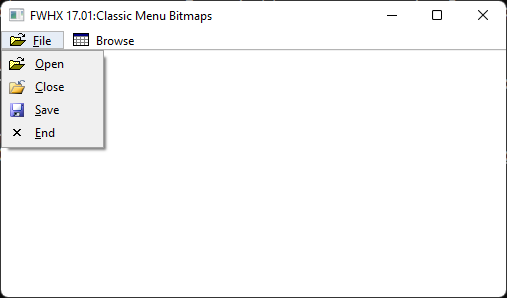
hi,
thx for your work and Sample Code where i have learn a lot
nageswaragunupudi wrote:Thanks.Dear Rao
I used style 2007, because I always used that style, because I like it. In most samples I post here also you can find that style.
It is our duty to provide full support honestly and not to play tricks. I do my job with utmost sincerity.
After reading your post, I did find some issues with classical menu with no-style. I will fully study and come out with all the issues. FWH will fix wherever necessary.
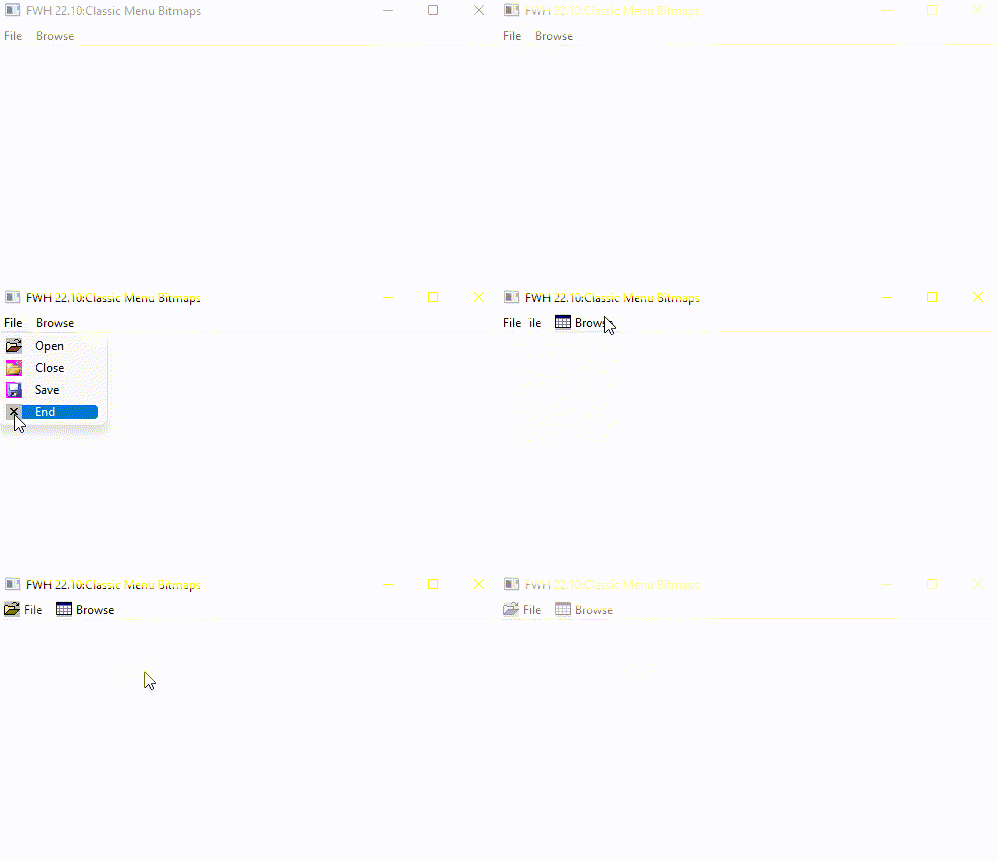
What is surprising is that in the last 5 years, nobody has complained about this.
The reason must be that everybody, including FWTeam, must be defining menus with some favorite style 20?? and did not notice the issue with the classic menu without any style.
My personal advice to Mr. Jimmy is to use some 20?? style of his taste for the time being, till the issue is sorted out.
Mr. Rao, add the COLORS clause to the menu definition (without putting any style 20?? ) and try.
cnavarro wrote:Mr. Rao, add the COLORS clause to the menu definition (without putting any style 20?? ) and try.This works perfectly both with FWH1709 and the latest version.
MENU oMenu COLORSMENU oMenunageswaragunupudi wrote:Dear RaoMr. Rao, add the COLORS clause to the menu definition (without putting any style 20?? ) and try.This works perfectly both with FWH1709 and the latest version.
Thanks.
May ask?
Is it possible to make it work like this without any clause like "COLORS" ?
You know better but we like to have your clarification.
Thanks again.
nageswaragunupudi wrote: if you useYES, that work fineinstead ofMENU oMenu COLORSMENU oMenu
Dear RaoThank you very much.
The menus defined without any clause ( COLORS or styles 20?? ), are painted by the Windows API ( S.O. ) with the limitations that this produced for us.
To improve them, I introduced the COLORS clause that allows you to use colors and images and fonts both in the main menu items and in the popups without any limitation in addition to other clauses.
nageswaragunupudi wrote:Now all our users also know.i think it must be in Help File so every User can read it

