FiveTech Support Forums

FiveWin / Harbour / xBase community
Board index FiveWin for Harbour/xHarbour MENUITEM RESOURCE transparency ?
Posts: 1772
Joined: Thu Sep 05, 2019 05:32 AM
MENUITEM RESOURCE transparency ?
Posted: Mon Oct 31, 2022 11:28 PM
hi,

what is need when use Resource to make it transparency :?:
greeting,

Jimmy
Posts: 6755
Joined: Wed Feb 15, 2012 08:25 PM
Re: MENUITEM RESOURCE transparency ?
Posted: Wed Nov 02, 2022 04:38 AM

Check that those resources have transparency enabled in their layout.

Cristobal Navarro

Hay dos tipos de personas: las que te hacen perder el tiempo y las que te hacen perder la noción del tiempo

El secreto de la felicidad no está en hacer lo que te gusta, sino en que te guste lo que haces
Posts: 1772
Joined: Thu Sep 05, 2019 05:32 AM
Re: MENUITEM RESOURCE transparency ?
Posted: Wed Nov 02, 2022 06:06 AM
hi,
cnavarro wrote:Check that those resources have transparency enabled in their layout.
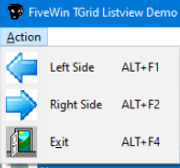
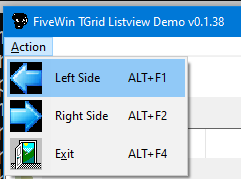
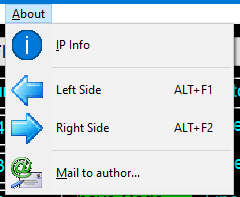
does work with HMG and Xbase++ like this (same Resource)
Code (fw): Select all Collapse
STATIC PROCEDURE BuildMainMenu()
LOCAL oMenu
   MENU oMenu
      MENUITEM "&Action"
      MENU
         MENUITEM "Left Side" + CHR( 9 ) + "ALT+F1" RESOURCE "MYLEFTSIDE" ;
                               ACCELERATOR ACC_ALT, 65648 ;
                               ACTION OpenComboSide( "left" )
         MENUITEM "Right Side" + CHR( 9 ) + "ALT+F2" RESOURCE "MYRIGHTSIDE" ;
                                ACCELERATOR ACC_ALT, 65649 ;
                                ACTION OpenComboSide( "right" )
         MENUITEM "E&xit" + CHR( 9 ) + "ALT+F4" RESOURCE "MYEXIT" ACTION oMain:End()
      ENDMENU
   ENDMENU
RETURN
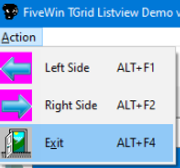
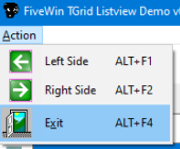
greeting,

Jimmy
Posts: 1772
Joined: Thu Sep 05, 2019 05:32 AM
Re: MENUITEM RESOURCE transparency ?
Posted: Thu Nov 03, 2022 02:18 PM
hi,

have try different Bitmap as Resource for MENU


as i can say none "match" with MENU which IHMO do not hamdle Transparency
please tell me a IMAGE from
c:\fwh\bitmaps\16x16\
c:\fwh\bitmaps\32x32\
c:\fwh\bitmaps\AlphaBmp\
c:\fwh\bitmaps\backgrnd\
c:\fwh\bitmaps\hires\
c:\fwh\bitmaps\metro\
c:\fwh\bitmaps\pngs\
c:\fwh\icons\hires\
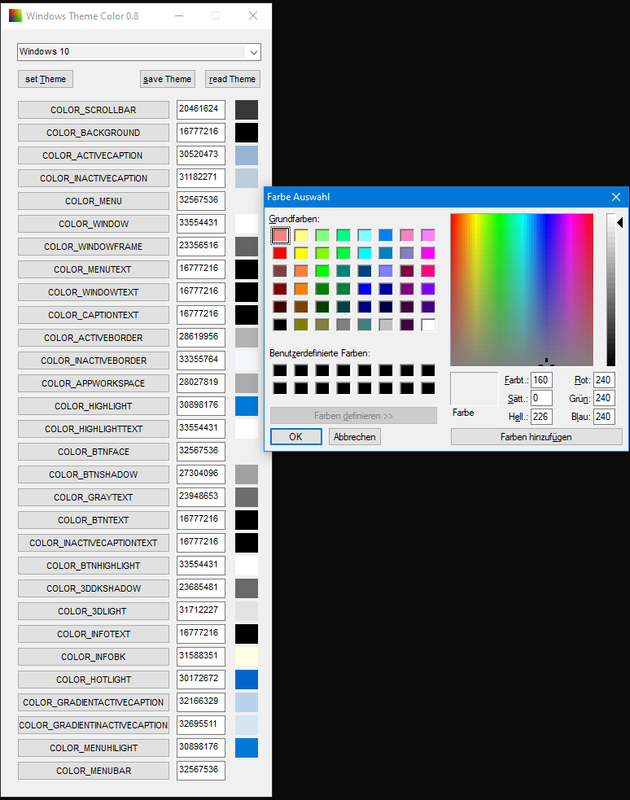
which will work, thx

p.s. which COLOR have MENU Background :?:
greeting,

Jimmy
Posts: 1772
Joined: Thu Sep 05, 2019 05:32 AM
Re: MENUITEM RESOURCE transparency ?
Posted: Thu Nov 03, 2022 02:53 PM
hi,

i have for COLOR_MENU (Window 10)

so it is {240,240,240}

---

does Fivewin have a Ownerdraw MENU :idea:
greeting,

Jimmy
Posts: 6755
Joined: Wed Feb 15, 2012 08:25 PM
Re: MENUITEM RESOURCE transparency ?
Posted: Thu Nov 03, 2022 03:42 PM

DearJimmy

If you not use clause COLOR or STYLE 2007, 2010, 2013, 2015, Fivewin use Windows menus

Cristobal Navarro

Hay dos tipos de personas: las que te hacen perder el tiempo y las que te hacen perder la noción del tiempo

El secreto de la felicidad no está en hacer lo que te gusta, sino en que te guste lo que haces
Posts: 1772
Joined: Thu Sep 05, 2019 05:32 AM
Re: MENUITEM RESOURCE transparency ?
Posted: Thu Nov 03, 2022 05:10 PM
hi,

to "modify" IMAGE to have COLOR_MENU is "just" a Workaround
i can get COLOR of Windows Theme COLOR_MENU "on-fly" ... what about STYLE 2007, 2010, 2013, 2015 how to "get" Color :?: ,

as you see i have try different IMAGE, also from Fivewin \BITMAP, but none of them work with "transparency"
so i guess transparency for MENU IMAGE is not include under Fivewin or what did i wrong :?:
greeting,

Jimmy
Posts: 6755
Joined: Wed Feb 15, 2012 08:25 PM
Re: MENUITEM RESOURCE transparency ?
Posted: Thu Nov 03, 2022 06:42 PM
Cristobal Navarro

Hay dos tipos de personas: las que te hacen perder el tiempo y las que te hacen perder la noción del tiempo

El secreto de la felicidad no está en hacer lo que te gusta, sino en que te guste lo que haces
Posts: 10733
Joined: Sun Nov 19, 2006 05:22 AM
Re: MENUITEM RESOURCE transparency ?
Posted: Sat Nov 05, 2022 01:32 PM
Code (fw): Select all Collapse
#include "fivewin.ch"

function Main()

   local oWnd, oMenu

   DEFINE WINDOW oWnd MENU MyMenu()


   oWnd:nWidth    := 400
   oWnd:nHeight   := 300

   ACTIVATE WINDOW oWnd CENTERED

return nil

function MyMenu()

   local oMenu

   MENU oMenu 2007
      MENUITEM "File"      FILE "\fwh\bitmaps\16x16\index.bmp"
      MENU
         MENUITEM "Open"   FILE "\fwh\bitmaps\16x16\open.bmp"
         MENUITEM "Save"   FILE "\fwh\bitmaps\16x16\save2.bmp"
         MENUITEM "Close"  FILE "\fwh\bitmaps\16x16\close2.bmp"
         SEPARATOR
         MENUITEM "Exit"   FILE "\fwh\bitmaps\16x16\exit2.bmp"
      ENDMENU
   ENDMENU

return oMenu
Regards


G. N. Rao.

Hyderabad, India
Posts: 44158
Joined: Thu Oct 06, 2005 05:47 PM
Re: MENUITEM RESOURCE transparency ?
Posted: Sat Nov 05, 2022 01:47 PM

FWH uses the pixel color at zero, zero to apply transparency and that may be the reason

regards, saludos

Antonio Linares
www.fivetechsoft.com
Posts: 10733
Joined: Sun Nov 19, 2006 05:22 AM
Re: MENUITEM RESOURCE transparency ?
Posted: Sat Nov 05, 2022 02:04 PM
Now, from Resources.

Use this rc file:
Code (fw): Select all Collapse
INDEX  BITMAP "\fwh\bitmaps\16x16\index.bmp"
OPEN2  BITMAP "\fwh\bitmaps\16x16\open.bmp"
SAVE   BITMAP "\fwh\bitmaps\16x16\save2.bmp"
CLOSE3 BITMAP "\fwh\bitmaps\16x16\close2.bmp"
EXIT   BITMAP "\fwh\bitmaps\16x16\exit2.bmp"
Modify the MyMenu() function in the above sample program like this:
Code (fw): Select all Collapse
function MyMenu()

   local oMenu

   MENU oMenu 2007
      MENUITEM "File"      RESOURCE "INDEX"
      MENU
         MENUITEM "Open"   RESOURCE "OPEN2"
         MENUITEM "Save"   RESOURCE "SAVE"
         MENUITEM "Close"  RESOURCE "CLOSE3"
         SEPARATOR
         MENUITEM "Exit"   RESOURCE "EXIT"
      ENDMENU
   ENDMENU

return oMenu
Result is exactly same as the above image in my last post.
Regards


G. N. Rao.

Hyderabad, India
Posts: 10733
Joined: Sun Nov 19, 2006 05:22 AM
Re: MENUITEM RESOURCE transparency ?
Posted: Sat Nov 05, 2022 02:39 PM
Sometime back, Mr. Jimmy sent me some "no_dpi" bitmaps.
I tried with those bmp files in RC file:

This is the rc file:
Code (fw): Select all Collapse
ABOUTJ    10 "c:\jimmy\bitmaps\no_dpi\about.bmp"
CLEAN32   10 "c:\jimmy\bitmaps\no_dpi\clean32.bmp"
CLEANUP   10 "c:\jimmy\bitmaps\no_dpi\cleanup.bmp"
CLIPBOARD 10 "c:\jimmy\bitmaps\no_dpi\clipboard.bmp"
CLOUD     10 "c:\jimmy\bitmaps\no_dpi\cloud.bmp"
COLORS    10 "c:\jimmy\bitmaps\no_dpi\colors.bmp"
Revised MyMenu() function:
Code (fw): Select all Collapse
function MyMenu()

   local oMenu

   MENU oMenu 2007
      MENUITEM "File"      RESOURCE "INDEX"
      MENU
         MENUITEM "About"   RESOURCE "ABOUTJ"
         MENUITEM "Clean32" RESOURCE "CLEAN32"
         MENUITEM "CleanUp" RESOURCE "CLEANUP"
         MENUITEM "ClpBrd"  RESOURCE "CLIPBOARD"
         MENUITEM "Cloud"   RESOURCE "CLOUD"
         MENUITEM "Colors"  RESOURCE "COLORS"
      ENDMENU
   ENDMENU

return oMenu
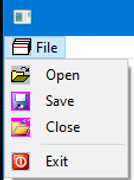
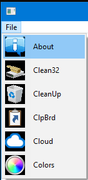
I find no problem with transparency


Can you please send the bitmaps, with which you have problem of transparency?
Regards


G. N. Rao.

Hyderabad, India
Posts: 1772
Joined: Thu Sep 05, 2019 05:32 AM
Re: MENUITEM RESOURCE transparency ?
Posted: Sun Nov 06, 2022 05:30 AM
hi,

thx for your work and Sample

as i can "see" you use a "Trick" to change Style to 2007, than it look much better

but how should a Newbie "know" this while Help File does not say it
without "Trick" it look like i say


so my Question : how to use this Technique when want "Dark-Mode" :?:

p.s. which Style can be used with MENU :?:
Help File does not say it
greeting,

Jimmy
Posts: 10733
Joined: Sun Nov 19, 2006 05:22 AM
Re: MENUITEM RESOURCE transparency ?
Posted: Sun Nov 06, 2022 02:22 PM

Thanks.

I used style 2007, because I always used that style, because I like it. In most samples I post here also you can find that style.

It is our duty to provide full support honestly and not to play tricks. I do my job with utmost sincerity.

After reading your post, I did find some issues with classical menu with no-style. I will fully study and come out with all the issues. FWH will fix wherever necessary.

Regards


G. N. Rao.

Hyderabad, India
Posts: 1772
Joined: Thu Sep 05, 2019 05:32 AM
Re: MENUITEM RESOURCE transparency ?
Posted: Sun Nov 06, 2022 02:38 PM
hi,

i have look at those Office Style : NICE :!:

Question : is there a Way to "detect" OS Style and use it as Menu Style :?:
those Office Style are identical with OS Style when they have released

Offtopic : does those Office Style also work on other Fivewin Control :idea:
greeting,

Jimmy