FiveTech Support Forums

FiveWin / Harbour / xBase community
Board index FiveWin for Harbour/xHarbour MDI child window appearance
Posts: 7317
Joined: Thu Oct 18, 2012 07:17 PM
MDI child window appearance
Posted: Thu Dec 22, 2022 11:02 AM
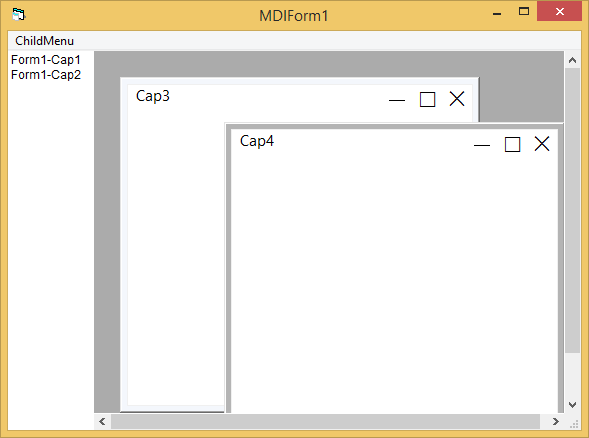
I found a test on VB create windows child with win 10 appearance, but on fwh I not Know how make it


the sources
https://www.vbforums.com/attachment.php?s=1b3ed19b44b7b70d4c7f2977dee9b5f1&attachmentid=153951&d=1511405388
Since from 1991/1992 ( fw for clipper Rel. 14.4 - Momos)

I use : FiveWin for Harbour March-April 2024 - Harbour 3.2.0dev (harbour_bcc770_32_20240309) - Bcc7.70 - xMate ver. 1.15.3 - PellesC - mail: silvio[dot]falconi[at]gmail[dot]com
Posts: 44158
Joined: Thu Oct 06, 2005 05:47 PM
Re: MDI child window appearance
Posted: Fri Dec 23, 2022 07:14 AM
Dear Silvio,

Please send me the EXE

Please use https://wormhole.app/ to send it
regards, saludos

Antonio Linares
www.fivetechsoft.com
Posts: 44158
Joined: Thu Oct 06, 2005 05:47 PM
Re: MDI child window appearance
Posted: Fri Dec 23, 2022 07:51 AM
Dear Silvio,

VB uses .NET and probably that example is using WPF too, which can only be used from .NET

Probably the only way you can use WPF from FWH is using https://github.com/FiveTechSoft/fivenet
regards, saludos

Antonio Linares
www.fivetechsoft.com
Posts: 44158
Joined: Thu Oct 06, 2005 05:47 PM
Re: MDI child window appearance
Posted: Fri Dec 23, 2022 08:14 AM
This way we can call VBS code from FWH, now if we could use WPF from VBS...

test.vbs
Code (fw): Select all Collapse
MsgBox( "Welcome from VBS" )
vbs.prg
Code (fw): Select all Collapse
#include "FiveWin.ch"

function Main()

   local oWnd := WaitRun( "wscript.exe test.vbs" )

   MsgInfo( "ok" )

return nil
regards, saludos

Antonio Linares
www.fivetechsoft.com
Posts: 7317
Joined: Thu Oct 18, 2012 07:17 PM
Re: MDI child window appearance
Posted: Fri Dec 23, 2022 08:19 AM
Antonio Linares wrote:Dear Silvio,

Please send me the EXE

Please use https://wormhole.app/ to send it
I not have the exe i found that message in vb forum
Since from 1991/1992 ( fw for clipper Rel. 14.4 - Momos)

I use : FiveWin for Harbour March-April 2024 - Harbour 3.2.0dev (harbour_bcc770_32_20240309) - Bcc7.70 - xMate ver. 1.15.3 - PellesC - mail: silvio[dot]falconi[at]gmail[dot]com
Posts: 44158
Joined: Thu Oct 06, 2005 05:47 PM
Re: MDI child window appearance
Posted: Fri Dec 23, 2022 08:19 AM

Or we could run your VB EXE, grab its window handle and manage it from FWH...

regards, saludos

Antonio Linares
www.fivetechsoft.com
Posts: 44158
Joined: Thu Oct 06, 2005 05:47 PM
Re: MDI child window appearance
Posted: Fri Dec 23, 2022 08:22 AM
Dear Silvio,

Then first thing to do is trying to create the EXE using VB :-)
regards, saludos

Antonio Linares
www.fivetechsoft.com
Posts: 44158
Joined: Thu Oct 06, 2005 05:47 PM
Re: MDI child window appearance
Posted: Fri Dec 23, 2022 09:00 AM
See this:

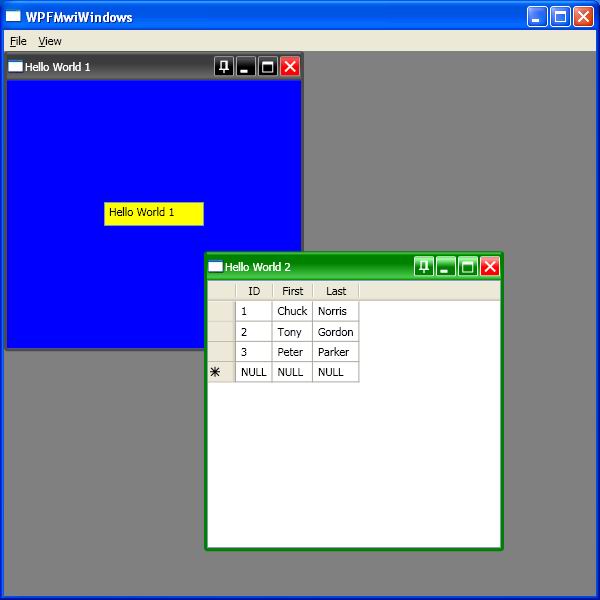
https://github.com/dutts/wpfmdi
Themes
WPF MDI includes two themes, Luna (XP) and Aero (Vista & 7) as well as support for custom themes. Themes are used depending on the operating system, although a theme can be set at compile and/or run time also.
regards, saludos

Antonio Linares
www.fivetechsoft.com
Posts: 44158
Joined: Thu Oct 06, 2005 05:47 PM
Re: MDI child window appearance
Posted: Fri Dec 23, 2022 09:15 AM
There are four styles supported directly by WPF: Classic, Luna, Royale and Aero.
Code (fw): Select all Collapse
The following is a sample using all of these four themes.

<StackPanel>
        <Button  Content="luna" Height="40" Width="100">
            <Button.Resources>
                <ResourceDictionary Source="/PresentationFramework.Luna;v3.0.0.0;31bf3856ad364e35;component/themes/luna.normalcolor.xaml"/>
            </Button.Resources>
        </Button>

        <Button  Content="Aero" Height="40" Width="100">
            <Button.Resources>
                <ResourceDictionary Source="/PresentationFramework.Aero;v3.0.0.0;31bf3856ad364e35;component/themes/Aero.normalcolor.xaml"/>
            </Button.Resources>
        </Button>

        <Button  Content="Royale" Height="40" Width="100">
            <Button.Resources>
                <ResourceDictionary Source="/PresentationFramework.Royale;v3.0.0.0;31bf3856ad364e35;component/themes/royale.normalcolor.xaml"/>
            </Button.Resources>
        </Button>

        <Button  Content="Classic" Height="40" Width="100">
            <Button.Resources>
                <ResourceDictionary Source="/PresentationFramework.Classic;v3.0.0.0;31bf3856ad364e35;component/themes/classic.xaml"/>
            </Button.Resources>
        </Button>
    </StackPanel>
regards, saludos

Antonio Linares
www.fivetechsoft.com
Posts: 44158
Joined: Thu Oct 06, 2005 05:47 PM
Re: MDI child window appearance
Posted: Fri Dec 23, 2022 09:33 AM
regards, saludos

Antonio Linares
www.fivetechsoft.com
Posts: 44158
Joined: Thu Oct 06, 2005 05:47 PM
Re: MDI child window appearance
Posted: Fri Dec 23, 2022 09:36 AM
Dear Silvio,

Here you have the EXE already built in case you want to test it:

https://github.com/FiveTechSoft/FWH_tools/blob/master/silvio_mdi.zip
regards, saludos

Antonio Linares
www.fivetechsoft.com
Posts: 44158
Joined: Thu Oct 06, 2005 05:47 PM
Re: MDI child window appearance
Posted: Fri Dec 23, 2022 04:56 PM
Dear Silvio,

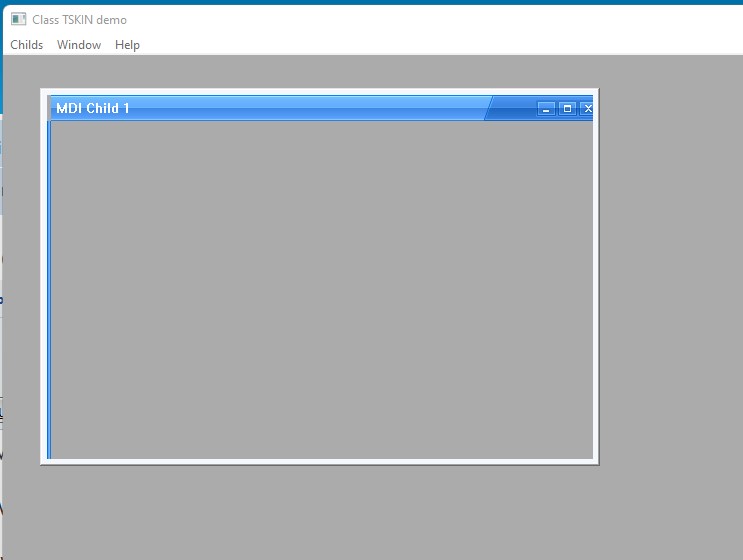
This is just an idea and needs to enhance FWH Class TSkin, but see the results :-) (you must run it from FWH samples folder)
Code (fw): Select all Collapse
#include "Fivewin.ch"

function Main()

    local oWnd, oWndChild

   DEFINE WINDOW oWnd TITLE "Class TSKIN demo" MDI
   
   DEFINE WINDOW oWndChild MDICHILD OF oWnd STYLE nOr( WS_CHILD, WS_THICKFRAME )
   oWndChild:bInit := {|| Skin( oWndChild, "blue_skin" ) }
   
   ACTIVATE WINDOW oWndChild
    
   ACTIVATE WINDOW oWnd 

return nil
regards, saludos

Antonio Linares
www.fivetechsoft.com
Posts: 7317
Joined: Thu Oct 18, 2012 07:17 PM
Re: MDI child window appearance
Posted: Fri Dec 23, 2022 08:41 PM
I like something easy as this

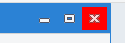
the header in blue and the writing in white, note the borders in blue


where the buttons are as

close


size


iconize


I remember you once doing something like that
found https://forums.fivetechsupport.com/viewtopic.php?f=3&t=37133&p=221657&hilit=window&sid=abac545ca37980a14505c1df020634b7&sid=abac545ca37980a14505c1df020634b7#p221817


change it as ( but not run)
Code (fw): Select all Collapse
#include "FiveWin.ch"

#define CLR_MSPURPLE RGB( 128,  57, 123 )
#define CLR_MSRED    RGB( 232,  17,  35 )
#define CLR_MSGRAY   RGB( 229, 229, 229 )

#define TME_LEAVE    2

Function Main()
   local oWnd,oBar
   DEFINE WINDOW oWnd TITLE " demo" MDI
   DEFINE BUTTONBAR oBar OF oWnd SIZE 60, 60 2007

   DEFINE BUTTON OF oBar ACTION Child(oWnd) ;


 ACTIVATE WINDOW oWnd

return nil
//-----------------------------------------------------------//
function child(oWnd)

   local oWndChild, nRowPos, nColPos, oBtnClose, oBtnMax, oBtnMin, lDrag := .F., lRResize := .F.

   DEFINE WINDOW oWndChild MDICHILD OF oWnd STYLE WS_POPUP COLOR CLR_BLACK, CLR_MSPURPLE

   oWndChild:SetSize( 500, 300 )
   oWndChild:Center()
   oWndChild:Shadow()
   oWndChild:bPainted = { || oWndChild:Say( 8, 30, "Caption", CLR_WHITE, CLR_MSPURPLE, oWndChild:oFont, .T., .T. ) }

   oWndChild:bLClicked = { | nRow, nCol | If( nRow < 25, ( oWndChild:Capture(), nRowPos := nRow, nColPos := nCol, lDrag := .T. ),),;
                                     If( nRow > 25 .and. nCol > oWndChild:nWidth - 25, ( oWndChild:Capture(), nRowPos := nRow, nColPos := nCol, lRResize := .T. ),) }

   oWndChild:bMMoved = { | nRow, nCol | TrackMouseEvent( oWndChild:hWnd, TME_LEAVE ),;
                                   If( lDrag .and. ! IsZoomed( oWndChild:hWnd ) .and. IsOverWnd( oWndChild:hWnd, nRow, nCol ),;
                                       oWndChild:Move( oWndChild:nTop + nRow - nRowPos, oWndChild:nLeft + nCol - nColPos,,, .T. ),),;
                                   If( lRResize .and. ! IsZoomed( oWndChild:hWnd ) .and. IsOverWnd( oWndChild:hWnd, nRow, nCol ),;
                                       ( oWndChild:SetSize( oWndChild:nWidth + nCol - nColPos, oWndChild:nHeight, .T. ), nColPos := nCol ),) }

   oWndChild:bLButtonUp = { || ReleaseCapture(), lDrag := .F., lRResize := .F. }
   oWndChild:bMLeave    = { || lDrag := .F. }

   @ 1, oWndChild:nWidth - 46 BTNBMP oBtnClose BITMAP "../bitmaps/16x16/closew.bmp" ;
      FLAT NOBORDER NOROUND ACTION oWndChild:End() SIZE 45, 29 ;
      COLOR CLR_BLACK, CLR_MSPURPLE

   @ 1, oWndChild:nWidth - 92 BTNBMP oBtnMax BITMAP "../bitmaps/16x16/max.bmp" ;
      FLAT NOBORDER NOROUND ACTION If( ! IsZoomed( oWndChild:hWnd ), oWndChild:Maximize(), oWndChild:Restore() ) SIZE 45, 29 ;
      COLOR CLR_BLACK, CLR_MSPURPLE

   @ 1, oWndChild:nWidth - 138 BTNBMP oBtnMin BITMAP "../bitmaps/16x16/min.bmp" ;
      FLAT NOBORDER NOROUND ACTION If( ! IsIconic( oWndChild:hWnd ), oWndChild:Iconize(), oWndChild:Restore() ) SIZE 45, 29 ;
      COLOR CLR_BLACK, CLR_MSPURPLE

   oBtnClose:bMMoved = { || oBtnClose:SetColor( CLR_BLACK, If( oBtnClose:lMOver, CLR_MSRED, oWndChild:nClrPane ) ) }
   oBtnMax:bMMoved   = { || oBtnMax:SetColor( CLR_BLACK, If( oBtnMax:lMOver, CLR_MSGRAY, oWndChild:nClrPane ) ) }
   oBtnMin:bMMoved   = { || oBtnMin:SetColor( CLR_BLACK, If( oBtnMin:lMOver, CLR_MSGRAY, oWndChild:nClrPane ) ) }

   oWndChild:bResized = { || oBtnClose:Move( 1, oWndChild:nWidth - 46 ), oBtnMax:Move( 1, oWndChild:nWidth - 92 ),;
                        oBtnMin:Move( 1, oWndChild:nWidth - 138 ) }

   ACTIVATE WINDOW oWndChild

return ni
or create a small class ?
Since from 1991/1992 ( fw for clipper Rel. 14.4 - Momos)

I use : FiveWin for Harbour March-April 2024 - Harbour 3.2.0dev (harbour_bcc770_32_20240309) - Bcc7.70 - xMate ver. 1.15.3 - PellesC - mail: silvio[dot]falconi[at]gmail[dot]com
Posts: 44158
Joined: Thu Oct 06, 2005 05:47 PM
Re: MDI child window appearance
Posted: Sat Dec 24, 2022 07:47 AM
Dear Silvio,

Yesterday I talked to Lailton and he told me he has some examples of skins for MdiChilds

On monday he will send me some examples that I will post here :-)
regards, saludos

Antonio Linares
www.fivetechsoft.com
Posts: 7317
Joined: Thu Oct 18, 2012 07:17 PM
Re: MDI child window appearance
Posted: Mon Dec 26, 2022 11:45 PM
Antonio Linares wrote:Dear Silvio,

Yesterday I talked to Lailton and he told me he has some examples of skins for MdiChilds

On monday he will send me some examples that I will post here :-)
Ok i wait for U
Since from 1991/1992 ( fw for clipper Rel. 14.4 - Momos)

I use : FiveWin for Harbour March-April 2024 - Harbour 3.2.0dev (harbour_bcc770_32_20240309) - Bcc7.70 - xMate ver. 1.15.3 - PellesC - mail: silvio[dot]falconi[at]gmail[dot]com