FiveTech Support Forums

FiveWin / Harbour / xBase community
Board index FiveWin for Harbour/xHarbour how to open devtoolswindow from application.
Posts: 1387
Joined: Fri May 23, 2008 01:33 PM
Re: how to open devtoolswindow from application.
Posted: Sat Jul 08, 2023 09:47 AM
Antonio Linares wrote:Dear Hakan,

It may be something that has changed inside webview.dll. We have not modified FWH code.

You may open an issue in https://github.com/webview/webview
I definitely think the same.

Thanks.
Regards,


Hakan ONEMLI


Harbour & MSVC 2022 & FWH 23.06
Posts: 44162
Joined: Thu Oct 06, 2005 05:47 PM
Re: how to open devtoolswindow from application.
Posted: Sat Jul 08, 2023 09:56 AM

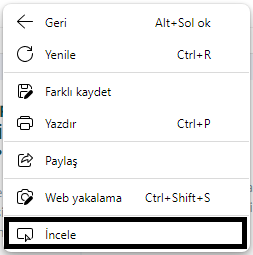
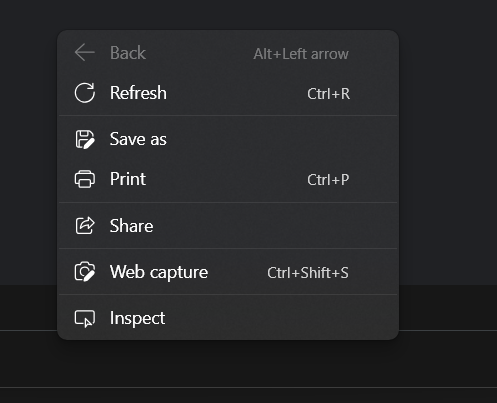
what menuitem is missing ? I can't understand what you posted...

regards, saludos

Antonio Linares
www.fivetechsoft.com
Posts: 1387
Joined: Fri May 23, 2008 01:33 PM
Re: how to open devtoolswindow from application.
Posted: Sat Jul 08, 2023 10:09 AM
Antonio Linares wrote:what menuitem is missing ? I can't understand what you posted...
Hi Antonio,

When the right button is pressed in Webview, "Inspect" should appear on the bottom line of the menu that opens.

The pictures I sent are in Turkish. Somehow, although my Microsoft Edge browser is in English, I could not make the webview browser in English. It probably accepts windows language.

"Inspect" is the Turkish version of "İncele" in the pictures. As you know, the "Inspect" menuitem opens the devtoolsboxwindow.

http://www.objekt.com.tr/fwh_test/webview_menu_before.png
Regards,


Hakan ONEMLI


Harbour & MSVC 2022 & FWH 23.06
Posts: 44162
Joined: Thu Oct 06, 2005 05:47 PM
Re: how to open devtoolswindow from application.
Posted: Sat Jul 08, 2023 10:29 AM
Dear Hakan,

https://learn.microsoft.com/en-us/microsoft-edge/webview2/how-to/context-menus?tabs=cpp#adding-menu-items-to-a-context-menu

thats not simple at all and it would require some hours (if not days) of coding and debugging
regards, saludos

Antonio Linares
www.fivetechsoft.com
Posts: 44162
Joined: Thu Oct 06, 2005 05:47 PM
Re: how to open devtoolswindow from application.
Posted: Sat Jul 08, 2023 10:52 AM
Implemented :-D

regards, saludos

Antonio Linares
www.fivetechsoft.com
Posts: 1387
Joined: Fri May 23, 2008 01:33 PM
Re: how to open devtoolswindow from application.
Posted: Sat Jul 08, 2023 10:54 AM
Thank you Antonio, Mr. Navarro,

I have solved my problem. I think default nDebug is changed in webview.
Code (fw): Select all Collapse
// Please install https://developer.microsoft.com/en-us/m ... /webview2/ x86 version before using it

#include "FiveWin.ch"

function Main()

   local oWebView := TWebView():New(1)     <------ HERE

   oWebView:Navigate( "http://www.google.com" )
   oWebView:SetTitle( "Microsoft Edge WebView working from FWH" )
   oWebView:SetSize( 1200, 800 )
   oWebView:SetUserAgent( "Mozilla/5.0 (Linux; Android 6.0; Nexus 5 Build/MRA58N) AppleWebKit/537.36 (KHTML, like Gecko) Chrome/103.0.5060.53 Mobile Safari/537.36" )
   //oWebView:OpenDevToolsWindow()
   sleep( 300 )
   oWebView:Run()
   oWebView:Destroy()

return nil
TWebView():New(1)

I apologize for the inconvenience I have caused.

Thanks.
Regards,


Hakan ONEMLI


Harbour & MSVC 2022 & FWH 23.06
Posts: 44162
Joined: Thu Oct 06, 2005 05:47 PM
Re: how to open devtoolswindow from application.
Posted: Sat Jul 08, 2023 12:46 PM
Dear Hakan,

Very good finding! :-)

> local oWebView := TWebView():New( 1 ) // shows the "inspect" menu item

thank you
regards, saludos

Antonio Linares
www.fivetechsoft.com

Continue the discussion