FiveTech Support Forums

FiveWin / Harbour / xBase community
Board index FiveWin for Harbour/xHarbour how to open devtoolswindow from application.
Posts: 1387
Joined: Fri May 23, 2008 01:33 PM
how to open devtoolswindow from application.
Posted: Wed Jul 05, 2023 07:20 PM
Hi,

I need to open devtoolswindows from application. The web page I am working on is not mine and it closed the access to devtoolswindow from the right button menu.

I have found this link. https://stackoverflow.com/questions/64981617/how-to-open-devtools-from-code-in-webview2
Just call the method OpenDevToolsWindow() of the ICoreWebView2 Interface.
How can I call this method from our TWebView class?

Thanks.
Regards,


Hakan ONEMLI


Harbour & MSVC 2022 & FWH 23.06
Posts: 1392
Joined: Mon May 14, 2007 09:49 AM
Re: how to open devtoolswindow from application.
Posted: Wed Jul 05, 2023 09:58 PM

If I understood correctly, then the cookie window is bothering you?

This is for DIV with a bitmap. See his class.

Using Eval(document.getElementsByClassName("classname").style.visibility = "hidden"; ), remove it

Posts: 44162
Joined: Thu Oct 06, 2005 05:47 PM
Re: how to open devtoolswindow from application.
Posted: Thu Jul 06, 2023 06:22 AM
Dear Hakan,

I just opened a new issue requesting it:

https://github.com/webview/webview/issues/947
regards, saludos

Antonio Linares
www.fivetechsoft.com
Posts: 44162
Joined: Thu Oct 06, 2005 05:47 PM
Re: how to open devtoolswindow from application.
Posted: Thu Jul 06, 2023 10:05 AM
regards, saludos

Antonio Linares
www.fivetechsoft.com
Posts: 44162
Joined: Thu Oct 06, 2005 05:47 PM
Re: how to open devtoolswindow from application.
Posted: Thu Jul 06, 2023 12:01 PM

Please download a new FWH 24.04 build 3 already available

regards, saludos

Antonio Linares
www.fivetechsoft.com
Posts: 1392
Joined: Mon May 14, 2007 09:49 AM
Re: how to open devtoolswindow from application.
Posted: Thu Jul 06, 2023 12:42 PM

Antonio, what changes have been made in build2 and build3 regarding the release of FW23.04 ?

Posts: 1387
Joined: Fri May 23, 2008 01:33 PM
Re: how to open devtoolswindow from application.
Posted: Thu Jul 06, 2023 01:14 PM
Antonio Linares wrote:Please download a new FWH 24.04 build 3 already available
What should be changed in TWebView class in order to use this function from dlls?

Thanks
Regards,


Hakan ONEMLI


Harbour & MSVC 2022 & FWH 23.06
Posts: 44162
Joined: Thu Oct 06, 2005 05:47 PM
Re: how to open devtoolswindow from application.
Posted: Thu Jul 06, 2023 02:12 PM
Natter wrote:Antonio, what changes have been made in build2 and build3 regarding the release of FW23.04 ?
Please read whatsnew.txt
regards, saludos

Antonio Linares
www.fivetechsoft.com
Posts: 44162
Joined: Thu Oct 06, 2005 05:47 PM
Re: how to open devtoolswindow from application.
Posted: Thu Jul 06, 2023 02:12 PM
Horizon wrote:
Please download a new FWH 24.04 build 3 already available
What should be changed in TWebView class in order to use this function from dlls?

Thanks
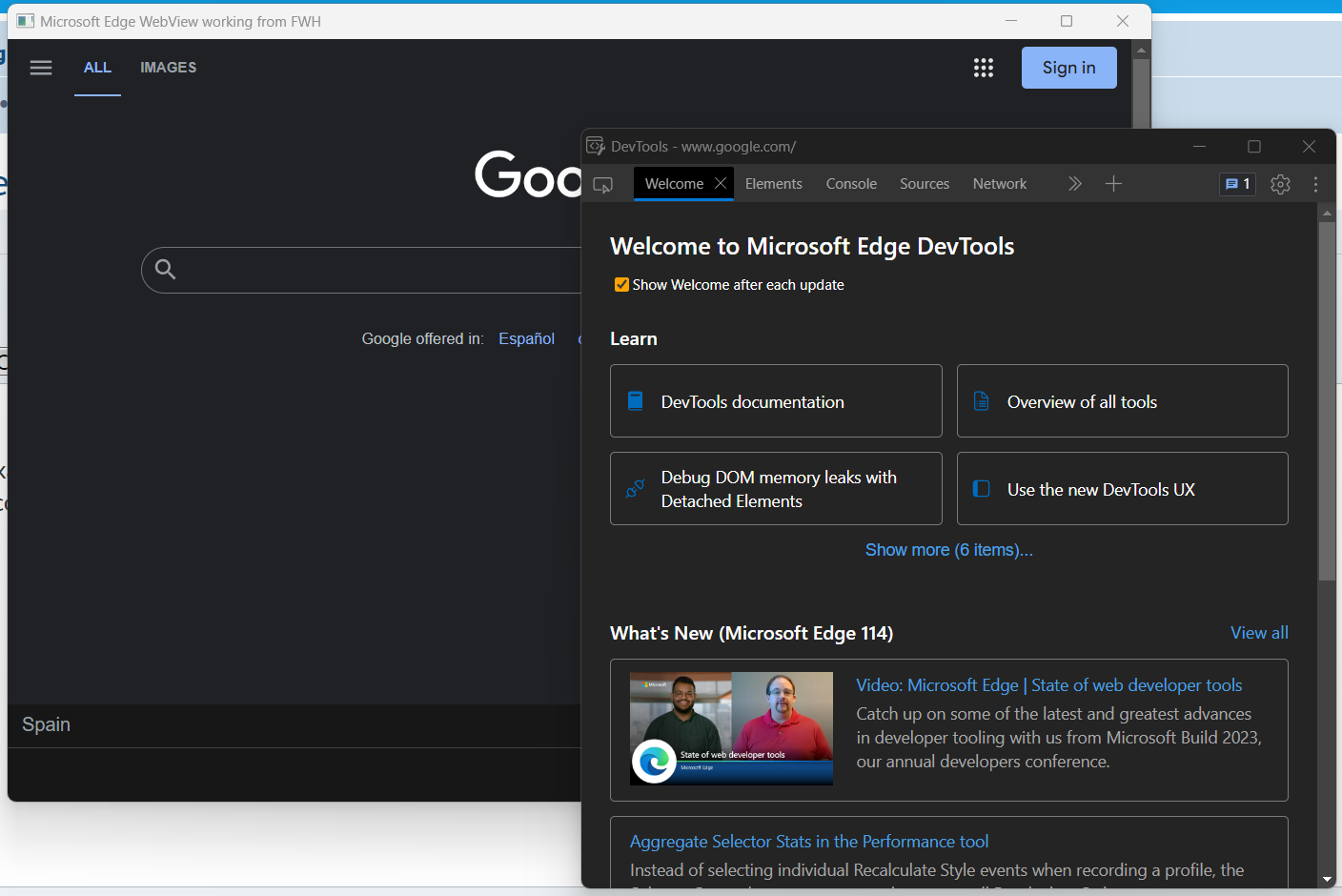
oWebView:OpenDevToolsWindow()
regards, saludos

Antonio Linares
www.fivetechsoft.com
Posts: 1387
Joined: Fri May 23, 2008 01:33 PM
Re: how to open devtoolswindow from application.
Posted: Thu Jul 06, 2023 02:30 PM
Antonio Linares wrote:
Please download a new FWH 24.04 build 3 already available
What should be changed in TWebView class in order to use this function from dlls?

Thanks
oWebView:OpenDevToolsWindow() I can't download because my subscription has expired. Do I have to sign up to use this change?
Regards,


Hakan ONEMLI


Harbour & MSVC 2022 & FWH 23.06
Posts: 6984
Joined: Fri Oct 07, 2005 07:07 PM
Re: how to open devtoolswindow from application.
Posted: Thu Jul 06, 2023 08:30 PM

Horizon,

I have installed the FTDN update, and now it's working. I think if you want to keep up with the latest developments, you need the FTDN update. With webview2 support, many new options are available.

Best regards,

Otto

Posts: 1387
Joined: Fri May 23, 2008 01:33 PM
Re: how to open devtoolswindow from application.
Posted: Fri Jul 07, 2023 11:29 AM
Otto wrote:Horizon,
I have installed the FTDN update, and now it's working. I think if you want to keep up with the latest developments, you need the FTDN update. With webview2 support, many new options are available.
Best regards,
Otto
I aggree with you Otto. I am also using WebView2 support with 22.06. I also commend the Fwh team for their support.

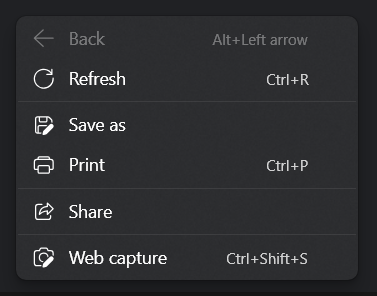
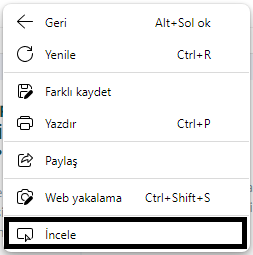
Before update webview dlls (because of closing main window), There is an option in right button menu to enter devtoolswindow like above.

http://www.objekt.com.tr/fwh_test/webview_menu_before.png


After new dlls.
http://www.objekt.com.tr/fwh_test/webview_menu_after.png


I solved my problem by installing old dlls. Of course, when I allocate budget resources, I will update ftdn.
Regards,


Hakan ONEMLI


Harbour & MSVC 2022 & FWH 23.06
Posts: 6755
Joined: Wed Feb 15, 2012 08:25 PM
Re: how to open devtoolswindow from application.
Posted: Sat Jul 08, 2023 04:28 AM
Horizon wrote: I aggree with you Otto. I am also using WebView2 support with 22.06. I also commend the Fwh team for their support.

Before update webview dlls (because of closing main window), There is an option in right button menu to enter devtoolswindow like above.

http://www.objekt.com.tr/fwh_test/webview_menu_before.png


After new dlls.
http://www.objekt.com.tr/fwh_test/webview_menu_after.png


I solved my problem by installing old dlls. Of course, when I allocate budget resources, I will update ftdn.
Hello, how create webview ?, please put a sample
Cristobal Navarro

Hay dos tipos de personas: las que te hacen perder el tiempo y las que te hacen perder la noción del tiempo

El secreto de la felicidad no está en hacer lo que te gusta, sino en que te guste lo que haces
Posts: 1387
Joined: Fri May 23, 2008 01:33 PM
Re: how to open devtoolswindow from application.
Posted: Sat Jul 08, 2023 09:15 AM
cnavarro wrote:
I aggree with you Otto. I am also using WebView2 support with 22.06. I also commend the Fwh team for their support.

Before update webview dlls (because of closing main window), There is an option in right button menu to enter devtoolswindow like above.

http://www.objekt.com.tr/fwh_test/webview_menu_before.png


After new dlls.
http://www.objekt.com.tr/fwh_test/webview_menu_after.png


I solved my problem by installing old dlls. Of course, when I allocate budget resources, I will update ftdn.
Hello, how create webview ?, please put a sample
Hi Mr. Navarro,

This is the sample for test (given from Antonio)
Code (fw): Select all Collapse
// Please install https://developer.microsoft.com/en-us/microsoft-edge/webview2/ x86 version before using it

#include "FiveWin.ch"

function Main()

   local oWebView := TWebView():New()

   oWebView:Navigate( "http://www.google.com" )
   oWebView:SetTitle( "Microsoft Edge WebView working from FWH" )
   oWebView:SetSize( 1200, 800 )
   oWebView:SetUserAgent( "Mozilla/5.0 (Linux; Android 6.0; Nexus 5 Build/MRA58N) AppleWebKit/537.36 (KHTML, like Gecko) Chrome/103.0.5060.53 Mobile Safari/537.36" )
   //oWebView:OpenDevToolsWindow()
   sleep( 300 )
   oWebView:Run()
   oWebView:Destroy()

return nil
Compile and test it with both old dlls and new dlls.

Thanks.
Regards,


Hakan ONEMLI


Harbour & MSVC 2022 & FWH 23.06
Posts: 44162
Joined: Thu Oct 06, 2005 05:47 PM
Re: how to open devtoolswindow from application.
Posted: Sat Jul 08, 2023 09:44 AM
Dear Hakan,

It may be something that has changed inside webview.dll. We have not modified FWH code.

You may open an issue in https://github.com/webview/webview

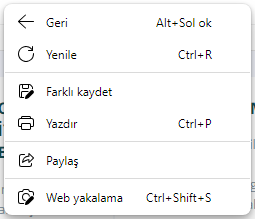
I get this popup here: (I can not understand what your popup says)
regards, saludos

Antonio Linares
www.fivetechsoft.com