FiveTech Support Forums

FiveWin / Harbour / xBase community
Board index FiveWin for Harbour/xHarbour Fwh 23.10 TGet another problem (SOLVED)
Posts: 1387
Joined: Fri May 23, 2008 01:33 PM
Re: Fwh 23.10 TGet another problem
Posted: Tue Nov 07, 2023 07:57 PM
nageswaragunupudi wrote:
Maybe your font set is problem?
Can you please clarify how to define fonts choosing Turkish Charset?
Got it, using CHARSET 162.
With this font definition I am able to see Turkish fonts for the above ASCII codes correctly
Code (fw): Select all Collapse
DEFINE FONT oFont NAME "Segoe UI" SIZE 0,-16 CHARSET 162
Is this the right way? Hi Mr. Rao,

I'm sorry for being late in replying.

I don't know CHARSET 162 using to define Turkish Charset. I have started a few thread since 15 years.
https://forums.fivetechsupport.com/viewtopic.php?f=3&t=12805&p=64949&hilit=d+default+charset+1&sid=54dfaf7858789882cd774ada3bea5028&sid=54dfaf7858789882cd774ada3bea5028#p64949
https://forums.fivetechsupport.com/viewtopic.php?f=3&t=13810&hilit=d+default+charset+1&sid=54dfaf7858789882cd774ada3bea5028
https://forums.fivetechsupport.com/viewtopic.php?f=3&t=14142&p=233011&hilit=d_DEFAULT_CHARSET_%3D1&sid=54dfaf7858789882cd774ada3bea5028&sid=54dfaf7858789882cd774ada3bea5028#p233011

but I use this method to define Turkish Charset. I have a line in my make file like below
Code (fw): Select all Collapse
$(OBJDIR)\font.c                : $(FWDIR)\source\classes\font.prg
        $(HBDIR)\bin\harbour $(FWDIR)\source\classes\font.prg /n \
        /i$(FWDIR)\include;$(HBDIR)\include /d_DEFAULT_CHARSET_=1 /o$(OBJDIR)\font.c
Code (fw): Select all Collapse
REQUEST HB_CODEPAGE_TRWIN

function Main()
    
    HB_CDPSELECT( "TRWIN" )
    
...
return
Every time the fwh version is renewed, I delete all obj files and renew it again. I was able to solve the font problem only this way. I often "Verdana" font in my application defining like below as usual.
Code (fw): Select all Collapse
DEFINE FONT oMyFnt NAME "Verdana" SIZE 0, -12
If there was a font definition problem, I should not have seen the Turkish characters previously entered in the TGet fields. However, I can see the previously entered Turkish character data. Only when I type Turkish characters on the keyboard while entering data, a question mark appears.

I should also say that there is no Turkish entry problem in GET MEMO fields.
Regards,


Hakan ONEMLI


Harbour & MSVC 2022 & FWH 23.06
Posts: 1387
Joined: Fri May 23, 2008 01:33 PM
Re: Fwh 23.10 TGet another problem
Posted: Wed Nov 08, 2023 04:48 PM
:(
Regards,


Hakan ONEMLI


Harbour & MSVC 2022 & FWH 23.06
Posts: 10733
Joined: Sun Nov 19, 2006 05:22 AM
Re: Fwh 23.10 TGet another problem
Posted: Wed Nov 08, 2023 05:29 PM

I will study this more and get back to you

Regards


G. N. Rao.

Hyderabad, India
Posts: 1387
Joined: Fri May 23, 2008 01:33 PM
Re: Fwh 23.10 TGet another problem
Posted: Sat Nov 11, 2023 05:43 PM
nageswaragunupudi wrote:I will study this more and get back to you
ok. thank you.
Regards,


Hakan ONEMLI


Harbour & MSVC 2022 & FWH 23.06
Posts: 10733
Joined: Sun Nov 19, 2006 05:22 AM
Re: Fwh 23.10 TGet another problem
Posted: Sat Nov 11, 2023 07:36 PM
but I use this method to define Turkish Charset. I have a line in my make file like below
Code:
$(OBJDIR)\font.c : $(FWDIR)\source\classes\font.prg
$(HBDIR)\bin\harbour $(FWDIR)\source\classes\font.prg /n \
/i$(FWDIR)\include;$(HBDIR)\include /d_DEFAULT_CHARSET_=1 /o$(OBJDIR)\font.c
Instead, you can use the library as it is and set
Code (fw): Select all Collapse
TFont():nDefaultCharSet := <yourCharset
at the beginning of your application in the Main() function.

This has the same effect of defining _DEFAULT_CHARSET_

Please see font.prg:
Code (fw): Select all Collapse
   DEFAULT nCharSet := ::nDefaultCharSet

   #ifdef _DEFAULT_CHARSET_
      DEFAULT nCharSet := _DEFAULT_CHARSET_
   #endif
Regards


G. N. Rao.

Hyderabad, India
Posts: 1387
Joined: Fri May 23, 2008 01:33 PM
Re: Fwh 23.10 TGet another problem
Posted: Sun Nov 12, 2023 01:00 PM
nageswaragunupudi wrote:
but I use this method to define Turkish Charset. I have a line in my make file like below
Code:
$(OBJDIR)\font.c : $(FWDIR)\source\classes\font.prg
$(HBDIR)\bin\harbour $(FWDIR)\source\classes\font.prg /n \
/i$(FWDIR)\include;$(HBDIR)\include /d_DEFAULT_CHARSET_=1 /o$(OBJDIR)\font.c
Instead, you can use the library as it is and set
Code (fw): Select all Collapse
TFont():nDefaultCharSet := <yourCharset
at the beginning of your application in the Main() function.

This has the same effect of defining _DEFAULT_CHARSET_

Please see font.prg:
Code (fw): Select all Collapse
   DEFAULT nCharSet := ::nDefaultCharSet

   #ifdef _DEFAULT_CHARSET_
      DEFAULT nCharSet := _DEFAULT_CHARSET_
   #endif
Yes, I have tried this and enough for displaying Turkish Charset.
Code (fw): Select all Collapse
TFont():nDefaultCharSet := 1
but My Get problem is still continue.
Regards,


Hakan ONEMLI


Harbour & MSVC 2022 & FWH 23.06
Posts: 1387
Joined: Fri May 23, 2008 01:33 PM
Re: Fwh 23.10 TGet another problem
Posted: Tue Nov 14, 2023 06:46 PM
:|
Regards,


Hakan ONEMLI


Harbour & MSVC 2022 & FWH 23.06
Posts: 44158
Joined: Thu Oct 06, 2005 05:47 PM
Re: Fwh 23.10 TGet another problem
Posted: Tue Nov 14, 2023 06:53 PM
Dear Hakan,

Please build this test using just C language:

go.bat
Code (fw): Select all Collapse
c:\bcc7\bin\brcc32 main.rc
c:\bcc7\bin\bcc32 -tW main.c main.res
main.exe
main.c
Code (fw): Select all Collapse
#include <windows.h>
#include "resource.h"

INT_PTR CALLBACK DialogProc(HWND hwndDlg, UINT uMsg, WPARAM wParam, LPARAM lParam) {
    switch (uMsg) {
        case WM_INITDIALOG:
           {
            LPCWSTR lpString = "ÞÞß";
            SetWindowText( hwndDlg, lpString ); 
           }
           break;

        case WM_COMMAND:
            if (LOWORD(wParam) == IDOK || LOWORD(wParam) == IDCANCEL) {
                EndDialog(hwndDlg, LOWORD(wParam));
                return (INT_PTR)TRUE;
            }
            break;
        case WM_CLOSE:
            EndDialog(hwndDlg, 0);
            return (INT_PTR)TRUE;
    }
    return (INT_PTR)FALSE;
}

int WINAPI WinMain(HINSTANCE hInstance, HINSTANCE hPrevInstance, LPSTR lpCmdLine, int nCmdShow) {
    DialogBox(hInstance, MAKEINTRESOURCE(IDD_MYDIALOG), NULL, DialogProc);
    return 0;
}
main.rc
Code (fw): Select all Collapse
#include "resource.h"

// Turkish (Turkey) has a primary language ID of 0x1f and a SUBLANG ID of 0x01
LANGUAGE 0x1f, 0x01 

IDD_MYDIALOG DIALOG DISCARDABLE  0, 0, 239, 66
STYLE DS_MODALFRAME | WS_POPUP | WS_CAPTION | WS_SYSMENU
CAPTION "Sample Dialog"
FONT 8, "MS Sans Serif"
BEGIN
    DEFPUSHBUTTON   "OK",IDOK,174,18,50,14
    PUSHBUTTON      "Cancel",IDCANCEL,174,35,50,14
END
resource.h
Code (fw): Select all Collapse
#define IDD_MYDIALOG 101
regards, saludos

Antonio Linares
www.fivetechsoft.com
Posts: 1387
Joined: Fri May 23, 2008 01:33 PM
Re: Fwh 23.10 TGet another problem
Posted: Tue Nov 14, 2023 07:13 PM
Antonio Linares wrote:Dear Hakan,

Please build this test using just C language:

go.bat
Code (fw): Select all Collapse
c:\bcc7\bin\brcc32 main.rc
c:\bcc7\bin\bcc32 -tW main.c main.res
main.exe
main.c
Code (fw): Select all Collapse
#include <windows.h>
#include "resource.h"

INT_PTR CALLBACK DialogProc(HWND hwndDlg, UINT uMsg, WPARAM wParam, LPARAM lParam) {
    switch (uMsg) {
        case WM_INITDIALOG:
           {
            LPCWSTR lpString = "ÞÞß";
            SetWindowText( hwndDlg, lpString ); 
           }
           break;

        case WM_COMMAND:
            if (LOWORD(wParam) == IDOK || LOWORD(wParam) == IDCANCEL) {
                EndDialog(hwndDlg, LOWORD(wParam));
                return (INT_PTR)TRUE;
            }
            break;
        case WM_CLOSE:
            EndDialog(hwndDlg, 0);
            return (INT_PTR)TRUE;
    }
    return (INT_PTR)FALSE;
}

int WINAPI WinMain(HINSTANCE hInstance, HINSTANCE hPrevInstance, LPSTR lpCmdLine, int nCmdShow) {
    DialogBox(hInstance, MAKEINTRESOURCE(IDD_MYDIALOG), NULL, DialogProc);
    return 0;
}
main.rc
Code (fw): Select all Collapse
#include "resource.h"

// Turkish (Turkey) has a primary language ID of 0x1f and a SUBLANG ID of 0x01
LANGUAGE 0x1f, 0x01 

IDD_MYDIALOG DIALOG DISCARDABLE  0, 0, 239, 66
STYLE DS_MODALFRAME | WS_POPUP | WS_CAPTION | WS_SYSMENU
CAPTION "Sample Dialog"
FONT 8, "MS Sans Serif"
BEGIN
    DEFPUSHBUTTON   "OK",IDOK,174,18,50,14
    PUSHBUTTON      "Cancel",IDCANCEL,174,35,50,14
END
resource.h
Code (fw): Select all Collapse
#define IDD_MYDIALOG 101
Hi Antonio,

I wish I could but I do not have bcc. I use MSVC 2022. :)
Regards,


Hakan ONEMLI


Harbour & MSVC 2022 & FWH 23.06
Posts: 44158
Joined: Thu Oct 06, 2005 05:47 PM
Re: Fwh 23.10 TGet another problem
Posted: Tue Nov 14, 2023 07:31 PM
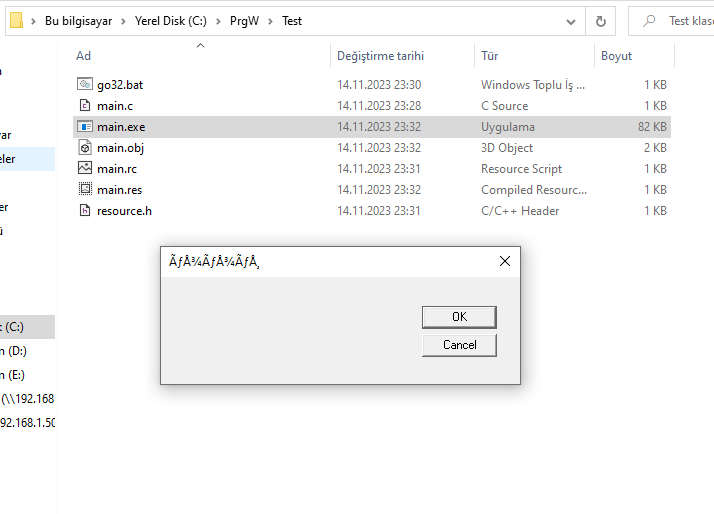
Here you have the Microsoft version:

go32.bat
Code (fw): Select all Collapse
call "%ProgramFiles%\Microsoft Visual Studio\2022\Community\VC\Auxiliary\Build\vcvarsall.bat" x86
rc main.rc
cl main.c main.res /link user32.lib
main.rc
Code (fw): Select all Collapse
#include <windows.h>
#include "resource.h"

// Turkish (Turkey) has a primary language ID of 0x1f and a SUBLANG ID of 0x01
LANGUAGE 0x1f, 0x01 

IDD_MYDIALOG DIALOG DISCARDABLE  0, 0, 239, 66
STYLE DS_MODALFRAME | WS_POPUP | WS_CAPTION | WS_SYSMENU
CAPTION "Sample Dialog"
FONT 8, "MS Sans Serif"
BEGIN
    DEFPUSHBUTTON   "OK",IDOK,174,18,50,14
    PUSHBUTTON      "Cancel",IDCANCEL,174,35,50,14
END
main.c and resource.h are the same ones as in the previous example
regards, saludos

Antonio Linares
www.fivetechsoft.com
Posts: 1387
Joined: Fri May 23, 2008 01:33 PM
Re: Fwh 23.10 TGet another problem
Posted: Tue Nov 14, 2023 08:38 PM
Regards,


Hakan ONEMLI


Harbour & MSVC 2022 & FWH 23.06
Posts: 44158
Joined: Thu Oct 06, 2005 05:47 PM
Re: Fwh 23.10 TGet another problem
Posted: Tue Nov 14, 2023 09:32 PM

The used language is turkish, select the charset you need, does the dialog title looks fine ?

This example is not using FWH. This is pure C. Can we make it look fine ?

regards, saludos

Antonio Linares
www.fivetechsoft.com
Posts: 1387
Joined: Fri May 23, 2008 01:33 PM
Re: Fwh 23.10 TGet another problem
Posted: Wed Nov 15, 2023 06:08 AM
Antonio Linares wrote:The used language is turkish, select the charset you need, does the dialog title looks fine ?

This example is not using FWH. This is pure C. Can we make it look fine ?
Dear Antonio,
Code (fw): Select all Collapse
Yes, I have tried this and enough for displaying Turkish Charset.
Code:
TFont():nDefaultCharSet := 1


but My Get problem is still continue.
What we are looking for? I do not any problem with displaying turkish characters (for examle TSay())

I have pressing Turkish characters in TGet() class. I do not use unicode, so there is FW_SetUnicode(.f.) at first lines of my application. I just wanted to clarify.
Regards,


Hakan ONEMLI


Harbour & MSVC 2022 & FWH 23.06
Posts: 44158
Joined: Thu Oct 06, 2005 05:47 PM
Re: Fwh 23.10 TGet another problem
Posted: Wed Nov 15, 2023 06:17 AM

Dear Hakan,

> Turkish characters are displayed as question mark in fwh 23.10. when FW_SetUnicode( .F. )

Was this working fine with FWH 23.07 ?

regards, saludos

Antonio Linares
www.fivetechsoft.com
Posts: 1387
Joined: Fri May 23, 2008 01:33 PM
Re: Fwh 23.10 TGet another problem
Posted: Wed Nov 15, 2023 06:27 AM
Antonio Linares wrote:Dear Hakan,

> Turkish characters are displayed as question mark in fwh 23.10. when FW_SetUnicode( .F. )

Was this working fine with FWH 23.07 ?
Yes.
Regards,


Hakan ONEMLI


Harbour & MSVC 2022 & FWH 23.06