

Silvio, which video?
Board index FiveWin for Harbour/xHarbour copy a row of xbrowse

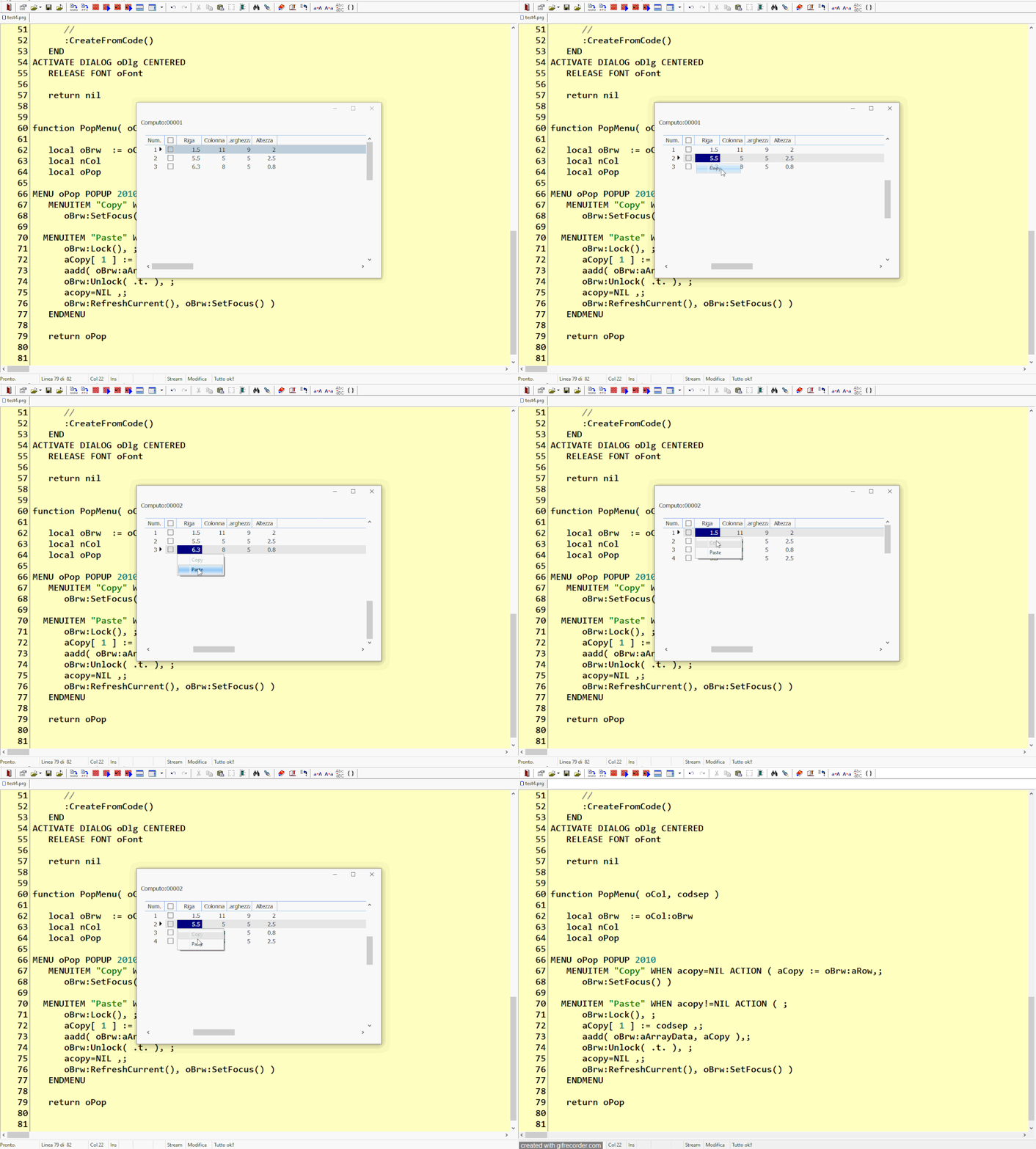
when I copied to the second xbrowse
it should enable the "copy" menuitem and disable the "paste" menuitem and give the possibility to copy another line and repeat the operations instead the copy command is disabled and "paste" is always active
Since from 1991/1992 ( fw for clipper Rel. 14.4 - Momos)
I use : FiveWin for Harbour March-April 2024 - Harbour 3.2.0dev (harbour_bcc770_32_20240309) - Bcc7.70 - xMate ver. 1.15.3 - PellesC - mail: silvio[dot]falconi[at]gmail[dot]com
I use : FiveWin for Harbour March-April 2024 - Harbour 3.2.0dev (harbour_bcc770_32_20240309) - Bcc7.70 - xMate ver. 1.15.3 - PellesC - mail: silvio[dot]falconi[at]gmail[dot]com
perhaps I found the error
Now seem run ok, but only one row and if I wish copy more rows ?
I tried to change
aCopy := oBrw:aRow
With
aCopy := oBrw:aSelected
but not run
#include "fivewin.ch"

 static aCopy

Function Main()

   Test("00001")
   Test("00002")
 retur nil

function Test(codcep)
   local oDlg, oBar, oBrw, oFont
   local aData:= {}

   //adata demo
      aAdd( aData, {codcep, 1.5,11,9,2 } )
      aAdd( aData, {codcep, 5.5,5.5,2.5,0.8 } )
      aAdd( aData, {codcep, 6.3,8,5,0.8 } )


   DEFINE FONT oFont NAME "TAHOMA" SIZE 0,-14
   DEFINE DIALOG oDlg SIZE 600,400 PIXEL TRUEPIXEL FONT oFont RESIZABLE

   @10,10 say "Computo:" +CodCep  SIZE 120,20 pixel OF oDlg

        @ 50,20 XBROWSE oBrw OF oDlg ;
              COLUMNS  2,3,4,5;
              HEADERS "Riga","Colonna","Larghezza","Altezza" ;
              COLSIZES 60,60,60,60 ;
              ARRAY aData     ;
              SIZE -20,-20 PIXEL   STYLE FLAT NOBORDER


   WITH OBJECT oBrw
      :SetMultiSelectCol()

               :lRecordSelector     := .t.
               :bRecSelHeader    := { || " Num. " }
               :bRecSelData      := { |o| Int( o:BookMark ) }
               :nRecSelWidth     := "999"

      :nEditTypes    := EDIT_GET
      :lCanPaste     := .t.
      :nMarqueeStyle := MARQSTYLE_HIGHLROW
      :bClrRowFocus  := { || { CLR_BLACK, RGB( 230,230,230 ) } }
      :bClrSelFocus  := { || { CLR_WHITE, CLR_BLUE } }


      :bPopUp        := { |oCol| PopMenu( oCol, oBrw:aArrayData[ oBrw:nArrayAt ][1] ) }
      //
      :CreateFromCode()
   END
ACTIVATE DIALOG oDlg CENTERED
RELEASE FONT oFont


xbrowser aData  TITLE  "NEW DATA"

xbrowser acopy  TITLE  "ACOPY ARRAY"

   return nil


function PopMenu( oCol, codsep )

   local oBrw  := oCol:oBrw
   local nCol
   local oPop

   MENU oPop POPUP 2010
   MENUITEM "Codsep:"+codsep
   MENUITEM "Copy" WHEN acopy=NIL ACTION ( aCopy := oBrw:aRow,;
      oBrw:SetFocus() )

  MENUITEM "Paste" WHEN acopy!=NIL ACTION ( ;
      oBrw:Lock(), ;
      aCopy[ 1 ] := codsep ,;
      aadd( oBrw:aArrayData, aCopy ),;
      oBrw:Unlock( .t. ), ;
      acopy:=NIL ,;
      oBrw:RefreshCurrent(), oBrw:SetFocus() )
   ENDMENU

   return oPop
Now seem run ok, but only one row and if I wish copy more rows ?
I tried to change
aCopy := oBrw:aRow
With
aCopy := oBrw:aSelected
but not run
Since from 1991/1992 ( fw for clipper Rel. 14.4 - Momos)
I use : FiveWin for Harbour March-April 2024 - Harbour 3.2.0dev (harbour_bcc770_32_20240309) - Bcc7.70 - xMate ver. 1.15.3 - PellesC - mail: silvio[dot]falconi[at]gmail[dot]com
I use : FiveWin for Harbour March-April 2024 - Harbour 3.2.0dev (harbour_bcc770_32_20240309) - Bcc7.70 - xMate ver. 1.15.3 - PellesC - mail: silvio[dot]falconi[at]gmail[dot]com
Silvio, try with the code I posted.
Otto
Otto wrote:Silvio, try with the code I posted.Otto ,
Otto
Now run ok but copy and paste only one row
I wish copy and paste more rows
only oBrw:aselected
new test
#include "fivewin.ch"

 static aCopy

Function Main()

   Test("00001")
   Test("00002")
 retur nil

function Test(codcep)
   local oDlg, oBar, oBrw, oFont
   local aData:= {}

   //adata demo
      aAdd( aData, {codcep, 1.5,11,9,2 } )
      aAdd( aData, {codcep, 5.5,5.5,2.5,0.8 } )
      aAdd( aData, {codcep, 6.3,8,5,0.8 } )


   DEFINE FONT oFont NAME "TAHOMA" SIZE 0,-14
   DEFINE DIALOG oDlg SIZE 600,400 PIXEL TRUEPIXEL FONT oFont RESIZABLE

   @10,10 say "Computo:" +CodCep  SIZE 120,20 pixel OF oDlg

        @ 50,20 XBROWSE oBrw OF oDlg ;
              COLUMNS  2,3,4,5;
              HEADERS "Riga","Colonna","Larghezza","Altezza" ;
              COLSIZES 60,60,60,60 ;
              ARRAY aData     ;
              SIZE -20,-20 PIXEL   STYLE FLAT NOBORDER


   WITH OBJECT oBrw
      :SetMultiSelectCol()

               :lRecordSelector     := .t.
               :bRecSelHeader    := { || " Num. " }
               :bRecSelData      := { |o| Int( o:BookMark ) }
               :nRecSelWidth     := "999"

      :nEditTypes    := EDIT_GET
      :lCanPaste     := .t.
      :nMarqueeStyle := MARQSTYLE_HIGHLROW
      :bClrRowFocus  := { || { CLR_BLACK, RGB( 230,230,230 ) } }
      :bClrSelFocus  := { || { CLR_WHITE, CLR_BLUE } }


      :bPopUp        := { |oCol| PopMenu( oCol, oBrw:aArrayData[ oBrw:nArrayAt ][1] ) }
      //
      :CreateFromCode()
   END
ACTIVATE DIALOG oDlg CENTERED
RELEASE FONT oFont


xbrowser aData  TITLE  "NEW DATA"

xbrowser acopy  TITLE  "ACOPY ARRAY"

   return nil


function PopMenu( oCol, codsep )

   local oBrw  := oCol:oBrw
   local nCol
   local oPop

   MENU oPop POPUP 2010
   MENUITEM "Codsep:"+codsep
    SEPARATOR
        if oBrw:IsSelectedRow()
              MENUITEM "Deselect the current row" action (oBrw:SelectRow( 0 ) )
              MENUITEM "Deselect all"             action (oBrw:SelectRow( 0 ))
              else
              MENUITEM "Select the current row"   action ( oBrw:SelectRow( 2 ) )
              MENUITEM "Select All"               action (oBrw:SelectRow( 4 ) )
           endif

           SEPARATOR

   MENUITEM "Copy" WHEN acopy=NIL .and. oBrw:IsSelectedRow();
                ACTION ( ;
                aCopy := oBrw:aRow,;
                oBrw:SetFocus() )

  MENUITEM "Paste" WHEN acopy!=NIL ACTION ( ;
      oBrw:Lock(), ;
      aCopy[ 1 ] := codsep ,;
      aadd( oBrw:aArrayData, aCopy ),;
      oBrw:Unlock( .t. ), ;
      acopy:=NIL ,;
      oBrw:RefreshCurrent(), oBrw:SetFocus() )
   ENDMENU

   return oPop
Since from 1991/1992 ( fw for clipper Rel. 14.4 - Momos)
I use : FiveWin for Harbour March-April 2024 - Harbour 3.2.0dev (harbour_bcc770_32_20240309) - Bcc7.70 - xMate ver. 1.15.3 - PellesC - mail: silvio[dot]falconi[at]gmail[dot]com
I use : FiveWin for Harbour March-April 2024 - Harbour 3.2.0dev (harbour_bcc770_32_20240309) - Bcc7.70 - xMate ver. 1.15.3 - PellesC - mail: silvio[dot]falconi[at]gmail[dot]com
You have to extend here:
MENUITEM "Copy" WHEN acopy=NIL ACTION ( aCopy := oBrw:aRow,;
oBrw:SetFocus() )
and here:
aadd( oBrw:aArrayData,aCopy ),; // oBrw:aArrayData[ oBrw:nArrayAt ] := aCopy ,;
Otto wrote:You have to extend here:
MENUITEM "Copy" WHEN acopy=NIL ACTION ( aCopy := oBrw:aRow,;
oBrw:SetFocus() )
and here:
aadd( oBrw:aArrayData,aCopy ),; // oBrw:aArrayData[ oBrw:nArrayAt ] := aCopy ,;
>MENUITEM "Copy" WHEN acopy=NIL ACTION ( aCopy := oBrw:aRow,;
>oBrw:SetFocus() )
must be seletected to copy
I wish copy the 1 and 3 row into xbrowse 2
aadd( oBrw:aArrayData,aCopy ) copy one row
you have also the oldest test
Pls this is the last
#include "fivewin.ch"

 static aCopy

Function Main()

   Test("00001")
   Test("00002")
 retur nil

function Test(codcep)
   local oDlg, oBar, oBrw, oFont
   local aData:= {}

   //adata demo
      aAdd( aData, {codcep, 1.5,11,9,2 } )
      aAdd( aData, {codcep, 5.5,5.5,2.5,0.8 } )
      aAdd( aData, {codcep, 6.3,8,5,0.8 } )


   DEFINE FONT oFont NAME "TAHOMA" SIZE 0,-14
   DEFINE DIALOG oDlg SIZE 600,400 PIXEL TRUEPIXEL FONT oFont RESIZABLE

   @10,10 say "Computo:" +CodCep  SIZE 120,20 pixel OF oDlg

        @ 50,20 XBROWSE oBrw OF oDlg ;
              COLUMNS  2,3,4,5;
              HEADERS "Riga","Colonna","Larghezza","Altezza" ;
              COLSIZES 60,60,60,60 ;
              ARRAY aData     ;
              SIZE -20,-20 PIXEL   STYLE FLAT NOBORDER


   WITH OBJECT oBrw
      :SetMultiSelectCol()

               :lRecordSelector     := .t.
               :bRecSelHeader    := { || " Num. " }
               :bRecSelData      := { |o| Int( o:BookMark )}
               :nRecSelWidth     := "999"
               :nRecSelColor     :=   nRgb( 245,244,234)

             :bClrStd          := { || { CLR_BLACK, If( oBrw:SelectRow(), 0x88EDFB, CLR_WHITE ) } }

      :nEditTypes    := EDIT_GET
      :lCanPaste     := .t.
      :nMarqueeStyle := MARQSTYLE_HIGHLROW
      :bClrRowFocus  := { || { CLR_BLACK, RGB( 230,230,230 ) } }
      :bClrSelFocus  := { || { CLR_WHITE, CLR_BLUE } }


      :bPopUp        := { |oCol| PopMenu( oCol, oBrw:aArrayData[ oBrw:nArrayAt ][1] ) }
      //
      :CreateFromCode()
   END
ACTIVATE DIALOG oDlg CENTERED
RELEASE FONT oFont


xbrowser aData  TITLE  "NEW DATA"

xbrowser acopy  TITLE  "ACOPY ARRAY"

   return nil


function PopMenu( oCol, codsep )

   local oBrw  := oCol:oBrw
   local nCol
   local oPop

   MENU oPop POPUP 2010
   MENUITEM "Codsep:"+codsep
    SEPARATOR
        if oBrw:IsSelectedRow()
              MENUITEM "Deselect the current row" action (oBrw:SelectRow( 0 ) )
              MENUITEM "Deselect all"             action (oBrw:SelectRow( 0 ))
              else
              MENUITEM "Select the current row"   action ( oBrw:SelectRow( 2 ) )
              MENUITEM "Select All"               action (oBrw:SelectRow( 4 ) )
           endif

           SEPARATOR

   MENUITEM "Copy" WHEN acopy=NIL .and. oBrw:IsSelectedRow();  // only when is seletected
                ACTION ( aCopy := oBrw:aRow,;
                oBrw:SetFocus() )

  MENUITEM "Paste" WHEN acopy!=NIL ACTION ( ;
      oBrw:Lock(), ;
      aCopy[ 1 ] := codsep ,;
      aadd( oBrw:aArrayData, aCopy ),;
      oBrw:Unlock( .t. ), ;
      acopy:=NIL ,;
      oBrw:RefreshCurrent(), oBrw:SetFocus() )
   ENDMENU

return oPopSince from 1991/1992 ( fw for clipper Rel. 14.4 - Momos)
I use : FiveWin for Harbour March-April 2024 - Harbour 3.2.0dev (harbour_bcc770_32_20240309) - Bcc7.70 - xMate ver. 1.15.3 - PellesC - mail: silvio[dot]falconi[at]gmail[dot]com
I use : FiveWin for Harbour March-April 2024 - Harbour 3.2.0dev (harbour_bcc770_32_20240309) - Bcc7.70 - xMate ver. 1.15.3 - PellesC - mail: silvio[dot]falconi[at]gmail[dot]com
I inserted the popup in the procedure I'm doing: it doesn't work, that is:
I state I load the array from a dbf
I manage the array and then save it in the dbf
if I copy and paste a line even in the same xbrowse
then I go to modify the copied line it also modifies the selected line while it shouldn't do so
and then when I go to save it in the dbf it doesn't save the copied line and the selected one but only one (one of the two)
this is because the record number is the same
if I change it I change both
when I go to save the array in the archive the procedure finds two records with the same record number and saves only one
Since from 1991/1992 ( fw for clipper Rel. 14.4 - Momos)
I use : FiveWin for Harbour March-April 2024 - Harbour 3.2.0dev (harbour_bcc770_32_20240309) - Bcc7.70 - xMate ver. 1.15.3 - PellesC - mail: silvio[dot]falconi[at]gmail[dot]com
I use : FiveWin for Harbour March-April 2024 - Harbour 3.2.0dev (harbour_bcc770_32_20240309) - Bcc7.70 - xMate ver. 1.15.3 - PellesC - mail: silvio[dot]falconi[at]gmail[dot]com
Silvio,
You must search the selected and
aadd( oBrw:aArrayData,aCopy )
each selected row.
Then inserting: FOR I:= 1 to len(aCopy )
Regards,
Otto
Otto wrote:Silvio,Please try this test
You must search the selected and
aadd( oBrw:aArrayData,aCopy )
each selected row.
Then inserting: FOR I:= 1 to len(aCopy )
Regards,
Otto
#include "fivewin.ch"

static aCopy
static cItemFlds :="CodSep,Top,Left,Width,Height,desc,row,recno()"


 REQUEST DBFCDX


Function Main()
    RddSetDefault( "DBFCDX" )

       SetHandleCount( 100 )
       FWNumFormat( "E", .t. )

       SET DATE FORMAT "dd-mm-yyyy"
       SET DELETED     ON
       SET CENTURY     ON
       SET EPOCH TO    year( date() ) - 20
       SET MULTIPLE    OFF


   Build_Demo_dbf()

   Test("00001")

   Test("00002")

 retur nil

function Test(codcep)
   local oDlg, oBar, oBrw, oFont,obtn1,obtn2,obtn3,obtn4
   local aData:= {}
   local oDbf

     oDbf:=TDemo():New()
     oDbf:setorder(1)
     oDbf:Gotop()


   //adata demo

       aData := oDbf:DbfToArray( cItemFlds, { ||FIELD->codSep == codcep  } )

   DEFINE FONT oFont NAME "TAHOMA" SIZE 0,-14
   DEFINE DIALOG oDlg SIZE 600,400 PIXEL TRUEPIXEL FONT oFont RESIZABLE

     //-----------------------------------------------------------------//
    DEFINE BUTTONBAR oBar OF oDlg SIZE 80, 60  2015   BOTTOM NOBORDER
      DEFINE BUTTON oBtn1 OF oBar  ;
      FILENAME "DLG_NO";
      PROMPT "EXIT"  ;
      ACTION   (  oDlg:end( IDCANCEL ) )

       DEFINE BUTTON oBtn2 OF oBar  BTNRIGHT  ;
      FILENAME "DLG_OK";
      PROMPT "MODIFY" ;
      ACTION  Modify_record(oBrw)

       DEFINE BUTTON oBtn3 OF oBar  BTNRIGHT  ;
      FILENAME "DLG_OK";
      PROMPT "DELETE" ;
      ACTION   oBrw:delete()


      DEFINE BUTTON oBtn4 OF oBar  BTNRIGHT  ;
      FILENAME "DLG_OK";
      PROMPT "OK" ;
      ACTION   (  oDlg:end( IDOK ) )

     //-----------------------------------------------------------------//


   @10,10 say "Computo:" +CodCep  SIZE 120,20 pixel OF oDlg

        @ 50,20 XBROWSE oBrw OF oDlg ;
              COLUMNS  2,3,4,5,6;
              HEADERS "Riga","Colonna","Larghezza","Altezza","Desc" ;
              COLSIZES 60,60,60,60,200 ;
              ARRAY aData     ;
              SIZE -20,-80 PIXEL   STYLE FLAT NOBORDER


   WITH OBJECT oBrw
      :SetMultiSelectCol()

               :lRecordSelector     := .t.
               :bRecSelHeader    := { || " Num. " }
               :bRecSelData      := { |o| Int( o:BookMark )}
               :nRecSelWidth     := "999"
               :nRecSelColor     :=   nRgb( 245,244,234)

             :bClrStd          := { || { CLR_BLACK, If( oBrw:SelectRow(), 0x88EDFB, CLR_WHITE ) } }

      :nEditTypes    := EDIT_GET
      :lCanPaste     := .t.
      :nMarqueeStyle := MARQSTYLE_HIGHLROW
      :bClrRowFocus  := { || { CLR_BLACK, RGB( 230,230,230 ) } }
      :bClrSelFocus  := { || { CLR_WHITE, CLR_BLUE } }


      :bPopUp        := { |oCol| PopMenu( oCol, oBrw:aArrayData[ oBrw:nArrayAt ][1] ) }
      //
      :CreateFromCode()
   END
   ACTIVATE DIALOG oDlg CENTERED ;
   ON INIT   oDlg:resize()

RELEASE FONT oFont

    if oDlg:nresult == IDOK
        if ! Empty( oBrw:aDeleted )
              AEval( oBrw:aDeleted, { |a| IF(a[ 8 ] ==0, a[8] := len(oBrw:aDeleted),nil) } )
              //--
              AEval( oBrw:aDeleted, { |a| a[ 8 ] := -a[ 8 ] } )
              oDbf:SaveArrayToDBF( cItemFlds, oBrw:aDeleted )
           endif
         //save
         AEval( aData, { |a| a[ 1 ] := codCep } )
         AEval( aData, { |a,i| a[ 7 ] := strzero(i,5) } )
         oDbf:ArrayToDBF( aData ,  cItemFlds,, .t., .t. )
      EndIF
   return nil


function PopMenu( oCol, codsep )

   local oBrw  := oCol:oBrw
   local nCol
   local oPop

   MENU oPop POPUP 2010
   MENUITEM "Codsep:"+codsep
    SEPARATOR
        if oBrw:IsSelectedRow()
              MENUITEM "Deselect the current row" action (oBrw:SelectRow( 0 ) )
              MENUITEM "Deselect all"             action (oBrw:SelectRow( 0 ))
              else
              MENUITEM "Select the current row"   action ( oBrw:SelectRow( 2 ) )
              MENUITEM "Select All"               action (oBrw:SelectRow( 4 ) )
           endif

           SEPARATOR

   MENUITEM "Copy" WHEN acopy=NIL .and. oBrw:IsSelectedRow();  // only when is seletected
                ACTION ( aCopy := oBrw:aRow,;
                oBrw:SetFocus() )

  MENUITEM "Paste" WHEN acopy!=NIL ACTION ( ;
      oBrw:Lock(), ;
      aCopy[ 1 ] := codsep ,;
      aadd( oBrw:aArrayData, aCopy ),;
      oBrw:Unlock( .t. ), ;
      acopy:=NIL ,;
      oBrw:RefreshCurrent(), oBrw:SetFocus() )
   ENDMENU

   return oPop

  //--------------------------------------------------//
Function Build_Demo_dbf()
   FIELD CODSEP


      local aFields  :=     { {  "CodSep",    "C",   5, 0 },;
                               {  "Top",       "N",   6, 2 },;
                               {  "Left",      "N",   6, 2 },;
                               {  "Width",     "N",   6, 2 },;
                               {  "Height",    "N",   6, 2 },;
                               {  "Desc",      "C",   30, 0 },;
                               {  "Row",       "C",   5, 0 }}

    if File( "Demo.dbf" )
      if !File( "demo.cdx" )
         USE  &("demo") NEW EXCLUSIVE ALIAS DB
         INDEX ON CODSEP+ROW          TAG CODSEP  FOR !Deleted()
         CLOSE DB
      endif
   else
      DbCreate( "Demo.dbf", aFields, "DBFCDX", .T., "DB" )
         INDEX ON CODSEP+ROW        TAG CODSEP  FOR !Deleted()
         CLOSE DB


      USE  &("demo") NEW EXCLUSIVE ALIAS DB
      //00001
      DB->( DbAppend() )
       REPLACE DB->codsep      WITH "00001"
       REPLACE DB->Top         WITH 1.5
       REPLACE DB->left        WITH 11
       REPLACE DB->Width       WITH 9
       REPLACE DB->Height      WITH 2
       REPLACE DB->Desc       WITH "Demo 1 row1"
       REPLACE DB->ROW         WITH "00001"
       DB->( Dbcommit() )

       DB->( DbAppend() )
       REPLACE DB->codsep      WITH "00001"
       REPLACE DB->Top         WITH 5.5
       REPLACE DB->left        WITH  5.5
       REPLACE DB->Width       WITH  2.5
       REPLACE DB->Height      WITH  0.8
       REPLACE DB->Desc       WITH "Demo 1 row2"
       REPLACE DB->ROW         WITH "00002"
       DB->( Dbcommit() )

      DB->( DbAppend() )
       REPLACE DB->codsep      WITH "00002"
       REPLACE DB->Top         WITH 6.3
       REPLACE DB->left        WITH 8
       REPLACE DB->Width       WITH 5
       REPLACE DB->Height      WITH 0.8
       REPLACE DB->Desc        WITH "Demo 2 row1"
       REPLACE DB->ROW         WITH "00001"
       DB->( Dbcommit() )

        INDEX ON CODSEP+ROW        TAG CODSEP  FOR !Deleted()
        CLOSE DB
     endif
    RETURN NIL


Function Modify_record(oBrowse)
   local  nTop           ,;
          nLeft          ,;
          nWidth         ,;
          nHeight        ,;
          cDesc
    local oMod
    local nWd  := GetSysMetrics(0) * .58
    local nHt  := (GetSysMetrics(1) / 4 )
    local oSay:= array(10)
    local aGet:= array(10)
    local nRow:= 0,nCol:= 10
    local nInterlinea := 30
    local nRecord:= oBrowse:nArrayAt
    local oBar,oBtn1,oBtn2

     nTop        := oBrowse:aArraydata[nRecord][2]
     nLeft       := oBrowse:aArraydata[nRecord][3]
     nWidth      := oBrowse:aArraydata[nRecord][4]
     nHeight     := oBrowse:aArraydata[nRecord][5]
     cDesc       := oBrowse:aArraydata[nRecord][6]

      DEFINE DIALOG oMod SIZE nWd, nHt PIXEL TRUEPIXEL;
      TiTLE "modify"

      //-----------------------------------------------------------------//
    DEFINE BUTTONBAR oBar OF oMod SIZE 80, 60  2015   BOTTOM NOBORDER
      DEFINE BUTTON oBtn1 OF oBar  ;
      FILENAME "DLG_NO";
      PROMPT "EXIT"  ;
      ACTION   (  oMod:end( IDCANCEL ) )


      DEFINE BUTTON oBtn3 OF oBar  BTNRIGHT  ;
      FILENAME "DLG_OK";
      PROMPT "OK" ;
      ACTION   (  oMod:end( IDOK ) )

     //-----------------------------------------------------------------//


      @ nRow, 5   Say oSay[6] Prompt "Row "      SIZE 80,14 PIXEL OF oMod  TRANSPARENT
      @ nRow, 295 Say oSay[8] Prompt "Width"  SIZE 80,14 PIXEL OF oMod  TRANSPARENT
      nRow-=2
      @ nRow, 120 GET aGet[6] VAR nTop     OF oMod SIZE 50, 20 PIXEL    PICTURE "@Z 999.99"  UPDATE
      @ nRow, 420 GET aGet[8] VAR nWidth  OF oMod SIZE 50, 20 PIXEL  PICTURE "@Z 999.99"  UPDATE
      nRow+=nInterlinea
      @ nRow, 5  Say oSay[7] Prompt "Col"    SIZE 80,14 PIXEL OF oMod  TRANSPARENT
      @ nRow, 295 Say oSay[9] Prompt "Height "   SIZE 80,14 PIXEL OF oMod  TRANSPARENT
      nRow-=2
      @ nRow, 120 GET aGet[7] VAR nLeft    OF oMod SIZE 50, 20 PIXEL   PICTURE "@Z 999.99"  UPDATE
      @ nRow, 420 GET aGet[9] VAR nHeight OF oMod SIZE 50, 20 PIXEL   PICTURE "@Z 999.99"  UPDATE
      nRow+=nInterlinea
      @ nRow, 5   Say oSay[6] Prompt "Desc "      SIZE 80,14 PIXEL OF oMod  TRANSPARENT
      nRow-=2
      @ nRow, 120 GET aGet[7] VAR cDesc     OF oMod SIZE 200, 20 PIXEL    UPDATE


      ACTIVATE DIALOG oMod CENTERED ;
               ON INIT   oMod:resize()

      IF  oMod:nresult == IDOK
              oBrowse:aArraydata[nRecord][2]:= nTop
              oBrowse:aArraydata[nRecord][3]:= nLeft
              oBrowse:aArraydata[nRecord][4]:= nWidth
              oBrowse:aArraydata[nRecord][5]:= nHeight
              oBrowse:aArraydata[nRecord][6]:= cDesc
              oBrowse:refresh()
    ENDIF
    return nil


    //--------------------------------------------------------------------------//

CLASS TXData from TDatabase
   //  DATA cDbfPath init cFilePath(GetModuleFileName( GetInstance() ))  + "Data\"
ENDCLASS


 CLASS TDemo from TXData
   METHOD New()
   ENDCLASS

METHOD New( lShared ) CLASS TDemo
   Default lShared := .t.
   ::super:New(,"DEMO" ,"DBFCDX", lShared)
   if ::use()
      ::setOrder(1)
      ::gotop()
   endif
RETURN Selfwhen the dialog is close it save on dbf
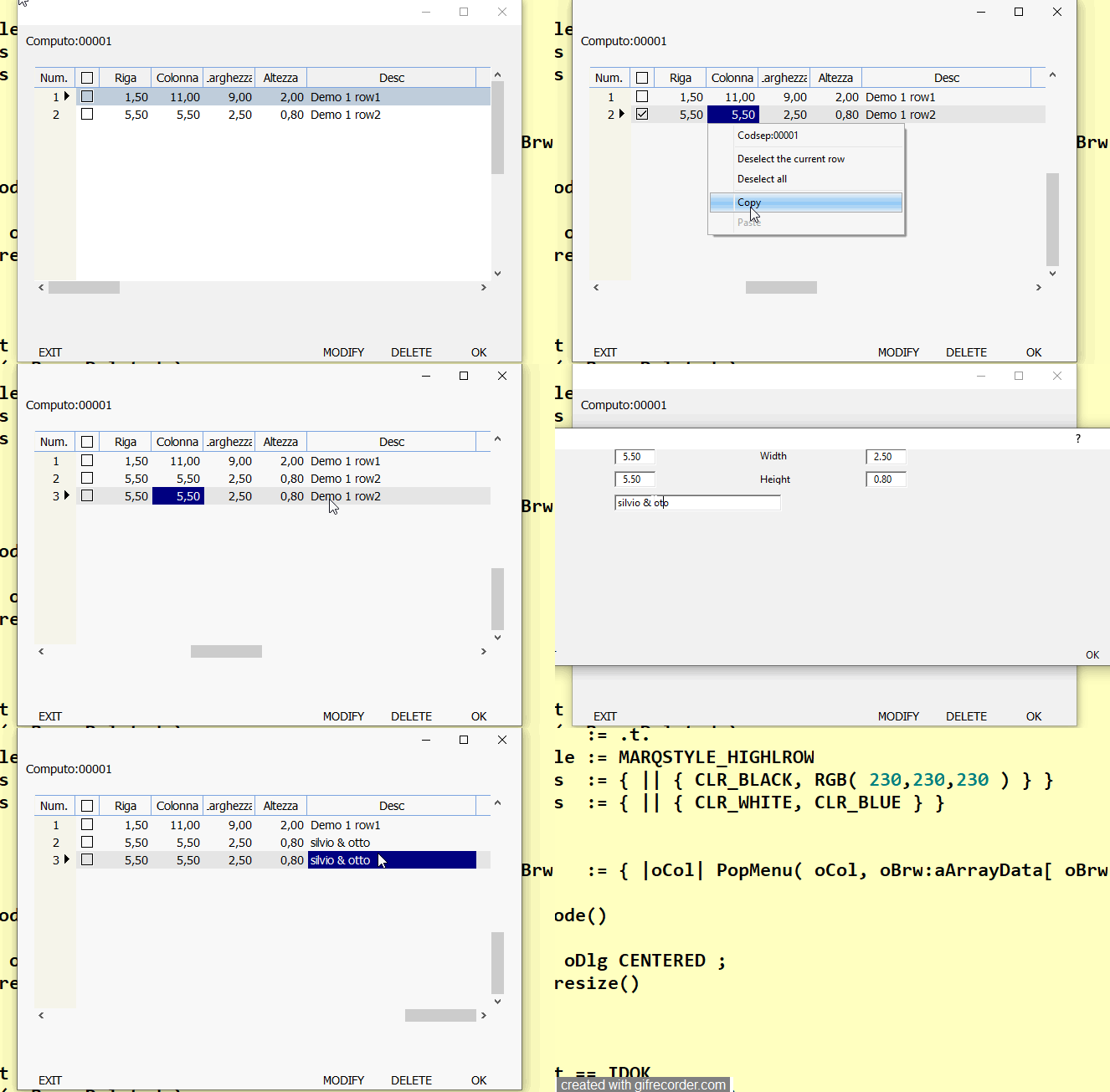
Operation to do
1. copy a record
2 paste the record
3 modify a record sample change the desc and press ok
4. you 'll see it changed two record ( the copied and the selected) it is wrong !!!!
this happen because the number of record is the same
Since from 1991/1992 ( fw for clipper Rel. 14.4 - Momos)
I use : FiveWin for Harbour March-April 2024 - Harbour 3.2.0dev (harbour_bcc770_32_20240309) - Bcc7.70 - xMate ver. 1.15.3 - PellesC - mail: silvio[dot]falconi[at]gmail[dot]com
I use : FiveWin for Harbour March-April 2024 - Harbour 3.2.0dev (harbour_bcc770_32_20240309) - Bcc7.70 - xMate ver. 1.15.3 - PellesC - mail: silvio[dot]falconi[at]gmail[dot]com
Silvio, insert xBrowse(aCopy) in your functions to see what you copy and msgInfo's.
Best regards,
Otto
Otto wrote:Silvio, insert xBrowse(aCopy) in your functions to see what you copy and msgInfo's.I not understood
Best regards,
Otto
when I copy insert on acopy the row I selected ( all field) change acopy[1] with new codsep
MENUITEM "Paste" WHEN acopy!=NIL ACTION ( ;
oBrw:Lock(), ;
aCopy[ 1 ] := codsep ,;
aCopy[ 8 ] := 0 ,; //recno
aadd( oBrw:aArrayData, aCopy ),;
oBrw:Unlock( .t. ), ;
acopy:=NIL ,;
oBrw:RefreshCurrent(), oBrw:SetFocus() )
ENDMENU
but when I modify it the nRecord:= oBrowse:nArrayAt is the same
Since from 1991/1992 ( fw for clipper Rel. 14.4 - Momos)
I use : FiveWin for Harbour March-April 2024 - Harbour 3.2.0dev (harbour_bcc770_32_20240309) - Bcc7.70 - xMate ver. 1.15.3 - PellesC - mail: silvio[dot]falconi[at]gmail[dot]com
I use : FiveWin for Harbour March-April 2024 - Harbour 3.2.0dev (harbour_bcc770_32_20240309) - Bcc7.70 - xMate ver. 1.15.3 - PellesC - mail: silvio[dot]falconi[at]gmail[dot]com
Silvio,
ask ChatGPT:
To address the issue of copying multiple rows and pasting them into your xBrowse control in Harbour with FiveWin, you need to modify your Copy and Paste functionalities to handle multiple rows. Here is an approach to achieve this:
-
Modify Copy Functionality: Instead of copying a single row to
aCopy, copy all selected rows. You can use a loop to go through the selected rows and add them toaCopy. -
Modify Paste Functionality: When pasting, iterate over
aCopyand add each row tooBrw:aArrayData. Make sure to resetaCopyafter pasting. -
Handle Unique Identifiers: To avoid issues with modifying copied rows, ensure each row has a unique identifier (like a record number). You might need to generate new unique IDs for the pasted rows.
Here's an example of how you could modify your code:
Modified Copy Functionality
// Inside PopMenu Function - Modify the "Copy" Menu Item

MENUITEM "Copy" WHEN acopy==NIL .and. oBrw:IsSelectedRow();

    ACTION (

        aCopy := {}, // Initialize aCopy as an empty array

        FOR EACH nRow IN oBrw:aSelectedRows // Iterate over selected rows

            AAdd( aCopy, oBrw:aArrayData[nRow] ) // Add each selected row to aCopy

        NEXT,

        oBrw:SetFocus()

    )
Modified Paste Functionality
// Inside PopMenu Function - Modify the "Paste" Menu Item

MENUITEM "Paste" WHEN !Empty( aCopy )

    ACTION (

        oBrw:Lock(),

        FOR EACH aRow IN aCopy

            aRow[1] := codsep, // Set new codsep

            aRow[8] := 0, // Reset record number or assign a new unique ID

            aAdd( oBrw:aArrayData, aRow ) // Add to the xBrowse array

        NEXT,

        oBrw:Unlock( .t. ),

        aCopy := NIL, // Reset aCopy

        oBrw:RefreshCurrent(),

        oBrw:SetFocus()

    )
Generate Unique Identifiers
For generating new unique IDs for the pasted rows, you could use a function that generates an ID not currently used in oBrw:aArrayData.
Notes
-
Ensure that
oBrw:aSelectedRowscontains the indexes of selected rows inoBrw:aArrayData. This might require additional implementation based on how row selection is handled in your application. -
When generating new unique IDs for pasted rows, make sure they do not conflict with existing ones.
These modifications should enable copying and pasting multiple selected rows in your xBrowse control, with each row being treated independently after being pasted.
I Wish Know what Say Nageswarao
Since from 1991/1992 ( fw for clipper Rel. 14.4 - Momos)
I use : FiveWin for Harbour March-April 2024 - Harbour 3.2.0dev (harbour_bcc770_32_20240309) - Bcc7.70 - xMate ver. 1.15.3 - PellesC - mail: silvio[dot]falconi[at]gmail[dot]com
I use : FiveWin for Harbour March-April 2024 - Harbour 3.2.0dev (harbour_bcc770_32_20240309) - Bcc7.70 - xMate ver. 1.15.3 - PellesC - mail: silvio[dot]falconi[at]gmail[dot]com
try using aclone, aCopy := aclone( oBrw:aRow )