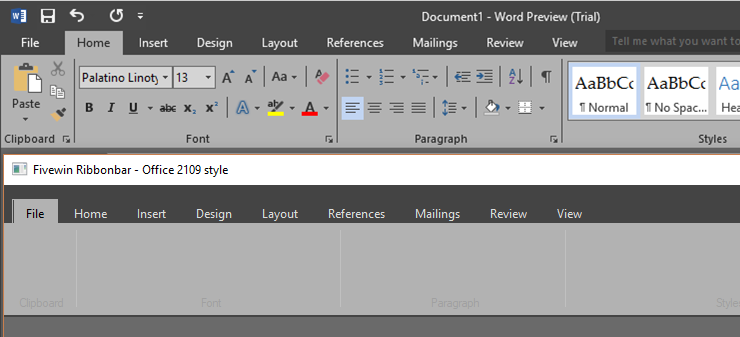
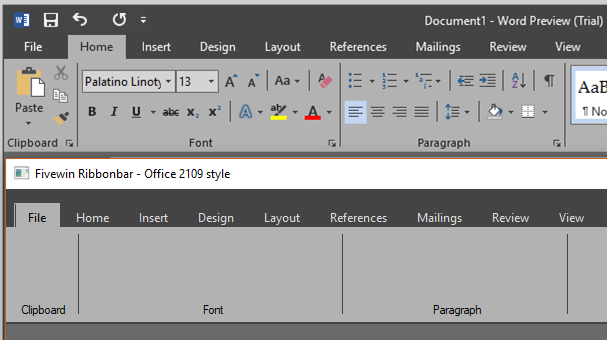
OK, I figured out how to change the colors of the group separator bars and the group caption. Actually, Antonio figured this out in a previous message in this thread.
I still haven't figured out how to remove the underline under the ribbonbar. The vertical black line on the left side of the selected tab is also there, but will disappear with the next FW language update.
/*
Purpose  : Fivewin Ribbonbar - MS Office 2019 style
Program  :
Author   : Frances Padilla (FAP)
Date     : 05/07/2019 04:52:26 PM
Company  :
Copyright:
Language : Fivewin/xHarbour
Updated  : 05/06/2019 By James Bott, <!-- e --><a href="mailto:jbott@compuserve.com">jbott@compuserve.com</a><!-- e -->
Notes    :
Source   : <!-- l --><a class="postlink-local" href="http://forums.fivetechsupport.com/viewtopic.php?f=3&t=36145&p=221601#p221601">viewtopic.php?f=3&t=36145&p=221601#p221601</a><!-- l -->
         : This is the dark theme
         : Somehow he got rid of the underline under the ribbonbar.

*/

#include "FiveWin.ch"
#include "Ribbon.ch"

//#define _ClrRed RGB(255,37,37)

#define _nClrPaneRB       RGB( 68, 68, 68 )
#define _nClrBoxOutRB     RGB( 178, 178, 178 )
#define _nClrBoxInRB      RGB( 178, 178, 178 )
#define _nClrBoxSelOut    RGB( 178, 178, 178 )  // doesn't show when changed to red
#define _nClrBoxSelIn  := RGB( 178, 178, 178 )
#define _aGradRB          { { 1, RGB( 178, 178, 178 ), RGB( 178, 178, 178 ) } }
#define _aGradFldRB       {|nOpt| iif( nOpt == oRibbon:nStart, { { 1, RGB( 178, 178, 178 ), RGB( 178, 178, 178 ) } },;
                                                                 { { 1, RGB( 178, 178, 178 ), RGB( 178, 178, 178 ) } } ) }
#define _aGradHighRB      { { 1, RGB(178, 178, 178 ), RGB( 178, 178, 178 ) } }
#define _aGradOverRB      { { 1, RGB( 178, 178, 178 ), RGB( 178, 178, 178 ) } }
#define _nCtrlFrGround    RGB( 255, 255, 255 )
#define _nCtrlBkGround    RGB( 106, 106, 106 )
#define _nClrBoxOut       RGB( 160, 160, 160 )
#define _nClrBoxIn        RGB( 160, 160, 160 )
#define _nClrTxt          RGB( 220, 220, 220 ) //RGB( 0, 0, 0 )
#define _bClrGradNormal   {|lPressed| iif( lPressed, { { 1, _nClrBoxOut, _nClrBoxOut } },;
                                                     { { 1, _nClrBoxOut, _nClrBoxOut } } ) }
#define _aClrGradUnder    {|| { { 1, _nClrBoxOut, _nClrBoxOut } } }
#define _aClrGradBack     { { 1, _nClrBoxOut, _nClrBoxOut } }


Function Main()

   local oFont
   local n, oWnd, oRibbon, oGroup
   local aDlgs, oDlg

   DEFINE FONT oFont NAME getSysFont() SIZE 0,-12

   DEFINE WINDOW oWnd title "Fivewin Ribbonbar - Office 2109 style"

        aDlgs := { ' File ', ' Home ', ' Insert ', ' Design ', ' Layout ', ' References ', ' Mailings ', ' Review ', ' View ' }

        oRibbon := TRibbonBar():New( oWnd, aDlgs,,,, 135, 40, _nClrPaneRB, _nClrBoxOutRB, _nClrBoxInRB,,;
        _nClrBoxSelOut, _aGradRB, _aGradFldRB, _aGradHighRB, _aGradOverRB,,,.t.,,)
                                    // _nClrBoxSelOut, _aGradRB, _aGradFldRB, _aGradHighRB, _aGradOverRB,,,,,.T.)

        // Change the colors of the tabs
        AFill( oRibbon:aClrTabTxt, { | oSelf, nPrompt | If( nPrompt == oSelf:nOption, CLR_BLACK,;
       If( oRibbon:nOverPrompt( ScreenToClient( oRibbon:hWnd, GetCursorPos() )[ 1 ], ScreenToClient( oRibbon:hWnd, GetCursorPos() )[ 2 ] ) == nPrompt, CLR_BLACK, _nClrTxt ) ) } )

        WITH OBJECT oRibbon
            :nHeightFld := 24
            :hSeparation := 4
            :SetFont( oFont )
            :nLeftMargin = 10   // left margin of tabs
            :nClrBoxSelOut = _nClrBoxSelOut   // New ! Removes white outline of tab when cursor is over them.
            :l2010 = .T.   // New ! Turns off highlighting of groups when cursor is over them.
            :CalcPos()
        END

         oGroup = oRibbon:AddGroup( 70, "Clipboard", 1 )
         oGroup = oRibbon:AddGroup( 260, "Font", 1 )
         oGroup = oRibbon:AddGroup( 221, "Paragraph", 1 )
         oGroup = oRibbon:addGroup( 320, "Styles", 1)

         for each oDlg in oRibbon:aDialogs

            oDlg:hBack = oRibbon:hBrushEx
            oDlg:Refresh()

            for each oGroup in oDlg:aControls
               if oGroup:IsKindOf( "TRBGROUP" )
                  //oGroup:End()
                  //oGroup:SetFont( oRibbon:oFont )

                 // oGroup:nHeight      = 100
                  oGroup:nClrBoxIn    = CLR_LIGHTGRAY
                  oGroup:aGradCaption = { { 1, CLR_LIGHTGRAY, CLR_LIGHTGRAY } }
                  //oGroup:bClrText     = { | lEnable | If( lEnable, CLR_LIGHTGRAY, CLR_DARKGRAY ) } //CLR_DARKGRAY ) }
                  oGroup:nClrTxt      = RGB(0,0,0)
                  oGroup:nClrBoxIn    = _nClrPaneRB //CLR_LIGHTGRAY
                  oGroup:nClrBoxOut   = _nClrPaneRB //CLR_LIGHTGRAY

                  //oGroup:SetColor( _nClrTxt, _nClrPaneRB )

                  DeleteObject( oGroup:hBrushSel )
                  DeleteObject( oGroup:hBrushUnSel )
                  DeleteObject( oGroup:hBack )
                  oGroup:hBrushUnSel  = oDlg:hBack
                  oGroup:hBack        = oDlg:hBack

                  oGroup:refresh()
               endif
            next
          next

        oWnd:SetSize( 930, 400 )
        oWnd:setColor(, _nCtrlBkGround)

   ACTIVATE WINDOW oWnd CENTER

return nil